
Introduction
This manual provides essential instructions for the safe operation, assembly, and maintenance of your DEERC 4CH Brushless RC Plane, Model US4-Z68. Please read this manual thoroughly before operating the aircraft to ensure proper function and to prevent damage or injury. This advanced remote control jet features dual 1503 2600KV brushless motors, a 6-axis gyro stabilizer, and durable EPP foam construction, designed for both beginners and experienced pilots.

Figure 1: The DEERC 4CH Brushless RC Plane, highlighting its powerful brushless motors.
Safety Information
Adhering to these safety guidelines is crucial for preventing accidents and ensuring a long lifespan for your aircraft.
- Keep away from flammable objects when charging the battery.
- Always operate the RC plane in open, clear areas, away from people, animals, buildings, and power lines.
- Do not fly in strong winds or adverse weather conditions.
- Ensure the battery is fully charged and securely installed before each flight.
- Regularly inspect the aircraft for any damage to propellers, wings, or fuselage. Do not fly if damaged.
- Adult supervision is recommended for younger users.
- Turn off the aircraft and remote control when not in use.
Package Contents
Verify that all items listed below are included in your package:
- Remote Control x 1
- RC Airplane x 1
- Silicone Nose Cap x 2
- Li-Po Battery x 2
- Front Wheel x 2
- Rear Wheel x 2
- Fan Blade x 4
- USB Cable x 1

Figure 2: Contents of the DEERC 4CH Brushless RC Plane package.
Setup
Assembly
Carefully attach the wings and tail sections to the main fuselage. Ensure all connections are secure. Install the landing gear wheels into their designated slots if you plan for ground takeoffs. The silicone nose cap should be placed on the front of the aircraft for impact protection.
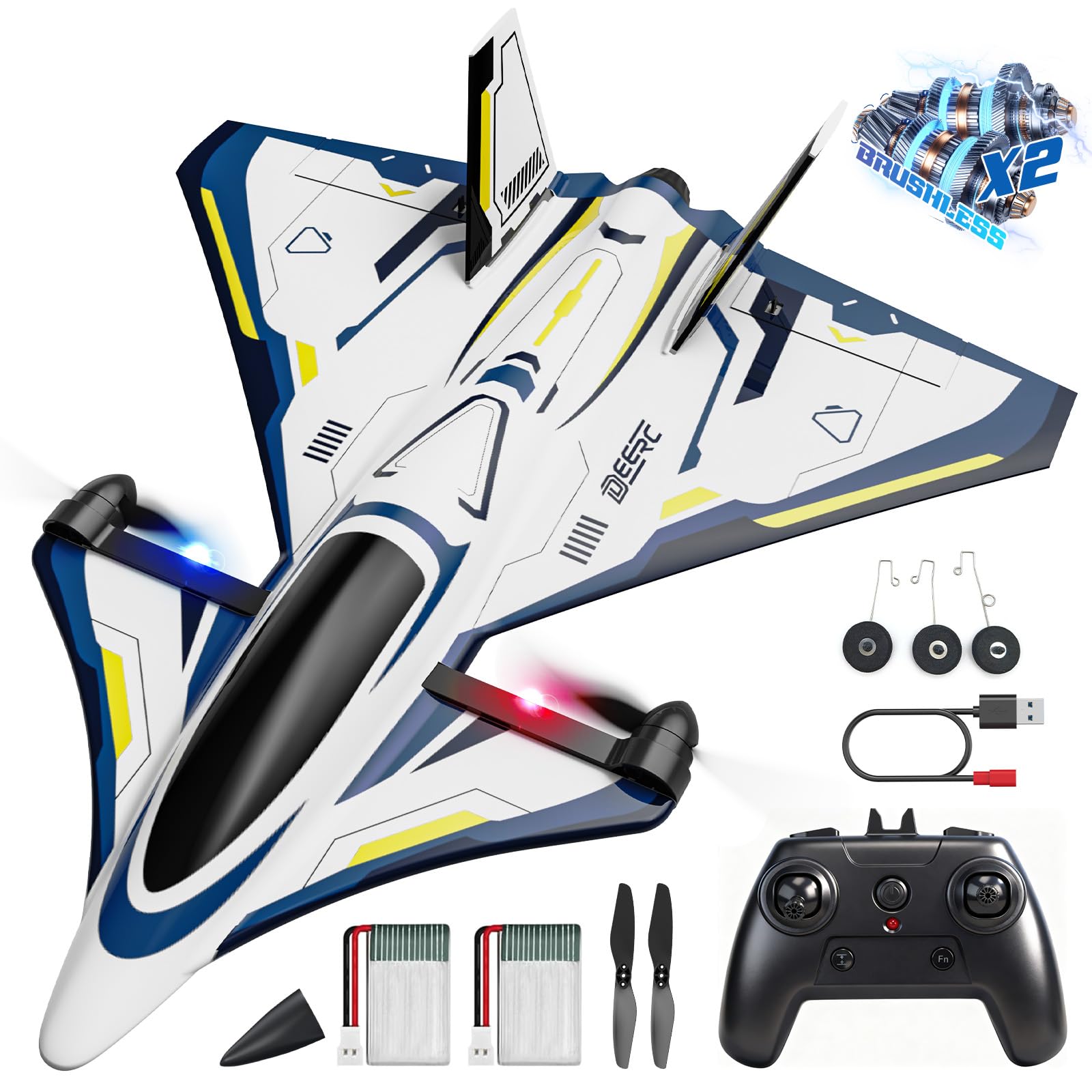
Figure 3: Fully assembled DEERC 4CH Brushless RC Plane.
Battery Installation & Charging
Insert the provided Li-Po batteries into the battery compartment of the aircraft. Connect the battery to the aircraft's power port. To charge the batteries, use the included USB charging cable. Connect the cable to a USB power source (e.g., computer, USB wall adapter) and then to the battery. The charging indicator will show the charging status. A full charge typically takes approximately 60-90 minutes, providing up to 10 minutes of flight time per battery.

Figure 4: Illustration of the twin Li-Po batteries and low battery alert feature.
Controller Pairing
1. Ensure the aircraft's battery is connected and the aircraft is powered on.
2. Turn on the remote control.
3. Move the throttle stick (left stick) to the lowest position, then push it to the highest position, and then back to the lowest position. The aircraft's indicator lights will stop flashing and remain solid, indicating successful pairing.
4. Perform a control surface check by moving the sticks to ensure all control surfaces respond correctly.
Operating Instructions
Pre-Flight Check
Before each flight, ensure the following:
1. Aircraft and remote control batteries are fully charged.
2. All control surfaces (elevators, ailerons) move freely and correctly.
3. Propellers are securely attached and undamaged.
4. You are in a safe, open area free from obstacles and people.
Takeoff Modes
The DEERC US4-Z68 supports four takeoff modes:
- Vertical Ground Takeoff: Place the aircraft on a flat surface. Increase throttle for vertical ascent.
- Vertical Handheld Takeoff: Hold the aircraft vertically, then increase throttle for vertical ascent.
- Ground Slide Takeoff: Place the aircraft on a smooth, flat surface (e.g., runway). Gradually increase throttle and steer until it gains enough speed to lift off.
- Hand Toss Takeoff: Hold the aircraft level and gently toss it forward while simultaneously increasing throttle.

Figure 5: Various methods for launching your DEERC RC Plane.
Flight Controls
The 2.4GHz remote control provides precise command over the aircraft. The 6-axis gyro stabilizer assists in maintaining stable flight, making it easier for beginners. Use the left stick for throttle (up/down) and yaw (left/right rotation). Use the right stick for pitch (nose up/down) and roll (wing tilt left/right).
Aerobatic Maneuvers
This aircraft is capable of performing various aerobatic tricks:
- 360° Flip: Engage the flip button on the remote and use the right stick to initiate a full vertical flip.
- Aerobatic Roll: Execute smooth barrel rolls with precision using the right stick.
- Inverted Flight: The plane can perform ultra-stable inverted flight, allowing for advanced maneuvers.

Figure 6: Examples of aerobatic maneuvers possible with the RC Plane.
Landing
Reduce throttle gradually and guide the aircraft towards a clear landing area. For ground landings, ensure the landing gear is attached. For vertical landings, slowly decrease throttle to descend. In hover mode, the aircraft can be landed like a drone.
Video 1: Official DEERC overview of the 4CH Brushless RC Plane, demonstrating its features and flight capabilities.
Maintenance
Proper maintenance ensures the longevity and performance of your RC plane.
- Cleaning: Wipe the aircraft with a soft, dry cloth after each use to remove dirt and debris. Avoid using harsh chemicals.
- Storage: Store the aircraft and batteries in a cool, dry place, away from direct sunlight and extreme temperatures. Remove batteries from the aircraft and remote control during long-term storage.
- Propeller Check: Regularly inspect propellers for cracks or damage. Replace any damaged propellers immediately to maintain flight efficiency and safety.
- EPP Foam Care: The EPP foam is durable and elastic. Minor dents can often be restored with gentle heat (e.g., warm water or hairdryer from a distance).

Figure 7: The aircraft's durable EPP foam and precision gyro system contribute to stable flight and resilience.
Troubleshooting
If you encounter issues, refer to the following common problems and solutions:
| Problem | Possible Cause | Solution |
|---|---|---|
| Aircraft does not respond to remote control. | Not paired; low battery in remote or aircraft. | Re-pair the remote control and aircraft. Charge or replace batteries. |
| Poor flight stability. | Strong winds; damaged propellers; gyro calibration issue. | Fly in calm conditions. Replace damaged propellers. Recalibrate the gyro (refer to specific instructions in the full manual if available). |
| Short flight time. | Battery not fully charged; old battery. | Ensure battery is fully charged. Consider replacing old batteries. |
| Motors not spinning. | Throttle not at lowest position during pairing; motor damage. | Ensure throttle is at lowest position before powering on and pairing. Contact support if motor is damaged. |
Specifications
Key technical specifications for the DEERC 4CH Brushless RC Plane Model US4-Z68:
- Brand Name: DEERC
- Model Name: US4-Z68
- Item Dimensions: 12.8 x 4.73 x 14.48 inches
- Material Type: EPP Foam
- Power Source: Battery Powered (2 Nonstandard Battery batteries included)
- Motors: Dual 1503 2600KV Brushless Motors
- Control System: 2.4GHz, 6-axis Gyro Stabilizer
- Control Range: Up to 500 feet
- Max Speed: 12.43 MPH
- Recommended Age: 0 - 12 years (Note: Adult supervision recommended for younger users)
- Indoor/Outdoor Usage: Outdoor
- Educational Objective: Improving hand-eye coordination, motor skills, and understanding of physics principles (STEM learning)
Warranty and Support
For warranty information, technical support, or any questions regarding your DEERC 4CH Brushless RC Plane, please contact DEERC customer service. Refer to the contact details provided on the product packaging or the official DEERC website. Please have your model number (US4-Z68) and purchase information ready when contacting support.