
Educator FE-582B
E-Collar Technologies FE-582B FOB Educator Remote Dog Training System User Manual
Model: FE-582B
Introduction
This manual provides comprehensive instructions for the safe and effective use of your E-Collar Technologies FE-582B FOB Educator Remote Dog Training System. This system is designed for training two medium or large dogs (25 lbs and above) and is suitable for various training environments, including field, yard, and working dog applications. It features a hands-free button for convenient operation and offers precise control for effective communication with your dogs.
The FE-582B system incorporates fine-grained level adjustments, a rising stimulation ramp, and a Pavlovian pre-tone to facilitate low-stress communication during training. The key-fob style handset is compact, and the receiver collars are sealed and waterproof, featuring an LED locator light. Battery conservation is managed through an auto-sleep function, with a tap-to-wake feature for immediate use. A wireless hands-free button provides quick access to training functions.
Package Contents
Please verify that all items listed below are included in your package:
- FOB Handset (Remote Transmitter)
- Two Receiver Collars with 3/4-inch straps (one black, one red)
- Wireless Hands-Free Button
- Wall Charger with Splitter Cable
- Contact Points: 5/8-inch and 3/4-inch sets
- Contact Point Removal Tool
- Test Light
- Lanyard
- User Guide (this manual)
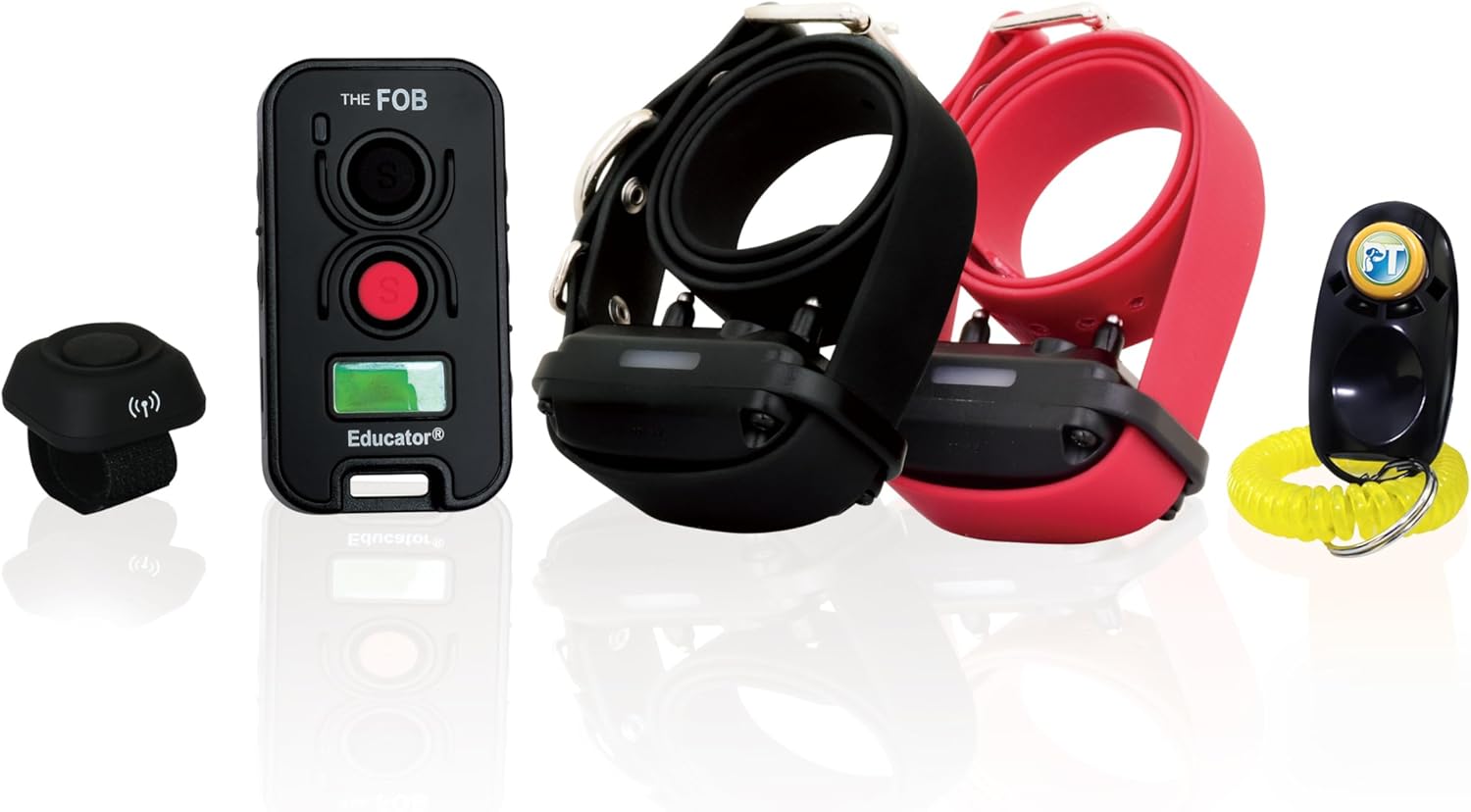
Image 1: All components of the FE-582B FOB Educator Remote Dog Training System. Shown are the FOB remote, the small hands-free button, and two receiver collars, one with a black strap and one with a red strap.
Setup
1. Charging the Devices
Before initial use, fully charge the FOB Handset and both Receiver Collars. Use the provided wall charger and splitter cable.
- Connect the splitter cable to the wall charger.
- Plug the two charging ends into the charging ports on the FOB Handset and each Receiver Collar.
- Plug the wall charger into a standard electrical outlet.
- Allow approximately 2 hours for a full charge. The indicator lights will change when charging is complete.
2. Attaching Contact Points
Select the appropriate contact points (5/8-inch or 3/4-inch) based on your dog's coat length. The contact points must make direct contact with the dog's skin for effective stimulation.
- Using the contact point removal tool, securely screw the chosen contact points into the receiver collar.
- Ensure they are tightened sufficiently to prevent loosening during activity.
3. Fitting the Receiver Collar
Proper fit is crucial for comfort and effectiveness. The collar should be snug but not overly tight.
- Place the receiver collar around your dog's neck, ensuring the contact points are positioned on the underside of the neck, making direct skin contact.
- You should be able to fit one finger snugly between the contact point and your dog's skin.
- Trim any excess collar strap if necessary, and use a lighter to singe the cut edge to prevent fraying.
Image 2: Detail of a receiver collar, illustrating the contact points and strap. Ensure proper fit for optimal performance.
4. Pairing the Hands-Free Button (if not pre-paired)
The wireless hands-free button allows for quick, convenient access to training functions.
- Ensure the FOB Handset and Receiver Collars are turned on.
- Refer to the specific pairing instructions in the full user guide for detailed steps, as this may vary slightly.
Operating Instructions
1. Turning On/Off
- FOB Handset: Press and hold the power button until the screen illuminates. To turn off, press and hold the power button until the screen shuts down.
- Receiver Collars: Press and hold the power button on the receiver until the LED light flashes. To turn off, press and hold until the LED light extinguishes.
2. Understanding the FOB Handset
Image 3: The FOB remote transmitter, showing its compact design and primary control buttons. The top button is for stimulation level adjustment, and the bottom red button is for activation.
The FOB Handset features a compact design with intuitive controls for managing two dogs. It offers 100 adjustable stimulation levels, along with tone, vibration, and rising stimulation modes.
- Stimulation Buttons: Typically, one button controls stimulation for Dog 1, and another for Dog 2.
- Level Adjustment: Use the dedicated buttons or dial (if present) to increase or decrease the stimulation level.
- Mode Selection: Cycle through tone, vibration, and various stimulation modes as needed for training.
3. Using the Hands-Free Button
Image 4: The wireless hands-free button, designed for convenient, quick access to training functions. It can be worn on a finger or attached to clothing.
The hands-free button provides immediate access to a pre-programmed function (e.g., a specific stimulation level, tone, or vibration) without needing to access the main FOB Handset. This is ideal for quick corrections or commands during active training sessions.
- Wear the button on your finger or attach it to clothing for easy access.
- Press the button to activate its assigned function.
4. Training Modes
- Momentary (Tap): Delivers a single, brief stimulation pulse.
- Continuous (Hold): Delivers stimulation for as long as the button is held, up to a safety cut-off.
- Rising Stimulation: Gradually increases stimulation intensity, often preceded by a Pavlovian pre-tone.
- Tone: Emits an audible tone.
- Vibration: Provides a non-stimulatory vibration.
Always start training at the lowest effective stimulation level and gradually increase if necessary. The goal is to get your dog's attention, not to cause pain.
Maintenance
1. Cleaning
- Regularly clean the receiver collar and contact points with a damp cloth to remove dirt, oil, and debris.
- Ensure contact points are free of buildup to maintain proper conductivity.
- Do not use harsh chemicals or abrasive cleaners.
2. Battery Care
- Recharge devices when the battery indicator is low.
- For long-term storage, charge the devices to approximately 50% and store in a cool, dry place.
- Avoid extreme temperatures, which can degrade battery life.
3. Contact Point Inspection
- Periodically check the contact points for wear or damage. Replace if necessary.
- Ensure they are securely fastened to the receiver.
Troubleshooting
| Problem | Possible Cause | Solution |
|---|---|---|
| No stimulation/tone/vibration |
|
|
| Hands-free button not working |
|
|
| Shortened range |
|
|
Specifications
- Model: FE-582B
- Range: Up to 500 yards (approximately 457 meters)
- Dog Capacity: Two dogs
- Dog Size Recommendation: Medium to Large dogs, 25 lbs and above
- Stimulation Levels: 100 adjustable levels
- Stimulation Modes: Momentary, Continuous, Rising, Tone, Vibration
- Waterproof: Transmitter and Receiver Collars are waterproof
- Battery: Rechargeable (3 Nonstandard Battery batteries included)
- Item Weight: 1 pound (total package)
- Package Dimensions: 12 x 8.3 x 0.78 inches
- Manufacturer: E-Collar Technologies
Warranty and Support
This E-Collar Technologies FE-582B system comes with a 2-year manufacturer's warranty. For warranty claims, technical support, or further assistance, please contact E-Collar Technologies directly or visit their official website.
For additional resources and product information, you may visit the Educator Store on Amazon.
Related documentsFE-582B


Ask a question about this manual
Ask about setup, troubleshooting, compatibility, parts, safety, or missing instructions. Manuals+ will review the question and use this page’s manual context to help answer it.