
1. Introduction
The arboleaf Smart Scale CS20L is a high-precision digital bathroom scale designed to provide comprehensive body composition analysis. Utilizing 4-electrode BIA technology, it offers detailed insights beyond standard weight measurements, including BMI, body fat, muscle mass, and more. This manual provides instructions for the proper setup, operation, and maintenance of your smart scale.
2. Important Safety Information
- Consult your physician before beginning any diet or exercise program.
- Do not use if you are pregnant, have a pacemaker, or other internal medical devices.
- The scale is intended for household use only.
- Always place the scale on a hard, flat surface for accurate measurements. Avoid carpets or soft surfaces.
- Keep the scale dry. Do not immerse in water.
- The glass surface can be slippery when wet. Step on and off carefully.
- Keep out of reach of children.
3. Package Contents
- arboleaf Smart Scale CS20L
- 3 AAA batteries (included)
- User Manual (this document)
4. Setup Guide
4.1. Battery Installation
- Open the battery compartment on the underside of the scale.
- Insert the 3 AAA batteries, ensuring correct polarity (+/-).
- Close the battery compartment.
4.2. App Download and Pairing
To access all 14 body metrics and trend tracking features, download the arboleaf app and pair your scale.
- Download the "arboleaf" app from your device's app store (Apple Health, Samsung Health, Health Connect, Fitbit compatible).
- Register for an account within the app.
- Ensure Bluetooth is enabled on your smartphone.
- In the app, navigate to "My Device" and select "Add device". Choose "Smart Body Fat Scale".
- Step onto the scale barefoot to initiate pairing. The app will display "Device successfully connected" once paired.
- Enter your personal details (gender, height, birthday) in the app to create your profile.

Image: Step-by-step guide for initial setup, including app download, pairing, and profile creation.
5. Operating Instructions
5.1. Taking a Measurement
- Place the scale on a hard, flat surface.
- Step onto the scale barefoot with dry feet, ensuring your feet are positioned on the metal electrodes.
- Stand still until your weight is displayed and the measurement is complete.
- The scale will automatically sync data to the arboleaf app via Bluetooth.
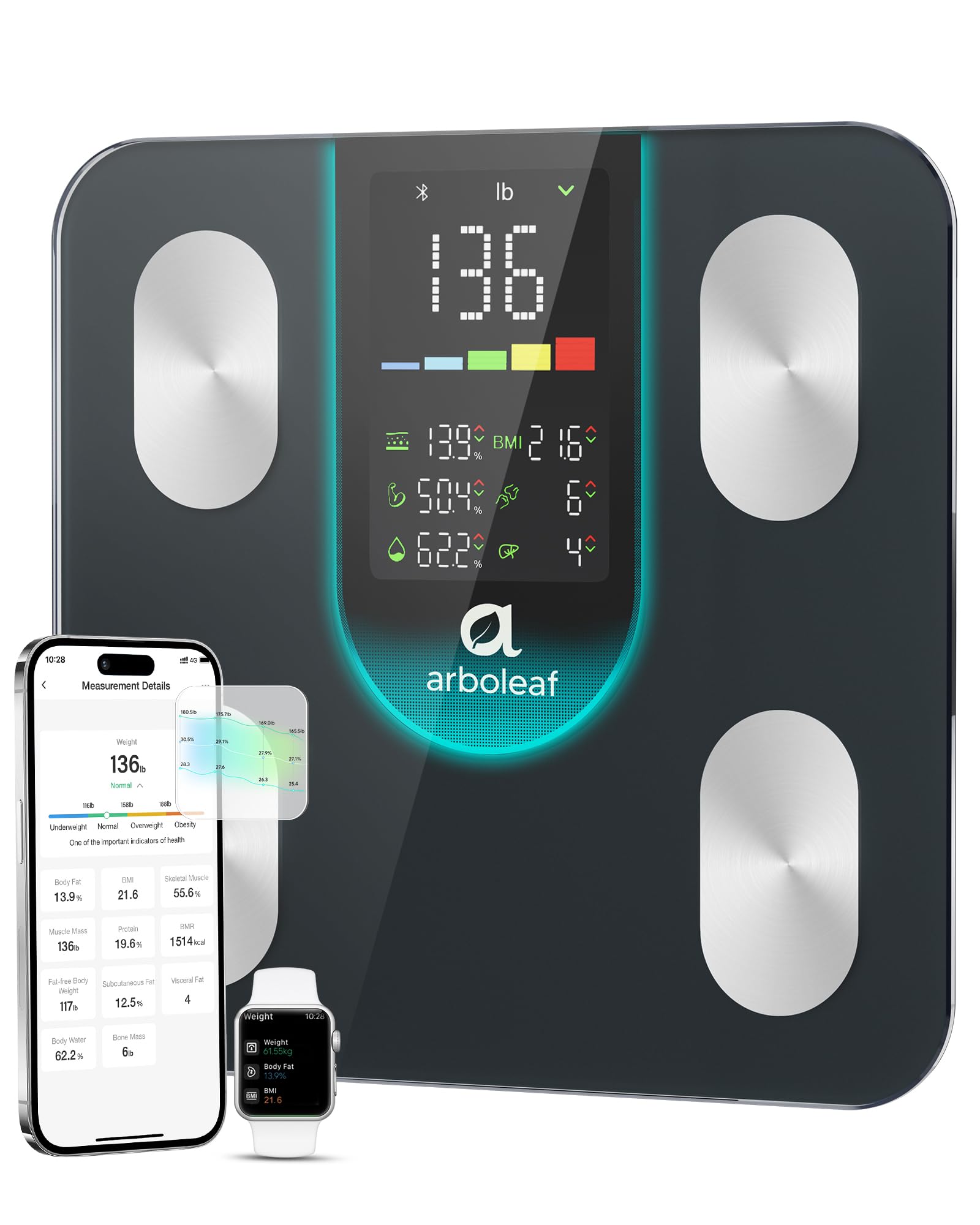
Image: The arboleaf Smart Scale displaying 7 key metrics on its large LED screen, including weight, BMI, body fat rate, muscle mass, body water, bone mass, and visceral fat. Note: Full metrics require app connection.
5.2. Multi-User Functionality
The arboleaf Smart Scale supports unlimited users and up to 8 personal profiles with automatic recognition, making it suitable for families and groups.
- Each user should create their own profile in the arboleaf app.
- When a user steps on the scale, the app will attempt to identify them based on their weight and other metrics.
- If multiple users have similar measurements, the app may prompt you to select the correct user.

Image: A family demonstrating the multi-user feature of the arboleaf Smart Scale, with individual profiles visible on the connected smartphone app.
6. Understanding Your Metrics
The arboleaf Smart Scale provides 7 key metrics directly on its display and up to 14 metrics within the app. These metrics are estimated using Bioelectrical Impedance Analysis (BIA) technology.
6.1. On-Scale Display Metrics (7-in-1)
- Weight: Your current body weight.
- BMI (Body Mass Index): A measure of body fat based on height and weight.
- Body Fat: Percentage of body weight that is fat.
- Muscle Mass: The total weight of muscle in your body.
- Body Water: Percentage of body weight that is water.
- Bone Mass: The total weight of bone in your body.
- Visceral Fat: Fat stored around the organs in the abdomen.
6.2. App-Exclusive Metrics (Additional 7)
Beyond the on-scale display, the app provides deeper insights:
- Protein: Percentage of protein in your body.
- Subcutaneous Fat: Fat stored directly under the skin.
- BMR (Basal Metabolic Rate): The number of calories required to keep your body functioning at rest.
- Body Type: Classification of your body composition.
- Metabolic Age: Compares your BMR to the average BMR for your age group.
- Skeletal Muscle: The amount of muscle attached to bones.
- Fat-free Body Weight: Your total body weight minus body fat.

Image: An infographic illustrating the 14 health metrics measured by the arboleaf Smart Scale, including weight, visceral fat, BMI, body water, body fat, skeletal muscle, fat-free body weight, protein, subcutaneous fat, BMR, body type, metabolic age, bone mass, and muscle mass.
6.3. Trend Tracking and App Sync
The arboleaf app allows you to track your progress over time with clear charts and weekly, monthly, and yearly trends. It also syncs with popular health apps.
- View historical data for all 14 metrics.
- Connect to Apple Health, Samsung Health, Health Connect, and Fitbit to consolidate your health data.

Image: The arboleaf app displaying a trend graph of body measurements (Weight, Body Fat, BMI) over several months, illustrating the tracking capabilities.

Image: A smartphone screen showing the arboleaf app's interface for syncing data with Apple Health, Health Connect, Samsung Health, and Fitbit, as well as options to share reports on social media platforms.
7. Maintenance
- Cleaning: Wipe the scale surface with a damp cloth and mild detergent. Do not use abrasive cleaners or immerse the scale in water.
- Storage: Store the scale in a cool, dry place. Avoid extreme temperatures.
- Battery Replacement: Replace batteries when the low battery indicator appears on the display.
8. Troubleshooting
| Problem | Solution |
|---|---|
| Scale does not turn on. | Check battery installation. Replace batteries if necessary. |
| Inaccurate measurements. | Ensure the scale is on a hard, flat surface. Step on barefoot with dry feet. Avoid moving during measurement. |
| App not syncing data. | Ensure Bluetooth is enabled on your device. Re-pair the scale with the app if connection issues persist. Check app permissions. |
| "Lo" displayed on screen. | Low battery indicator. Replace batteries. |
9. Specifications
| Feature | Detail |
|---|---|
| Brand | arboleaf |
| Model Number | CS20L |
| Color | Black |
| Weight Limit | 400 Pounds |
| Readout Accuracy | 0.1kg |
| Display Type | LED |
| Special Features | Auto Shut Off, Basal Metabolic Rate, Body Fat, Large Display, Smart |
| Batteries | 3 AAA batteries (included) |
| Item Weight | 3.36 pounds |
| Package Dimensions | 12.8 x 12.48 x 1.73 inches |

Image: A detailed view of the arboleaf Smart Scale highlighting its BIA technology, large color LED display, highly sensitive 4 electrodes, and 4 anti-slip pads for accurate and stable measurements.
10. Warranty and Support
For warranty information and customer support, please refer to the official arboleaf website or contact their customer service directly. Product protection plans may be available for purchase separately.
- Online Support: Visit the arboleaf Store on Amazon for product information and support resources.


