
1. Product Overview
The INJORA Aluminum Steering Set (Model GROM-14BK) is designed as an upgrade or replacement for the steering components in compatible 1/16 or 1/12 scale RC vehicles, including the Arrma Mojave Grom and Losi Nascar models. This set is engineered to enhance the durability and performance of your vehicle's steering system.
Key Features:
- High precision CNC machined aluminum construction.
- Lightweight design for optimal performance.
- Directly replaces stock plastic parts for simple installation.
- Designed to improve steering precision and overall durability.
Package Contents:
- 1 x Aluminum Steering Set (Weight: 8.9g)
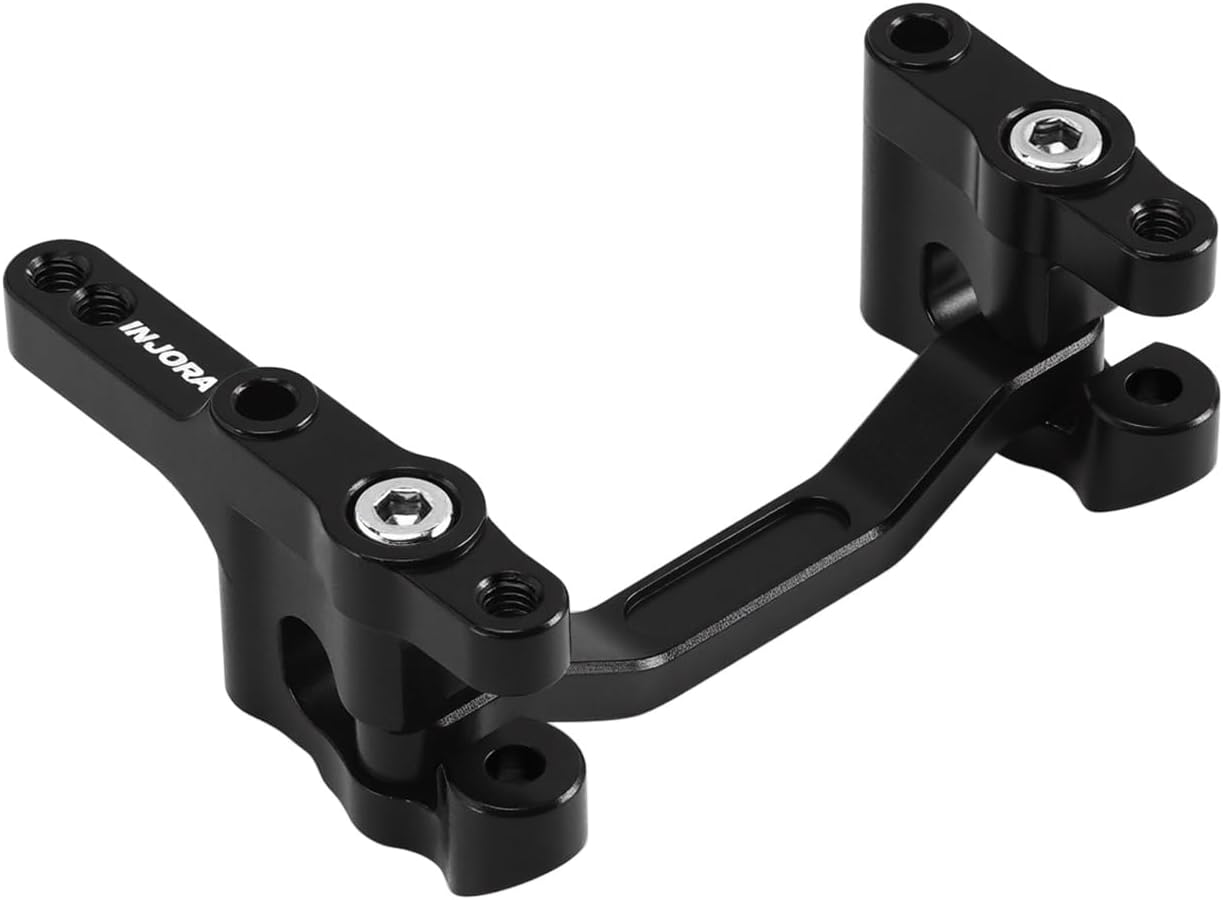
Image 1.1: Overview of the INJORA Aluminum Steering Set components.
2. Installation Guide
This steering set is designed for direct replacement of the original stock parts. Basic tools for RC vehicle maintenance (e.g., small screwdrivers, hex wrenches) will be required. Always refer to your vehicle's original manual for specific disassembly and reassembly instructions.
- Preparation: Ensure your RC vehicle is powered off and the battery is disconnected. Place the vehicle on a clean, stable work surface.
- Access Steering Assembly: Carefully remove any body panels or components that obstruct access to the existing steering assembly.
- Remove Stock Steering Set:
- Locate the screws or pins securing the stock steering components.
- Carefully detach the steering links from the servo horn and wheel hubs.
- Remove the entire stock steering rack assembly. Keep track of all removed hardware.
- Install INJORA Aluminum Steering Set:
- Position the new aluminum steering set in the vehicle's chassis.
- Secure the steering set using the appropriate screws or hardware. Ensure all pivot points move freely without excessive play or binding.
- Attach the steering links to the servo horn and wheel hubs. Ensure proper alignment.
- Note: Some users recommend applying a small amount of thread-locking compound (Loctite) to metal-to-metal screws to prevent loosening from vibrations.
- Test and Adjust:
- Reconnect the battery and power on the vehicle.
- Test the steering function. Ensure full left and right steering throw without binding.
- Adjust servo trim and sub-trim settings on your transmitter if necessary to ensure the wheels are centered when the steering wheel is at neutral.
- Reassemble: Reattach any body panels or components removed during disassembly.

Image 2.1: Detailed view of the aluminum steering set for installation reference.
3. Operation
Once installed, the INJORA Aluminum Steering Set operates in conjunction with your vehicle's existing servo and steering linkages. Its primary function is to provide a more robust and precise steering response compared to standard plastic components.
- The CNC machined aluminum construction minimizes flex, leading to more direct and accurate steering input.
- The enhanced durability helps withstand impacts and stress during aggressive driving, reducing the likelihood of steering component failure.
- Ensure your servo is adequately powerful for the vehicle and that the servo saver is correctly adjusted to prevent damage to the servo or steering components.
4. Maintenance
Regular maintenance of your steering set will ensure its longevity and optimal performance.
- Inspection: Periodically inspect the steering set for any signs of wear, damage, or loose screws. Check for any binding or excessive play in the linkages.
- Cleaning: After use, especially in dirty or dusty conditions, clean the steering components to remove debris. A soft brush and compressed air can be effective. Avoid harsh chemicals that may damage materials.
- Lubrication: While aluminum components generally do not require lubrication, ensure that any associated bearings or pivot balls are clean and functioning smoothly.
- Fastener Check: Regularly check all screws and fasteners for tightness. Vibrations during operation can cause them to loosen over time. Reapply thread-locking compound if necessary.
5. Troubleshooting
If you encounter issues with your steering after installing the INJORA Aluminum Steering Set, consider the following:
| Problem | Possible Cause | Solution |
|---|---|---|
| Sloppy or imprecise steering |
|
|
| Steering binds or sticks |
|
|
| Steering not centered |
|
|
6. Specifications
| Attribute | Detail |
|---|---|
| Brand | INJORA |
| Model Number | GROM-14BK |
| Material | Aluminum |
| Color | Black |
| Weight | 8.9g |
| Compatibility | Arrma Mojave Grom, Losi Nascar (1/16 or 1/12 scale) |
| Package Contents | 1 x Steering Set |
7. Warranty and Support
Specific warranty information for the INJORA Aluminum Steering Set (GROM-14BK) is not provided in the product details. For warranty inquiries or technical support, please contact INJORA directly through their official channels or the retailer from whom the product was purchased.
Contact Information:
- Refer to the INJORA official website or your purchase documentation for the most current support contact details.
- For general inquiries, you may visit the INJORA Store on Amazon.