
1. Introduction
This manual provides detailed instructions for the setup, operation, and maintenance of your TECKNET TK-MS046 Dual-Mode Wireless Mouse. Please read this manual thoroughly before using the product to ensure proper functionality and to maximize your user experience.

Image 1.1: The TECKNET TK-MS046 Dual-Mode Wireless Mouse, a compact and ergonomic device.
2. Product Overview
The TECKNET TK-MS046 is a versatile dual-mode wireless mouse designed for comfort and efficiency. It supports both 2.4GHz wireless and Bluetooth 5.2/3.0 connectivity, offering flexible options for various devices. Key features include:
- Dual-Mode Connectivity: Seamlessly switch between 2.4GHz wireless (via USB-A receiver) and Bluetooth 5.2/3.0.
- Adjustable DPI: Two sensitivity levels (800/1600 DPI) for precise cursor control.
- Silent Click: Designed for quiet operation, ideal for shared environments.
- Ambidextrous Design: Symmetrical shape suitable for both left and right-handed users.
- Long Battery Life: Up to 18 months of battery life with a single AA battery (not included).
- Auto-Sleep Mode: Conserves power by entering sleep mode after 10 minutes of inactivity.

Image 2.1: Component diagram of the TECKNET TK-MS046 mouse, highlighting the Left Button, Right Button, Anti-Slip Scroller, DPI Switch Button, BT Indicator, AA Battery Compartment, Power Switch, Mode Switch Button, and USB Receiver.
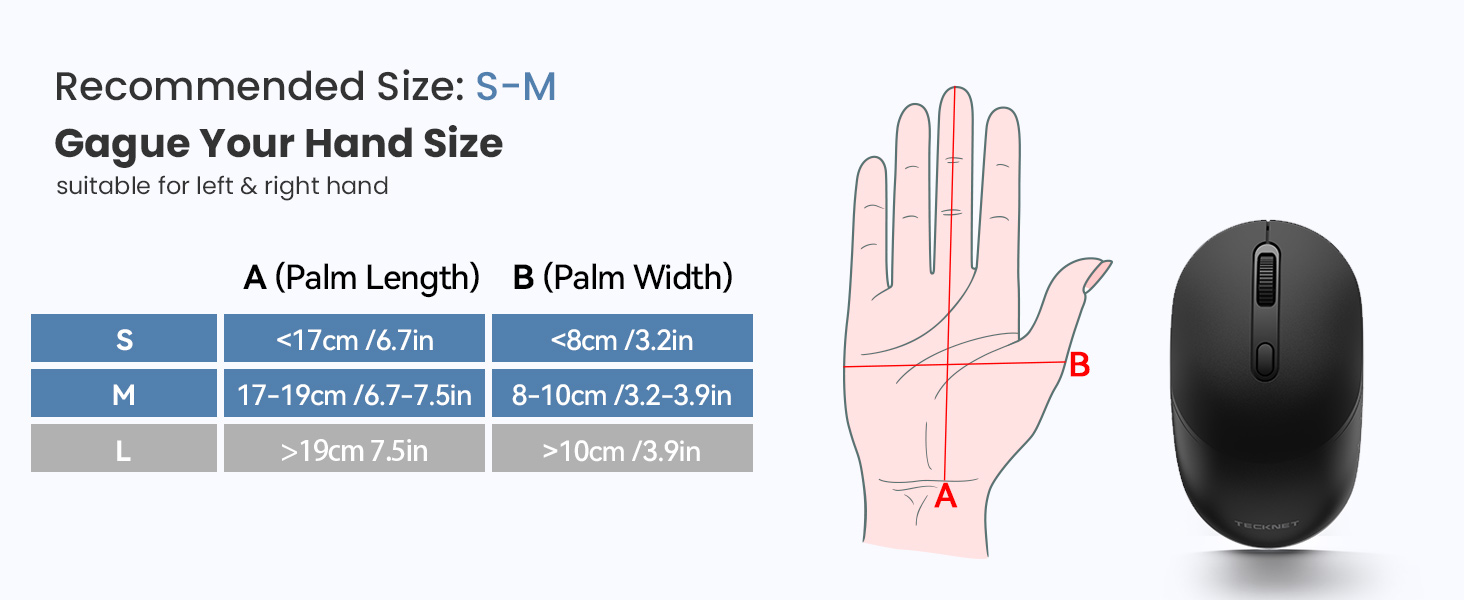
Image 2.2: Recommended hand size guide for optimal comfort with the TECKNET TK-MS046 mouse, suitable for small to medium hands.
3. Setup Instructions
3.1. Battery Installation
- Locate the battery compartment on the underside of the mouse.
- Open the battery compartment cover.
- Insert one AA battery (not included) into the compartment, ensuring correct polarity (+/-).
- Close the battery compartment cover.

Image 3.1: The mouse with its battery compartment open, showing where to insert the AA battery, and the ON/OFF switch.
3.2. Connectivity Modes
The TECKNET TK-MS046 mouse offers two connection modes: 2.4G Wireless and Bluetooth. You can switch between modes using the Mode Switch Button on the underside of the mouse.

Image 3.2: Visual guide for setting up both Bluetooth and 2.4G wireless connections.
3.2.1. 2.4G Wireless Mode
- Ensure an AA battery is installed (refer to Section 3.1).
- Locate the USB-A receiver, which is stored inside the mouse's battery compartment.
- Plug the USB-A receiver into an available USB port on your computer.
- Toggle the Mode Switch Button on the mouse's underside to select the 2.4G mode. The LED indicator will flash red.
- The mouse should connect automatically. No additional drivers are typically required.
3.2.2. Bluetooth Mode (BT 5.2/3.0)
- Ensure an AA battery is installed (refer to Section 3.1).
- Toggle the Mode Switch Button on the mouse's underside to select the Bluetooth mode. The LED indicator will flash green.
- Press and hold the Bluetooth pairing button (usually located near the mode switch) for 3-5 seconds until the LED indicator flashes rapidly. This indicates pairing mode.
- On your computer or device, open Bluetooth settings.
- Search for new devices and select "BT 3.0 Mouse" or "BT 5.2 Mouse" from the list to connect.
- Once connected, the LED indicator will stop flashing.
4. Operating Instructions
4.1. DPI Adjustment
The mouse features two adjustable DPI settings (800 and 1600) to suit different tasks and preferences. To change the DPI:
- Press the DPI Switch Button, located behind the scroll wheel, to cycle between the available DPI settings.
- The cursor speed will change instantly, allowing you to select the sensitivity that best fits your current activity.
4.2. Auto-Sleep Mode
To conserve battery life, the mouse will automatically enter sleep mode after approximately 10 minutes of inactivity. To wake the mouse:
- Click any button (left or right click) 2-3 times, or move the mouse.
- The mouse will reactivate and reconnect to your device.
5. Maintenance
To ensure the longevity and optimal performance of your TECKNET TK-MS046 mouse, follow these maintenance guidelines:
- Cleaning: Use a soft, dry cloth to clean the mouse. Avoid using harsh chemicals or abrasive materials.
- Storage: When not in use for extended periods, turn off the mouse using the power switch on the underside to further conserve battery life.
- Battery Replacement: Replace the AA battery when the mouse performance degrades or the low battery indicator (if present) activates.
6. Troubleshooting
If you encounter issues with your TECKNET TK-MS046 mouse, refer to the following common solutions:
| Problem | Possible Solution |
|---|---|
| Mouse not connecting (2.4G) |
|
| Mouse not connecting (Bluetooth) |
|
| Cursor is erratic or jumps |
|
| Mouse does not wake from sleep mode |
|
| DPI setting not changing |
|
7. Specifications
| Feature | Detail |
|---|---|
| Model Number | TK-MS046 |
| Connectivity Technology | 2.4G Wireless, Bluetooth 5.2/3.0 |
| Movement Detection | Optical |
| DPI Settings | 800 / 1600 |
| Battery Type | 1 x AA Battery (not included) |
| Product Dimensions | 4.6 x 2.6 x 0.1 inches |
| Item Weight | 2.12 ounces |
| Compatibility | Windows, macOS, ChromeOS |
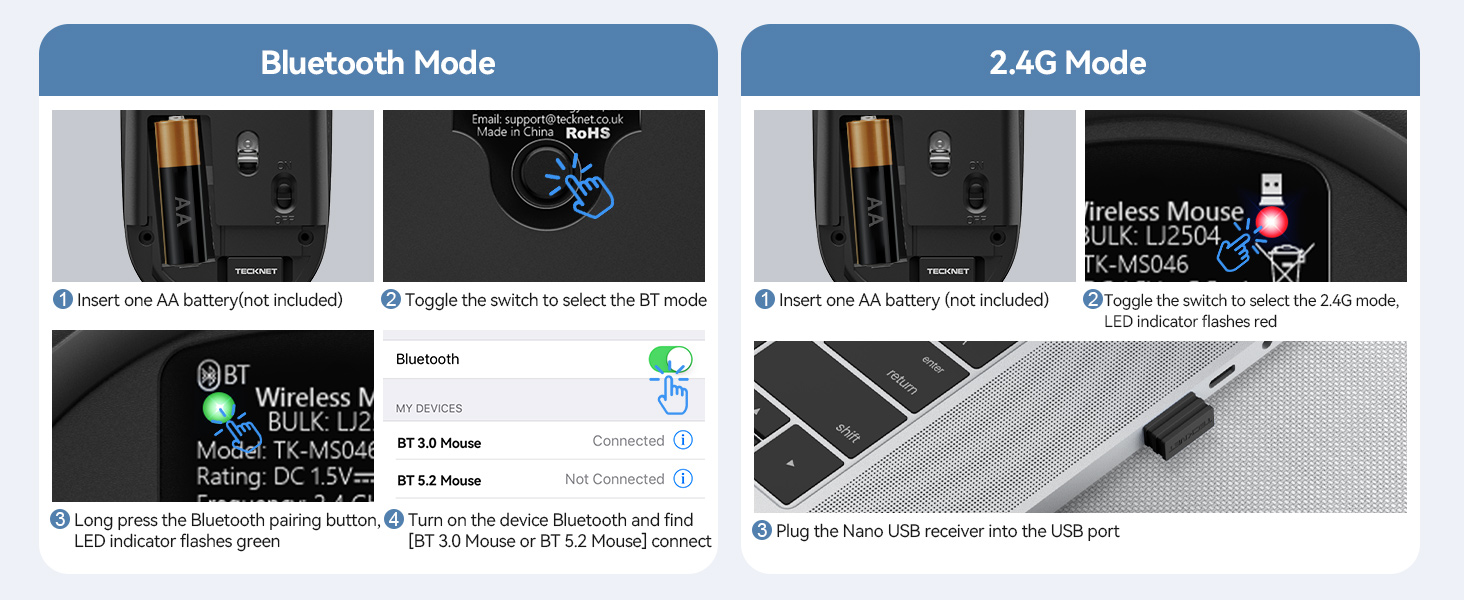
Image 7.1: The TECKNET TK-MS046 mouse demonstrating universal system compatibility across various operating systems.
8. Warranty and Support
For any questions, technical assistance, or warranty inquiries regarding your TECKNET TK-MS046 Dual-Mode Wireless Mouse, please do not hesitate to contact TECKNET customer support. Refer to the product packaging or the official TECKNET website for the most current contact information.