
Introduction
Thank you for purchasing the Foyoconven 4-Slice Digital Smart Touch Screen Toaster. This appliance is designed to provide efficient and customizable toasting for various bread types. Please read this manual thoroughly before use to ensure safe and optimal operation.
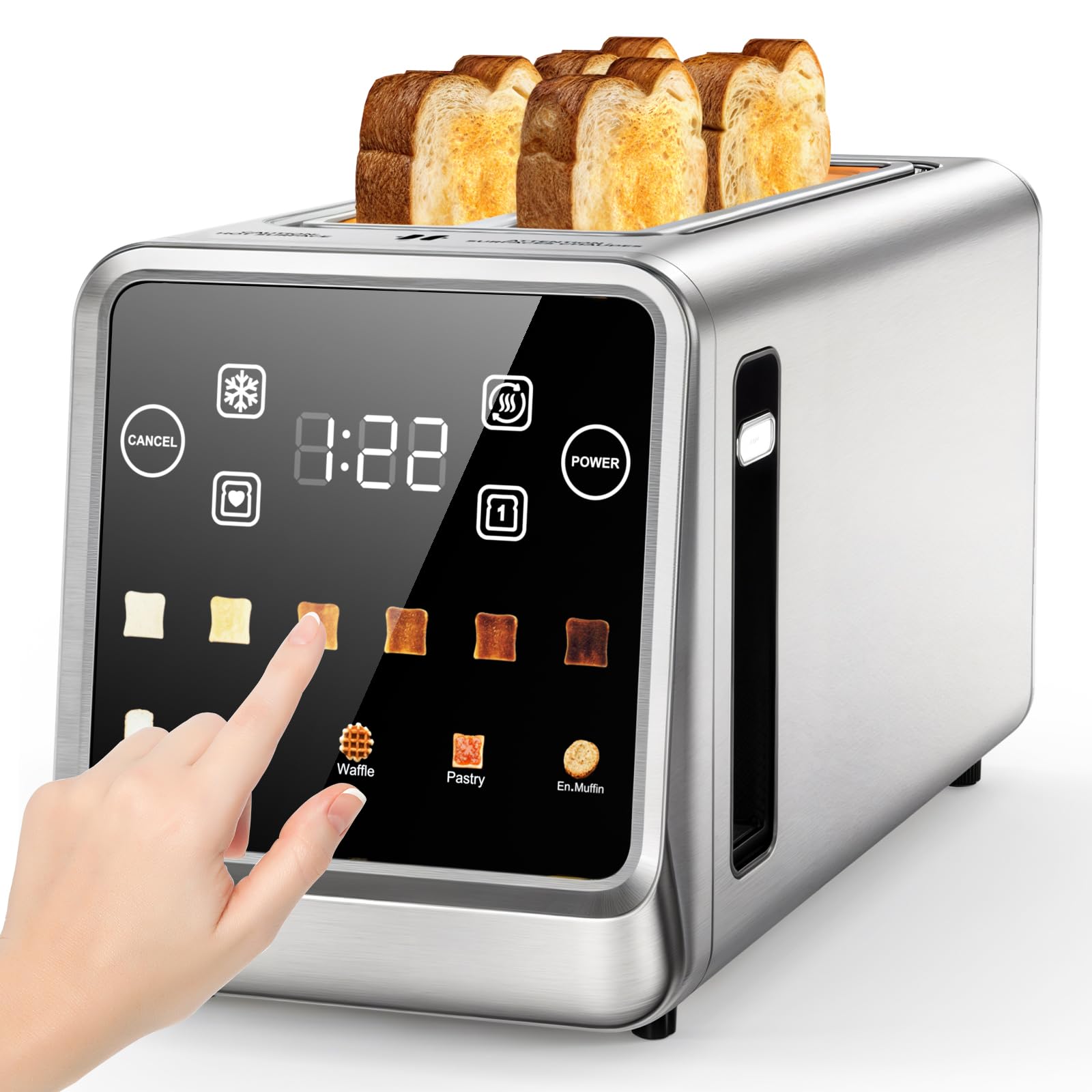
Image: The Foyoconven 4-Slice Digital Smart Touch Screen Toaster, showcasing its sleek stainless steel design and digital display.
Safety Instructions
Always follow basic safety precautions when using electrical appliances to reduce the risk of fire, electric shock, and injury.
- Do not touch hot surfaces. Use handles or knobs.
- To protect against electrical hazards, do not immerse cord, plugs, or toaster in water or other liquid.
- Close supervision is necessary when any appliance is used by or near children.
- Unplug from outlet when not in use and before cleaning. Allow to cool before putting on or taking off parts.
- Do not operate any appliance with a damaged cord or plug, or after the appliance malfunctions or has been damaged in any manner.
- Do not use outdoors.
- Do not let cord hang over edge of table or counter, or touch hot surfaces.
- Do not place on or near a hot gas or electric burner, or in a heated oven.
- Do not use appliance for other than intended use.
- Oversize foods, metal foil packages, or utensils must not be inserted in a toaster as they may involve a risk of fire or electric shock.
- A fire may occur if toasters are covered or touching flammable material, including curtains, draperies, walls, and the like, when in operation.
- Do not attempt to dislodge food when toaster is plugged in.
- Do not operate unattended.
Product Features
- 1.5-Inch Wide Slots: Accommodates thick breads, large bagels, and waffles without squashing.
- Smart Touchscreen with 6 Settings: Easily select from precise browning levels and specialized presets for different bread types.
- Memory Function: Remembers your favorite toasting preference for consistent results with one touch.
- Energy-Efficient Operation: Smart slot detection and single-slice mode help reduce power consumption.
- Easy-Clean Design: Features a removable crumb tray and fingerprint-resistant finish for simple maintenance.
Setup
- Unpacking: Carefully remove the toaster and all packaging materials. Retain packaging for future storage or transport.
- Placement: Place the toaster on a stable, heat-resistant, and dry surface, away from flammable materials. Ensure adequate ventilation around the appliance.
- First Use: Before toasting food for the first time, operate the toaster without bread on the highest setting (level 6) to burn off any manufacturing residues. A slight odor or smoke may be present; this is normal and will dissipate. Allow the toaster to cool completely.
- Power Connection: Plug the power cord into a standard 120V AC electrical outlet.
Operating Instructions
General Toasting
- Insert Bread: Place up to four slices of bread, bagels, or other items into the wide toasting slots.
- Power On: Press the POWER button on the touchscreen to activate the display.
- Select Bread Type: On the touchscreen, select the appropriate bread type (e.g., Bread, Bagel, Waffle, Pastry, English Muffin). This optimizes the toasting cycle for best results.
- Adjust Browning Level: Use the '+' and '-' buttons on the touchscreen to select your desired browning level from 1 (lightest) to 6 (darkest).
- Start Toasting: The toaster will automatically lower the bread and begin the toasting cycle after a selection is made. The countdown timer will display the remaining time.
- Cancel Toasting: To stop the toasting cycle at any time, press the CANCEL button. The bread will automatically pop up.

Image: A hand selecting a setting on the digital smart touchscreen of the toaster.
Special Functions
- Defrost Function: For frozen items, select the DEFROST icon after selecting the bread type and browning level. This function thaws and then toasts the item.
- Reheat Function: To warm up previously toasted items without further browning, select the REHEAT icon.
- Memory Function: The toaster remembers your last used settings for each bread type. To use your saved preference, simply select the bread type and the toaster will apply the last browning level used for that type.
- Single Slot Mode: The toaster features smart slot detection. If only one or two slots are used, the toaster will adjust power consumption accordingly, making it more energy-efficient.

Image: The toaster with four slices of bread inserted, ready for toasting.
Even Heating Technology
The Foyoconven toaster utilizes advanced heating elements to ensure uniform browning across the entire surface of your bread. This technology minimizes unevenly toasted spots, providing consistent results.

Image: An internal view of the toaster, highlighting the heating elements designed for uniform heat distribution.

Image: Various types of bread, including thick slices and bagels, demonstrating the toaster's wide slot capability.
Maintenance and Cleaning
Regular cleaning ensures optimal performance and extends the life of your toaster.
- Always Unplug: Before cleaning, ensure the toaster is unplugged from the power outlet and has cooled down completely.
- Crumb Tray: Pull out the removable crumb tray located at the bottom of the toaster. Dispose of crumbs and wipe the tray clean with a damp cloth. Dry thoroughly before reinserting.
- Exterior: Wipe the exterior of the toaster with a soft, damp cloth. For stubborn stains, a mild non-abrasive cleaner can be used. Avoid abrasive pads or harsh chemicals that could damage the stainless steel finish or touchscreen.
- Interior: Do not insert any objects into the toasting slots to clean. If food becomes lodged, unplug the toaster and carefully invert it to shake out the food.
Troubleshooting
| Problem | Possible Cause | Solution |
|---|---|---|
| Toaster does not turn on. | Not plugged in; power outage; circuit breaker tripped. | Ensure toaster is securely plugged in. Check household circuit breaker. Try a different outlet. |
| Bread does not toast evenly. | Inconsistent bread thickness; moisture content; initial use residue. | Ensure bread slices are uniform. For first use, run a cycle without bread. Adjust browning level. |
| Bread is burnt or too dark. | Browning level set too high. | Reduce the browning level. Use the CANCEL button if toast is browning too quickly. |
| Smoke coming from toaster. | Food lodged in slots; crumbs in tray; initial use residue. | Unplug immediately. Remove any lodged food carefully. Empty crumb tray. (See First Use in Setup). |
| Touchscreen unresponsive. | Temporary software glitch; power issue. | Unplug the toaster for 1 minute, then plug it back in. Ensure hands are clean and dry when operating. |
Specifications
| Feature | Detail |
|---|---|
| Brand | Foyoconven |
| Model Number | TA7703-UL |
| Color | Stainless Steel |
| Material | Stainless Steel |
| Product Dimensions (DxWxH) | 14.76" x 7.4" x 6.14" |
| Wattage | 1400 watts |
| Number of Slices | 4 |
| Browning Settings | 6 |
| Special Features | Built-In Timer, Cancel Function, Defrost Mode, LED Indicator, Touchscreen, Memory Function |
| Item Weight | 4.08 Pounds |
Warranty and Support
This product comes with a standard manufacturer's warranty. For detailed warranty information, product support, or service inquiries, please contact Foyoconven customer service. Contact details can typically be found on the product packaging or the official Foyoconven website.
Please have your model number (TA7703-UL) and purchase date available when contacting support.