
Introduction
Thank you for choosing the OMIZN GT5 Watch Walkie Talkie. This device offers unlimited range communication via 4G LTE network, ensuring reliable and secure connectivity. This manual provides essential information for setting up, operating, and maintaining your device.
What's Included
Your OMIZN GT5 package includes the following items:
- GT5 Watch Walkie Talkie Unit
- Belt Clip
- Wrist Band
- USB Type-C Charging Cable
- Power Adapter
- G-style Earpiece
- Finger PTT Trigger
- User Manual
- Screwdriver (for battery/clip installation)
Product Overview
The OMIZN GT5 is designed for versatile and robust communication. Below are key components and features:
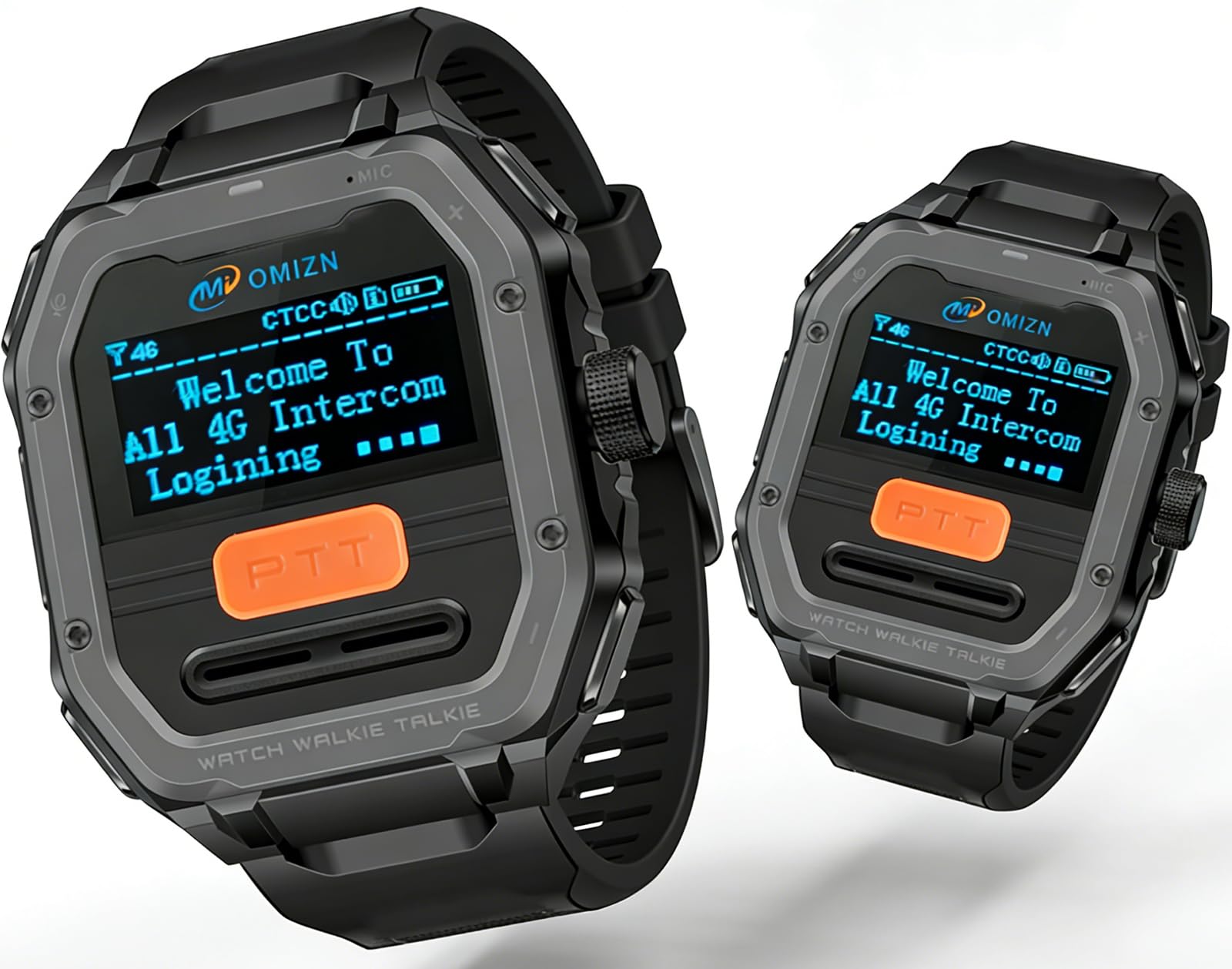
Image: OMIZN GT5 Watch Walkie Talkie displaying 'Welcome To All 4G Intercom Logging' on its 1.3-inch OLED screen. The image highlights its compact size, 0.17 lb weight, and 1200mAh battery.

Image: Diagram of the OMIZN GT5 Watch Walkie Talkie with key components labeled: VOX Switch, Type-C Port, PTT Key, Volume - (Down), Volume + (Up), Long Press (ON/OFF/Back), Single Click (Menu).
Key Features:
- 1.3" OLED Screen: Clear digital display for easy viewing of information.
- PTT Button: Push-to-Talk button for instant communication.
- Volume/Power Knob: Controls volume, and long press for power ON/OFF. Single click accesses the menu.
- VOX Switch: Activates voice-operated transmission for hands-free use.
- Type-C Port: For charging the device.
- SIM Card Slot: Located under the battery cover for the pre-installed SIM.
Setup Instructions
Follow these steps to prepare your OMIZN GT5 for use:
- Install Battery:
- Slide down the battery cover on the back of the device.
- Align the battery with the contacts and push it upwards into the slot until it clicks securely into place.
- Replace the battery cover.
- Check SIM Card: The device comes with a pre-installed SIM card. Ensure it is properly seated in the SIM1 slot under the battery.
- Attach Belt Clip/Wrist Band/Lanyard:
- To attach the belt clip, align the clip with the designated slots on the back of the device and secure it with the provided screws using the screwdriver.
- To attach the wrist band, slide the pins through the watch lugs on the device.
- For lanyard use, thread the lanyard loop through the designated attachment point on the top of the device.
- Charge the Device: Connect the USB Type-C charging cable to the device's Type-C port and the power adapter. Plug the adapter into a wall outlet. A full charge is recommended before first use.
Operating Instructions
Learn how to effectively use your OMIZN GT5 Watch Walkie Talkie:
- Power On/Off: Long press the Volume/Power knob on the top right side of the device. The screen will display 'Welcome to public intercom' upon startup.
- Adjust Volume: Rotate the Volume/Power knob to increase or decrease the volume.
- Push-to-Talk (PTT): To transmit your voice, press and hold the orange PTT button on the front of the device. Release the button to listen.
- VOX (Voice Operated Transmission): Activate the VOX switch on the side of the device for hands-free communication. Your voice will automatically transmit when you speak.
- Group Communication: The device supports multiple groups. Use the menu (single click Volume/Power knob) to navigate to 'Group' and select your desired communication group.
- Menu Navigation: Single click the Volume/Power knob to access the main menu. Use the up/down buttons to navigate through options like 'Group', 'Member', 'Setting', 'Friend'. Press the PTT button to confirm selection or the back button to return.
- Screen Lock: Press the Volume/Power knob once to lock the screen.
Key Features
The OMIZN GT5 offers a range of features designed for optimal communication:
- Unlimited Range via 4G LTE: Utilizes the 4G LTE network for instant push-to-talk communication without distance limitations, suitable for cross-city or multi-location use.
- Pre-Installed SIM: Comes with a built-in SIM card, offering no contract, no monthly fees, and no hidden costs. Works in 172 countries (contact seller for international use).
- Hands-Free VOX Communication: Supports voice activation for hands-free talking, ideal for users needing free hands while working or during activities.
- Finger PTT and Earpiece Included: Includes a Finger PTT trigger and G-style earpiece for quick and convenient push-to-talk control.
- Multiple Wearing Options: Can be worn as a watch, clipped to clothing, or used with a lanyard, adapting to various work styles and activities.
- Clear Voice with Noise Reduction: Advanced noise reduction technology minimizes background sounds, ensuring clear communication in noisy environments.
- AES256 Encrypted Communication: Employs AES256 digital encryption to protect conversations, suitable for business and internal group communication.
- IP65 Rated for Daily Use: Dust and water-resistant design ensures durability for outdoor and job site use.
- Long Battery Life with Type-C Charging: Supports a full day of active use and 2-3 days standby. Type-C charging is compatible with power banks, vehicles, and wall chargers.
Specifications
| Specification | Detail |
|---|---|
| Brand | OMIZN |
| Model Number | OMIZN-GT5-2Pack |
| Color | Grey |
| Number of Channels | 200 |
| Special Feature | Digital Display, Lightweight, Long Range, Noise Reduction, Voice Operated Transmission |
| Frequency Range | 4G LTE |
| Talking Range Maximum | Unlimited (via 4G LTE network) |
| Voltage | 3.7 Volts (DC) |
| Water Resistance Level | IP65 (Dust and Water Resistant) |
| Product Dimensions | 0.79"D x 1.97"W x 2.36"H |
| Item Weight | 2.24 ounces |
| Compatible Devices | G-style earpiece, Finger PTT trigger, other OMIZN two-way radios using the same frequency band or channel |
| Temperature Range | -30℃ - 70℃ Degrees Celsius |
| Connectivity Protocol | LTE |
Maintenance
To ensure the longevity and optimal performance of your OMIZN GT5, follow these maintenance guidelines:
- Cleaning: Wipe the device with a soft, damp cloth. Avoid using harsh chemicals or abrasive cleaners.
- Charging: Always use the provided USB Type-C cable and power adapter. Do not overcharge the battery.
- Storage: Store the device in a cool, dry place away from direct sunlight and extreme temperatures.
- Water Resistance: The IP65 rating means it is dust and water-resistant for daily use (resists sweat, rain, hand washing). It is NOT suitable for bathing, swimming, diving, or prolonged submersion in water.
Troubleshooting
If you encounter issues with your OMIZN GT5, try the following solutions:
- Device not powering on: Ensure the battery is fully charged and correctly installed. Long press the power knob.
- No signal/communication: Check if the device is within 4G LTE coverage. Ensure the SIM card is properly inserted.
- Poor audio quality: Verify that the earpiece is securely connected. Check the volume settings. Ensure the microphone is not obstructed.
- Cannot connect to other users/groups: Confirm that all devices are set to the same communication group.
- Battery drains quickly: Reduce screen brightness or disable unnecessary features. Ensure the device is fully charged before use.
Official Product Videos
OMIZN GT5 Watch Walkie Talkie
Video Description: This video provides an overview of the OMIZN GT5 Watch Walkie Talkie, showcasing its design and primary functions. It highlights the device's compact form factor and ease of use for communication.
GT5 Watch Global Walkie Talkie Unlimited Range with VOX
Video Description: This video demonstrates the global reach and VOX functionality of the GT5 Watch Walkie Talkie. It illustrates how the device can be used for hands-free communication across vast distances.
OMIZN T6 Ultra-Slim Walkie Talkie
Video Description: This video showcases the ultra-slim design of the OMIZN T6 Walkie Talkie, highlighting its portability and sleek form factor. While not the GT5, it provides insight into OMIZN's product design philosophy.
Lifetime Free Service Unlimited Range
Video Description: This video emphasizes the lifetime free service and unlimited range capabilities of the walkie-talkie, demonstrating its value proposition for users seeking cost-effective and far-reaching communication.
CARRBORG Walkie Talkie
Video Description: This video provides a general overview of the CARRBORG Walkie Talkie, showcasing its features and potential applications. It highlights the device's robust build and clear communication.
Warranty and Support
For warranty information, technical support, or any inquiries regarding your OMIZN GT5 Watch Walkie Talkie, please refer to the contact details provided in the included User Manual or visit the official OMIZN website. Customer satisfaction is a priority, and assistance is available for product-related concerns.
