
1. Introduction
This manual provides detailed instructions for the installation, operation, and maintenance of your STUDIOFINIX Marine Bluetooth Receiver, Model ST-BT01-US. This device is designed to provide wireless Bluetooth audio connectivity in various marine and outdoor vehicle environments, including boats, UTVs, ATVs, motorcycles, and golf carts. Please read this manual thoroughly before use to ensure proper installation and optimal performance.
2. Package Contents
Verify that all items listed below are included in your package:
- Receiver x 1
- Instruction Manual x 1
- 3M Adhesive Backing x 1
- Installation Screws x 2

Figure 2.1: Package Contents. This image displays the STUDIOFINIX Marine Bluetooth Receiver, its user manual, 3M adhesive backing, and two installation screws, all included in the product box.
3. Product Features
- Bluetooth 5.3 Connectivity: Equipped with the latest Bluetooth 5.3 technology for a stable, fast, and remote wireless connection, ensuring seamless audio streaming.
- IP67-Rated Waterproof Design: Built to withstand harsh marine and outdoor conditions, resistant to water, dust, and other elements.
- Versatile Vehicle Compatibility: Ideal for yachts, motorcycles, golf carts, UTVs, ATVs, and other vehicles requiring wireless audio integration.
- RCA Output: Features male RCA outputs for easy connection to an amplifier or existing audio system.

Figure 3.1: IP67 Waterproof Feature. The image shows the receiver unit with water droplets, illustrating its IP67 waterproof capability, designed to withstand seawater and rainwater.

Figure 3.2: Versatile Application. This image demonstrates the receiver's compatibility with various vehicles, including ships, cars, motorcycles, and speedboats, highlighting its broad utility.

Figure 3.3: Upgraded Bluetooth 5.3. This graphic emphasizes the stable and low-latency connection provided by Bluetooth 5.3, ensuring a smooth and high-quality audio experience.
4. Setup and Installation
Follow these steps for proper installation of your Marine Bluetooth Receiver:
- Power Connection:
- Connect the red wire to the vehicle's positive power supply (B+).
- Connect the black wire to the vehicle's negative power supply (GND).
- Connect the blue wire (power switch control line) to the ACC (Accessory) power source. This line acts as an accessory power switch.
- Amplifier Connection:
- Connect the red and white RCA male outputs from the receiver to the corresponding RCA inputs on your amplifier.
- If your amplifier does not have direct RCA inputs, an AUX adapter may be required.
- Mounting: Use the provided 3M adhesive backing or installation screws to securely mount the receiver in a suitable location, ensuring it is protected from direct impact and excessive heat.
Important Notes:
- Ensure all connections comply with local electrical safety standards.
- Verify polarity to avoid reverse connection damage.
- The blue wire functions as an ACC power switch, not a remote trigger for an amplifier.

Figure 4.1: Product Connections. This diagram illustrates the wiring connections for the receiver, including power (B+, GND, ACC) and RCA outputs to an amplifier.
5. Operating Instructions
Once installed, follow these steps to operate your Bluetooth receiver:
- Power On: Ensure the vehicle's ignition or accessory power is on to activate the receiver. The receiver will automatically enter pairing mode.
- Pairing: On your mobile device, navigate to the Bluetooth settings. Search for available devices and select "STUDIOFINIX BT" (or similar name) to pair. A confirmation sound may indicate successful pairing.
- Audio Playback: Once paired, you can stream audio from your device to the connected amplifier and speakers. Control playback (play/pause, skip tracks, volume) directly from your mobile device.
- Automatic Reconnection: The receiver will attempt to automatically reconnect to the last paired device when powered on and within range.
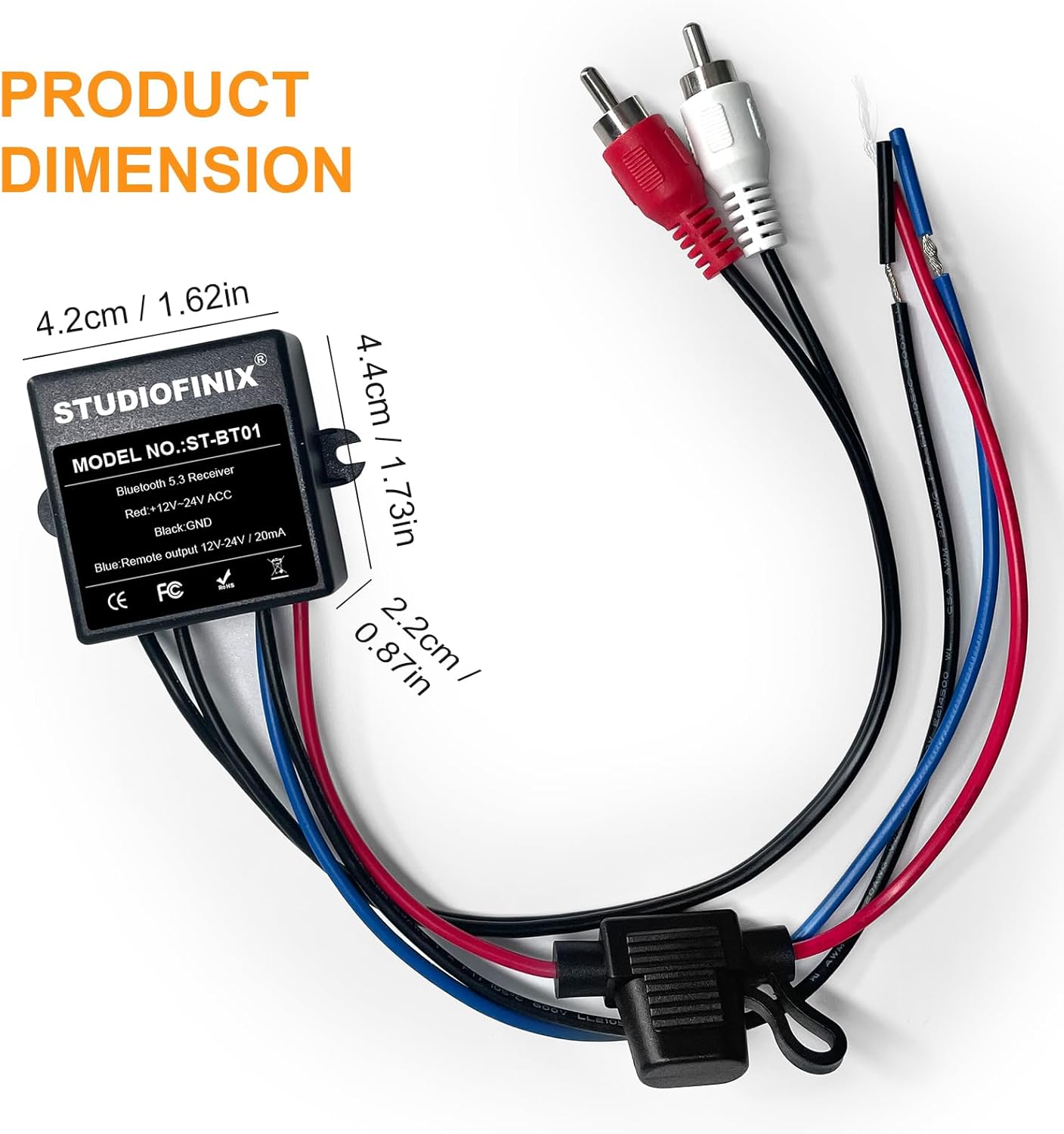
Figure 5.1: Bluetooth Connection. This image shows a smartphone wirelessly connected to the receiver, demonstrating how to stream music in a vehicle.
6. Maintenance
To ensure the longevity and optimal performance of your STUDIOFINIX Marine Bluetooth Receiver, follow these maintenance guidelines:
- Cleaning: Wipe the receiver with a soft, damp cloth. Avoid using harsh chemicals or abrasive cleaners, as these can damage the waterproof seal or finish.
- Inspection: Periodically check all wiring connections for corrosion or damage, especially in marine environments. Ensure connections are secure.
- Protection: Although IP67 rated, avoid prolonged submersion or high-pressure water jets directly on the unit to prevent potential damage over time.
- Storage: If the vehicle or vessel is stored for an extended period, ensure the receiver is powered off.
7. Troubleshooting
If you encounter issues with your receiver, refer to the following common problems and solutions:
| Problem | Possible Cause | Solution |
|---|---|---|
| Receiver does not power on. | No power supply; incorrect wiring; blown fuse. | Check power connections (red to B+, black to GND, blue to ACC). Verify the vehicle's power is on. Inspect for a blown fuse in the power line and replace if necessary. |
| Cannot connect via Bluetooth. | Receiver not in pairing mode; device Bluetooth off; interference; already connected to another device. | Ensure receiver is powered on. Turn Bluetooth off and on again on your mobile device. Move closer to the receiver. Disconnect from other Bluetooth devices. |
| No audio output. | Incorrect RCA connection; amplifier off; volume too low; incorrect input selected on amplifier. | Verify RCA cables are securely connected to the amplifier's input. Ensure the amplifier is powered on and its volume is up. Select the correct input source on your amplifier. |
| Audio quality is poor or intermittent. | Weak Bluetooth signal; interference; damaged cables. | Move your mobile device closer to the receiver. Avoid sources of strong electromagnetic interference. Check RCA cables for damage. |
8. Specifications
| Feature | Detail |
|---|---|
| Brand | STUDIOFINIX |
| Model Number | ST-BT01-US |
| Connectivity Technology | Bluetooth 5.3 |
| Waterproof Rating | IP67 |
| Audio Output Mode | Stereo |
| Connector Type | RCA Male |
| Compatible Devices | Speakers, Amplifiers |
| Item Weight | 0.2 Kilograms |
| Number of Channels | 2 |

Figure 8.1: Product Dimensions. This image provides the physical measurements of the receiver unit for installation planning.
9. Warranty and Support
Warranty Information:
This STUDIOFINIX product comes with a 1-year warranty from the date of purchase, covering manufacturing defects. This warranty does not cover damage caused by improper installation, misuse, accidents, or unauthorized modifications.
Return Policy:
Eligible for return or replacement within 30 days of receipt. Please refer to the retailer's return policy for detailed instructions.
Customer Support:
For technical assistance, warranty claims, or further inquiries, please contact STUDIOFINIX customer support through the retailer's platform or visit the official STUDIOFINIX website.