
1. Introduction
Welcome to the Ruitoo RT6 Electric Scooter user manual. This guide provides essential information for the safe and efficient operation, maintenance, and troubleshooting of your new electric scooter. The RT6 is designed for adults, featuring a powerful 1000W brushless motor, a top speed of 30Mph, and a maximum range of 34 miles, making it ideal for commuting and adventures. It includes advanced safety features like dual brakes, turn signals, and a smart display.

Figure 1.1: The Ruitoo RT6 Electric Scooter, showcasing its design and front light.
2. Important Safety Information
Your safety is paramount. Please read and understand all safety warnings and instructions before operating the scooter. Failure to do so may result in serious injury or damage to the scooter.
- Always wear a helmet and appropriate protective gear (knee pads, elbow pads) when riding.
- Check the brakes, tires, and battery level before each ride.
- Obey all local traffic laws and regulations.
- Do not ride in heavy rain, snow, or icy conditions.
- Avoid riding on slippery surfaces, loose gravel, or uneven terrain at high speeds.
- Do not perform stunts or sudden maneuvers.
- The scooter is designed for one rider only. Do not carry passengers.
- Keep hands and feet away from moving parts.
- Ensure the scooter is fully charged before long rides.
The RT6 is equipped with a dual braking system and integrated lighting (front white/yellow, rear red lights, turn signals) for enhanced visibility and safety.
3. Package Contents
Please check the box for the following items:
- Ruitoo RT6 Electric Scooter
- Power Adapter/Charger
- User Manual (this document)
- Toolkit
4. Setup Guide
4.1 Unfolding the Scooter
To unfold your RT6 scooter:
- Place the scooter on a flat surface.
- Locate the folding mechanism latch near the base of the handlebar stem.
- Release the latch and carefully lift the handlebar stem until it locks into the upright position. Ensure it clicks securely.
- If applicable, unfold the seat post and secure the seat.

Figure 4.1: The RT6 scooter in its folded state, demonstrating its portability for storage or transport.
4.2 Handlebar and Seat Adjustment
The RT6 features an adjustable handlebar height and a removable/adjustable seat for a personalized riding experience.
- Handlebar: Use the quick-release clamp on the handlebar stem to adjust the height. Ensure it is securely fastened before riding.
- Seat: The seat height can be adjusted using the clamp on the seat post. Tighten firmly after adjustment. The seat can also be removed if preferred.

Figure 4.2: The adjustable height design of the RT6, accommodating riders of various statures.
4.3 Charging the Battery
Before your first ride, fully charge the scooter's battery.
- Locate the charging port on the scooter (usually near the battery compartment).
- Ensure the scooter is powered off.
- Connect the charger to the charging port, then plug the charger into a standard wall outlet.
- The indicator light on the charger will change (e.g., red to green) when charging is complete.
- Charging time is approximately 6 hours for a full charge.
5. Operating Instructions
5.1 Powering On/Off
Press and hold the power button on the handlebar display to turn the scooter on or off.
5.2 Smart Display Overview
The intuitive LCD screen provides real-time riding data:
- Battery Level: Indicates remaining battery charge.
- Speed Display: Shows current speed.
- Gear Position: Displays the selected speed mode (Low/Medium/High).
- Headlight Symbols: Indicates headlight status.
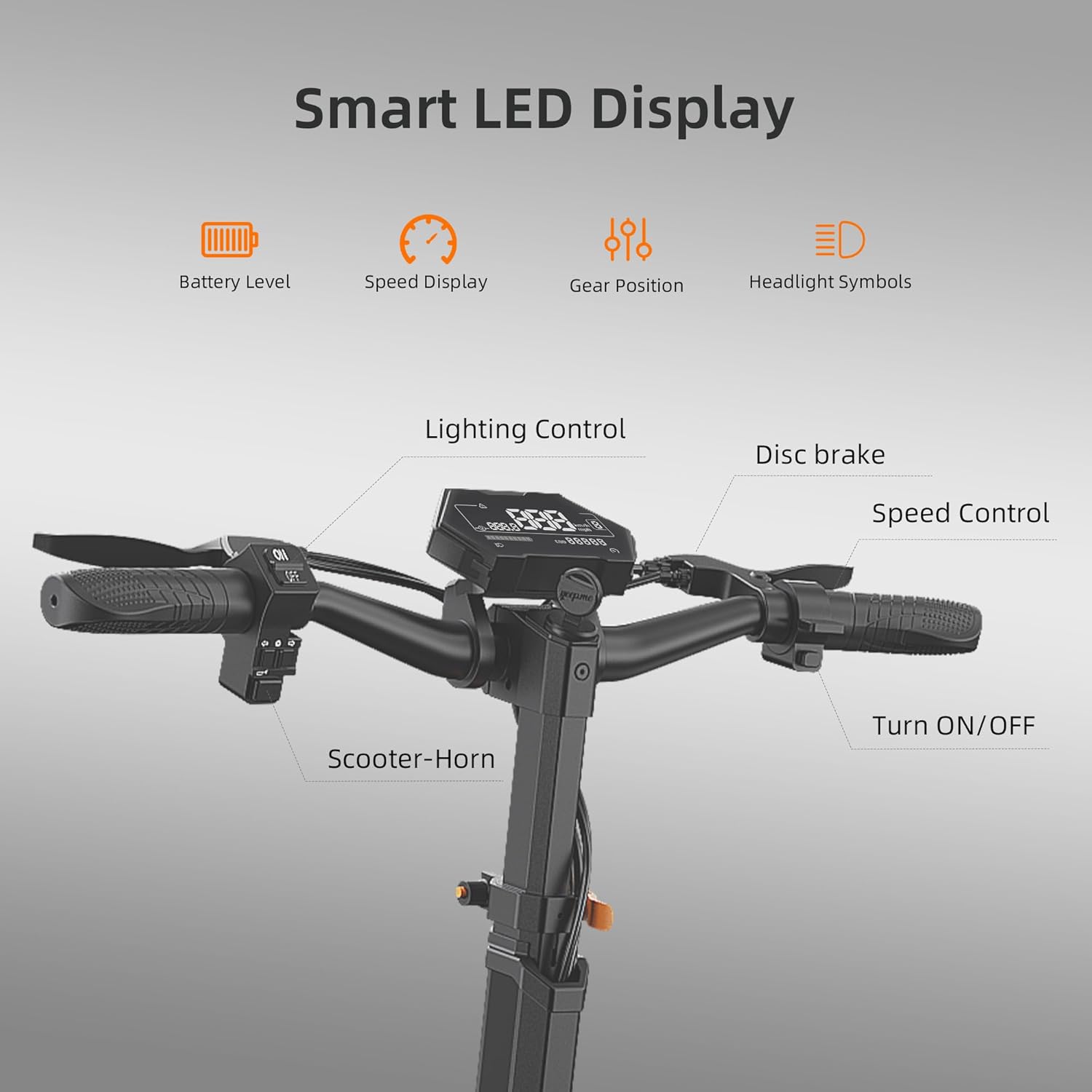
Figure 5.1: The Smart LED Display and handlebar controls, including lighting control, disc brake, speed control, and horn.
5.3 Speed Modes
The RT6 offers 3 adjustable speed modes (Low, Medium, High) to suit different riding conditions and preferences. Use the speed mode button on the handlebar to cycle through them.
5.4 Braking
The scooter is equipped with disc brakes on both wheels. Apply both brake levers simultaneously for effective and controlled stopping. Practice braking in a safe, open area before riding in traffic.
5.5 Riding Tips
The RT6 features large 10-inch all-terrain tires and a front and rear hydraulic damping system, providing a smooth and stable ride across various surfaces, including soil and flat roads. It can also handle slopes up to 30 degrees.

Figure 5.2: The RT6 performing well on both paved and unpaved surfaces, highlighting its all-terrain capability.

Figure 5.3: The RT6's ability to ascend inclines, showcasing its powerful motor.
6. Maintenance
Regular maintenance ensures the longevity and safe operation of your scooter.
- Tires: Check tire pressure regularly. Maintain recommended PSI for optimal performance and safety.
- Brakes: Inspect brake pads and cables periodically. Adjust or replace as needed.
- Cleaning: Wipe down the scooter with a damp cloth. Do not use high-pressure water or immerse the scooter in water.
- Battery Care: Store the scooter in a cool, dry place. If storing for extended periods, charge the battery to about 50-70% every 2-3 months to prevent deep discharge.
- Fasteners: Periodically check all screws and bolts to ensure they are tight.

Figure 6.1: Detail of the front hydraulic shock absorber, which contributes to a smooth ride.
7. Troubleshooting
If you encounter issues with your RT6 scooter, refer to the table below for common problems and solutions.
| Problem | Possible Cause | Solution |
|---|---|---|
| Scooter does not power on | Low battery; Loose connection; Power button malfunction | Charge the battery; Check all cable connections; Contact customer support |
| Reduced range/speed | Low tire pressure; Overloaded; Riding uphill frequently; Battery degradation | Inflate tires to recommended PSI; Reduce load; Ride on flatter terrain; Consider battery replacement if old |
| Brakes feel weak | Brake pads worn; Cable loose; Disc dirty | Inspect and replace brake pads; Adjust brake cable tension; Clean brake disc with alcohol |
| Unusual noises during ride | Loose components; Debris in wheels; Motor issue | Check all fasteners; Inspect wheels for foreign objects; Contact customer support if motor noise persists |
If the problem persists after attempting these solutions, please contact Ruitoo customer support.
8. Technical Specifications
Below are the key specifications for the Ruitoo RT6 Electric Scooter:
| Feature | Specification |
|---|---|
| Model Name | RT6 |
| Motor Power | 1000W Brushless Motor |
| Top Speed | Up to 30 Mph (48 km/h) |
| Max Range | 34 Miles (50-55 km) per charge |
| Battery | 48V/18.2Ah Lithium-ion |
| Charging Time | Approx. 6 hours |
| Tire Size | 10 Inches (All-terrain pneumatic) |
| Weight Limit | 264 Pounds (120 KG) |
| Item Weight | 24.3 Kilograms |
| Product Dimensions (LxWxH) | 47" x 23.6" x 47" (119.4 x 59.9 x 119.4 cm) |
| Brake Style | Dual Disc Braking (Front & Rear) |
| Suspension | Front Hydraulic & Rear Spring Shock Absorbers |
| Special Features | Adjustable Handlebar Height, Foldable, Seat, Wide Platform, Smart Display, Turn Signals |

Figure 8.1: Key performance specifications of the RT6, including motor, battery, and range.
9. Warranty and Customer Support
The Ruitoo RT6 Electric Scooter comes with a 1-year limited warranty from the date of purchase. This warranty covers manufacturing defects under normal use. It does not cover damage caused by misuse, accidents, unauthorized modifications, or normal wear and tear.
For warranty claims, technical support, or any questions regarding your scooter, please contact Ruitoo customer support through the retailer where you purchased the product or visit the official Ruitoo website for contact information.
Please have your purchase receipt and scooter model number (RT6) ready when contacting support.
