
Introduction
Thank you for choosing the Yechen Accent Sideboard Buffet Cabinet. This manual provides essential information for the safe assembly, operation, and maintenance of your new furniture. Please read all instructions carefully before beginning assembly and retain this manual for future reference.
Safety Information
- Always follow the assembly instructions carefully.
- Do not overload the cabinet. The tabletop supports up to 100 lbs. Each adjustable shelf supports up to 30 lbs. The bottom shelf supports up to 200 lbs.
- Ensure all connections are securely fastened before use.
- Use the provided anti-tip kit to secure the cabinet to a wall, especially in households with children or pets, to prevent accidental tipping.
- Keep small parts and packaging materials away from children.
Product Features
- Upgraded Design: Features two cable management holes and a convenient push-to-open door system for cleaner organization and seamless user experience.
- On-Trend Arched Reeded Doors: Smooth, handle-free pop-open doors with a wave-textured reeded finish and elegant archway design. Reeded panels feature rounded, raised ridges for richer depth and dimension.
- Spacious & Flexible Storage: Includes 4 adjustable shelves with 12 height positions to organize various items.
- High-Quality & Durable Construction: Crafted from MDF wood with thickened top and bottom panels for stability. The scratch-resistant and waterproof surface is easy to clean.
- Multi-functional: Versatile for use as a sideboard buffet server, kitchen storage, media console, or in dining rooms, living rooms, entryways, or hallways.
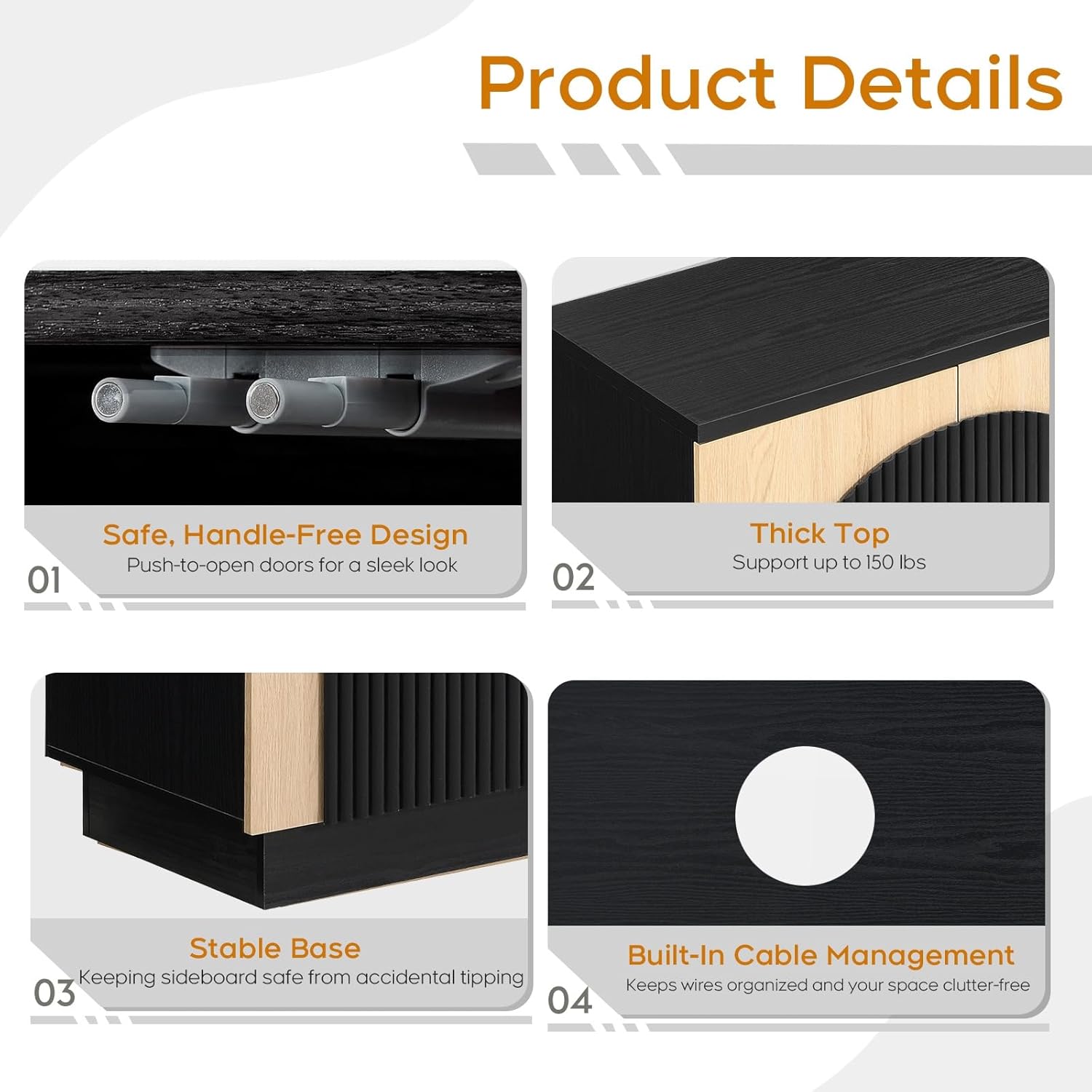
Figure 1: Product Details highlighting the handle-free design, thick top, stable base, and built-in cable management.
Parts List
Before assembly, verify that all parts and hardware are present and undamaged. Refer to the diagram below for identification.

Figure 2: Layout of all cabinet components and hardware.
Setup and Assembly
Assembly is straightforward with clear, easy-to-read instructions and marked spare parts. It is recommended to assemble the cabinet on a soft, clean surface to prevent scratches.
- Prepare Panels: Lay out all wooden panels (1-14) and hardware (A-N) as shown in Figure 2.
- Install Magnetic Catches: Attach magnetic catches (A) to the designated spots on panels 1 and 2 using screws (B). (Refer to Figure 3)

Figure 3: Installation of magnetic catches.
- Insert Cam Lock Nuts: Insert cam lock nuts (E) into the pre-drilled holes on panels 3, 4, and 5. (Refer to Figure 4)

Figure 4: Inserting cam lock nuts.
- Insert Wooden Dowels: Insert wooden dowels (C) into the corresponding holes on panels 11. (Refer to Figure 5)

Figure 5: Inserting wooden dowels.
- Assemble Base Frame: Connect panels 11 and 12 to form the base frame using screws (D). (Refer to Figure 6)

Figure 6: Assembling the base frame.
- Attach Side and Middle Panels: Secure panels 3, 4, and 5 to the bottom panel (1) using screws (D) and cam locks (F). (Refer to Figure 7)

Figure 7: Attaching side and middle panels.
- Attach Top Panel: Place the top panel (2) onto the assembled frame and secure it with screws (F). (Refer to Figure 8)

Figure 8: Attaching the top panel.
- Install Back Panels: Slide the back panels (13) into the grooves on the rear of the cabinet and secure them with screws (G). (Refer to Figure 9)

Figure 9: Installing the back panels.
- Install Adjustable Shelves: Insert shelf pins (E) into the desired height positions and place the adjustable shelves (6) onto the pins. (Refer to Figure 10)

Figure 10: Installing adjustable shelves.
- Attach Door Hinges: Secure hinges (J, K) to the cabinet doors (7, 8, 9, 10) using screws (G, H). (Refer to Figure 11)

Figure 11: Attaching hinges to the doors.
- Mount Doors: Attach the doors to the cabinet frame by screwing the hinges into the pre-drilled holes. (Refer to Figure 12)

Figure 12: Mounting the cabinet doors.
- Install Anti-Tip Kit: Secure the anti-tip strap (N) to the back of the cabinet and to the wall using the provided wall anchor (L) and screw (M). (Refer to Figure 13)
Figure 13: Installing the anti-tip safety strap.
Operating Instructions
Adjustable Shelves
The cabinet features 4 adjustable shelves with 12 height positions. To adjust a shelf, remove any items, lift the shelf, reposition the shelf pins to the desired height, and then place the shelf back onto the pins. This allows for customized storage to accommodate items of various sizes.

Figure 14: Visual guide for adjusting shelf heights.
Push-to-Open Doors
The cabinet doors operate with a push-to-open system. Gently press the door inward to release the latch and open. To close, push the door firmly until the magnetic catch engages.
Cable Management
Utilize the built-in cable management holes located on the back panel to route and organize electronic device cables, keeping your space tidy and clutter-free.
Maintenance
The cabinet's surface is scratch-resistant and waterproof, making it easy to clean. Wipe with a soft, damp cloth and mild detergent if necessary. Avoid abrasive cleaners or harsh chemicals that could damage the finish. Regularly check all screws and fittings to ensure they remain tight.
Troubleshooting
Door Alignment Issues
If the cabinet doors do not align properly, they can be adjusted using the hinges. Refer to the hinge adjustment guide below:
- Height Adjustment: Loosen the screw slightly, then gently move the door up/down. Tighten once the door aligns evenly with neighboring doors.
- Side-to-Side Alignment: Adjust the middle screw (usually elongated for lateral movement). Turn clockwise to shift the door left, counter-clockwise to shift right.
- Forward/Backward Tilt (Depth Adjustment): Turning clockwise pulls the door inward. Turning counter-clockwise pushes the door outward.

Figure 15: Detailed guide for adjusting cabinet door hinges.
Specifications
| Feature | Detail |
|---|---|
| Brand | Yechen |
| Model Number | B0FMJJ88HV |
| Color | Black/Natural Oak |
| Product Dimensions | 15.5"D x 55"W x 31.5"H |
| Material | MDF Wood, Wooden Frame |
| Item Weight | 92 pounds |
| Weight Limit (Top) | 100 lbs |
| Weight Limit (Shelves) | 30 lbs each |
| Weight Limit (Bottom Shelf) | 200 lbs |
| Number of Shelves | 8 (4 adjustable) |
| Special Features | Adjustable Shelf, Cable Management Holes, Reeded Doors Design, Push-to-Open Doors |
| Assembly Required | Yes |
Official Product Videos
Watch these official videos from Yechen Direct for additional product insights and demonstrations.
Video 1: Official Product Video: Effortless Organization with the Reeded Cabinet. This video demonstrates the cabinet's storage capabilities and design in a home setting.
Video 2: Official Product Video: Organize Your Space with Style - Reeded Cabinet. A detailed overview of the cabinet's features and aesthetic appeal.
Video 3: Official Product Video: Sideboard Cabinet with Reeded Arched Door Features. This video highlights the unique reeded door design and its functionality.
Video 4: Official Product Video: Textured Storage Solution - See the Sideboard in Your Home. This video provides a visual of the cabinet integrated into various home environments.
Customer Support
If you encounter any problems with your Yechen Accent Sideboard Buffet Cabinet, please do not hesitate to contact our professional seller customer service. We are committed to assisting you in resolving any issues as soon as possible.
For further assistance, please visit the Yechen Store on Amazon.