
Introduction
This user manual provides detailed instructions for the installation, operation, and maintenance of your Hieasy X24 4MP 2.5K Window Security Camera. Please read this manual thoroughly before using the product to ensure proper functionality and safety. The Hieasy X24 camera offers 2.5K Ultra HD resolution, color night vision, motion detection, and flexible storage options, designed for indoor security monitoring.

Image: Overview of Hieasy X24 camera features and window mounting.
What's in the Box
Verify that all components are present in your package:
- Camera Body
- 6.6/Ft Charging Cable
- Instruction Manual
- Power Adapter
- 32GB Micro SD Card (pre-installed or included separately)

Image: Visual representation of the Hieasy X24 package contents.
Specifications
| Feature | Detail |
|---|---|
| Model Name | X24 |
| Indoor/Outdoor Usage | Indoor |
| Video Capture Resolution | 2.5K (2560x1440) |
| Effective Still Resolution | 4 MP |
| Connectivity Protocol | Wi-Fi (2.4G & 5G) |
| Power Source | Corded Electric (5 Volts) |
| Mounting Type | Window Mount (Adhesive) |
| Special Feature | Color Night Vision, Motion Detection |
| Night Vision Range | 33 Feet |
| Viewing Angle | 68 Degrees |
| Storage | Local SD card (up to 512GB, 32GB included) |
| Frame Rate | 25 frames per second |
| Control Method | App |
| Product Dimensions | 3.5 x 2.8 x 3.5 inches |
| Item Weight | 11.3 ounces |
| Material | Plastic |
Setup and Installation
The Hieasy X24 camera features an adhesive mounting system for quick and easy installation on windows.
Window Mounting Steps:
- Clean the Window Surface: Ensure both sides of the glass where the camera will be mounted are clean and dry.
- Attach Adhesive to Camera: Peel off the protective film from the adhesive pad and firmly attach it to the front of the camera, ensuring the camera lens aligns with the opening in the adhesive.
- Mount Camera to Window: Peel off the remaining release paper from the adhesive pad and press the camera firmly onto the desired window surface.
- Connect Power: Plug the charging cable into the camera and connect the power adapter to a power outlet.
- Secure Cables: Use the provided cable fixers to neatly secure the charging cable along the window frame or wall.
- Power On: Once connected, the blue indicator light on the camera will illuminate, indicating the product has started. You should hear a voice prompt "Waiting for connection."

Image: Quick installation process for the Hieasy X24 camera.
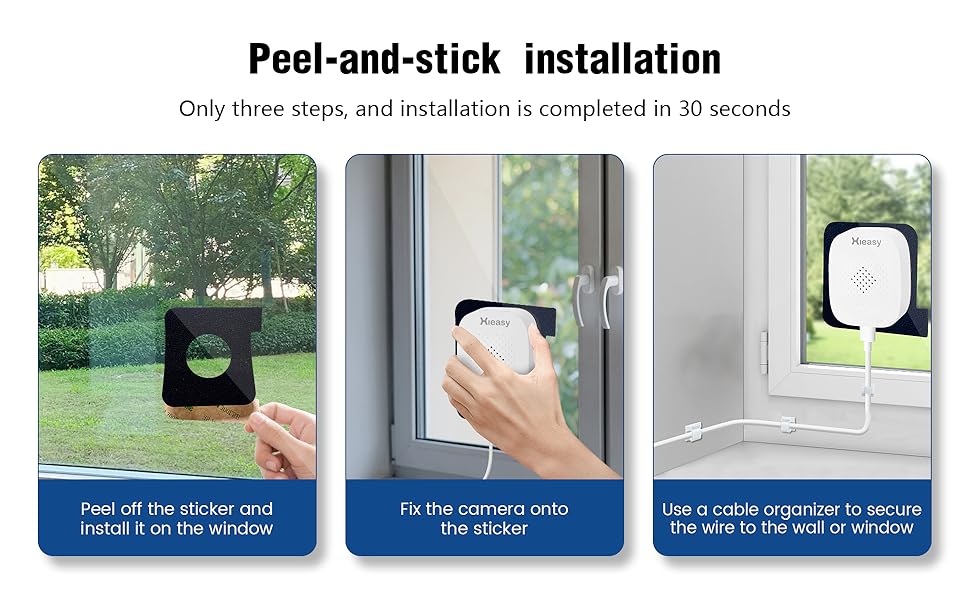
Image: Detailed steps for peel-and-stick installation.
Installation Video Guide:
Video: Step-by-step guide on installing the Hieasy X24 camera onto glass.
Operating Instructions
App Connection:
To access live monitoring, recordings, and camera settings, download the official Hieasy app on your smartphone (compatible with Android and iOS). Follow these steps to connect your device:
- Download App: Search for "Hieasy" in your app store and install the application.
- Create Account: Register for a new account or log in if you already have one.
- Add Device: In the app, click "Add Device" and select the found network camera.
- Connect to WiFi: Select your 2.4GHz or 5GHz WiFi network and enter the password. Ensure your device is close to the router during this process.
- Device Binding: The app will guide you through binding the device. Once connected, you can name your camera.
- Enable Push Alarms: Activate push alarm notifications in the app settings to receive timely alerts.
- Start Monitoring: Click "Play" to view the live camera feed.
App Connection Video Guide:
Video: Guide on connecting the Hieasy X24 camera to your mobile phone via the app.
Key Features:
- 2.5K Ultra HD Picture Quality: The 4-megapixel lens provides clear and detailed 2560x1440 resolution video.
- Color Night Vision: Advanced low-light algorithms enable full-color imaging even in dark conditions, ensuring no details are missed at night.
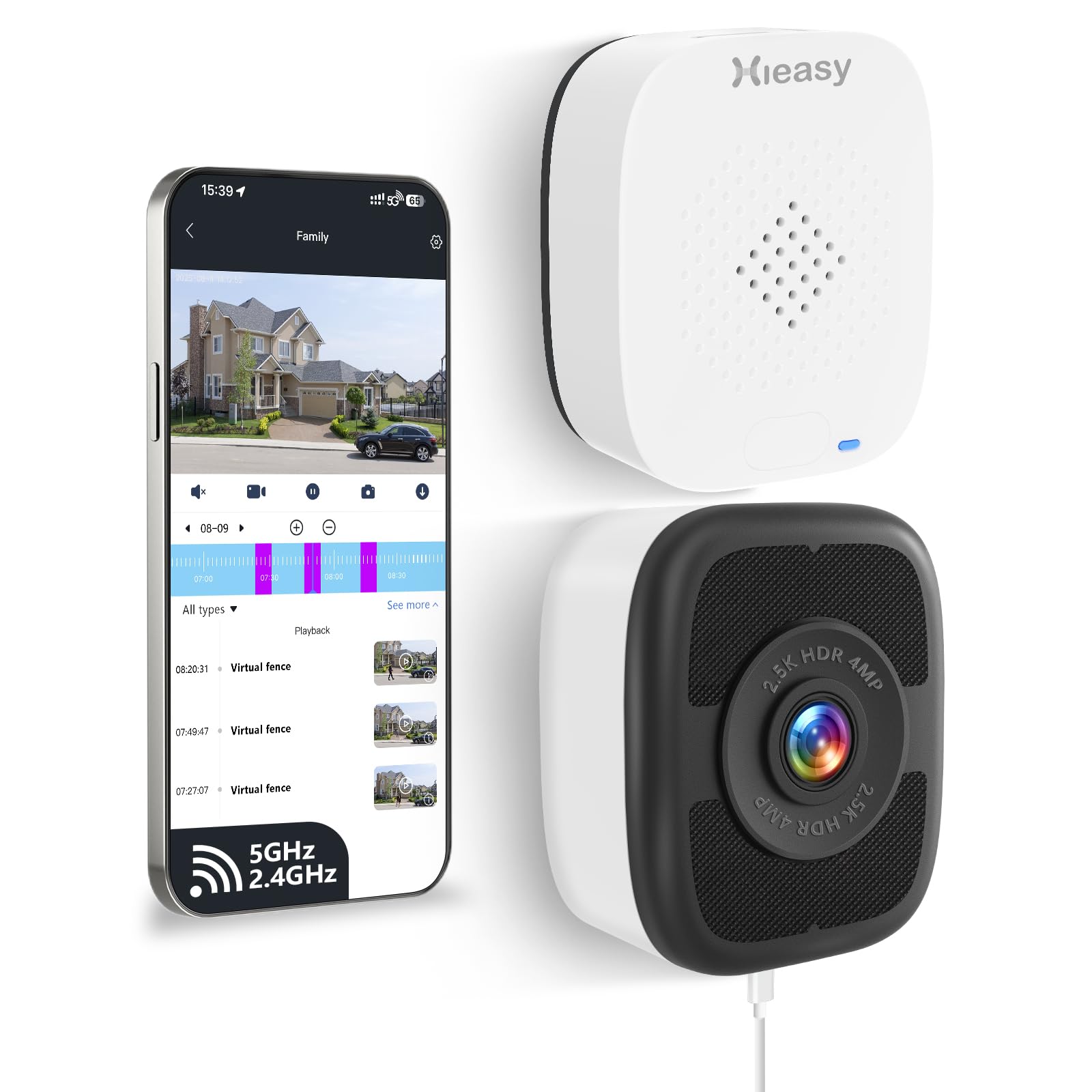
Image: Night vision comparison demonstrating the clarity of 2.5K color night vision.

Image: Visual example of color night vision capability.
- Motion Detection & Timely Alerts: Customize motion detection zones. The camera sends instant push notifications to your phone, sounds an alarm, and records video when movement is detected, deterring intruders.

Image: Out-of-bounds detection and instant app notification.

Image: Custom area detection and 4x zoom capabilities.
- No Subscription Fees: All core features are available without any recurring subscription costs.
- Local Storage: Supports 24/7 recording to a Micro SD card (up to 512GB). A 32GB card is included to begin immediate use.

Image: Local SD card storage feature with included 32GB card.
- Remote Access & Device Sharing: View live feeds from anywhere via your smartphone. Share access with up to 16 users for collaborative monitoring.

Image: Device sharing feature allowing multiple users to view the camera feed.

Image: Family and friends sharing feature for remote viewing.
- Multiple Scenario Suitability: The camera is suitable for various indoor monitoring needs, including motion detection, warning areas, leave detection, and people counting.

Image: Examples of suitable scenarios for the Hieasy X24 camera.

Image: Multiple scenarios for camera use, providing comprehensive protection.
Maintenance
- Cleaning: Gently wipe the camera lens and body with a soft, dry cloth. Avoid using harsh chemicals or abrasive materials.
- Firmware Updates: Regularly check the Hieasy app for available firmware updates to ensure optimal performance and security.
- SD Card Management: Periodically review and manage recordings on your Micro SD card. Format the card as needed to maintain recording efficiency.
- Power Supply: Ensure the camera is connected to a stable power source. Avoid frequent power interruptions.
Troubleshooting
- Camera not powering on:
- Ensure the power adapter is securely plugged into both the camera and a working power outlet. Check if the power outlet is functional.
- Unable to connect to Wi-Fi:
- Verify that you are entering the correct Wi-Fi password.
- Ensure the camera is within range of your Wi-Fi router.
- Confirm your router supports 2.4GHz or 5GHz Wi-Fi, and you are selecting the correct band during setup.
- Restart your router and the camera, then try connecting again.
- Poor video quality or lag:
- Check your Wi-Fi signal strength. A weak signal can affect video streaming.
- Ensure there are no obstructions blocking the camera's view or the Wi-Fi signal.
- Clean the camera lens if it appears dirty.
- Motion detection alerts not working:
- Verify that motion detection is enabled in the app settings.
- Check the configured motion detection zones and sensitivity levels.
- Ensure your phone's notification settings allow alerts from the Hieasy app.
Warranty and Support
Your Hieasy X24 4MP 2.5K Window Security Camera is covered by a manufacturer's warranty. For specific warranty details, please refer to the warranty card included in your product packaging or contact Hieasy customer support. For technical assistance, troubleshooting, or further inquiries, please visit the official Hieasy website or contact their customer service team.
Manufacturer: Hieasy
Date First Available: August 15, 2025
For additional support, you may visit the Hieasy Store on Amazon.