
1. Introduction
Thank you for choosing the Snowkuna K13 Cordless Vacuum Cleaner. This manual provides essential information for the safe and efficient operation, maintenance, and troubleshooting of your new appliance. Please read this manual thoroughly before first use and retain it for future reference.
2. Important Safety Information
WARNING: To reduce the risk of fire, electric shock, or injury, read all instructions before using this vacuum cleaner.
- Do not use outdoors or on wet surfaces.
- Do not allow to be used as a toy. Close attention is necessary when used by or near children.
- Use only as described in this manual. Use only manufacturer’s recommended attachments.
- Do not use with damaged cord or plug. If appliance is not working as it should, has been dropped, damaged, left outdoors, or dropped into water, return it to a service center.
- Do not pull or carry by cord, use cord as a handle, close a door on cord, or pull cord around sharp edges or corners. Do not run appliance over cord. Keep cord away from heated surfaces.
- Do not unplug by pulling on cord. To unplug, grasp the plug, not the cord.
- Do not handle plug or appliance with wet hands.
- Do not put any object into openings. Do not use with any opening blocked; keep free of dust, lint, hair, and anything that may reduce airflow.
- Keep hair, loose clothing, fingers, and all parts of body away from openings and moving parts.
- Do not pick up anything that is burning or smoking, such as cigarettes, matches, or hot ashes.
- Do not use to pick up flammable or combustible liquids, such as gasoline, or use in areas where they may be present.
- Do not use without dust bag and/or filters in place.
- Turn off all controls before unplugging.
- Use extra care when cleaning on stairs.
- Do not use to pick up toxic material (chlorine bleach, ammonia, drain cleaner, etc.).
- Do not vacuum hard or sharp objects such as glass, nails, screws, coins, etc.
- Do not place in direct sunlight or store in high temperature environments.
3. What's in the Box
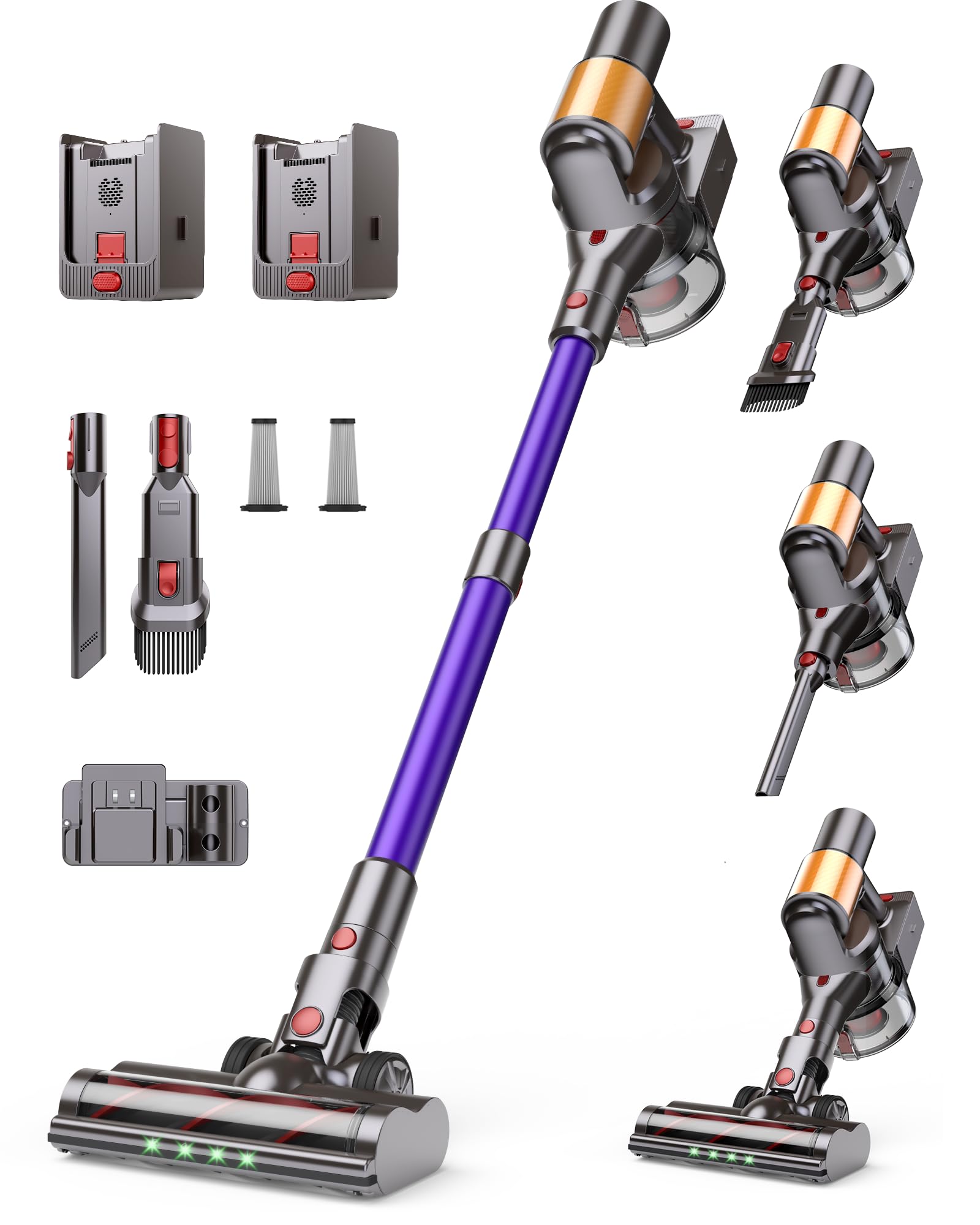
Your Snowkuna K13 Cordless Vacuum Cleaner package includes the following components:
- Main Unit
- 2 Batteries
- Dust Bin
- Telescopic Pole
- Adapter (Charger)
- Instruction Manual (this document)
- 2-in-1 Brush Head
- Long Seam Brush
- Floor Brush
- Warranty Certificate
- 2 Extra HEPA Filters
- Cleaning Tool for Brush Roll

This image displays the main unit, two batteries, telescopic pole, floor brush, 2-in-1 brush head, long seam brush, adapter, instruction manual, and an extra filter.
Video: An unboxing video demonstrating the contents of the Snowkuna K13 Cordless Vacuum Cleaner package, showing each component as it is removed from the box.
4. Assembly
Assembling your Snowkuna K13 Cordless Vacuum Cleaner is straightforward. Follow these steps:
- Attach the Telescopic Pole: Align the telescopic pole with the main unit's connection point. Press the red release button on the pole and push it firmly into the main unit until it clicks into place.
- Attach the Floor Brush: Connect the floor brush to the bottom end of the telescopic pole. Ensure the connection is secure with a click.
- Insert Battery: Slide one of the fully charged batteries into the battery slot on the main unit until it locks securely.
- Attach Accessories (Optional): For handheld use or specific cleaning tasks, detach the telescopic pole and attach the 2-in-1 brush head or long seam brush directly to the main unit.
Video: A step-by-step guide on how to easily assemble the Snowkuna K13 Cordless Vacuum Cleaner, demonstrating the connection of the main unit, telescopic pole, and floor brush.
5. Charging the Battery
The Snowkuna K13 comes with two Lithium-Ion batteries, each providing up to 60 minutes of runtime in Standard Mode. It is recommended to fully charge the battery before its first use.
- Connect the adapter to a power outlet.
- Plug the adapter's charging cable into the charging port on the battery.
- The battery indicator light will illuminate to show charging status. A full charge typically takes 4-5 hours.
- Once fully charged, disconnect the adapter.
The vacuum includes two batteries, allowing for extended cleaning sessions without interruption. Each battery provides 15-60 minutes of working time depending on the mode selected.
Video: Instructions on how to properly charge the Snowkuna K13 battery using the provided adapter, showing the connection process and indicator light.
6. Operating Instructions
Your Snowkuna K13 Cordless Vacuum Cleaner is designed for versatile cleaning across various surfaces.
6.1 Power On/Off and Suction Modes
- Power On: Press the power button on the main unit's LED display.
- Select Mode: Use the mode selection button to cycle through the three suction modes: Normal (18KPA), Sport (28KPA), and Turbo (50KPA). The LED display will show the current mode and remaining battery life.
- Power Off: Press the power button again to turn off the vacuum.

The LED display provides real-time information on battery life, selected suction mode, and filter alerts, ensuring you are always aware of the vacuum's status.
6.2 Self-Standing Design
The vacuum features a self-standing design, allowing you to pause cleaning and leave the vacuum upright without needing to lean it against a wall. This is particularly useful for quick breaks or when moving furniture.
Video: A quick tip demonstrating the self-standing feature of the Snowkuna K13, showing how it can be left upright during cleaning pauses.
6.3 Cleaning Performance
The 600W brushless motor delivers up to 50KPA suction power, effective on various surfaces including hardwood floors, carpets, and tiles. The S-shaped illuminated brush head automatically detangles hair and features built-in LED lights to reveal hidden dust.

The flexible anti-tangle floor brush is designed to prevent hair wrap, ensuring consistent cleaning performance.
Video: A demonstration of the Snowkuna K13's cleaning performance on various floor types, highlighting its suction power and effectiveness on dirt and debris.
7. Maintenance
Regular maintenance ensures optimal performance and extends the lifespan of your vacuum cleaner.
7.1 Emptying the Dustbin
The 1.5L oversized dustbin should be emptied after each use to maintain strong suction. To empty, press the dustbin release button and dispose of the contents.
7.2 Cleaning and Replacing Filters
The 6-stage HEPA filtration system traps 99.9% of dust. The filters are reusable after cleaning. It is recommended to clean the HEPA filter every 1-3 months, depending on usage, and replace it when necessary.
- Twist and pull to remove the filter assembly from the main unit.
- Separate the HEPA filter from the metal filter.
- Tap off loose dust or rinse with water. Ensure filters are completely dry before reassembling.
- Reassemble the filters and reinsert into the main unit, twisting to lock.
Video: A demonstration on how to quickly swap and clean the filter of the Snowkuna K13 vacuum cleaner, ensuring proper maintenance for optimal performance.
7.3 Cleaning the Brush Roll
Use the provided cleaning tool to remove any tangled hair or debris from the brush roll to maintain effective cleaning.
8. Troubleshooting
Here are solutions to common issues you might encounter:
- Dirty or Used Vacuum: If you receive a dirty or used K13-7S vacuum cleaner due to shipping or warehouse issues, please contact Snowkuna support immediately. All products sold are brand new.
- Weak Suction or Blockage: Clean the dust cup after each use and replace the HEPA filter every 1-3 months. If suction remains weak, try cleaning the telescopic rod and dust cup first. If the issue persists, contact Snowkuna for after-sales support.
- Battery Cannot Be Charged: First, confirm whether the correct adapter is used. If the adapter is correct and the battery still cannot be charged normally, please contact Snowkuna official for after-sales support.
- Vacuum Cleaner Cannot Be Turned On: Please confirm whether the battery is charged and correctly installed. If the vacuum cleaner still cannot work properly, please contact Snowkuna official for after-sales support.
9. Specifications
| Feature | Specification |
|---|---|
| Brand | Snowkuna |
| Model Name | K13 |
| Special Features | 50KPa Suction, 600W Motor, Max 120Mins Runtime, LED Touch Screen, 1.5L Dust Cup, 6-layer Filtration System, Anti-tangle Brush, Self-Standing, Multi-connection Cleaning Heads |
| Filter Type | HEPA Filter |
| Included Components | 2 Batteries, Main Unit, Dust Bin, Telescopic Pole, Adapter, Instruction Manual, 2-in-1 Brush Head, Long Seam Brush, Floor Brush, Warranty Certificate |
| Cordless | Yes |
| Capacity | 1.5 Liters |
| Wattage | 550 watts (Motor: 600W) |
| Form Factor | Stick |
| Color | Blue |
| Product Dimensions | 12"L x 12"W x 47"H |
| Battery Type | Lithium-Ion |
| Battery Life | 120 minutes (with 2 batteries) |
| Number of Speeds | 3 |
| Surface Recommendation | All floors |
| Item Weight | 7 pounds |
10. Warranty and Support
The Snowkuna K13 Cordless Vacuum Cleaner comes with a 2-Year Hassle-Free Warranty. For any questions, issues, or to claim your warranty, please contact Snowkuna customer support. Enjoy 24/7 customer support because we stand by our product.