
1. Product Overview
The Kaiser KSB-4008 is a versatile portable Bluetooth speaker designed for powerful audio output and dynamic lighting effects. It features an 8-inch woofer, 2.5-inch tweeter, and mid-range drivers, delivering 40W RMS of balanced sound. Integrated RGB LED lighting enhances the atmosphere for various events. With KSR-Link technology, you can wirelessly connect another compatible speaker for an expanded sound experience. The speaker includes a rechargeable battery, Bluetooth connectivity, and supports USB and Micro SD inputs for diverse music playback options. Its robust and portable design makes it suitable for both indoor and outdoor use.
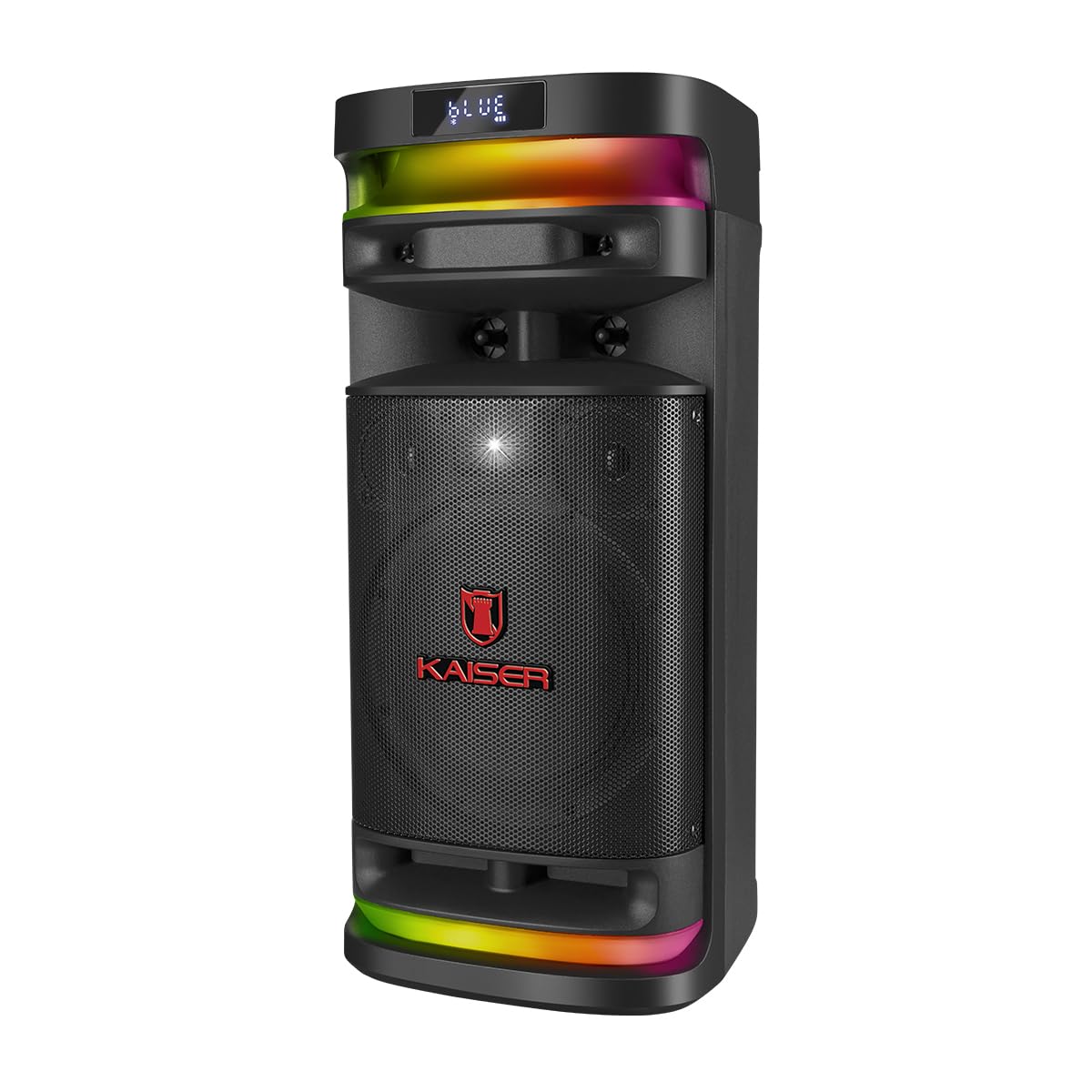
Figure 1.1: Front view of the Kaiser KSB-4008 Portable Bluetooth Speaker, showcasing its speaker grille and RGB LED light strips.
Key Features:
- 40W RMS Power: Provides powerful and balanced audio output.
- Full Speaker Configuration: Includes an 8-inch woofer, 2.5-inch tweeter, and mid-range for comprehensive sound reproduction.
- RGB LED Light Effect: Multi-color lighting creates a vibrant atmosphere.
- KSR-Link Technology: Allows wireless connection to another compatible speaker for amplified sound.
- Versatile Connectivity: Supports Bluetooth, USB, and Micro SD for various audio sources.
- Rechargeable Battery: Enables extended use without constant power connection.
- Portable and Sturdy Design: Easy to transport for indoor or outdoor events.
2. Package Contents
Please check the box for the following items:
- Kaiser KSB-4008 Portable Bluetooth Speaker
- Wireless Microphone
- Charging Cable (for microphone)
- User Manual (this document)

Figure 2.1: Included wireless microphone and its USB charging cable.
3. Safety Instructions
To ensure safe operation and prevent damage, please read and follow these safety guidelines:
- Do not expose the speaker to water, moisture, or extreme temperatures.
- Avoid placing the speaker near heat sources or in direct sunlight for extended periods.
- Ensure proper ventilation; do not block any ventilation openings.
- Use only the specified charging cables and power adapters.
- Do not attempt to open, modify, or repair the speaker yourself. Refer all servicing to qualified personnel.
- Keep the speaker away from children and pets.
- Operate the speaker within its specified voltage and current limits.
- Avoid listening at excessively high volumes for prolonged periods to prevent hearing damage.
4. Product Components and Controls
Familiarize yourself with the various parts and controls of your KSB-4008 speaker.
Figure 4.1: Top Control Panel Layout.
Control Panel Functions:
- POWER Switch: Turns the speaker ON/OFF.
- CARGA (Charge) Indicator: Lights up when charging.
- AUX Input: 3.5mm jack for external audio devices.
- USB Port: For USB flash drives.
- Micro SD Slot: For Micro SD cards.
- MIC Input: 6.35mm jack for wired microphone (if used).
- GUIT Input: 6.35mm jack for guitar (if used).
- VOL MIC (Microphone Volume): Adjusts the volume of the microphone.
- VOLUMEN (Master Volume): Adjusts the overall speaker volume.
- LED Button: Controls the RGB LED light effects.
- GRAB Button: For recording audio (functionality may vary).
- MIC PRIO (Microphone Priority): Prioritizes microphone audio over music.
- REPETIR (Repeat) Button: Repeats current track or playlist.
- Previous Track / Rewind Button: Skips to previous track or rewinds.
- Play/Pause Button: Plays or pauses audio playback.
- Next Track / Fast Forward Button: Skips to next track or fast forwards.
- MODO BT (Mode/Bluetooth) Button: Switches between input modes (Bluetooth, USB, Micro SD, AUX) and initiates Bluetooth pairing.
5. Setup and Initial Use
5.1 Charging the Speaker
- Connect the speaker to a power outlet using a compatible charging cable (not explicitly listed but implied).
- The 'CARGA' indicator light on the control panel will illuminate during charging.
- Once fully charged, the indicator light may change color or turn off. Disconnect the speaker from the power source.
5.2 Powering On/Off
- To turn ON the speaker, toggle the POWER switch to the 'ON' position.
- To turn OFF the speaker, toggle the POWER switch to the 'OFF' position.
5.3 Wireless Microphone Setup
- Ensure the wireless microphone is charged. Use the provided USB charging cable if necessary.
- Turn on the microphone using its power button.
- The microphone should automatically pair with the speaker. If not, refer to the microphone's specific instructions for pairing.
- Adjust the microphone volume using the VOL MIC knob on the speaker's control panel.
6. Operating Instructions
6.1 Bluetooth Connection
- Turn on the speaker.
- Press the MODO BT button repeatedly until 'BLUE' or 'BT' appears on the display, indicating Bluetooth mode. The speaker will enter pairing mode.
- On your mobile device, enable Bluetooth and search for available devices.
- Select 'Kaiser KSB-4008' (or similar name) from the list.
- Once connected, the speaker will confirm with an audible prompt, and the display will show a stable Bluetooth icon.
6.2 USB / Micro SD Playback
- Insert a USB flash drive or Micro SD card into the respective port/slot.
- The speaker should automatically switch to USB or Micro SD mode and begin playing audio files. If not, press the MODO BT button to select the correct input mode.
- Use the Play/Pause, Previous Track, and Next Track buttons to control playback.
6.3 AUX Input
- Connect an external audio device (e.g., smartphone, MP3 player) to the AUX input using a 3.5mm audio cable.
- Press the MODO BT button to select AUX input mode.
- Control playback from your connected device.
6.4 KSR-Link Technology (True Wireless Stereo)
KSR-Link allows you to connect two KSB-4008 speakers wirelessly for a stereo sound experience.
- Ensure both KSB-4008 speakers are powered on and in Bluetooth mode, but not connected to any device.
- On one of the speakers (this will be the primary speaker), press and hold the MODO BT button for a few seconds until you hear a confirmation tone, indicating KSR-Link pairing mode.
- The two speakers will automatically connect to each other. Once connected, you will hear another confirmation tone.
- Now, connect your mobile device to the primary speaker via Bluetooth as described in section 6.1.
- Audio will now play in stereo through both speakers.
6.5 RGB LED Light Control
- Press the LED button on the control panel to cycle through different light modes or to turn the lights off.
6.6 Volume Adjustment
- Adjust the overall speaker volume using the VOLUMEN knob.
- Adjust the wireless microphone volume using the VOL MIC knob.
7. Maintenance
7.1 Cleaning
- Always turn off the speaker and disconnect it from power before cleaning.
- Use a soft, dry cloth to wipe the exterior surfaces.
- Do not use abrasive cleaners, waxes, or solvents as they may damage the finish.
- Avoid getting moisture into any openings.
7.2 Storage
- Store the speaker in a cool, dry place away from direct sunlight and extreme temperatures.
- If storing for an extended period, charge the battery to approximately 50% every few months to maintain battery health.
8. Troubleshooting
If you encounter issues with your KSB-4008 speaker, refer to the following common problems and solutions:
| Problem | Possible Cause | Solution |
|---|---|---|
| Speaker does not power on. | Battery is depleted. Power switch is off. | Charge the speaker. Ensure the POWER switch is in the 'ON' position. |
| No sound output. | Volume is too low. Incorrect input mode. Device not connected properly. | Increase the VOLUMEN knob. Press MODO BT to select the correct input. Reconnect your audio source. |
| Bluetooth device cannot pair. | Speaker not in pairing mode. Device too far. Interference. | Ensure speaker is in Bluetooth pairing mode (display shows 'BLUE' or 'BT'). Move device closer to speaker. Turn off other Bluetooth devices. |
| Wireless microphone not working. | Microphone battery low. Microphone not turned on. VOL MIC is low. | Charge the microphone. Turn on the microphone. Increase the VOL MIC knob. |
| KSR-Link connection fails. | Speakers already connected to a device. Incorrect pairing procedure. | Ensure both speakers are not connected to any Bluetooth device. Follow KSR-Link pairing steps carefully. |
9. Specifications
Technical specifications for the Kaiser KSB-4008 Portable Bluetooth Speaker:

Figure 9.1: Kaiser KSB-4008 Speaker Dimensions.
| Feature | Specification |
|---|---|
| Brand | Kaiser |
| Model | KSB-4008 |
| Speaker Type | Atmospheric |
| Peak Power Handling (RMS) | 40 Watts |
| Woofer Size | 8 inches |
| Tweeter Size | 2.5 inches |
| Connectivity | Bluetooth, USB, Micro SD, AUX |
| Special Features | RGB LED Light, KSR-Link Technology, Rechargeable Battery |
| Product Dimensions (LxWxH) | 37.4 x 36.2 x 80 cm (Note: Image shows 56.7 x 26.5 x 25 cm, please verify actual dimensions) |
| Item Weight | 500 g |
| Included Components | Wireless microphone |
Note: Product dimensions from specifications (37.4 x 36.2 x 80 cm) differ from the provided image (56.7 x 26.5 x 25 cm). Please refer to the product packaging for the most accurate dimensions.
10. Warranty and Support
For warranty information and technical support, please refer to the warranty card included with your product or visit the official Kaiser website. Keep your purchase receipt as proof of purchase for any warranty claims.


