
BLUETTI Elite 30 V2
BLUETTI Elite 30 V2 Portable Power Station User Manual
Model: Elite 30 V2 | Brand: BLUETTI
1. Introduction
The BLUETTI Elite 30 V2 is a compact and portable power station designed to provide reliable power for various applications, including outdoor activities, road trips, and home emergencies. It features a durable LiFePO4 battery, multiple output ports, and advanced safety features.
This manual provides essential information for the safe and efficient operation of your Elite 30 V2. Please read it thoroughly before use and retain it for future reference.

Figure 1: BLUETTI Elite 30 V2 Portable Power Station
2. Package Contents
Verify that all items listed below are included in your package:
- BLUETTI Elite 30 V2 Power Station
- AC Charging Cable
- Car Charging Cable
- User Manual
Video 1: Unboxing and initial overview of the BLUETTI Elite 30 V2 package contents.
3. Product Overview
3.1. Front Panel

Figure 2: Front Panel Layout
- DC/PV Input: For solar panel or DC charging (12V-28V/10A/200W max).
- DC Output 12V/10A: Car outlet for 12V devices.
- 12V/8A DC5521 Outputs (x2): For compatible 12V devices.
- USB-C 140W Output: High-speed USB-C charging.
- USB-A 15W Outputs (x2): Standard USB-A charging.
- USB-C 100W Output: Fast USB-C charging.
- LCD Display: Shows battery level, input/output wattage, and status indicators.
- DC Power Button: Activates/deactivates DC outputs.
- Main Power Button: Turns the unit on/off.
- AC Power Button: Activates/deactivates AC outputs.
- AC Output 120V/600W (x2): Standard AC outlets.
3.2. Rear Panel
The rear panel includes the AC input port and a grounding screw.
- AC Input: For charging via the included AC charging cable.
- Grounding Screw: For optional grounding connection.
4. Setup
4.1. Initial Charging
Before first use, fully charge the BLUETTI Elite 30 V2. Connect the AC charging cable to the AC input port on the rear of the unit and plug it into a standard wall outlet. The LCD display will indicate the charging status.
4.2. App Connection
The Elite 30 V2 supports smart app control via Bluetooth and Wi-Fi. Download the official BLUETTI app from your device's app store. Follow the in-app instructions to connect your power station for remote monitoring and control.

Figure 3: Smart App Control Interface
5. Operating Modes
5.1. AC/DC Output
Press the corresponding AC or DC power button on the front panel to activate the outlets. The LCD screen will show the output wattage. Ensure the total power consumption of connected devices does not exceed the rated output.
5.2. Power Lifting Mode (1500W)
The Elite 30 V2 features a Power Lifting mode that allows it to handle resistive loads up to 1500W, such as kettles or toasters, for short durations. This mode can be activated via the BLUETTI app settings.
5.3. Uninterruptible Power Supply (UPS) Functionality
When connected to a wall outlet and powering devices, the Elite 30 V2 can function as a UPS. In the event of a power outage, it automatically switches to battery power within 10 milliseconds, ensuring uninterrupted operation for connected devices.

Figure 4: UPS Mode in action, providing seamless power during an outage.
Video 2: Detailed explanation of the Elite 30 V2's features, including UPS functionality and output ports.
6. Charging Methods
The Elite 30 V2 supports multiple charging methods:
- AC Wall Outlet: Charges from 0% to 100% in approximately 70 minutes (up to 380W input).
- Solar Panels: Supports up to 200W solar input (12V-28V/10A). Charging time varies based on solar intensity and panel wattage. A solar charging cable is required and sold separately for 100W or 200W solar panels.
- Car Charging: Charges via the 12V car charging cable.

Figure 5: AC Wall Charging
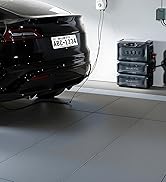
Figure 6: Solar Charging Setup
7. Battery Information
The Elite 30 V2 utilizes a 288Wh LiFePO4 (Lithium Iron Phosphate) battery. LiFePO4 batteries are known for their long lifespan, enhanced safety, and stability. This battery is rated for over 3000 charge cycles to 80% capacity, providing a long-term power solution.
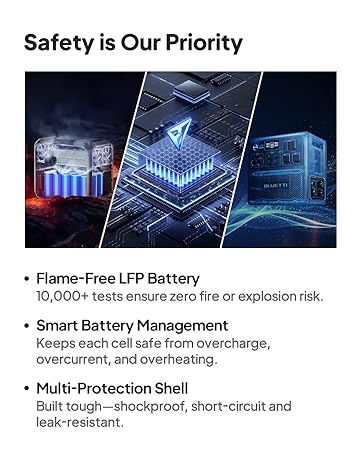
Figure 7: Internal Battery Safety Features
8. Specifications
| Feature | Specification |
|---|---|
| Model | Elite 30 V2 |
| Battery Capacity | 288Wh LiFePO4 |
| AC Output | 600W (1500W Power Lifting) |
| USB-C Output | 1x 140W, 1x 100W |
| USB-A Output | 2x 15W |
| DC Output | 1x 12V/10A Car Port, 2x 12V/8A DC5521 |
| AC Input | Up to 380W (70 min to 100%) |
| Solar Input | 12V-28V/10A/200W Max |
| UPS Switchover Time | <10ms |
| Weight | 9.5 lbs (4.3 kg) |
| Dimensions (L x W x H) | 9.8" x 7" x 6.6" |
| Operating Noise Level | <30dB |
9. Maintenance
- Store the unit in a cool, dry place away from direct sunlight and heat sources.
- For long-term storage, charge the unit to 50-80% every 3-6 months to prolong battery life.
- Clean the exterior with a soft, dry cloth. Do not use abrasive cleaners or immerse the unit in water.
- Ensure ventilation ports are clear of obstructions during operation.
10. Troubleshooting
10.1. Unit Not Turning On
- Ensure the battery is charged. Connect to an AC outlet for charging.
- Press and hold the main power button for a few seconds.
10.2. No Output from AC/DC Ports
- Ensure the respective AC or DC power button is activated (indicated by an illuminated light).
- Check if the device connected exceeds the power station's output limits.
- Verify the power station is not in an overload protection state (check LCD display for error codes).
10.3. Slow Charging
- For solar charging, ensure panels are in direct sunlight and correctly angled.
- Check charging mode settings in the app (e.g., Silent mode charges slower).
- Verify charging cables are securely connected and undamaged.
11. Warranty and Support
The BLUETTI Elite 30 V2 comes with a 5-year product warranty. For technical support, warranty claims, or any inquiries, please contact BLUETTI customer service through their official website or the contact information provided in your warranty card.
Related documentsElite 30 V2


Ask a question about this manual
Ask about setup, troubleshooting, compatibility, parts, safety, or missing instructions. Manuals+ will review the question and use this page’s manual context to help answer it.