
1. Introduction and Overview
The RCA Wave-85 AI Translation Earbuds are a versatile 3-in-1 device designed for seamless communication, music playback, and calls. These earbuds support real-time two-way translation in 144 languages and accents, making them ideal for travel, business, and learning. They integrate advanced features such as AI Assistant, AI Chat, and AI Image Generation to enhance user experience.
The open-ear design ensures comfort during extended use, while Bluetooth 5.4 technology provides stable and fast connectivity. Intuitive touch controls allow for easy management of audio and translation functions. The included charging case extends battery life significantly, ensuring your earbuds are ready when you need them.

Image: The RCA Wave-85 AI Translation Earbuds shown with their charging case, highlighting their sleek design.
2. What's in the Box
Upon unboxing your RCA Wave-85 AI Translation Earbuds, please ensure all the following components are present:
- 2 x AI Translation Earbuds
- 1 x Charging Case
- 1 x USB-C Cable
- 1 x User Manual
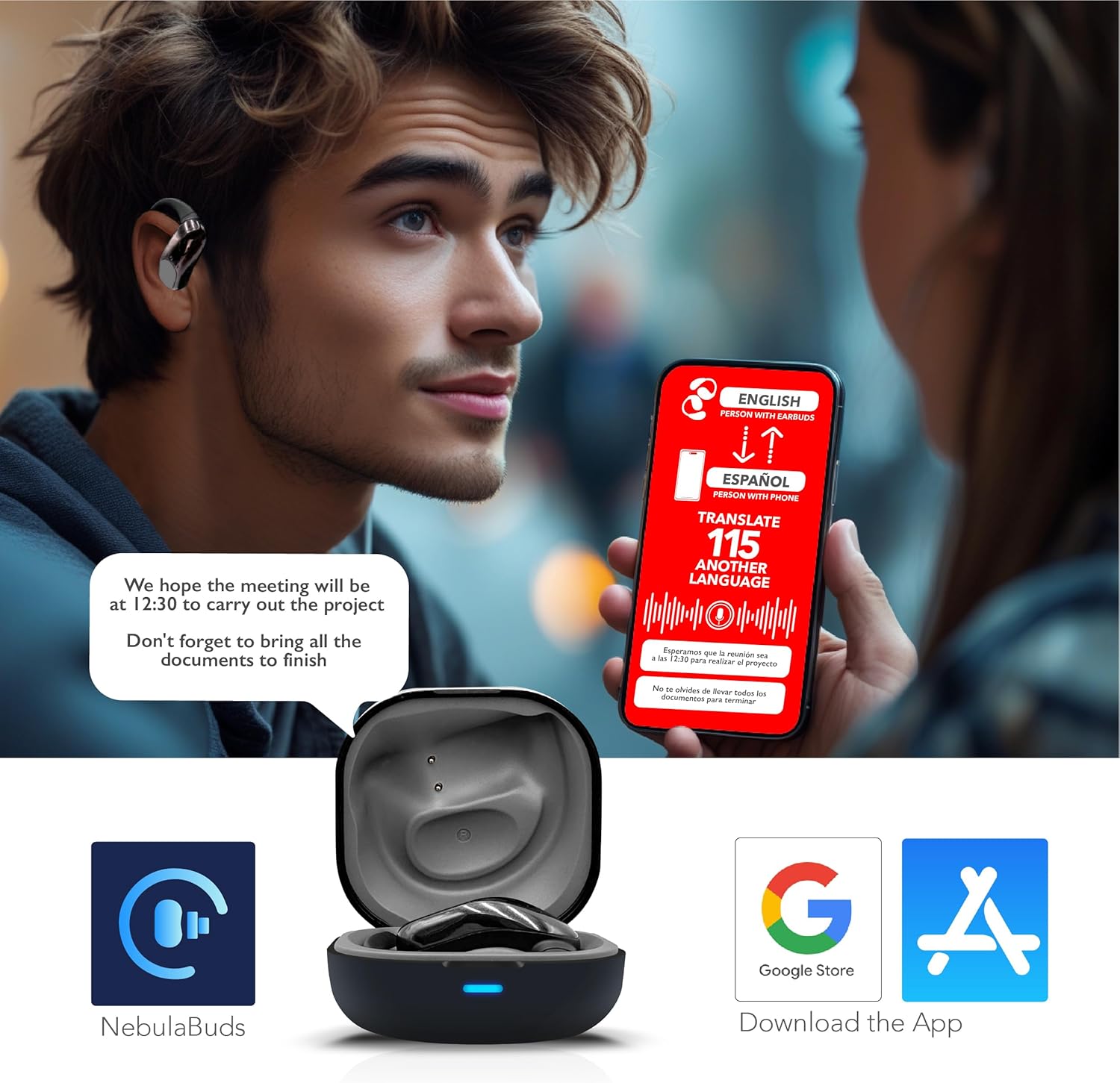
Image: All components included in the RCA Wave-85 package, laid out neatly.
3. Setup
3.1 Initial Charging
Before first use, fully charge the earbuds and the charging case. Connect the provided USB-C cable to the charging case and a compatible power source. The LED indicator on the case will show charging status. A full charge provides up to 10 hours of playtime for the earbuds, with an additional 50 hours available from the charging case.

Image: The RCA Wave-85 charging case open with earbuds inside, showing the charging contacts.
3.2 Pairing with Your Device
The earbuds feature Bluetooth 5.4 for quick and stable connections. Simply open the charging case, and the earbuds will automatically enter pairing mode. On your smartphone or tablet, navigate to Bluetooth settings and select 'RCA Wave-85' from the list of available devices.
3.3 App Installation
To unlock the full translation capabilities and advanced features, download the dedicated 'NebulaBuds' app from the Google Play Store or Apple App Store. Follow the in-app instructions to connect your earbuds and configure your preferred settings.

Image: A smartphone displaying the NebulaBuds app interface, with icons for Google Play and Apple App Store, indicating where to download the app.
4. Operating Instructions
4.1 Wearing the Earbuds
The RCA Wave-85 earbuds feature an open-ear design with soft silicone ear hooks for a secure and comfortable fit. Gently place the earbud over your ear, ensuring the hook rests comfortably behind your ear and the speaker is positioned near your ear canal. This design allows you to enjoy audio while remaining aware of your surroundings.
4.2 Touch Controls
The earbuds are equipped with intuitive touch controls for managing various functions:
- Play/Pause Music: Single tap on either earbud.
- Answer/End Call: Single tap on either earbud.
- Next Track: Double tap on the right earbud.
- Previous Track: Double tap on the left earbud.
- Activate Voice Assistant/Translation Mode: Triple tap (refer to app for specific mode activation).

Image: An RCA Wave-85 earbud highlighting its touch control area, built-in microphones, and open-ear design.
4.3 Translation Modes
The NebulaBuds app offers multiple translation modes to suit different communication scenarios:
- Live Recording: Translates spoken language in real-time during conversations.
- Simultaneous Interpretation: Provides continuous translation for presentations or lectures.
- Face-to-Face: Facilitates direct conversations with real-time translation displayed on your phone and heard through the earbuds.
- Video Call/Voice Call Translation: Generates an invitation link within the app for seamless real-time translated communication during calls.
- AI Assistant/AI Chat/AI Image Generation: Utilize the integrated AI features for various tasks and enhanced interaction.

Image: A visual representation of the earbuds facilitating a real-time translated conversation between English and Spanish speakers.
5. Maintenance
To ensure the longevity and optimal performance of your RCA Wave-85 earbuds, follow these maintenance guidelines:
- Cleaning: Regularly clean the earbuds and charging case with a soft, dry, lint-free cloth. Avoid using abrasive materials or harsh chemicals.
- Water Resistance: The earbuds are IPX7 waterproof, meaning they can withstand immersion in up to 1 meter of water for 30 minutes. However, the charging case is not waterproof. Ensure earbuds are dry before placing them back in the charging case.
- Storage: Store the earbuds in their charging case when not in use to protect them from dust and damage. Avoid exposing them to extreme temperatures or direct sunlight.
- Battery Care: For optimal battery health, avoid fully discharging the earbuds frequently. Charge them regularly, even if not in constant use.
6. Troubleshooting
If you encounter any issues with your RCA Wave-85 earbuds, please refer to the following common solutions:
| Issue | Possible Solution |
|---|---|
| Earbuds not pairing | Ensure earbuds are charged and in pairing mode. Turn off and on your device's Bluetooth. Try resetting the earbuds (refer to app or manufacturer website for specific instructions). |
| No audio/poor sound quality | Check volume levels on both earbuds and connected device. Ensure earbuds are clean and properly seated in your ears. Re-pair the earbuds. |
| Translation not working | Verify internet connection (required for most translation modes). Ensure the NebulaBuds app is open and correctly configured. Check microphone permissions for the app. |
| Charging issues | Ensure the USB-C cable and power adapter are working. Clean charging contacts on earbuds and case. Try a different charging cable or power source. |
If the issue persists, please contact RCA customer support for further assistance.
7. Specifications
| Feature | Specification |
|---|---|
| Model Name | Wave-85 |
| Connectivity Technology | Wireless (Bluetooth 5.4) |
| Bluetooth Range | 15 Meters |
| Battery Life (Earbuds) | 10 Hours |
| Total Battery Life (with Case) | Up to 60 Hours |
| Charging Time (Rapid Charge) | 5 minutes for 1 hour playtime |
| Translation Languages | 144 Languages & Accents |
| Water Resistance Level | IPX7 (Earbuds only) |
| Control Type | Touch Control, App Control |
| Audio Driver Size | 14.2 Millimeters |
| Ear Placement | Open Ear |
| Item Weight | 5.6 ounces |
8. Warranty and Support
The RCA Wave-85 AI Translation Earbuds come with a manufacturer's warranty. Please refer to the warranty card included in your package for detailed terms and conditions. For technical support, product inquiries, or warranty claims, please visit the official RCA website or contact their customer service department.
Keep your purchase receipt and product packaging for warranty purposes.