
InnoVibe IVSP1598
InnoVibe Moon Shape Bluetooth Speaker with Night Light User Manual
Model: IVSP1598 | Brand: InnoVibe
Introduction
This manual provides detailed instructions for the safe and efficient use of your InnoVibe Moon Shape Bluetooth Speaker with Night Light. This versatile device combines a portable wireless speaker, a dimmable LED night light, and a convenient phone holder, designed to enhance your audio and ambient experience.

Image: The InnoVibe Moon Shape Bluetooth Speaker with its integrated night light.
What's in the Box
- InnoVibe Moon Shape Bluetooth Speaker with Night Light
- Power Cable (USB Type-C)
- User Manual
Product Features
- Portable Bluetooth Speaker: Stream audio wirelessly with this compact, moon-shaped speaker, perfect for travel, dorms, or bedrooms.
- Color Changing LED Night Light: Enjoy calming ambiance with soft RGB lighting that changes colors, creating a cozy atmosphere anywhere.
- Multifunctional Design: Functions as a Bluetooth speaker, touch night light, and convenient phone holder in one stylish unit.
- 5W Speaker Output: Delivers rich, room-filling sound despite its compact size, perfect for personal or shared spaces.
- Rechargeable Battery: Powered by an 800mAh rechargeable battery, it runs up to 5 hours.
- Type-C Charging: Recharges quickly via the included USB Type-C cable.
- FCC Certified: Built with quality materials (ABS) and certified for safe use in any environment.

Image: Overview of the InnoVibe Moon Speaker highlighting its key features including sound reactivity, multiple light modes, integrated speaker, rechargeable battery, and touch controls for lighting.
Setup
- Unboxing: Carefully remove all components from the packaging. Ensure all items listed in "What's in the Box" are present.
Video: An unboxing demonstration of a wireless induction speaker. Note: The product shown in this video may differ in appearance from your Moon Shape Bluetooth Speaker, but the unboxing process is similar.
- Initial Charge: Before first use, fully charge the speaker using the provided USB Type-C cable. Connect the Type-C end to the speaker's charging port and the USB-A end to a compatible USB power adapter (not included). The charging indicator will show the charging status.
- Power On/Off: Press and hold the power button (usually indicated by a power symbol) to turn the speaker on or off.
- Phone Holder: Extend the integrated phone holder to securely place your smartphone for optimal viewing while listening to music or watching videos.
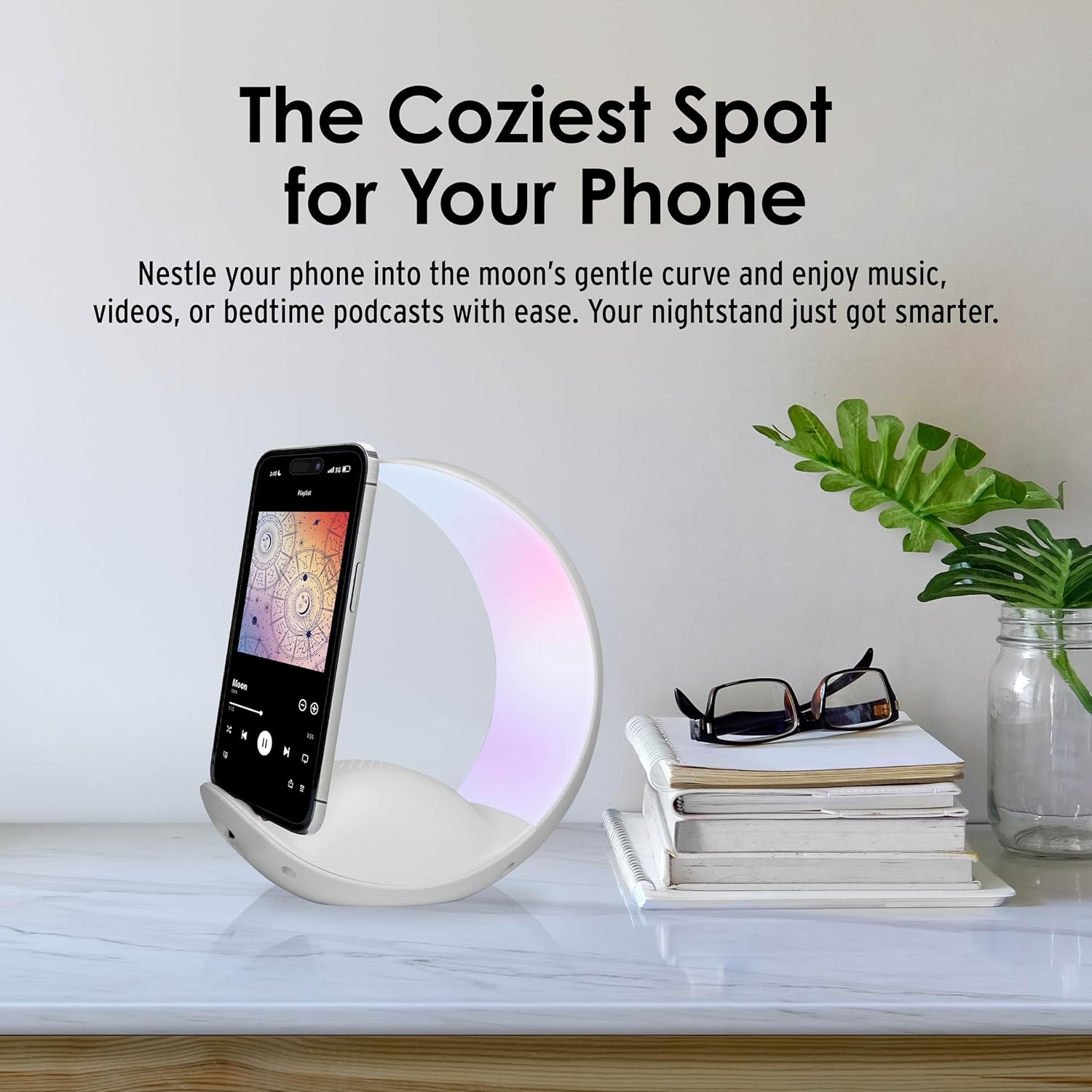
Image: The Moon Shape Bluetooth Speaker serving as a phone holder, ideal for bedside use.
Operating Instructions
1. Bluetooth Connection
- Ensure the speaker is powered on and in Bluetooth pairing mode (indicated by a flashing LED).
- On your smartphone or other Bluetooth-enabled device, go to Bluetooth settings.
- Search for available devices and select "IVSP1598" or "InnoVibe Speaker" to pair.
- Once paired, the speaker will emit a confirmation sound, and the LED indicator will become solid.
Video: Demonstration of Bluetooth connection and music playback on a similar speaker. Note: The product shown in this video may differ in appearance from your Moon Shape Bluetooth Speaker.
2. Music Playback
- After successful Bluetooth pairing, play music from your connected device.
- Use the volume buttons (+/-) on the speaker or your connected device to adjust the volume.
- The speaker may also support other playback methods like USB stick, AUX-in, or Micro SD card (check specific model features for port availability).

Image: The Moon Shape Bluetooth Speaker delivering clear sound in a room setting.
3. LED Night Light Functions
- Turn On/Off: Use the dedicated light button (often indicated by a light bulb icon) to turn the night light on or off.
- Change Colors/Modes: Short press the light button to cycle through different color modes (e.g., solid colors, RGB color-changing, sound-reactive).
- Dimmable: Long press the light button or use touch controls (if available) to adjust the brightness of the light.

Image: Various light modes of the Moon Shape Bluetooth Speaker, including color-changing and sound-reactive options.
Video: Demonstration of RGB night light and ambient lighting features. Note: The product shown in this video may differ in appearance from your Moon Shape Bluetooth Speaker.
4. Wireless Charging
- Place your wireless charging compatible smartphone on the designated charging area of the speaker.
- Ensure the speaker is connected to a power source for the wireless charging function to operate.
- The charging indicator on your phone will confirm that charging has begun.
Video: Demonstration of wireless charging functionality on a similar speaker. Note: The product shown in this video may differ in appearance from your Moon Shape Bluetooth Speaker.
Maintenance
- Clean the speaker with a soft, dry cloth. Do not use abrasive cleaners or solvents.
- Keep the device away from water, moisture, and extreme temperatures.
- Store in a cool, dry place when not in use for extended periods.
Troubleshooting
- No Power:
- Ensure the device is fully charged. Connect to a power source using the Type-C cable.
- Cannot Pair via Bluetooth:
- Make sure the speaker is in pairing mode (flashing LED). Check your device's Bluetooth settings and ensure it's discoverable. Try restarting both the speaker and your device.
- No Sound:
- Check the volume levels on both the speaker and your connected device. Ensure Bluetooth is properly connected.
- Wireless Charging Not Working:
- Verify that the speaker is plugged into a power source. Ensure your phone is wireless charging compatible and correctly positioned on the charging pad. Remove any thick phone cases that might interfere with charging.
Specifications
| Model Name: | Bluetooth Speaker |
| Item Model Number: | IVSP1598 |
| Brand: | InnoVibe |
| Color: | White |
| Speaker Type: | Smart Speaker |
| Special Feature: | LED Light |
| Connectivity Technology: | Bluetooth |
| Speaker Maximum Output Power: | 5 Watts |
| Frequency Response: | 2480 MHz |
| Audio Output Mode: | Stereo |
| Product Dimensions: | 5.31"D x 2.91"W x 6.77"H |
| Item Weight: | 0.77 Pounds (12.3 ounces) |
| Batteries: | 1 Nonstandard Battery (included) |
| UPC: | 810106636948 |
Warranty and Support
For warranty information or technical support, please refer to the contact details provided with your purchase or visit the official InnoVibe website. Keep your proof of purchase for any warranty claims.
Ask a question about this manual
Ask about setup, troubleshooting, compatibility, parts, safety, or missing instructions. Manuals+ will review the question and use this page’s manual context to help answer it.