
anwickjeff Criss Cross Legged Office Chair
Criss Cross Legged Office Chair User Manual
Brand: anwickjeff | Model: Criss Cross Legged Office Chair
Introduction
This manual provides comprehensive instructions for the assembly, operation, and maintenance of your new anwickjeff Criss Cross Legged Office Chair. Designed for comfort and versatility, this chair features a wide seat, flip-up armrests, and adjustable functions to support various sitting preferences, including cross-legged positions. Please read this manual thoroughly before use to ensure proper setup and to maximize your chair's lifespan.

Figure 1: anwickjeff Criss Cross Legged Office Chair (Green)
Safety Information
- Ensure all screws and bolts are securely tightened before first use and periodically check for looseness.
- Do not stand on the chair or use it as a step stool.
- Avoid placing heavy objects on the chair that exceed its maximum weight capacity of 300 lbs.
- Keep fingers and clothing clear of moving parts, especially during height adjustment and tilting.
- Use the chair on a flat, stable surface to prevent tipping.
- Do not expose the chair to direct sunlight or extreme temperatures for prolonged periods, as this may damage the upholstery and frame.
Package Contents
Before beginning assembly, please verify that all components are present and undamaged. If any parts are missing or damaged, please contact customer support.
- Office Chair (Seat, Backrest, Armrests, Base, Casters)
- Throw Pillow
- Assembly Hardware (Screws, Washers, Allen Wrench)
- Assembly Instructions

Figure 2: Key Components of the Chair
Setup and Assembly
Assembly of the anwickjeff Criss Cross Legged Office Chair is designed to be straightforward and typically takes 10-15 minutes. Follow the included detailed assembly instructions step-by-step.
- Unpack all components and lay them out on a clean, soft surface to prevent scratches.
- Attach the casters to the chair base. Ensure they are firmly inserted.
- Insert the gas lift cylinder into the center hole of the base.
- Attach the seat plate mechanism to the underside of the seat cushion using the provided screws. Ensure the front of the seat plate faces the front of the seat.
- Attach the backrest to the seat assembly.
- Mount the assembled seat and backrest onto the gas lift cylinder.
- Attach the armrests to the seat and backrest as per the instructions.
- Once assembled, test all functions and ensure all connections are secure.
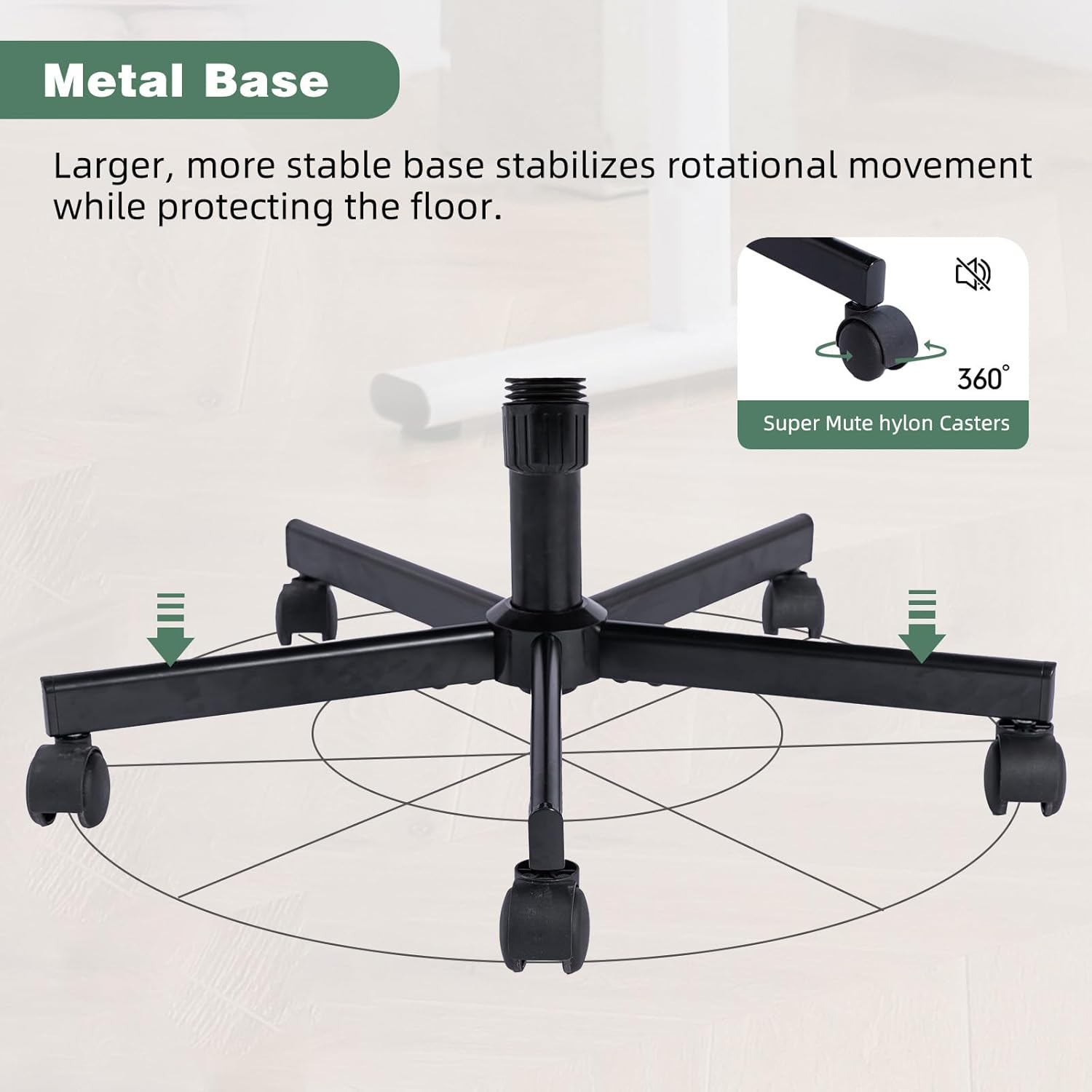
Figure 3: Chair Base and Casters
Operating Instructions
Your office chair offers several adjustable features to customize your seating experience:
- Seat Height Adjustment: Locate the lever on the right side beneath the seat. Pull the lever up to raise the seat; release it at the desired height. To lower the seat, pull the lever up while seated.
- 360° Swivel: The chair is designed to swivel freely in a full 360-degree rotation, allowing for effortless movement and access to your workspace.
- Tilt Function: The chair can tilt from 108° to 130°. To engage the tilt, pull out the lever on the left side beneath the seat. Push it in to lock the chair in an upright position. The tilt tension can be adjusted by rotating the round knob located at the front of the tilt mechanism.
- Flip-Up Armrests: The armrests can be flipped up to allow for unrestricted movement or to push the chair closer to your desk for space-saving storage. Simply lift the armrests upwards until they lock into the upright position.

Figure 4: Adjustable Functions (Height, Tilt, Wheels)

Figure 5: Ergonomic Design and Adjustable Handrail
Care and Maintenance
- Upholstery Care: The seat is upholstered in linen fabric. For general cleaning, gently vacuum the fabric to remove dust and debris. For spills, blot immediately with a clean, dry cloth. For stubborn stains, use a mild fabric cleaner following the product's instructions, testing on an inconspicuous area first.
- Frame and Base: Wipe the metal base and frame with a soft, damp cloth. Avoid abrasive cleaners.
- Casters: Periodically clean the caster wheels to remove hair, dust, and debris that can impede smooth rolling.
- Hardware: Regularly check all screws and bolts to ensure they remain tight. Re-tighten as necessary to maintain stability and safety.
Troubleshooting
- Chair feels unstable: Ensure all assembly screws are fully tightened. The chair features a larger wheelbase diameter for enhanced stability; verify the base is correctly assembled and on a flat surface.
- Difficulty adjusting height or tilt: Check for any obstructions in the mechanism. Ensure the levers are fully engaged or disengaged as required. If the gas lift is not functioning, contact customer support.
- Casters not rolling smoothly: Inspect the wheels for accumulated debris (hair, lint, etc.) and clean them thoroughly.
- Color variation: Please note that the chair’s color may appear slightly different under various lighting conditions compared to product photos. Minor differences are normal and not indicative of a defect.
Specifications
| Feature | Detail |
|---|---|
| Brand | anwickjeff |
| Model Name | Wide Office Chair |
| Color | Green |
| Product Dimensions | 25.2"D x 25.2"W x 36.6"H |
| Seat Height | 20.4 Inches |
| Seat Depth | 21.5 inches |
| Item Weight | 32 pounds |
| Max Weight Capacity | 300 lbs (as per image) |
| Upholstery Material | Linen Fabric (as per description) |
| Fill Material | Foam |
| Base Movement | Swivel |
| Special Features | Adjustable Height, Easy Assembly, Ergonomic Comfort, Flip-Up Armrests, Criss Cross Leg-Friendly Design, Throw Pillow Included |
| UPC | 712974673042 |

Figure 6: Chair Dimensions and Weight Capacity
Warranty and Support
anwickjeff is committed to providing high-quality products and excellent customer service. While specific warranty details are not provided in this manual, dedicated customer support is available to assist you with any questions or concerns before and after your purchase.
For assistance, please refer to the contact information provided with your purchase or visit the anwickjeff store on Amazon:
Visit the anwickjeff Store on Amazon
Please retain your proof of purchase for any support inquiries.
Ask a question about this manual
Ask about setup, troubleshooting, compatibility, parts, safety, or missing instructions. Manuals+ will review the question and use this page’s manual context to help answer it.