
Introduction
This manual provides instructions for the assembly, operation, and maintenance of your GreenForest Heavy Duty Computer Tower Stand with Wheels. Please read these instructions carefully before assembly and use to ensure proper function and longevity of the product.
What's in the Box
Verify that all components are present before beginning assembly:
- Assembly Guide
- Installation Tool
- Cable Management Components
- All structural parts (frame, shelves, casters, hardware)
Assembly Instructions
Assembly is required for this product. Please follow the included Assembly Guide for detailed step-by-step instructions. An installation tool is provided to assist with the process.
Video: Official instruction video for the GreenForest PC tower stand. This video demonstrates the assembly process and key features of the stand.
The stand is designed to accommodate various PC tower sizes. Refer to the dimensions below to ensure compatibility with your computer case.

Image: Detailed dimensions of the PC tower stand, indicating compatibility with E-ATX, Full-Tower, and Ultra-Tower cases up to 23.6 inches in height.
The stand features a full-metal frame, reinforced angle iron, and a bottom crossbar for enhanced stability. Industrial-grade steel ball bearing casters are included for smooth mobility.

Image: Illustration of the stand's robust construction, emphasizing its metal components and industrial-grade casters designed to support heavy loads up to 150 lbs.
Operating Instructions
Height Adjustment
The stand offers 5 levels of height adjustment, ranging from 25.5 inches to 33.4 inches. To adjust the height, loosen the locking mechanisms on the side supports, slide the top shelf to the desired height, and then securely tighten the locks. Ensure both sides are adjusted evenly for stability.

Image: Visual guide to adjusting the stand's height, illustrating the range from 25.5 inches to 33.4 inches.
Mobility and Locking Casters
The industrial-grade steel casters allow for smooth 360-degree movement across various floor surfaces, including hardwood, tile, and carpet. Each caster is equipped with a locking mechanism. To secure the stand in place, press down on the lever located on each caster. To unlock and move, lift the lever.
Cable Management and Accessory Storage
Utilize the reversible cable management tray to organize power and data cables, preventing clutter. The stand also includes two hooks for headphones and a customizable pegboard for storing controllers, consoles, and other gaming accessories. Position these as needed for an organized setup.
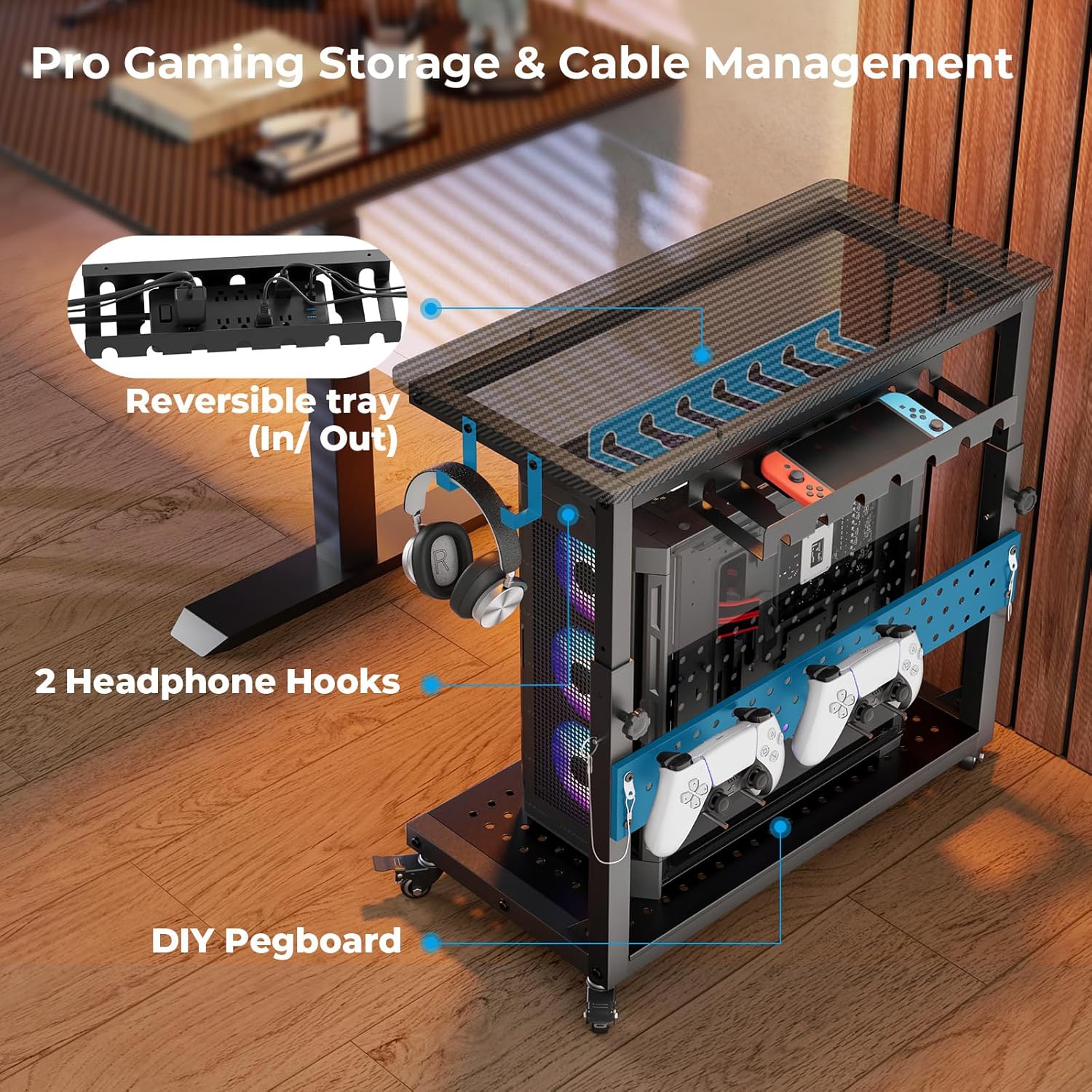
Image: Close-up of the stand's integrated storage solutions, including the reversible cable tray, headphone hooks, and customizable pegboard.
Optimal Cooling
The perforated base elevates your PC 3.9 inches off the ground, promoting maximum airflow and reducing dust buildup. Ensure no objects obstruct the perforations to maintain optimal cooling performance for your system.
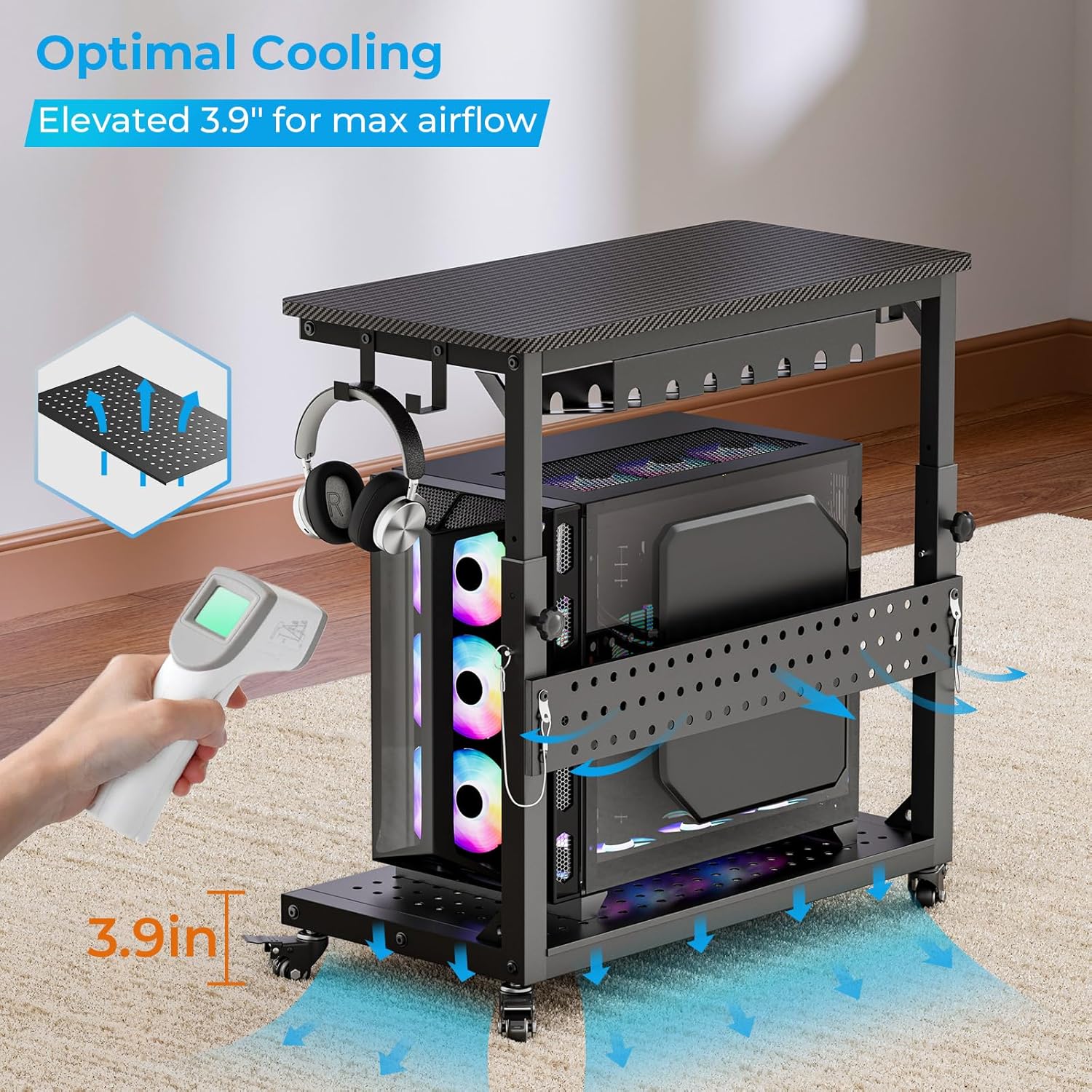
Image: Diagram showing airflow around a PC tower placed on the elevated, perforated base, highlighting the cooling benefits.
Maintenance
To maintain the appearance and functionality of your GreenForest PC Tower Stand, follow these guidelines:
- Cleaning: Wipe surfaces with a soft, damp cloth. Avoid abrasive cleaners or harsh chemicals that may damage the finish.
- Casters: Periodically check the casters for any debris (hair, lint) that may hinder smooth movement. Clean as necessary. Ensure locking mechanisms function correctly.
- Hardware: Occasionally check all screws and bolts to ensure they remain tight. Retighten if any looseness is detected to maintain stability.
- Weight Capacity: Do not exceed the maximum weight capacity of 150 lbs for the base and 100 lbs for the top shelf to prevent damage or instability.
Troubleshooting
- Stand is wobbly: Ensure all screws and bolts are securely tightened. Verify that the height adjustment mechanisms are fully locked on both sides. Ensure the stand is on a flat, even surface.
- Casters are not rolling smoothly: Check for debris (hair, dust) caught in the wheels. Clean the casters thoroughly. Ensure the caster locks are disengaged.
- Difficulty adjusting height: Ensure the locking mechanisms are fully loosened before attempting to adjust. Do not force the adjustment. If resistance occurs, check for obstructions.
- PC overheating: Ensure the perforated base is clear of obstructions to allow for proper airflow. Verify that your PC's internal fans are functioning correctly.
Specifications
| Brand | GreenForest |
| Model | B0FMFCFPY1 |
| Color | Carbon Fiber Black |
| Outer Dimensions (D x W x H) | 13.9"D x 28.1"W x 29.5"H |
| Outer Height Range | 25.5" to 33.4" |
| Inner Dimensions (without Cable Management) | 26.9"L x 13.7"W |
| Inner Height Range | 18.7" to 25.9" |
| Load-Bearing Capacity | Base: 150 lbs, Top Shelf: 100 lbs |
| Material | Industrial steel ball bearing casters, Metal, Particle Board |
| Item Weight | 22.49 Pounds |
| Assembly Required | Yes |
Warranty and Support
For warranty information or technical support, please refer to the documentation included with your purchase or contact GreenForest customer service directly. Keep your purchase receipt for warranty claims.