Introduction
This manual provides essential instructions for the safe and efficient use of your Baseus 70W Universal Travel Adapter and 100W Retractable USB C Cable. Please read this manual thoroughly before using the product and retain it for future reference.
Product Overview
The Baseus Universal Travel Adapter is designed to provide power connectivity and charging solutions across various regions, featuring multiple plug types and integrated charging ports. The accompanying 100W Retractable USB C Cable offers high-speed charging for compatible devices.

Image: The Baseus 70W Universal Travel Adapter and the separate 100W Retractable USB C Cable.
Key Features:
- Worldwide Compatibility: Equipped with Type C/A/G/I plugs for use in over 200 countries and regions.
- Integrated 70W USB-C Retractable Cable: Built-in cable for convenient charging directly from the adapter.
- 6-in-1 Multi-Device Charging: Simultaneously charge up to six devices using the universal AC socket, Type-A socket, USB-C port, two USB-A ports, and the built-in 70W retractable cable.
- Compact and Portable Design: Dimensions of 1.99 x 2.17 x 3.23 inches and a weight of 0.55 lb for easy travel.
- Separate 100W Retractable USB C Cable: Offers up to 100W Power Delivery for fast charging laptops, tablets, and smartphones.
- Dual-End Retraction: The 100W cable features a patented design allowing retraction from either end for convenient storage.

Image: The universal travel adapter showcasing its four interchangeable plug types: EU/KR, UK, USA/JP, and AUS/CN, indicating global compatibility.

Image: The Baseus travel adapter plugged into a wall outlet, simultaneously charging a laptop, tablet, and smartphone via its various ports and integrated cable, illustrating its 6-in-1 charging capability.
Setup
Deploying the Travel Adapter Plug:
- Identify the correct plug type for your region (Type C/A/G/I).
- Locate the corresponding slider or button on the side of the adapter.
- Slide or press the button to extend the desired plug. Ensure it locks securely into place before inserting into a wall outlet.
- To retract, press the release button (if applicable) and push the plug back into the adapter body.
Image: Close-up views of the travel adapter showing how to extend and retract the EU/KR, UK, USA/JP, and AUS/CN plug pins using the side sliders.
Using the Retractable USB-C Cables:
- Integrated 70W Cable: Gently pull the USB-C connector from the side of the travel adapter to extend the cable. Do not pull excessively.
- Separate 100W Cable: For the circular 100W retractable cable, pull both ends simultaneously to extend the cable to the desired length. To retract, pull both ends again slightly, and the cable will automatically coil back into the housing.

Image: A hand extending the braided 70W retractable USB-C cable from the travel adapter, showing its maximum length of 27 inches.
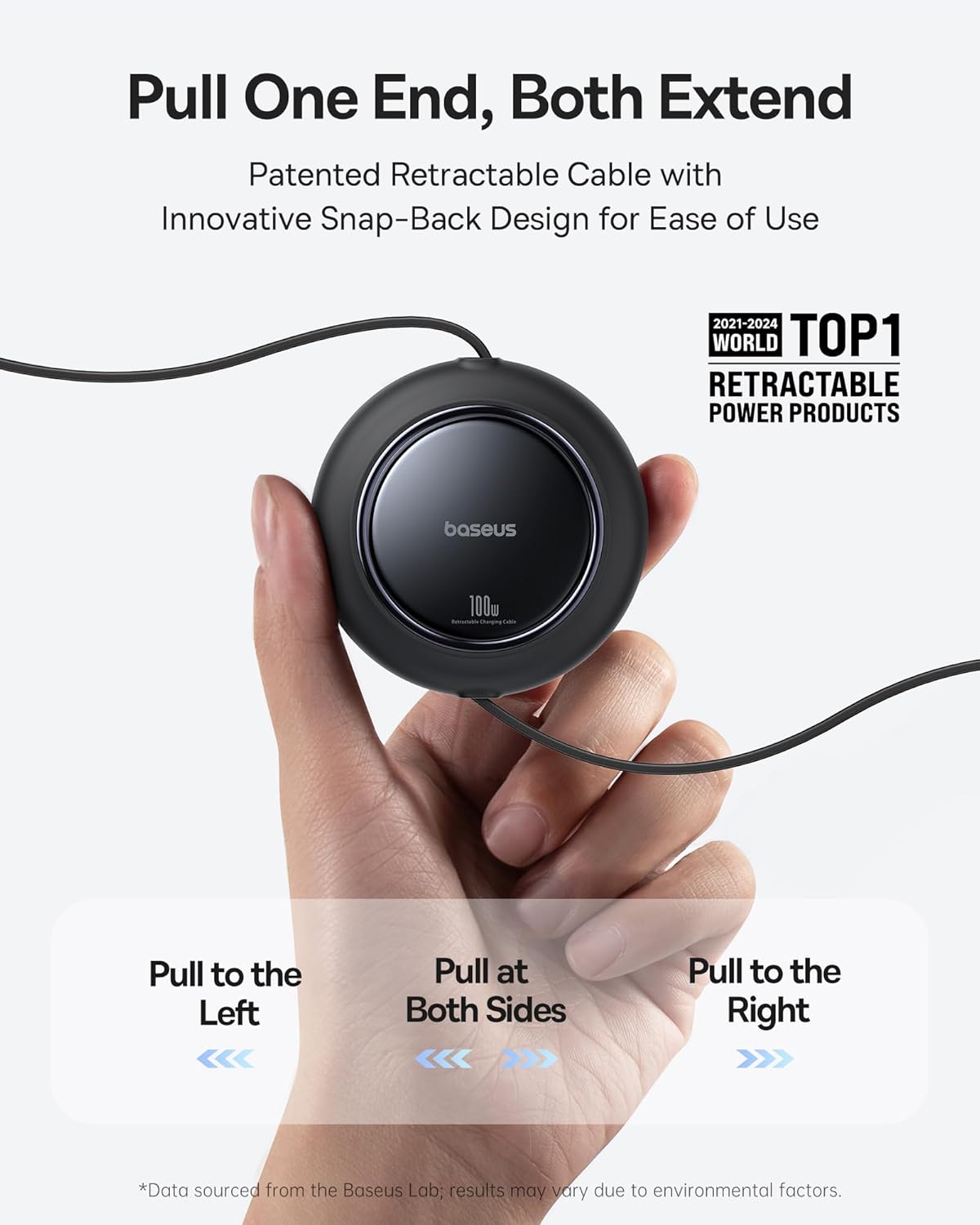
Image: A hand demonstrating the retraction mechanism of the 100W retractable USB-C cable, showing how pulling one end extends both sides and how a second pull retracts it.
Operating Instructions
Using the Universal Travel Adapter:
- Select and deploy the appropriate plug for your wall outlet.
- Insert the adapter firmly into the wall outlet.
- Connect your devices:
- For AC powered devices, plug them into the universal AC socket on the adapter.
- For USB-C devices, use the integrated 70W retractable USB-C cable or the dedicated USB-C port.
- For USB-A devices, use the two USB-A ports or the Type-A socket.
- Ensure all connections are secure. The adapter will begin charging compatible devices automatically.
Using the 100W Retractable USB C Cable:
- Extend the cable by pulling both ends simultaneously to the desired length.
- Connect one USB-C end to a compatible power source (e.g., a 100W power adapter).
- Connect the other USB-C end to your device (laptop, tablet, smartphone).
- For dual device charging, connect the two separate USB-C ends to your devices. Note that the 100W fast charging is only achieved when using one USB-C port alone. When charging two devices, the power output will be distributed (e.g., 65W + 35W or 50W + 50W).
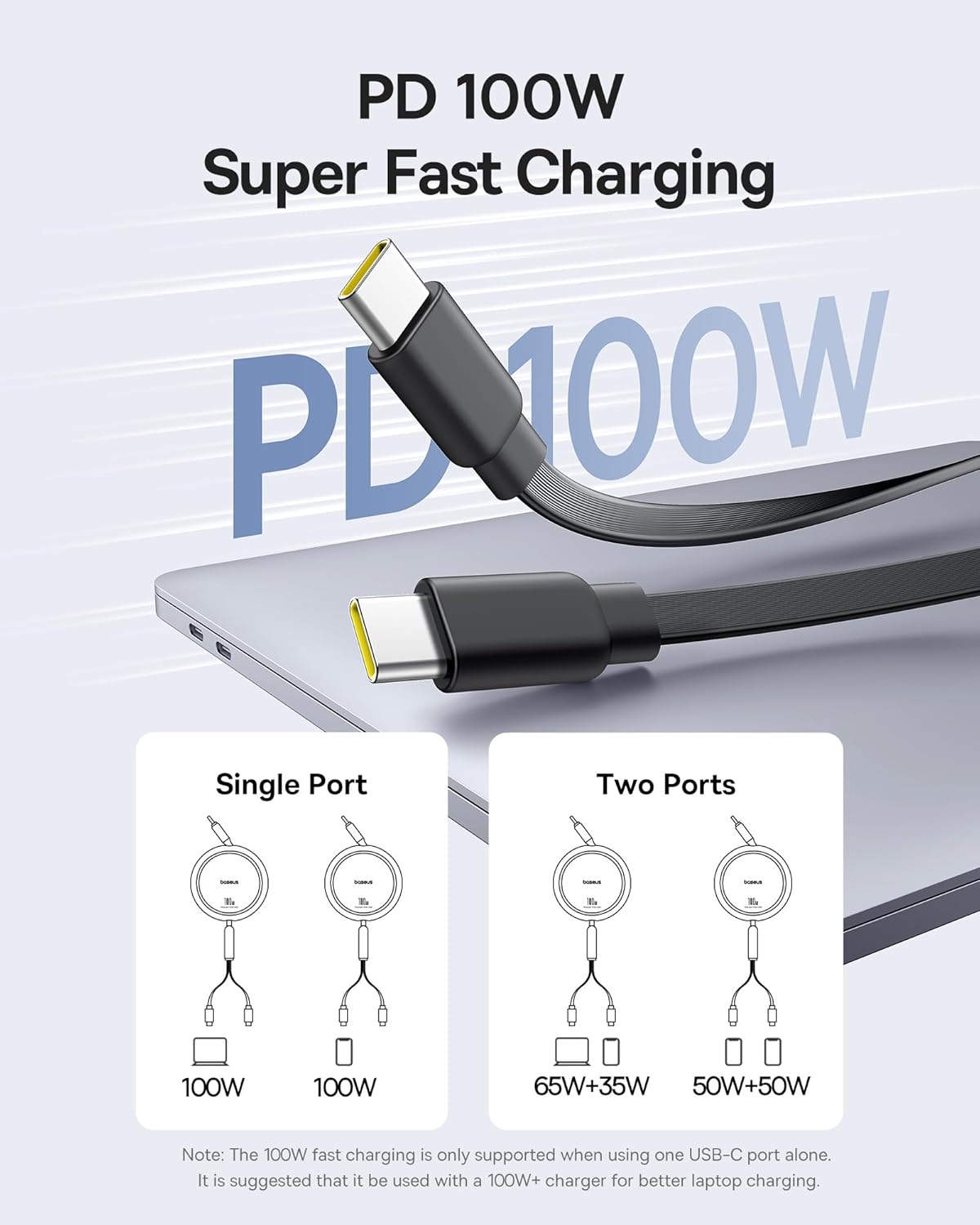
Image: Diagram illustrating the power distribution of the 100W retractable USB-C cable. It shows 100W output when a single port is used, and distributed power (e.g., 65W+35W or 50W+50W) when two ports are used simultaneously.

Image: The 100W retractable USB-C cable connected to a laptop (65W Max) and a smartphone (35W Max), demonstrating its ability to charge two devices simultaneously with a total output of 100W Max.
Maintenance
- Keep the adapter and cable clean and dry. Use a soft, dry cloth to wipe surfaces.
- Avoid exposing the product to extreme temperatures, direct sunlight, or corrosive liquids.
- When retracting the cables, do so gently to prevent damage to the internal mechanism.
- Store the product in a cool, dry place when not in use.
Troubleshooting
| Problem | Possible Cause | Solution |
|---|---|---|
| Device not charging. | Loose connection, incorrect plug type, device not compatible, power outlet issue. | Ensure all connections are secure. Verify the correct plug type is deployed. Check if the wall outlet is functional. Confirm device compatibility with the adapter's output. |
| Slow charging. | Multiple devices connected, cable not fully extended, device not supporting fast charging, power source limitation. | Disconnect some devices to increase power to others. Ensure cables are fully extended. Use a 100W+ charger for optimal 100W cable performance. Check device's charging specifications. |
| Retractable cable not retracting. | Cable mechanism jammed or pulled incorrectly. | Gently pull both ends of the cable slightly further out, then release slowly to allow the mechanism to reset and retract. Do not force. |
Specifications
- Model Number: CG11
- Brand: Baseus
- Output Voltage: 110 Volts (AC)
- Plug Formats: Type C, Type A, Type G, Type I (Universal)
- Total Power Outlets: 6 (1 Universal AC, 1 Type-A AC, 1 USB-C, 2 USB-A, 1 Integrated 70W USB-C Cable)
- Integrated Cable Output: 70W Max (USB-C)
- Separate Retractable Cable Output: 100W Max (USB-C)
- Dimensions: Approximately 1.99 x 2.17 x 3.23 inches
- Weight: Approximately 0.55 lb
Warranty and Support
Baseus products are manufactured to high quality standards. For information regarding warranty coverage, technical support, or customer service, please visit the official Baseus store or contact their customer support channels.


