
Introduction
This manual provides essential information for the safe and efficient operation, maintenance, and care of your TopMate ES42 Ultra Compact 4-Wheel Electric Mobility Scooter. Please read this manual thoroughly before using the scooter to ensure proper function and to prevent injury or damage. Keep this manual for future reference.

Image: The TopMate ES42 Ultra Compact 4-Wheel Electric Mobility Scooter, showcasing its sleek black and red design with a comfortable seat and handlebars.
Safety Information
Always prioritize safety when operating the mobility scooter. Failure to follow safety guidelines can result in serious injury or damage to the product.
- Read and understand all instructions before operation.
- Ensure the scooter is fully charged before each use.
- Do not exceed the maximum weight capacity of 264.5 lbs (120 kg).
- Operate the scooter on stable, level surfaces. Avoid steep inclines exceeding 10 degrees.
- Use caution when operating in crowded areas or near traffic.
- Always engage the electromagnetic brake system by releasing the control levers when stopping.
- Utilize LED headlights and rear taillights for enhanced visibility, especially in low-light conditions.
- Keep hands and feet clear of moving parts.
- Do not operate the scooter under the influence of alcohol or medication that may impair judgment.
Setup and Unfolding
The TopMate ES42 is designed for easy portability and quick setup. Follow these steps to unfold your scooter:
- Place the folded scooter on a flat, stable surface.
- Release any securing straps, such as the magic strap, that hold the scooter in its folded position.
- Gently lift the handlebar stem upwards until it locks into place.
- Unfold the seat and ensure it is securely positioned.
- Adjust the handlebar height to a comfortable position by loosening and tightening the adjustment mechanism.
- Ensure all locking mechanisms are engaged before use.

Image: A sequence demonstrating the easy folding and unfolding process of the TopMate ES42 scooter, showing its transformation from a compact, suitcase-sized unit to a fully assembled scooter.

Image: The TopMate ES42 scooter folded compactly and stored in the trunk of a car, illustrating its travel-friendly design.
Operating Instructions
Familiarize yourself with the controls before operating the scooter.
Control Panel Overview
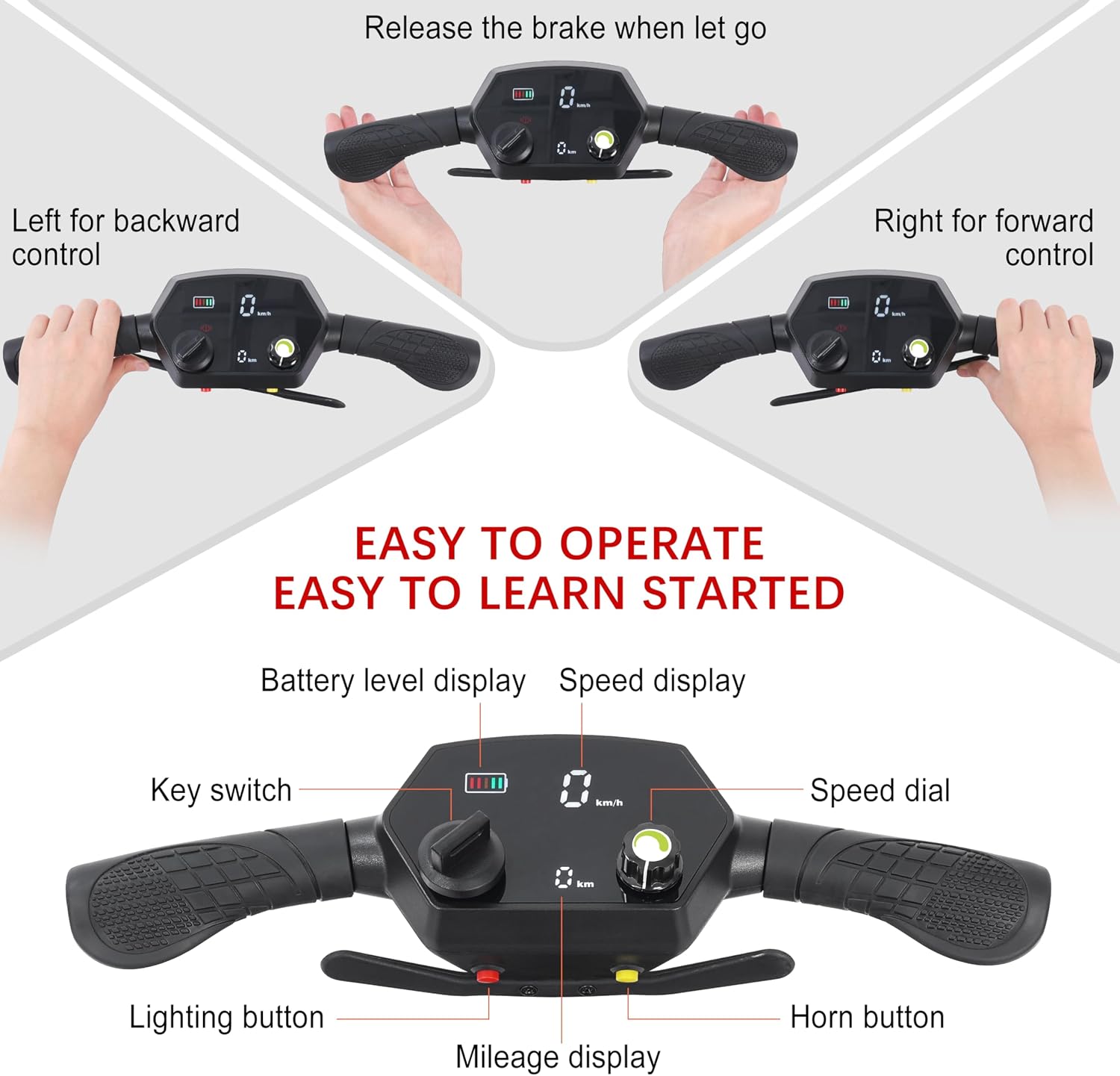
Image: A close-up view of the TopMate ES42 scooter's control panel, highlighting the key switch, speed dial, battery level display, speed display, mileage display, lighting button, and horn button.
- Key Switch: Turns the scooter power on/off.
- Speed Dial: Adjusts the maximum speed setting.
- Battery Level Display: Shows the current battery charge.
- Speed Display: Indicates current speed (0-5 MPH).
- Mileage Display: Shows distance traveled.
- Lighting Button: Activates the LED headlights and rear taillights.
- Horn Button: Sounds the horn for alerts.
Driving Controls
- Forward Movement: Push the right handle forward to accelerate. The scooter can reach a top speed of 5 MPH (8 KM/H).
- Reverse Movement: Push the left handle forward to move backward. The maximum reverse speed is 1 MPH (2 KM/H).
- Braking: Release both control handles to engage the electromagnetic brake system, bringing the scooter to an immediate stop.

Image: An illustration showing the intuitive control system of the TopMate ES42 scooter, where pushing the right handle controls forward motion, the left handle controls reverse, and releasing both engages the brake.
Battery and Charging
The TopMate ES42 is equipped with dual 24V 10.4Ah lithium batteries for extended range.
Charging Procedure
- The scooter offers two charging modes: direct charging (plugging into the scooter) or removable battery charging (removing batteries and charging them separately).
- Connect the charger to a standard power outlet and then to the scooter's charging port or directly to the battery pack.
- A full charge typically takes 5-6 hours. Do not overcharge the batteries.
- The battery indicator on the control panel will show charging status.

Image: Illustration of the dual battery system and two charging methods for the TopMate ES42 scooter: charging the battery directly after removal, and charging the battery while it is installed in the scooter.
Airline Travel
The dual 24V 10.4Ah lithium batteries meet FAA and international aviation standards, making them safe for air travel. Always confirm with your airline regarding their specific regulations for mobility device batteries before flying.

Image: A graphic depicting an airplane alongside a close-up of the scooter's battery compartment, indicating that the 24V 10.4Ah batteries are airline approved.
Maintenance
Regular maintenance ensures the longevity and optimal performance of your scooter.
- Cleaning: Wipe down the scooter with a damp cloth. Avoid using harsh chemicals or excessive water.
- Battery Care: Store batteries in a cool, dry place. If storing for extended periods, charge them periodically (every 1-2 months) to maintain battery health.
- Tires: The scooter features solid tires, which do not require inflation. Inspect them periodically for wear or damage.
- Fasteners: Periodically check all bolts, screws, and fasteners to ensure they are tight.
- Storage: When not in use, store the scooter in a dry, protected area, preferably folded to save space.
Troubleshooting
Refer to this section for common issues and their solutions.
| Problem | Possible Cause | Solution |
|---|---|---|
| Scooter does not power on. | Battery is depleted or not connected. Key switch is off. | Charge the battery. Ensure batteries are properly inserted. Turn the key switch to the 'ON' position. |
| Scooter moves slowly or lacks power. | Low battery charge. Overloaded. | Recharge the battery fully. Reduce load to within weight capacity. |
| Brakes are not engaging properly. | Control levers not fully released. | Ensure both control levers are fully released to activate the electromagnetic brake. If issues persist, contact support. |
| Unusual noises during operation. | Loose components. Obstruction. | Inspect for loose parts and tighten. Check for any obstructions in the wheels or motor area. |
Specifications
| Feature | Specification |
|---|---|
| Model | ES42 |
| Motor Power | 270W (24V) |
| Max Speed | 5 MPH (8 KM/H) |
| Reverse Speed | 1 MPH (2 KM/H) |
| Battery Type | Dual 24V 10.4Ah Lithium Batteries (20.8Ah total) |
| Max Range | Up to 20 miles (32 KM) |
| Charging Time | 5-6 hours |
| Scooter Weight (without battery) | 39 lbs (17.7 kg) |
| Weight Capacity | 264.5 lbs (120 kg) |
| Folded Dimensions | 28.7 x 19.9 x 14.8 inches (73 x 50.5 x 37.5 cm) |
| Incline Capability | Up to 10 degrees |
| Brake System | Electromagnetic |
| Wheel Type | Solid (2x 6" front, 2x 9" rear, 2 anti-tip) |
| Material | Aluminum Alloy, ABS |

Image: A visual representation of the TopMate ES42 scooter's key specifications, including its weight (39 lbs), weight capacity (264.5 lbs), and recommended user height (under 6'2").

Image: An illustration highlighting the 270W motor, maximum speed of 5 MPH, reverse speed of 1 MPH, and the scooter's ability to handle inclines up to 10 degrees.
Warranty and Support
The TopMate ES42 Electric Mobility Scooter comes with a 2-year guarantee, ensuring a worry-free experience. For technical support, warranty claims, or any questions regarding your scooter, please refer to the contact information provided with your purchase documentation or visit the official TopMate website.