
Introduction
This manual provides detailed instructions for installing and operating your BrickSoul LED Light Up Kit, designed specifically for the LEGO How to Train Your Dragon: Toothless 10375 Building Set. This kit enhances your model with vibrant lighting, transforming it into a dynamic display piece. Please note that the LEGO model itself is not included with this lighting kit.
Package Contents
Before beginning installation, please verify that all components listed below are present in your package:
- LED Light Kits (various wires and light components)
- Light Control Button (integrated into USB cable)
- Battery Box (for AAA batteries, batteries not included)
- Instructions for Use (digital guides available via QR code/PDF)
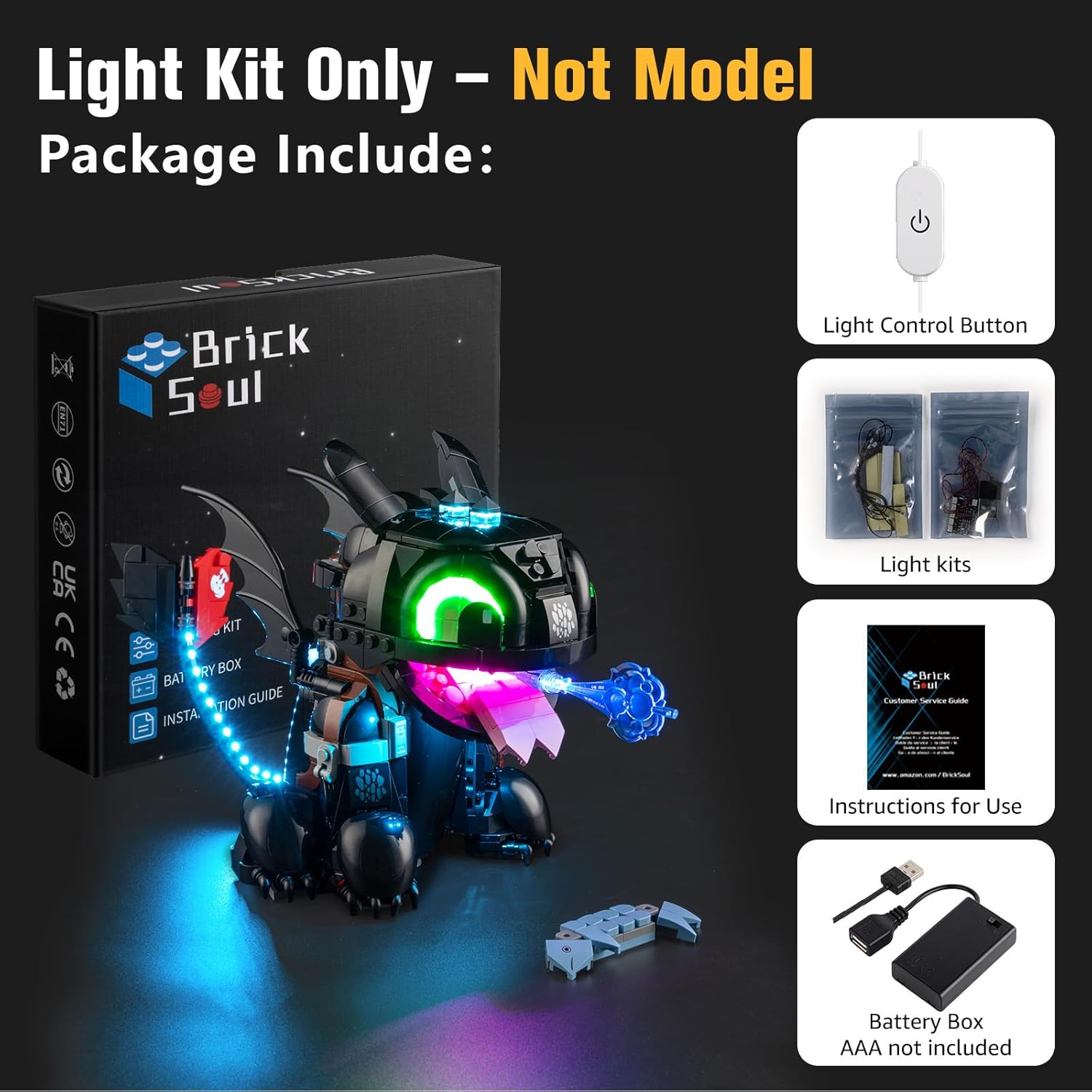
Image: Overview of the BrickSoul LED Light Up Kit components.
Safety Information
- This product contains small parts and is not suitable for children under 3 years old due to choking hazards.
- Recommended age for installation and use is 14 years and up.
- Ensure the power source (USB or AAA batteries) provides a safe 3-5V input.
- Do not attempt to modify the wiring or components, as this may damage the product and void the warranty.
- Keep wires away from sharp edges or moving parts of the LEGO model to prevent damage.
Setup Guide
The BrickSoul LED kit is designed for straightforward installation. Follow these general steps, referring to the detailed digital video and PDF guides for your specific model:
- Prepare Your Model: Carefully remove a few bricks from your LEGO 10375 Toothless model as indicated in the digital instructions to create space for the wiring and lights.
- Install Lights: Follow the numbered step-by-step bags and the digital guides to strategically place the LED components within your model. Ensure wires are neatly tucked away for a clean, professional appearance.
- Connect Power: Connect the lighting kit to the provided USB cable with the integrated control button or to the battery box (AAA batteries not included).
- Test Functionality: Once installed, test the lights to ensure all connections are secure and functioning correctly.

Image: Detailed views of the installed LED lights enhancing the LEGO Toothless model.

Image: The BrickSoul LED Light Up Kit bringing the LEGO Toothless model to life in a display setting.
Installation Video Guide
Video: A demonstration of the BrickSoul LED Lighting Kit for LEGO 10375 How to Train Your Dragon: Toothless, showing the illuminated model and various lighting effects.
Operating Instructions
This upgraded lighting kit features a convenient one-touch control system:
- Power On/Off: Tap the button located on the USB cable to turn the lights on or off.
- Adjust Brightness: Press and hold the button to cycle through different brightness levels. Release the button when the desired brightness is achieved.

Image: Illustration of the one-touch brightness control function via the USB button.

Image: The BrickSoul LED Light Up Kit in operation, highlighting the remote control for the lights.
Maintenance
To ensure the longevity and optimal performance of your BrickSoul LED Light Up Kit, follow these maintenance guidelines:
- Cleaning: Gently wipe the LED components and wires with a soft, dry cloth to remove dust. Avoid using liquid cleaners directly on the lights or electrical connections.
- Wire Management: Periodically check that all wires are securely in place and not pinched or exposed. Proper wire management prevents damage and maintains the aesthetic appeal of your model.
- Battery Replacement: If using the battery box, replace AAA batteries when lights dim or cease to function. Ensure correct polarity when inserting new batteries.
Troubleshooting
If you encounter any issues with your lighting kit, refer to the following common solutions:
- Lights Not Turning On:
- Check the power source: Ensure the USB cable is securely connected to a power adapter or the battery box has fresh batteries and is correctly connected.
- Verify connections: Inspect all wire connections to ensure they are firmly seated. Loose connections are a common cause of non-functional lights.
- Test the control button: Ensure the control button on the USB cable is functioning by tapping it.
- Lights Are Dim or Flickering:
- Check power supply: If using batteries, they may be low and require replacement. If using USB, try a different USB port or power adapter.
- Adjust brightness: Use the press-and-hold function on the control button to increase brightness.
- Individual Lights Not Working:
- Inspect the specific light unit and its connections. If a single light is damaged, contact BrickSoul support for a replacement.
For further assistance, please refer to the digital instructions or contact BrickSoul customer support.
Product Specifications
| Feature | Detail |
|---|---|
| Brand | BrickSoul |
| Model Number | 10375-TV |
| Item Weight | 4.8 ounces |
| Product Dimensions | 6.36 x 4.32 x 1.33 inches |
| Style | 10375 Upgrade Wired Dimmable Lights |
| Material | Plastic |
| Included Components | LED Light Kit |
| Special Features | Non Toxic |
| Power Source | USB |
| Batteries Included? | No |
| Batteries Required? | No |
| Manufacturer Recommended Age | 14 years and up |
Warranty and Support
BrickSoul offers a worry-free warranty and dedicated support for your lighting kit:
- Accidental Damage: In case of bent connectors or broken wires due to accidental damage, BrickSoul provides quick and hassle-free replacements.
- Customer Support: The BrickSoul support team is available to ensure a smooth and stress-free lighting experience. For assistance, please visit the official BrickSoul store or contact customer service.
- Digital Instructions: This product utilizes digital instructions. You can access detailed PDF and video guides by scanning the QR code provided in the package or visiting the BrickSoul website and inputting the product model number.
Visit the official BrickSoul Store for more information and support.

Image: Accessing digital instructions for the BrickSoul LED Light Up Kit.
