
1. Product Overview
The STUDIOFINIX In-Wall Audio Control Amplifier Receiver Wall Plate is designed to integrate seamlessly into your home or office audio system. This 4-channel amplifier provides versatile audio input options and Bluetooth wireless streaming, allowing for flexible control of your sound environment.
Key Features:
- 4-Channel Output: Supports up to two pairs of speakers.
- Bluetooth 5.0 Connectivity: Wireless audio streaming from compatible devices with a range of up to 30 feet (10 meters).
- Multiple Audio Inputs: Includes front 3.5mm AUX jack, rear line-level pigtail leads, USB port for flash drives, and a 1/4" microphone input.
- Integrated Controls: Master volume knob with power ON/OFF function, and input selection switch.
- Compact Design: All-in-one unit designed for in-wall installation.
2. Safety Information
Please read and understand all safety instructions before installing and operating this device. Retain this manual for future reference.
- Electrical Safety: Ensure power is disconnected before installation or servicing. All wiring should be performed by a qualified professional if you are unsure.
- Ventilation: Do not block ventilation openings. Ensure adequate airflow around the unit.
- Moisture: Do not expose the unit to water or excessive moisture.
- Temperature: Avoid extreme temperatures. Operate the device within recommended environmental conditions.
- Speaker Connection: Always match positive (+) and negative (-) terminals correctly to prevent damage to the amplifier and speakers.
3. What's Included
Verify that all components are present in the package:
- 1 x In-Wall Audio Control Amplifier Receiver Wall Plate
- 1 x AC Power Adapter
- 2 x Mounting Screws
- 1 x Owner's Manual
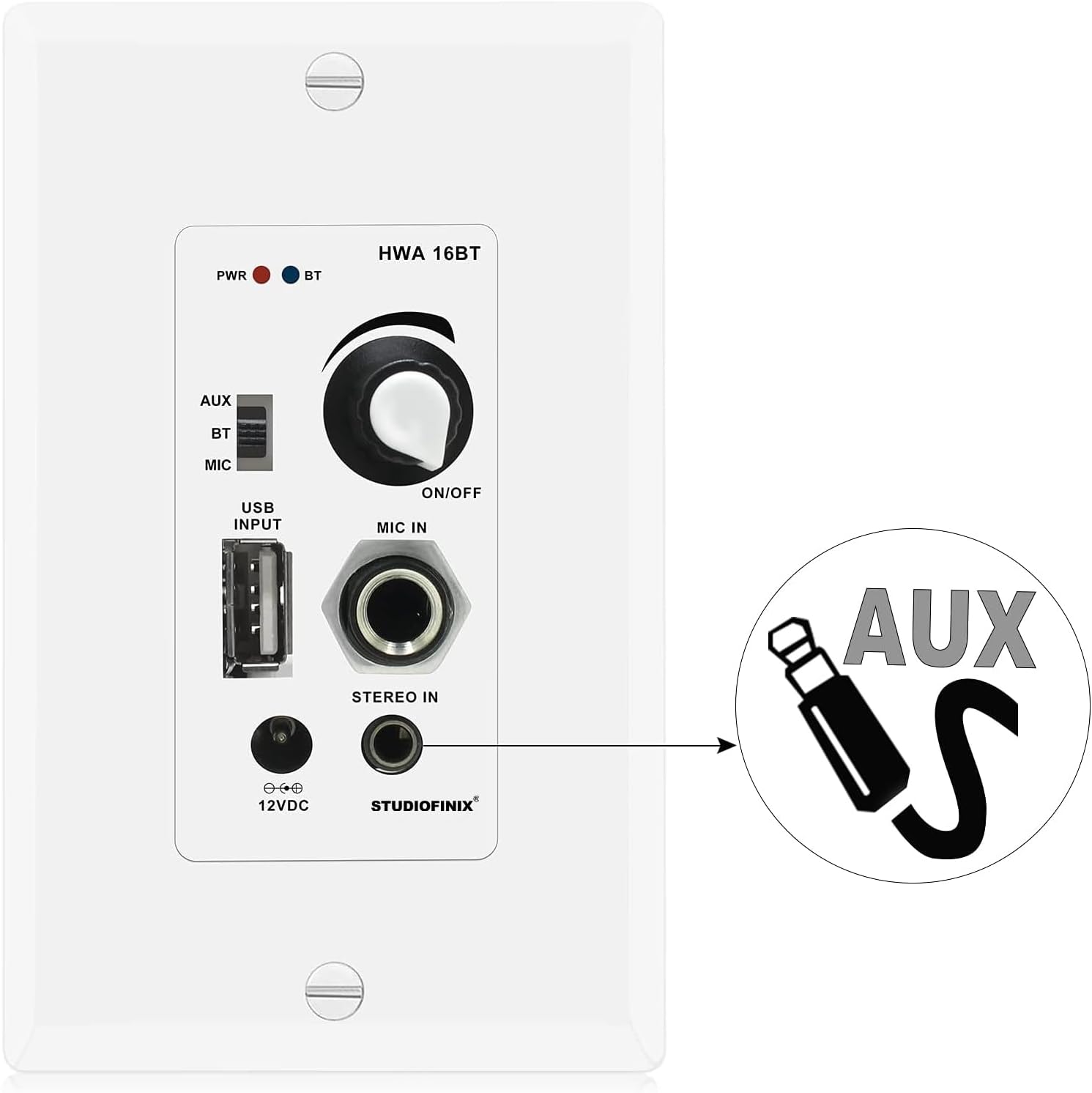
Image: Package contents showing the in-wall amplifier, power supply, screws, and user manual.
4. Setup and Installation
This section outlines the steps for installing and connecting your in-wall amplifier.
4.1 Speaker Connection
The amplifier supports up to two pairs of speakers (4 channels). Ensure correct polarity when connecting speaker wires.
- Identify the positive (+) and negative (-) terminals on your speakers.
- Connect the speaker wires from your speakers to the corresponding terminals on the amplifier's rear terminal block. Match positive to positive (red) and negative to negative (black).
- Ensure all connections are secure to prevent short circuits.

Image: Speaker wiring diagram for the 4-channel in-wall amplifier, showing connections for four speakers.
4.2 Power Connection
Connect the included AC power adapter to the DC 12V input on the amplifier. The power adapter can be connected via the front access port or the rear board pigtail leads.
4.3 In-Wall Mounting
The amplifier is designed to fit into a standard single-gang wall box. Secure the unit using the provided mounting screws.
5. Operating Instructions
Familiarize yourself with the controls and functions of your STUDIOFINIX in-wall amplifier.

Image: Front panel layout of the 4-channel in-wall amplifier, detailing each control and port.
5.1 Power ON/OFF and Master Volume
The large knob on the front panel controls both power and master volume. Rotate clockwise to turn the unit ON and increase volume. Rotate counter-clockwise to decrease volume and turn the unit OFF.
5.2 Input Selection
Use the slide switch located on the left side of the front panel to select your desired audio source:
- AUX: For connecting external devices via the 3.5mm AUX input.
- BT: For Bluetooth wireless audio streaming.
- MIC: For microphone input.
5.3 Bluetooth Pairing
- Set the input selection switch to BT. The Bluetooth Signal LED will blink, indicating pairing mode.
- On your mobile device (smartphone, tablet, etc.), enable Bluetooth and search for available devices.
- Select "STUDIOFINIX" from the list of devices.
- Once paired, the Bluetooth Signal LED will illuminate steadily. You can now stream audio wirelessly.
5.4 USB Playback
Insert a USB flash drive containing MP3 audio files into the USB port. The unit will automatically detect and play audio from the drive. The USB port also provides 5V/1A for charging devices.

Image: USB port on the amplifier, used for MP3 flash drive playback or device charging.
5.5 AUX Input
Connect an external audio source (e.g., smartphone, media player) to the 3.5mm AUX input jack using a standard audio cable. Set the input selection switch to AUX.

Image: 3.5mm AUX input jack for connecting external audio devices.
5.6 Microphone Input
Connect a dynamic microphone to the 1/4" MIC IN jack. Set the input selection switch to MIC for microphone use.
6. Maintenance
To ensure the longevity and optimal performance of your STUDIOFINIX in-wall amplifier, follow these maintenance guidelines:
- Cleaning: Use a soft, dry cloth to clean the surface of the unit. Do not use liquid cleaners or abrasive chemicals.
- Ventilation: Periodically check that the ventilation openings are clear of dust and debris.
- Connections: Ensure all cable connections remain secure. Loose connections can affect audio quality.
7. Troubleshooting
If you encounter issues with your in-wall amplifier, refer to the following common problems and solutions:
- No Power:
- Ensure the AC power adapter is securely connected to both the amplifier and a working power outlet.
- Verify the master volume knob is turned ON.
- No Sound:
- Check speaker wire connections for correct polarity and secure contact.
- Confirm the correct input source (AUX, BT, MIC) is selected via the slide switch.
- Adjust the master volume.
- If using Bluetooth, ensure the device is paired and playing audio.
- If using AUX, ensure the cable is fully inserted and the external device's volume is up.
- Bluetooth Disconnection/Cannot Pair:
- Ensure the amplifier's input is set to BT.
- Move your Bluetooth device closer to the amplifier (within 30 feet/10 meters).
- Turn off and on Bluetooth on your device, then try pairing again.
- If previously paired, try forgetting the device on your phone and re-pairing.
- Distorted Audio:
- Reduce the volume on both the amplifier and the audio source.
- Check speaker impedance compatibility (minimum 4 Ohm).
- Ensure speaker wires are not frayed or touching each other.
8. Specifications
Technical specifications for the STUDIOFINIX In-Wall Audio Control Amplifier Receiver Wall Plate:
| Model Number | ST-HWA16BT-4CH-CA |
| Power Output | 100 Watt Peak, 40 Watt RMS x 4 Ch. @ 4 Ohm |
| Bluetooth Version | 5.0 |
| Wireless Range | 30 feet (10 meters) |
| Microphone Input Type | Dynamic |
| Power Amplifier Type | Stereo Class-D |
| Minimum Load Resistance | 4 Ohm |
| Total Harmonic Distortion (T.H.D.) | 0.03% (8 Ohm, 1KHz) |
| Power Draw | 12V 3Amps |
| Power Supply | DC 100-240V, 50/60Hz (12V DC Adapter) |
| Material | Plastic |
| Color | White |
| Item Weight | 9.6 ounces |
| Installation Type | Screw-In |

Image: Technical specifications of the in-wall Bluetooth amplifier.
9. Warranty and Support
For warranty information or technical support, please contact STUDIOFINIX directly through their official website or the retailer where the product was purchased. Keep your purchase receipt as proof of purchase.