
1. Safety Precautions
Before using the VILTROX AF 9mm F2.8 E Mount Lens, please read and understand the following safety precautions to ensure safe and proper operation:
- Do not look directly at the sun or strong light sources through the lens, as this can cause permanent eye damage.
- Keep the lens away from water and moisture to prevent damage to internal electronic components.
- Avoid dropping or subjecting the lens to strong impacts, which can cause optical or mechanical damage.
- Do not attempt to disassemble or modify the lens. Repairs should only be performed by authorized service personnel.
- Store the lens in a cool, dry place, away from direct sunlight and extreme temperatures.
- Keep out of reach of children.
2. Package Contents
Verify that all items are present in your VILTROX AF 9mm F2.8 E Mount Lens package:
- Lens
- Lens Caps (Front and Rear)
- Lens Hood
- Lens Pouch
- Warranty Card
- Instruction Manual

Image: Contents of the VILTROX AF 9mm F2.8 E Mount Lens package.
3. Product Overview
The VILTROX AF 9mm F2.8 E is an APS-C prime wide-angle lens designed for Sony E-mount cameras. It features a 13.5mm equivalent focal length (on APS-C) and a bright F2.8 aperture, making it suitable for landscapes, architecture, and vlogging.
3.1 Lens Features
- Ultra-Wide Field of View: Delivers a 113.8° field of view, ideal for expansive scenes.
- Advanced Optical Design: Comprises 13 elements in 11 groups, including 3 High Refractive (HR), 3 Extra-low Dispersion (ED), and 2 Aspherical (ASPH) elements for sharp, clear images.
- Close Focusing Capability: Minimum focusing distance of 0.13 meters (13cm) for detailed close-up shots.
- Lightweight and Compact: Weighs approximately 175g, enhancing portability.
- Reliable Autofocus: Equipped with an STM motor for fast and accurate autofocus performance.
- USB-C Upgrade Port: Allows for easy firmware updates to maintain optimal performance.
3.2 Lens Components

Image: Front view of the lens.
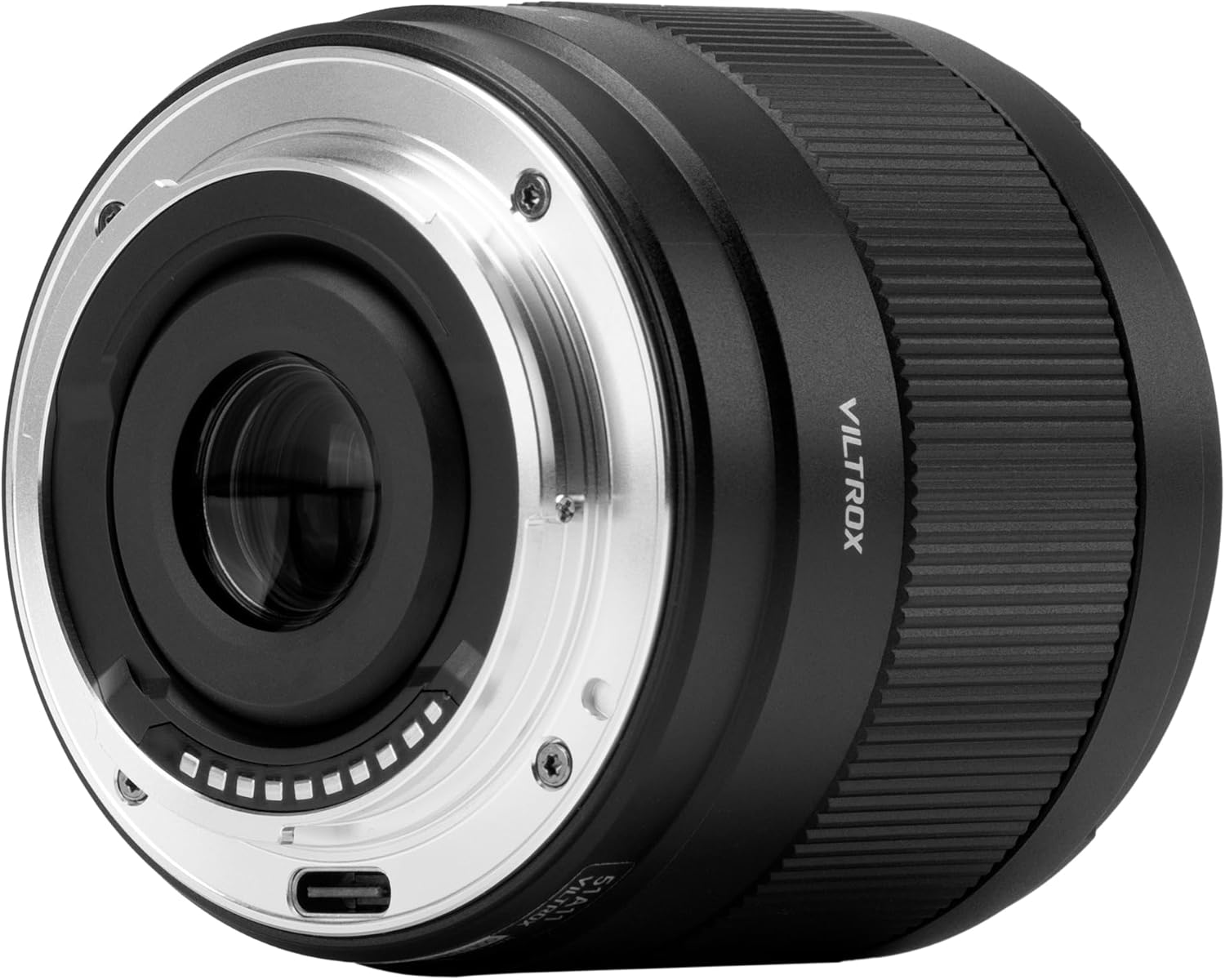
Image: Rear view of the lens, highlighting the E-mount and USB-C port.

Image: Optical design diagram.

Image: MTF (Modulation Transfer Function) chart.
4. Setup
4.1 Attaching the Lens
- Ensure your camera is turned off.
- Remove the rear lens cap from the lens and the body cap from your camera.
- Align the white index mark on the lens barrel with the white index mark on your camera's lens mount.
- Insert the lens into the camera mount and rotate it clockwise until it clicks into place. Do not force the lens.
4.2 Detaching the Lens
- Ensure your camera is turned off.
- While pressing the lens release button on your camera, rotate the lens counter-clockwise until it stops.
- Carefully remove the lens from the camera mount.
- Attach the front and rear lens caps to protect the lens elements.

Image: Lens attached to a Sony camera.
5. Operating the Lens
5.1 Autofocus (AF)
The VILTROX AF 9mm F2.8 E lens features an STM motor for fast and accurate autofocus. To use autofocus, ensure your camera's focus mode is set to AF (Autofocus). The lens will automatically adjust focus when the shutter button is half-pressed.
5.2 Manual Focus (MF)
For precise control over focus, switch your camera's focus mode to MF (Manual Focus). Rotate the focus ring on the lens barrel to adjust the focus manually. Your camera's focus peaking or magnification features can assist with accurate manual focusing.
5.3 Aperture Control
The lens has a fixed maximum aperture of F2.8. Aperture control is managed through your camera's settings. Adjusting the aperture (f-stop) will affect the depth of field and the amount of light entering the lens.
5.4 Firmware Updates
The lens is equipped with a USB-C port for firmware updates. Regularly checking for and installing the latest firmware ensures optimal performance and compatibility with new camera models. Visit the VILTROX official website for firmware downloads and instructions.

Image: USB-C port for firmware updates.
5.5 Using the Lens Hood
The included lotus-shaped lens hood helps to block stray light, reducing flare and ghosting, and provides physical protection for the front element. Attach the lens hood by aligning it with the front of the lens and twisting until it locks into place.

Image: Lotus-shaped lens hood.
5.6 Official Product Video
Video: Official VILTROX video showcasing the AF 9mm F2.8 Air E lens, highlighting its ultra-wide field of view and stunning results.
6. Maintenance
6.1 Cleaning the Lens
- Use a blower brush to remove dust and loose particles from the lens surface.
- For smudges or fingerprints, use a clean, soft microfiber cloth specifically designed for optical lenses. Breathe lightly on the lens surface before wiping gently in a circular motion.
- Do not use organic solvents such as paint thinner or benzene to clean the lens.
6.2 Storage
- Always attach the front and rear lens caps when the lens is not in use.
- Store the lens in a dry, well-ventilated area, preferably in the included lens pouch, to protect it from dust and scratches.
- Avoid storing the lens in areas with high humidity or extreme temperature fluctuations.
7. Troubleshooting
If you encounter issues with your VILTROX AF 9mm F2.8 E lens, refer to the following common problems and solutions:
- Lens not recognized by camera: Ensure the lens is securely mounted and the camera is turned on. Check for any firmware updates for both the lens and camera.
- Autofocus not working: Verify that the camera's focus mode is set to AF. Clean the lens and camera contacts. Ensure there is sufficient light and contrast in the scene for the autofocus system to operate effectively.
- Image quality issues (e.g., blur, softness): Check if the lens is properly focused. Ensure the lens elements are clean. If using a filter, ensure it is clean and correctly attached.
- Lens not attaching/detaching smoothly: Ensure the index marks are aligned correctly when attaching. When detaching, press the lens release button firmly. Do not force the lens.
If problems persist, contact VILTROX customer support or an authorized service center for assistance.
8. Specifications
| Feature | Specification |
|---|---|
| Brand | VILTROX |
| Model Number | AF 9/2.8 E |
| Focal Length | 9mm (13.5mm equivalent on APS-C) |
| Maximum Aperture | F2.8 |
| Minimum Aperture | F16 |
| Lens Type | Wide Angle Prime Lens |
| Compatible Mountings | Sony E-mount |
| Lens Elements/Groups | 13 Elements in 11 Groups |
| Minimum Focusing Distance | 0.13m (0.43ft) |
| Autofocus Motor | STM (Stepping Motor) |
| Filter Size | 55mm |
| Weight | 175g (6.2 ounces) |
| Product Dimensions | 2.22 x 2.56 x 2.56 inches |
| Firmware Update Port | USB-C |
9. Warranty & Support
VILTROX products are covered by a limited warranty. Please refer to the warranty card included in your package for specific terms and conditions, including the warranty period and coverage details.
For technical support, troubleshooting assistance, or warranty claims, please contact VILTROX customer service through their official website or the contact information provided on your warranty card.
Keep your proof of purchase for warranty validation.


