1. Setup
1.1 Unboxing and Initial Preparation
Carefully remove all components from the packaging. Ensure all protective foam and plastic wraps are removed from the main unit and accessories. Verify that all included items are present:
- Duabes Automatic Litter Box Main Unit
- Litter Trapping Mat
- Power Adapter
- User Manual
- Trash Bags (20 pcs)
- Solid State Aromatherapy (Deodorizer)
- Cleaning Brush
- Quick Start Guide

Figure 1: All components included with the Duabes Automatic Litter Box.
1.2 Assembly
- Attach the Legs: Turn the main unit upside down. Locate the four designated slots for the legs. The legs are labeled 'L' (Left) and 'R' (Right) and have notches for easy alignment. Insert each leg firmly until it clicks into place.
- Insert the Waste Bin: Slide the 13L waste bin into the designated compartment at the bottom front of the main unit.
- Position the Globe: The globe may be slightly pushed back for compact packaging. Unlock the side pieces, lift the globe, and reposition it so the internal mat is flat and aligned correctly. Secure the side pieces back in place.
- Install Trash Bag and Deodorizer: Line the waste bin with one of the provided trash bags, tucking the edges into the slots for a neat fit. Place the solid state aromatherapy deodorizer into its designated holder within the waste bin.

Figure 2: Waste bin with trash bag and deodorizer.

Figure 3: Removable liner with litter level indicators.
1.3 Litter Filling
Fill the litter compartment with clumping cat litter. Ensure the litter level is between the 'MIN' and 'MAX' lines indicated on the removable liner. Do not overfill or underfill the litter box.

Figure 4: Compatible clumping litter types.
1.4 Power Connection and App Setup
Connect the power adapter to the litter box and plug it into a wall outlet. The device will power on. To connect to the app:
- Scan the QR code provided in the Quick Start Guide or search for "Tuya" in your app store to download the app.
- Install and register an account.
- On the device, long-press the Wi-Fi button for 3 seconds until it starts flashing, indicating pairing mode.
- Follow the prompts in the app to complete the binding process. Ensure your Wi-Fi network is 2.4GHz.
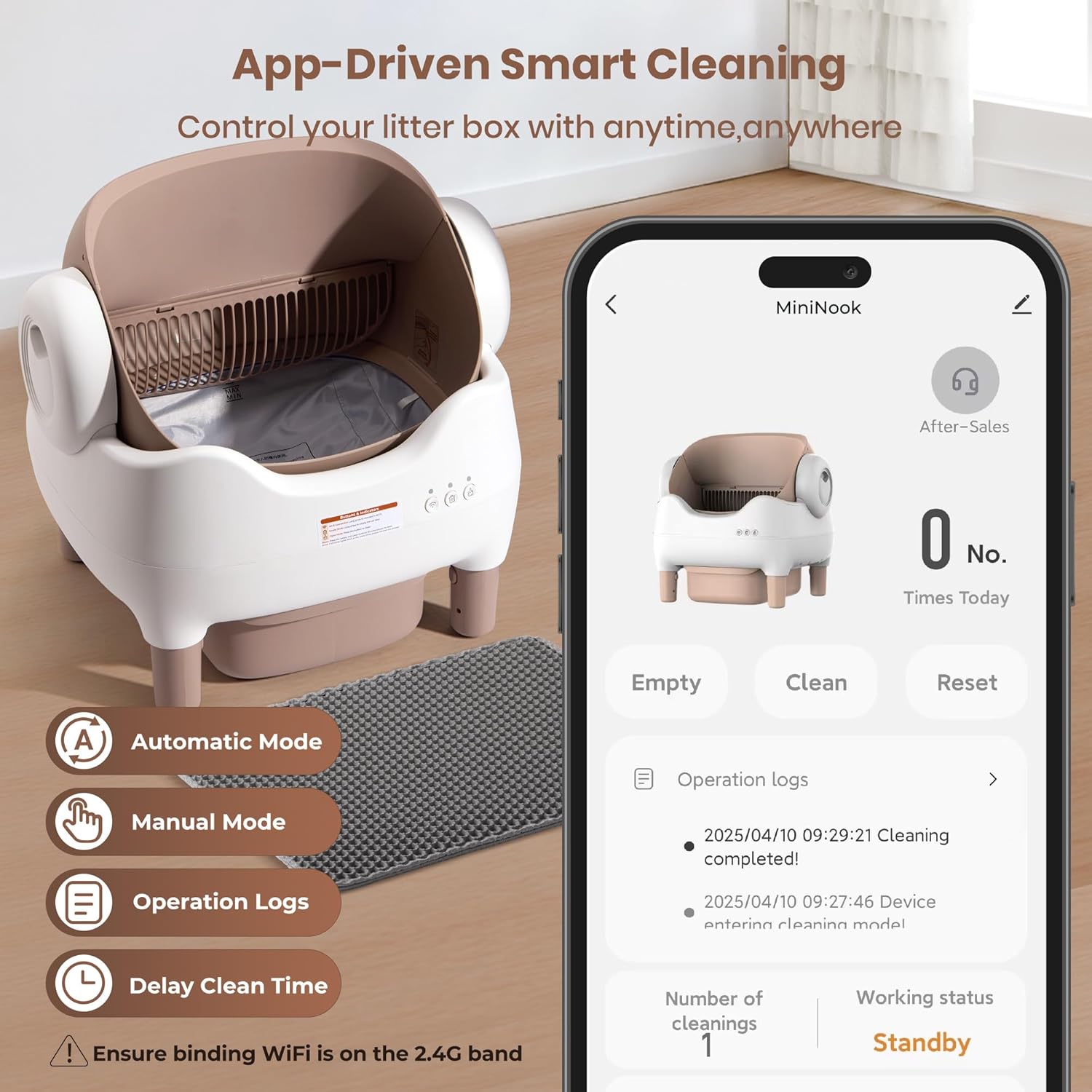
Figure 5: App control interface.
2. Operating Instructions
2.1 Automatic Cleaning Cycle
The Duabes Automatic Litter Box is designed to clean itself automatically after your cat uses it. The integrated infrared and weight sensors detect your cat's presence and usage. After your cat exits the box and a set delay time has passed (adjustable via the app), the cleaning cycle will begin. The globe will rotate, sifting clean litter and depositing waste into the sealed trash bin below. The cleaning process is quiet, operating under 20 dB.

Figure 6: Quiet operation of the litter box.
2.2 Manual Control Buttons
The device features three control buttons on the front panel:
- Wi-Fi Button: Long press to connect to Wi-Fi.
- Empty Mode Button (Trash Can Icon): Long press to empty the cat litter into the waste bin. This is useful for full litter changes.
- Clean Mode Button (Brush Icon): Press to initiate a cleaning cycle. This will level the litter and remove waste.
2.3 Safety Features
The Duabes Automatic Litter Box prioritizes your cat's safety with multiple integrated sensors:
- Infrared Sensors (3 pairs): Detect your cat's presence. If a cat enters during a cleaning cycle, the operation will immediately pause and resume only after the cat has safely exited.
- Weight Sensors (4 precise sensors): Accurately detect your cat's weight, allowing the app to differentiate between multiple cats (if they have different weights) and track their usage habits.
- Open-Top Design: Provides a spacious and secure environment, reducing anxiety for cats and preventing them from feeling trapped, unlike fully enclosed designs. The design ensures a wide open gap at its most closed point during operation, eliminating pinch points.

Figure 7: Safety sensors and open design for cat comfort.
2.4 App Functionality
The companion app offers enhanced control and monitoring:
- Remote Control: Initiate cleaning cycles or empty the waste bin from anywhere.
- Cleaning Delay Settings: Adjust the delay time before a cleaning cycle begins after your cat exits.
- Usage Statistics: Monitor your cat's bathroom habits, including frequency and duration.
- Cat Weight Tracking: The app records the weight of each cat using the box, allowing you to track individual health and usage patterns (useful for multi-cat households).
- Operation Logs: View a detailed history of all cleaning cycles and cat entries.
3. Maintenance
3.1 Waste Bin Emptying
The 13L waste bin can hold up to 14 days of waste for a single cat. For optimal hygiene and odor control, it is recommended to empty the waste bin regularly. Simply slide out the bin, tie off the trash bag, and dispose of it. Replace with a new trash bag and reinsert the deodorizer.
3.2 Removable Liner Cleaning
The internal liner is removable for easy cleaning. To remove, detach it from the globe. It can be washed with water and mild soap. Ensure it is completely dry before reinserting it into the globe.

Figure 8: Cleaning instructions for removable parts.
3.3 General Cleaning
The main unit of the litter box is washable but should avoid direct water exposure. Use a damp cloth to wipe down the exterior. The included cleaning brush can be used to sweep away any cat litter residue on the liner pad or other surfaces.
4. Troubleshooting
4.1 Common Issues and Solutions
- Device Not Connecting to Wi-Fi: Ensure your Wi-Fi network is 2.4GHz. Check that the Wi-Fi button is flashing during pairing. Try restarting your router and the litter box.
- Cleaning Cycle Not Starting: Verify that the waste bin is properly installed. Check for any obstructions in the litter compartment. Ensure no cat is currently inside or near the box.
- Error Lights Flashing: If all three indicator lights flash simultaneously, it typically indicates an issue with the waste drawer installation. Reinstall the drawer correctly.
- Litter Not Leveling: If the litter is uneven, you can manually initiate a cleaning cycle via the app or by pressing the clean button on the device. Alternatively, unplug and replug the device to reset and level the litter.
For further assistance, refer to the detailed user manual or contact customer support.
5. Specifications
| Feature | Detail |
|---|---|
| Brand | Duabes |
| Model Name | Automatic Litter Box |
| Item Model Number | Automatic Litter Box |
| ASIN | B0FMDQSCZF |
| UPC | 850076069162 |
| Product Dimensions (LxWxH) | 21.66" x 20.08" x 23.95" |
| Item Weight | 22 Pounds |
| Color | White & Coffee |
| Material | Acrylonitrile Butadiene Styrene (ABS) |
| Litter Box Type | Automated Self-Cleaning Litter Box |
| Waste Bin Capacity | 13 Liters |
| Noise Level | Under 20 dB |
| Supported Cat Weight | 2 lbs to 34 lbs |
6. Warranty & Support
For information regarding product warranty, please refer to the warranty card included in your packaging or visit the official Duabes website. If you encounter any issues or require technical assistance, please contact Duabes customer support. Contact details can typically be found in the user manual or on the product's official website.


