
1. Introduction
Thank you for choosing the WXQZXO Bluetooth Shower Speaker M22. This portable, waterproof speaker is designed to provide high-quality audio and vibrant lighting effects for various environments, including bathrooms, parties, and outdoor activities. Please read this manual carefully to ensure proper use and optimal performance of your device.
2. Package Contents
Ensure all items are present in the package:
- WXQZXO Bluetooth Shower Speaker (M22) x 1
- Instruction Manual x 1
- Suction Cup x 1
- Lanyard x 1
- Charging Cable (USB-C) x 1
3. Product Overview
The WXQZXO M22 speaker features a compact, round design with intuitive controls and a vibrant LED light ring. It is IPX7 waterproof, making it suitable for use in wet environments.

Figure 1: WXQZXO Bluetooth Shower Speaker M22. This image displays the speaker's front view, highlighting its colorful LED light ring and central speaker grille, with water splashes indicating its waterproof nature.
Button Functions

Figure 2: Button Function Description. This diagram illustrates the location and function of each button on the speaker's side panel, including Power ON/OFF, Volume/Track controls, Play/Pause, and LED Control.
- Power Button: Press and hold to power on/off.
- '-' Button: Short press for previous track, long press to decrease volume.
- Play/Pause Button: Short press to play/pause music, answer/end calls. Long press for TWS pairing.
- '+' Button: Short press for next track, long press to increase volume.
- Light Button: Short press to cycle through light modes.
4. Setup
4.1 Charging the Speaker
Before first use, fully charge the speaker. The charging port is located under a waterproof cover on the side of the speaker. Gently lift the cover to access the USB-C port.
- Open the waterproof cover on the side of the speaker.
- Connect the provided USB-C charging cable to the speaker and a compatible USB power adapter (not included).
- The LED indicator will show charging status. A full charge takes approximately 3 hours.
- Once fully charged, disconnect the cable and securely close the waterproof cover to maintain IPX7 rating.

Figure 3: USB-C Fast Charging. This image highlights the USB-C charging port, emphasizing the speaker's quick charging capability and 6-8 hours of playtime.
4.2 Power On/Off
- To Power On: Press and hold the Power button for 2-3 seconds until the LED lights illuminate and you hear an audible prompt.
- To Power Off: Press and hold the Power button for 2-3 seconds until the LED lights turn off and you hear an audible prompt.
4.3 Bluetooth Pairing
The speaker uses Bluetooth 5.4 for a stable and fast connection up to 33 feet (10 meters).
- Ensure the speaker is powered on and in pairing mode (LED lights will flash, indicating it's discoverable).
- On your device (smartphone, tablet, computer), enable Bluetooth and search for available devices.
- Select "M22" from the list of devices.
- Once connected, the speaker will emit a confirmation tone, and the LED lights will stabilize.

Figure 4: Bluetooth 5.4 Connection. This image shows the speaker wirelessly connected to a smartphone, illustrating the stable and fast Bluetooth 5.4 technology.
4.4 True Wireless Stereo (TWS) Pairing
For an immersive stereo sound experience, you can pair two WXQZXO M22 speakers together.
- Ensure both speakers are powered on and not connected to any other Bluetooth device.
- On one speaker (this will be the primary speaker), long press the Play/Pause button for 3 seconds. It will enter TWS pairing mode.
- The primary speaker will automatically search for and connect to the second speaker.
- Once successfully paired, both speakers will emit a confirmation tone, and their LED lights will synchronize.
- Now, connect your device to the primary speaker via Bluetooth as described in section 4.3. Audio will play through both speakers in stereo.

Figure 5: Wireless Stereo Pairing. This image demonstrates two speakers paired together, creating a 360-degree surround sound experience, ideal for enhancing audio for laptops or other devices.
5. Operating Instructions
5.1 Music Playback
- Play/Pause: Short press the Play/Pause button.
- Volume Up: Long press the '+' button.
- Volume Down: Long press the '-' button.
- Next Track: Short press the '+' button.
- Previous Track: Short press the '-' button.
5.2 Light Control
The speaker features 7 vibrant LED colors and 7 changing themes.
- Change Light Mode: Short press the Light button to cycle through the available light effects.
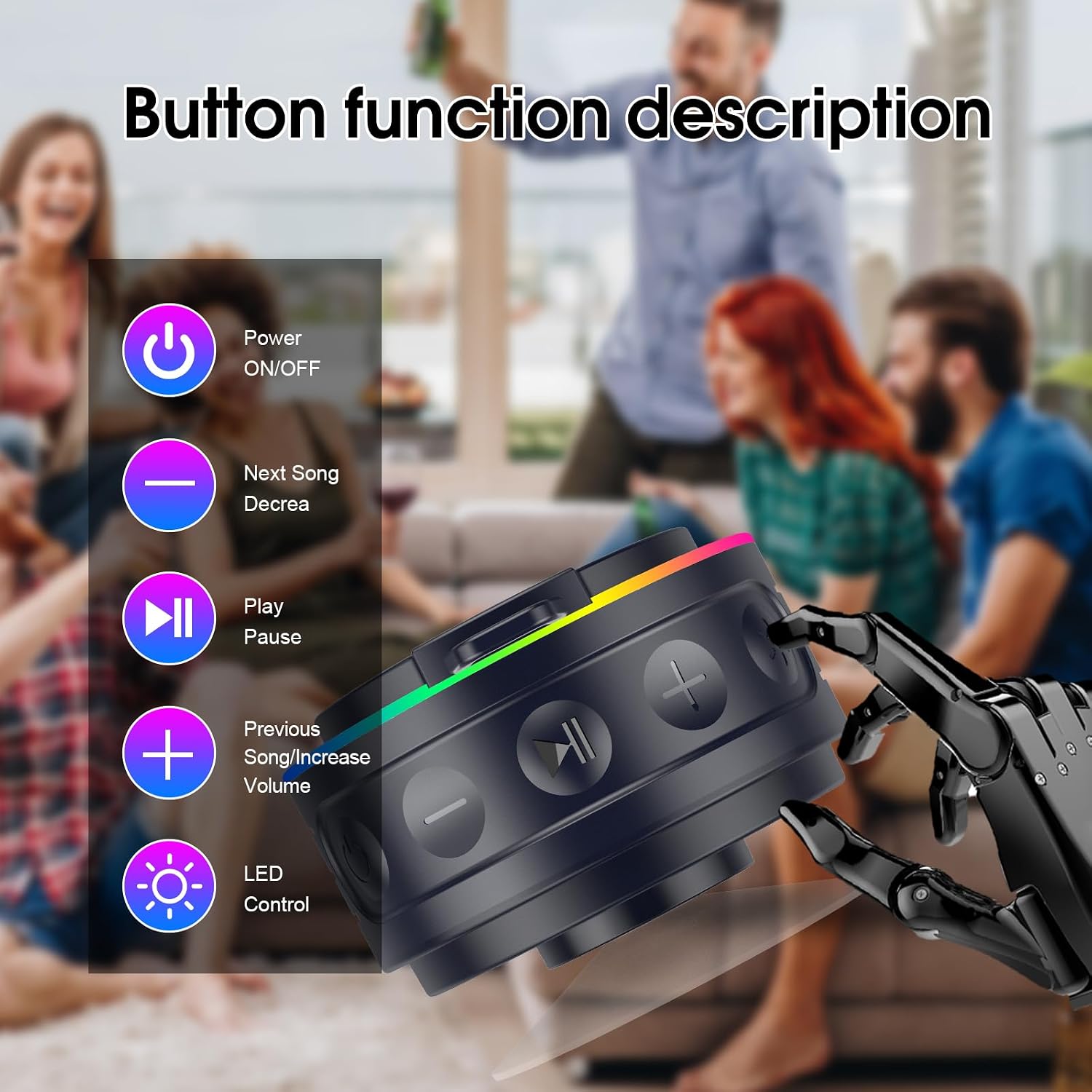
Figure 6: Colorful Lighting Effects. This image showcases the speaker's ability to display 7 LED colors and 7 changing themes, enhancing the ambiance for any occasion.
5.3 Hands-Free Calling
With the built-in microphone, you can answer calls directly through the speaker when connected to your smartphone.
- Answer/End Call: Short press the Play/Pause button.
- Reject Call: Long press the Play/Pause button.

Figure 7: Convenient Call Function. This image illustrates the speaker's built-in microphone and hands-free calling feature, allowing users to stay connected while enjoying music.
6. Placement and Mounting
The WXQZXO M22 speaker is designed for versatile placement with its included suction cup and lanyard.
- Suction Cup: Attach the suction cup to the back of the speaker. Press firmly onto smooth, clean surfaces like bathroom tiles, mirrors, or glass. Ensure the surface is dry for optimal adhesion.
- Lanyard: Use the provided lanyard to hang the speaker from hooks, backpacks, bicycles, or other suitable points.

Figure 8: Enjoy Music While Bathing. This image shows the speaker mounted with its strong suction cup on a bathroom wall, allowing for music enjoyment without water damage.

Figure 9: Ultra Portable Design. This image illustrates the speaker's portability, shown attached to a backpack during a hike, highlighting its suitability for outdoor activities.
7. Maintenance
- Cleaning: Wipe the speaker with a soft, damp cloth. Do not use harsh chemicals or abrasive cleaners.
- Storage: Store the speaker in a cool, dry place away from direct sunlight and extreme temperatures.
- Waterproof Seal: Always ensure the charging port cover is securely closed when not charging to maintain its IPX7 waterproof rating.
8. Troubleshooting
| Issue | Possible Cause | Solution |
|---|---|---|
| Speaker does not power on | Low battery; Power button not pressed long enough | Charge the speaker; Press and hold the Power button for 2-3 seconds |
| Cannot pair via Bluetooth | Speaker not in pairing mode; Device Bluetooth off; Speaker too far from device | Ensure speaker is on and flashing; Enable Bluetooth on your device; Move speaker closer (within 33 ft) |
| No sound during playback | Volume too low; Speaker not connected; Audio source paused | Increase speaker/device volume; Re-pair Bluetooth; Check audio source playback status |
| TWS pairing fails | Speakers already connected to other devices; Speakers too far apart | Disconnect speakers from other devices; Ensure speakers are close to each other during pairing |
9. Specifications
- Model: M22
- Speaker Type: 3D
- Connectivity Technology: Bluetooth 5.4
- Wireless Range: Up to 33 feet (10 meters)
- Water Resistance: IPX7 (Waterproof)
- Speaker Output Power: 5 Watts
- Playtime: Over 8 hours (at 50% volume)
- Charging Time: Approximately 3 hours
- Product Dimensions: 7.9"D x 7.9"W x 5"H
- Item Weight: 11.7 ounces
- Battery: 1 x 12V (included)
- Special Features: Immersive Stereo Sound, Vibrant Colorful Light Show, Built-in Microphone, Easy Key Control, Portable Design.
10. Safety Information
Please observe the following safety guidelines:
- Do not disassemble, repair, or modify the speaker.
- Keep the speaker away from extreme heat sources, open flames, or direct sunlight for prolonged periods.
- Do not expose the speaker to corrosive liquids.
- Ensure the charging port cover is sealed when using the speaker near water.
- Dispose of the battery and speaker according to local regulations.
11. Warranty and Support
WXQZXO offers a 30-Day Worry-Free Trial and a 12-Month Quality Guarantee for this product. For any inquiries or support needs, please contact our 24-Hour Customer Service.
Please refer to your purchase platform or the official WXQZXO website for detailed warranty terms and contact information.
12. Product Videos
Watch these official product videos for additional guidance and demonstrations:
WXQZXO Bluetooth Shower Speaker Overview
Video 1: An overview of the WXQZXO Bluetooth Shower Speaker, demonstrating its features and design.
Bluetooth Shower Speaker Features
Video 2: A detailed look at the various features of the Bluetooth Shower Speaker, including its sound quality and light modes.