
1. Introduction
Thank you for purchasing the WXQZXO M22 Bluetooth Shower Speaker. This portable, waterproof speaker is designed to provide high-quality audio with dynamic LED lighting, suitable for various environments including bathrooms, outdoor activities, and home use. Please read this manual carefully to ensure proper setup and operation.

Image: WXQZXO M22 Bluetooth Shower Speaker in various usage scenarios.
2. Package Contents
Ensure all items are present in the package:
- WXQZXO M22 Bluetooth Shower Speaker (1)
- Instruction Manual (1)
- Suction Cup (1)
- Lanyard/Rope (1)
- USB-C Charging Cable (1)
3. Product Overview
The WXQZXO M22 speaker features a compact design with intuitive controls and a vibrant LED light ring. It includes a built-in microphone for hands-free calls and is IPX7 waterproof for use in wet environments.

Image: Front view of the WXQZXO M22 speaker, emphasizing its IPX7 waterproof rating and built-in microphone.
Button Functions
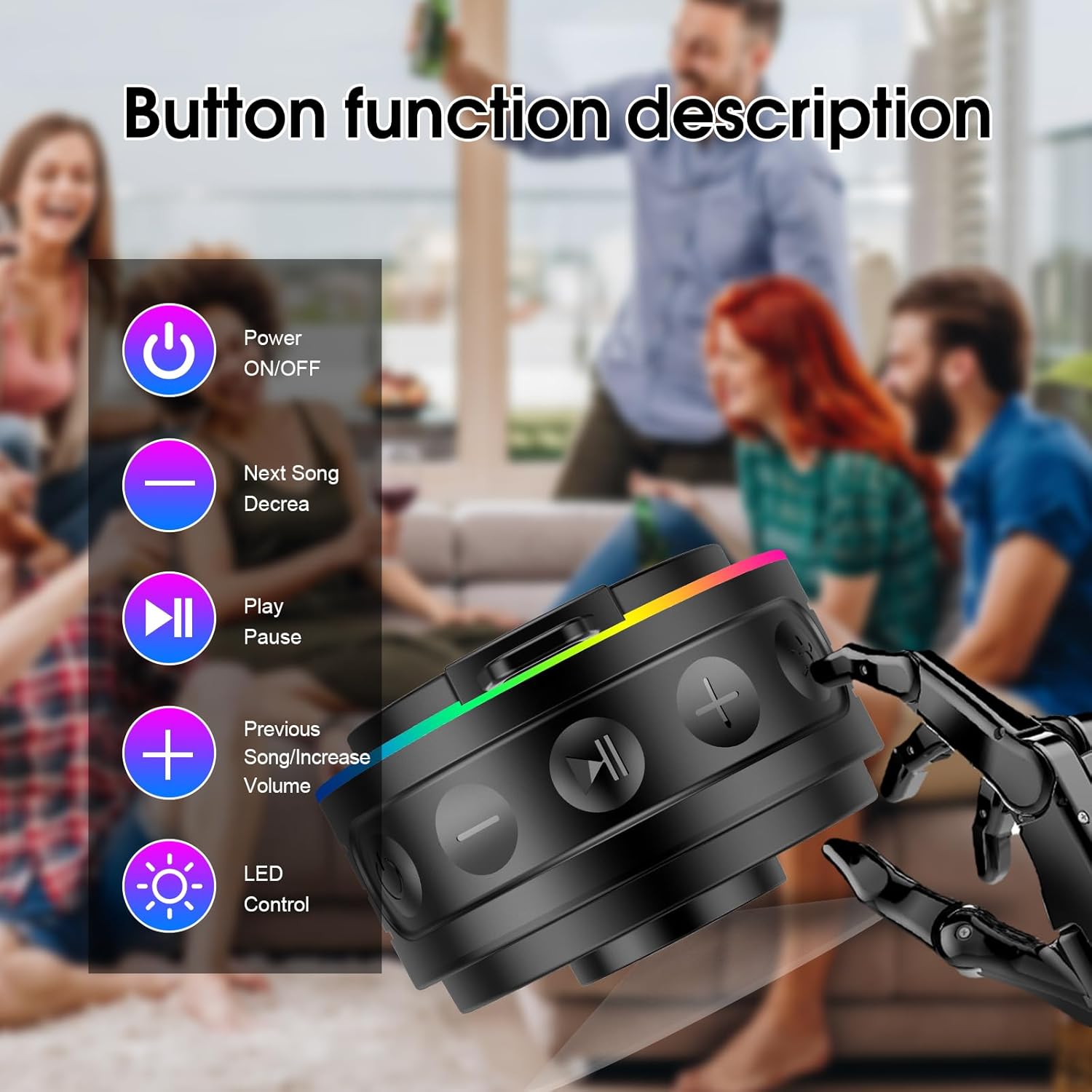
Image: Detailed description of the speaker's control buttons.
- Power Button: Press and hold to power on/off.
- Volume Down / Previous Track Button (-): Short press for volume down, long press for previous track.
- Play / Pause Button (►►): Short press to play/pause music, answer/end calls. Long press to activate TWS pairing.
- Volume Up / Next Track Button (+): Short press for volume up, long press for next track.
- LED Control Button (💡): Short press to cycle through LED light modes.
4. Setup
4.1 Charging the Speaker
Before first use, fully charge the speaker. The charging port is located under a protective cover to maintain its waterproof rating.
- Locate the USB-C charging port on the side of the speaker, protected by a rubber flap.
- Gently open the rubber flap.
- Connect the provided USB-C cable to the speaker and a compatible USB power adapter (not included).
- The LED indicator will show charging status. A full charge takes approximately 3 hours.
- Once fully charged, disconnect the cable and securely close the rubber flap to ensure waterproof integrity.

Image: The speaker connected to a USB-C charging cable, illustrating the charging process and highlighting battery life.
4.2 Power On/Off
- To Power On: Press and hold the Power button (Ⓜ) for 2-3 seconds until the LED lights illuminate and you hear an audible prompt.
- To Power Off: Press and hold the Power button (Ⓜ) for 2-3 seconds until the LED lights turn off and you hear an audible prompt.
5. Operating Instructions
5.1 Bluetooth Pairing
The speaker uses Bluetooth 5.4 for a stable and fast connection.
- Ensure the speaker is powered on and in pairing mode (LED lights will be flashing).
- On your mobile device (smartphone, tablet, etc.), enable Bluetooth.
- Search for available Bluetooth devices.
- Select "M22" from the list of devices.
- Once paired, the speaker will indicate a successful connection, and the LED lights will change to a steady pattern.
Video: A detailed demonstration of the WXQZXO M22 Bluetooth Shower Speaker, showcasing its features and ease of use.
5.2 True Wireless Stereo (TWS) Pairing
You can pair two M22 speakers together for an immersive stereo sound experience.
- Ensure both M22 speakers are powered on and not connected to any other Bluetooth device.
- On one of the speakers (this will be your primary speaker), long press the Play/Pause button (►►) for 3 seconds.
- The speakers will attempt to connect to each other. A successful connection will be indicated by an audible prompt and synchronized LED lights.
- Once TWS paired, connect your mobile device to the primary speaker via Bluetooth as described in section 5.1.

Image: Two WXQZXO M22 speakers wirelessly connected to a laptop, illustrating the TWS pairing feature for enhanced audio.
5.3 Music Playback
- Play/Pause: Short press the Play/Pause button (►►).
- Volume Up: Short press the Volume Up (+) button.
- Volume Down: Short press the Volume Down (-) button.
- Next Track: Long press the Volume Up (+) button.
- Previous Track: Long press the Volume Down (-) button.
5.4 LED Light Control
The speaker features multiple LED light modes.
- Change Light Mode: Short press the LED Control button (💡) to cycle through the available light effects.
5.5 Hands-Free Calling
When connected to your phone via Bluetooth, you can use the speaker for hands-free calls.
- Answer Call: Short press the Play/Pause button (►►).
- End Call: Short press the Play/Pause button (►►) during a call.
- Reject Call: Long press the Play/Pause button (►►) when an incoming call rings.
Video: A short promotional video highlighting the WXQZXO M22 Bluetooth Shower Speaker's dynamic LED lights and portable design.
6. Maintenance
- Cleaning: Wipe the speaker with a soft, damp cloth. Do not use harsh chemicals or abrasive cleaners.
- Waterproof Care: Always ensure the charging port's rubber flap is securely closed when not charging to maintain IPX7 waterproof performance. Do not submerge the speaker for extended periods or at depths greater than 1 meter.
- Storage: Store the speaker in a cool, dry place away from direct sunlight and extreme temperatures.
7. Troubleshooting
| Problem | Possible Cause | Solution |
|---|---|---|
| Speaker does not power on. | Low battery. | Charge the speaker fully. |
| Cannot pair via Bluetooth. | Speaker not in pairing mode; device Bluetooth off; too far from device. | Ensure speaker is on and flashing, enable Bluetooth on device, move closer to speaker (within 10 meters). |
| No sound. | Volume too low; speaker not connected. | Increase volume on speaker and device; re-pair Bluetooth. |
| TWS pairing fails. | Speakers already connected to other devices. | Disconnect both speakers from any other Bluetooth devices before attempting TWS pairing. |
8. Specifications
| Feature | Detail |
|---|---|
| Model Name | M22 |
| Brand | WXQZXO |
| Connectivity Technology | Bluetooth 5.4 |
| Water Resistance Level | IPX7 Waterproof |
| Speaker Maximum Output Power | 5 Watts |
| Maximum Range | 10 Meters |
| Playtime | Over 8 hours (at 50% volume) |
| Charging Time | Under 3 hours |
| Product Dimensions | 7.9"D x 7.9"W x 5"H |
| Item Weight | 11.3 ounces |
| Battery | 1 x 12V battery (included) |
| Material | Plastic |
9. Warranty and Support
WXQZXO is committed to providing quality products and customer satisfaction.
- Quality Guarantee: This product comes with a 12-month quality guarantee from the date of purchase.
- Customer Service: For any inquiries or support needs, please contact our 24-hour customer service. Refer to the product packaging or official website for contact details.