
1. Introduction
Thank you for choosing the JBL Stage GT 60041 4-Channel Car Amplifier. This amplifier is designed to deliver powerful and clear audio performance for your vehicle's sound system. This manual provides essential information for proper installation, operation, and maintenance to ensure optimal performance and longevity of your amplifier. Please read this manual thoroughly before attempting installation or operation.

The JBL Stage GT 60041 amplifier features a sleek, compact design with the JBL logo prominently displayed on the top panel.
2. Safety Information
Always observe the following safety precautions to prevent injury or damage to the amplifier or vehicle:
- Professional Installation Recommended: Installation of car audio components requires experience with electrical wiring and automotive procedures. If you are unsure, consult a qualified professional.
- Disconnect Battery: Before starting any wiring, disconnect the vehicle's negative battery terminal to prevent electrical shorts.
- Proper Wiring: Ensure all wiring is correctly connected and insulated to prevent shorts and damage. Use appropriate gauge wires for power and ground connections.
- Ventilation: Mount the amplifier in a location that allows for adequate air circulation to prevent overheating.
- Fuse Protection: The amplifier includes built-in fuses. Do not bypass or replace with fuses of a different rating.
- Avoid Moisture: Do not expose the amplifier to moisture or excessive humidity.
- Secure Mounting: Securely mount the amplifier to prevent it from coming loose during vehicle operation.
3. What's in the Box
Verify that all items are present in the package:
- 1x JBL STAGEA60041 Stage Series 4-channel amplifier
- 65w X 4 amplifier
- Mounting hardware (screws)
- High-level input harnesses
- Owner's manual
4. Setup and Installation
4.1 Mounting the Amplifier
The JBL Stage GT 60041 features a compact design, allowing for flexible mounting options. Choose a location that is dry, well-ventilated, and secure. Avoid mounting in areas exposed to direct sunlight, excessive heat, or moisture.
- Mark the mounting holes using the amplifier as a template.
- Drill pilot holes if necessary.
- Secure the amplifier using the provided mounting screws.

An angled perspective of the JBL Stage GT 60041 amplifier, providing a clear view of the power input terminals (GND, REM, +12V) and the speaker output terminals.
4.2 Wiring Connections
Proper wiring is crucial for performance and safety. Refer to the diagram below and follow these steps:

The power and speaker terminal side of the JBL Stage GT 60041 amplifier, showing connections for Ground (GND), Remote (REM), +12V power, dual 20A fuses, and speaker outputs for channels 1 through 4, including bridged options.
- Power Connection (+12V): Connect a heavy-gauge power cable (typically 8-gauge or larger, depending on cable length and power requirements) from the amplifier's +12V terminal to the positive terminal of your vehicle's battery. Install an in-line fuse holder within 18 inches (45 cm) of the battery.
- Ground Connection (GND): Connect a heavy-gauge ground cable from the amplifier's GND terminal to a clean, unpainted metal surface on the vehicle's chassis. Ensure a good electrical connection.
- Remote Turn-On (REM): Connect a remote turn-on wire from your head unit's remote output to the amplifier's REM terminal. This wire turns the amplifier on and off with your head unit.
- Audio Input (RCA or High-Level):
- RCA Inputs: If your head unit has RCA pre-outs, connect them to the amplifier's LINE INPUT (CH1/CH2, CH3/CH4) using high-quality RCA cables.
- High-Level Inputs: If your head unit does not have RCA pre-outs, use the provided high-level input harnesses. Connect the speaker wires from your head unit to the HIGH INPUT terminals on the amplifier. The amplifier's load detection system ensures compatibility with factory stereos.
- Speaker Outputs: Connect your speakers to the SPEAKER terminals (CH1, CH2, CH3, CH4). Observe correct polarity (+ to + and - to -). For bridged operation, refer to the specific wiring instructions in the full manual for your speaker configuration.
5. Operating the Amplifier
The JBL Stage GT 60041 amplifier features various controls to fine-tune your audio experience. These controls are located on the side panel of the amplifier.
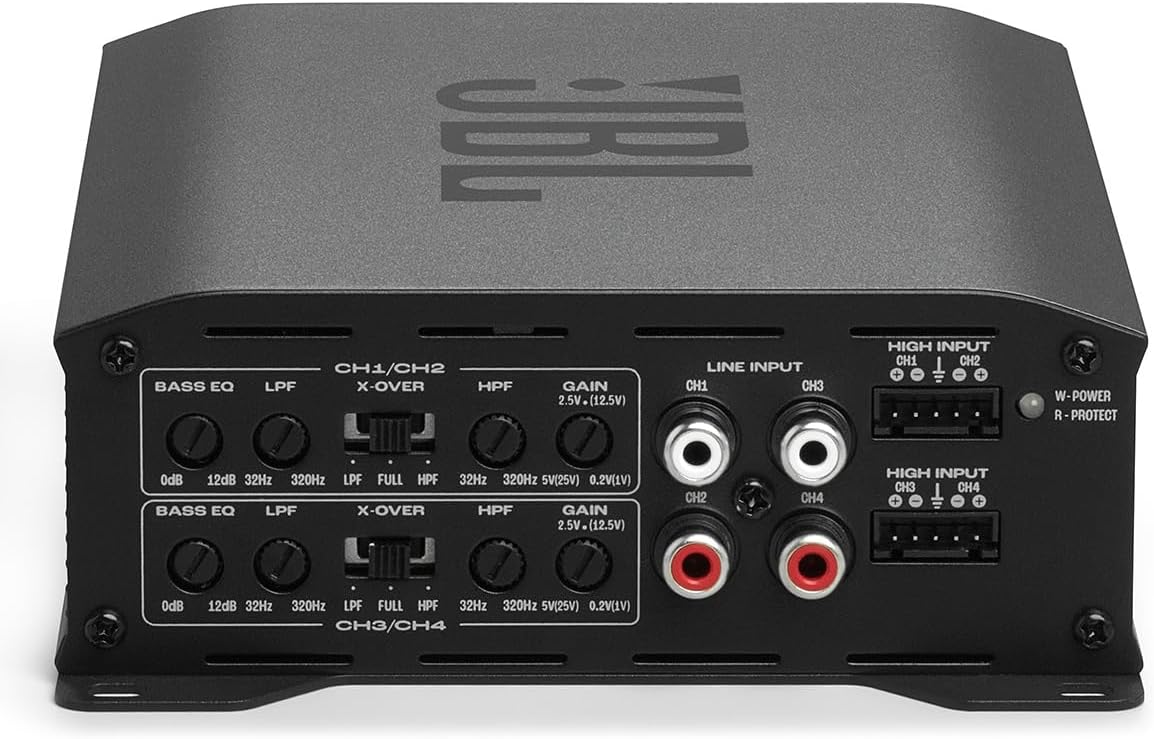
This image shows the control panel of the JBL Stage GT 60041 amplifier, featuring RCA inputs, high-level inputs, and adjustment knobs for Bass EQ, Crossover (X-OVER), High-Pass Filter (HPF), and Gain for channels 1/2 and 3/4.
5.1 Controls Overview
- GAIN (Input Level): This control matches the amplifier's input sensitivity to the output of your head unit. Start with the gain set to minimum and slowly increase it until you hear distortion, then back off slightly. The versatile input compatibility supports speaker-level inputs from 1Vrms to 25Vrms and low-level inputs from 200mVrms to 5Vrms.
- BASS EQ: Adjusts the bass boost at 45Hz from 0dB to 12dB. Use this to customize your bass response to optimize low-end output for different setups and enclosures.
- X-OVER (Crossover Switch): Selects the crossover mode:
- FULL: Full range audio output.
- LPF (Low-Pass Filter): Allows only frequencies below the set point to pass through, typically used for subwoofers.
- HPF (High-Pass Filter): Allows only frequencies above the set point to pass through, typically used for full-range speakers or tweeters.
- LPF/HPF Frequency Control: Adjusts the cutoff frequency for the Low-Pass or High-Pass filter, ranging from 32Hz to 320Hz.
6. Maintenance
The JBL Stage GT 60041 amplifier requires minimal maintenance. Follow these guidelines to keep it in optimal condition:
- Cleaning: Use a soft, dry cloth to wipe the amplifier's exterior. Avoid using harsh chemicals or abrasive cleaners.
- Ventilation: Ensure that the amplifier's cooling fins are free from dust and debris to maintain proper airflow.
- Connections: Periodically check all wiring connections to ensure they are secure and free from corrosion.
7. Troubleshooting
If you experience issues with your amplifier, refer to the table below for common problems and solutions. The amplifier includes comprehensive protection against shorts, overheating, and voltage irregularities.
| Problem | Possible Cause | Solution |
|---|---|---|
| No Power / Amplifier Not Turning On | Blown fuse; Loose power/ground/remote wire; Faulty remote turn-on signal. | Check amplifier fuses and in-line fuse; Verify all power, ground, and remote connections are secure; Test remote wire for +12V when head unit is on. |
| No Sound Output | Loose RCA/high-level input cables; Incorrect gain setting; Speaker wires disconnected; Amplifier in protection mode. | Check input cable connections; Adjust gain setting; Verify speaker wire connections and polarity; Check for protection light (R-PROTECT) and resolve underlying issue (e.g., shorted speaker wire). |
| Distorted Sound | Gain set too high; Incorrect crossover settings; Poor speaker connection; Damaged speaker. | Reduce gain setting; Adjust LPF/HPF settings appropriately; Check speaker wiring; Test speakers. |
| Amplifier Overheating | Insufficient ventilation; Impedance too low; Prolonged high-volume use. | Ensure adequate airflow around the amplifier; Verify speaker impedance matches amplifier's capabilities; Reduce volume or allow amplifier to cool. |
8. Specifications
Detailed technical specifications for the JBL Stage GT 60041 4-Channel Car Amplifier:

The underside of the JBL Stage GT 60041 amplifier, displaying the product label with model number, input specifications, and regulatory compliance information.
| Feature | Specification |
|---|---|
| Model Number | JBLSTAGEGT60041AM |
| Item Weight | 10 pounds |
| Package Dimensions | 18 x 14 x 8 inches |
| Input Voltage | DC 12V |
| Fuses | 2 x 20A |
| Low-Level Input Sensitivity | 200mVrms to 5Vrms |
| High-Level Input Sensitivity | 1Vrms to 25Vrms |
| Bass EQ Boost | 0dB to 12dB at 45Hz |
| Crossover Frequency Range | 32Hz - 320Hz (LPF/HPF) |
9. Warranty and Support
The JBL Stage GT 60041 4-Channel Car Amplifier comes with a 1-Year Manufacturer Warranty. This warranty covers defects in materials and workmanship under normal use. Please retain your proof of purchase for warranty claims.
For technical support, warranty service, or additional product information, please visit the official JBL website or contact their customer service department. You can find more information and support resources by visiting the JBL Store on Amazon.


