Introduction
Thank you for choosing the COSTWAY Lightweight 3-Wheel Aluminum Rollator Walker. This manual provides essential information for the safe and effective use of your new mobility aid. Please read all instructions carefully before assembly and use. Keep this manual for future reference.
Safety Information
- Always ensure all parts are securely fastened before use.
- Do not exceed the maximum user weight of 136 kg (300 lbs).
- Regularly check the brakes and wheels for proper function.
- Use caution on uneven surfaces or inclines.
- Keep hands and fingers clear of moving parts during folding and unfolding.
Setup and Assembly
The COSTWAY 3-Wheel Rollator is designed for easy assembly with minimal effort and no special tools required. Follow these steps to prepare your rollator for use.
Unfolding the Rollator
- Carefully remove the rollator from its packaging.
- Place the rollator on a flat, stable surface.
- Gently pull the handles apart until the frame locks into its open position. Ensure all locking mechanisms are engaged.
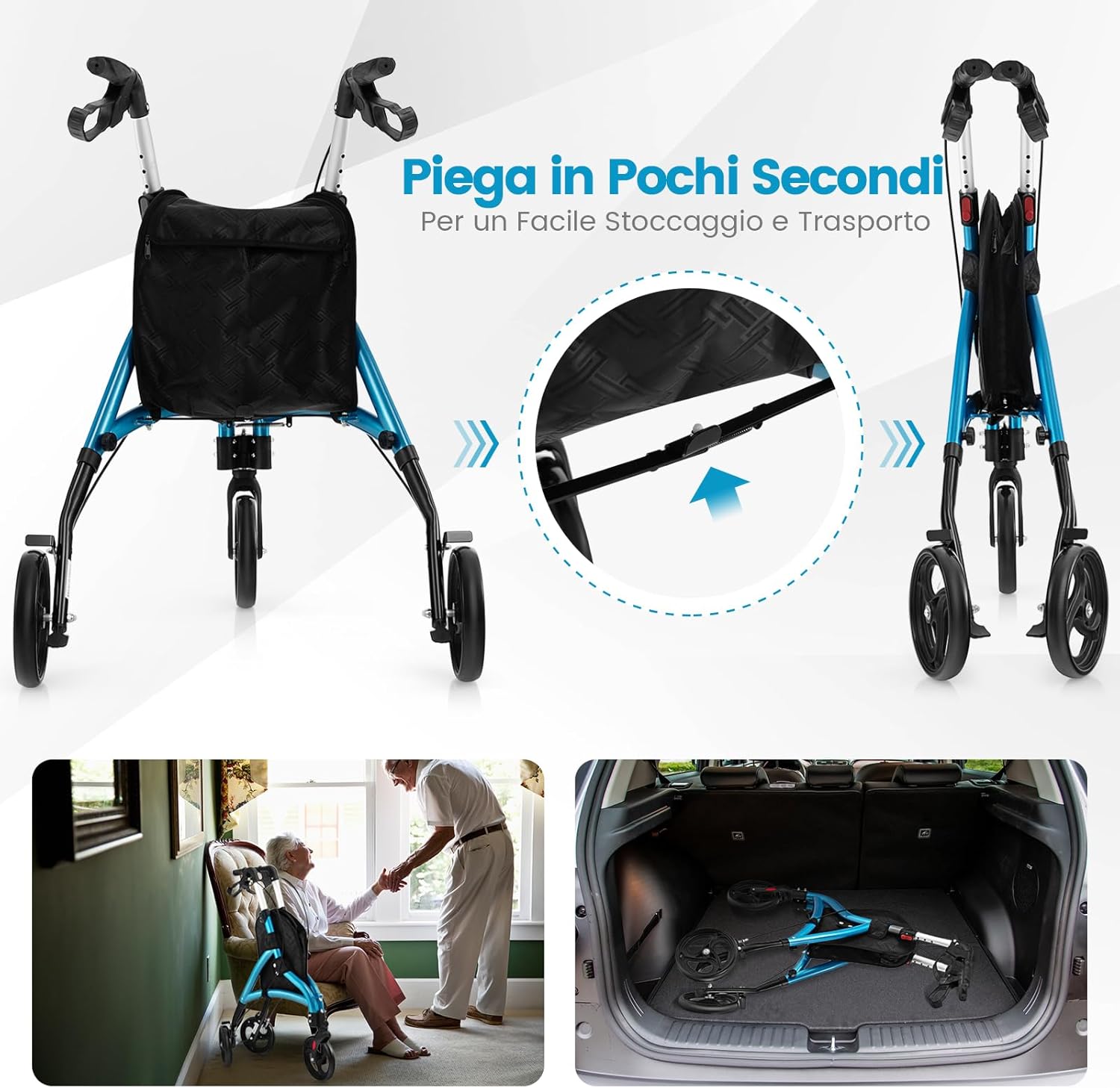
Figure 1: The rollator can be easily folded for storage and transport. The image shows the rollator both open and folded, highlighting the folding latch.
Adjusting Handle Height
The handles are adjustable to 6 different height levels (86 cm to 96 cm) to accommodate users of various heights. Proper handle height is crucial for comfort and stability.
- Locate the height adjustment buttons on the handle shafts.
- Press the button and slide the handle up or down to the desired height.
- Release the button and ensure the handle locks securely into place at the chosen height. Repeat for the other handle, ensuring both are at the same level.

Figure 2: Adjusting the handle height. Press the button to slide the handle to one of the 6 available positions between 86 cm and 96 cm.
Video 1: Detailed demonstration of the rollator's features, including assembly and height adjustment. (Duration: 3:12)
Operating Instructions
Using the Braking System
The rollator features an enhanced braking system with three modes for safety and control:
- Free Mode: The wheels roll freely without resistance. To engage, ensure the brake levers are in their neutral position.
- Slow Mode: For controlled descent on inclines or when needing reduced speed. To engage, gently pull the brake levers towards the handles.
- Parking Mode: To lock the rear wheels and prevent movement, push the brake levers down until they click into the locked position. This is essential when standing still or sitting.

Figure 3: The braking system offers three modes: free, slow, and parking. Ergonomic levers ensure a secure grip.
Navigating Different Surfaces
The rollator is equipped with large, anti-slip, silent, and shock-absorbing wheels (20 cm diameter) suitable for various terrains. The front wheel rotates 360° for easy maneuverability, and the rear wheels have brakes.
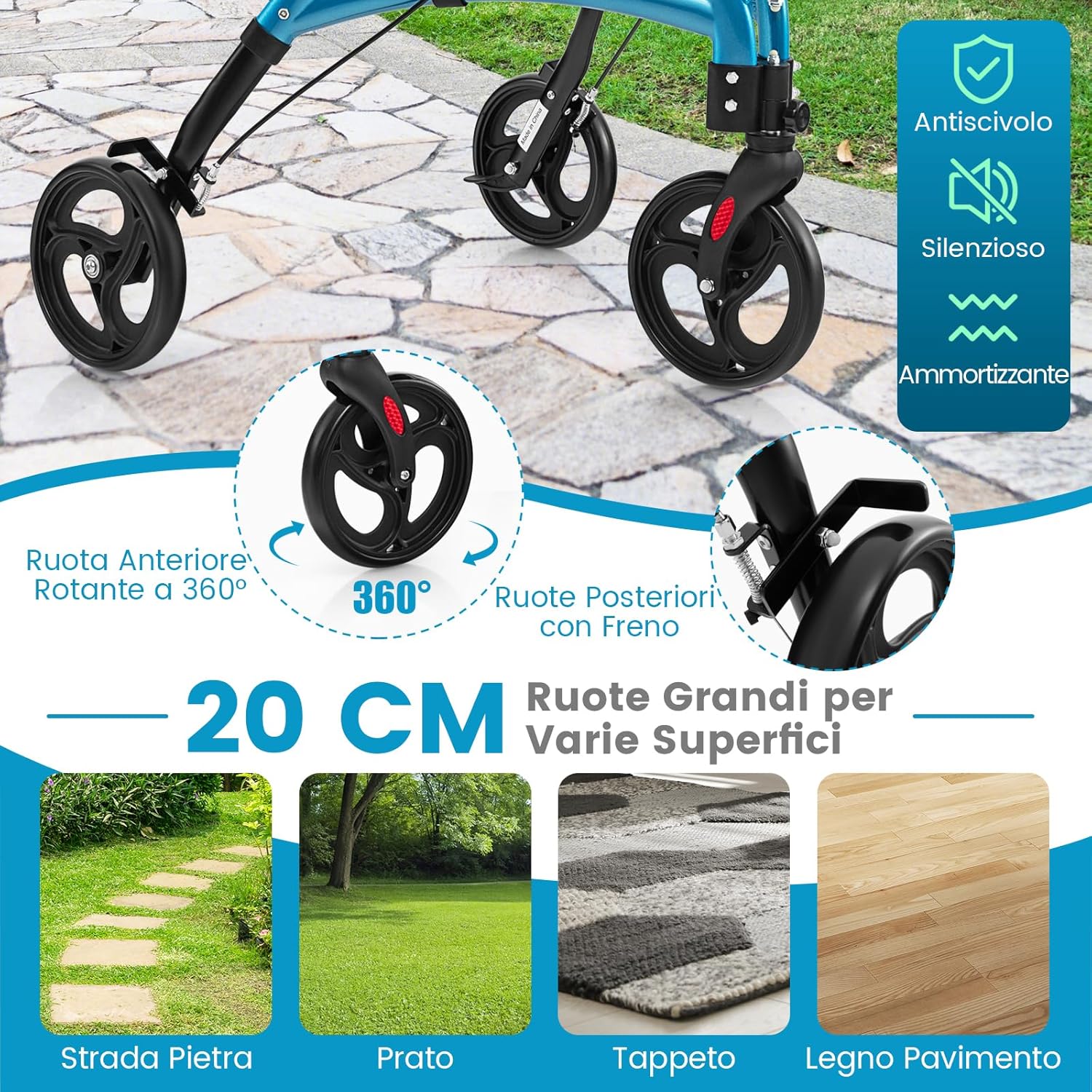
Figure 4: The 20 cm wheels are designed for stability and smooth movement across various surfaces.
Overcoming Obstacles with Foot Lift
To safely navigate small obstacles like curbs or door thresholds, use the integrated foot lift. This feature helps prevent tipping incidents.
- Approach the obstacle slowly.
- Place your foot on the foot lift lever located near the rear wheel.
- Gently press down to lift the front wheels over the obstacle, then guide the rear wheels over.
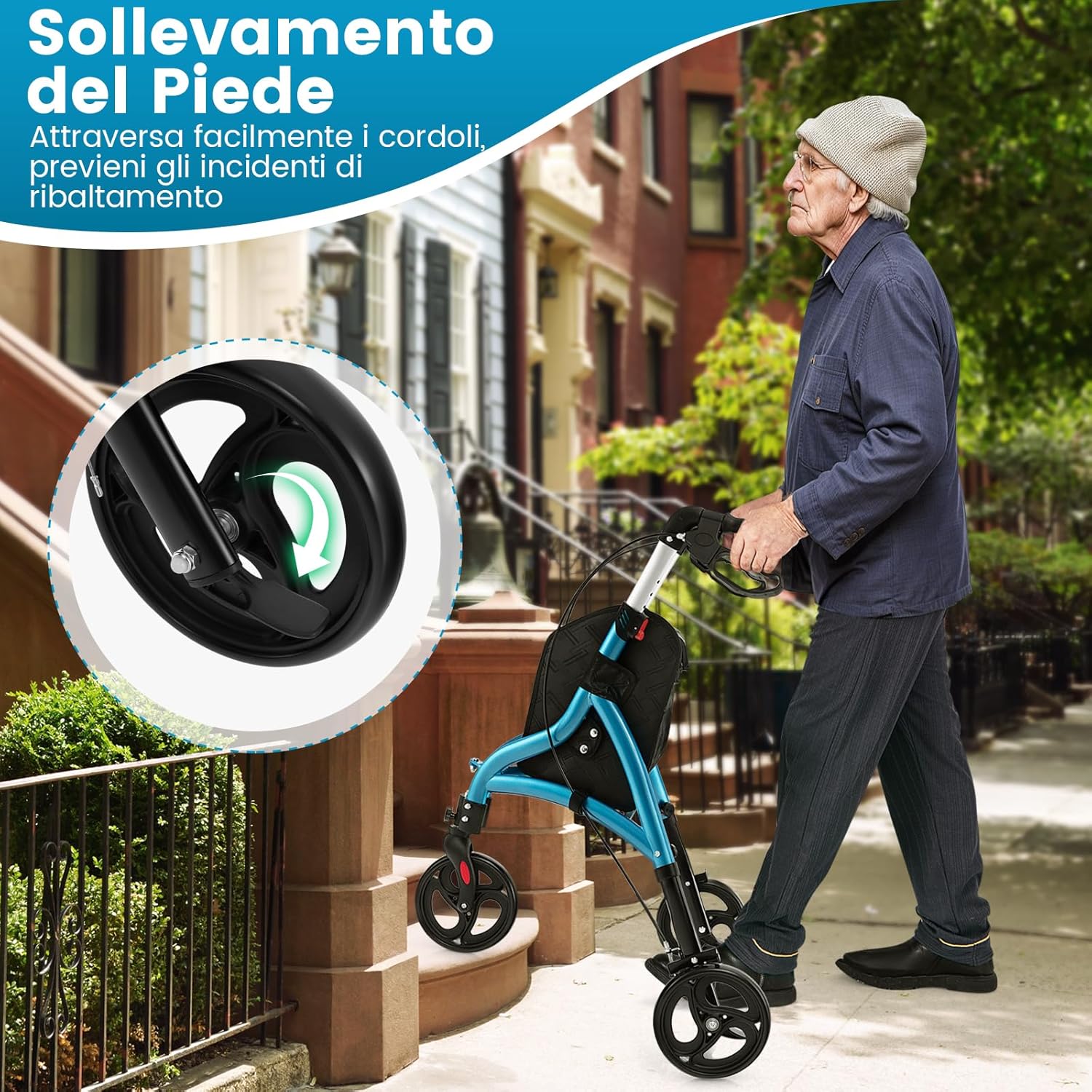
Figure 5: Using the foot lift to easily clear small obstacles and prevent tipping.
Using the Storage Bag
The rollator includes a convenient storage bag for personal items or shopping. Ensure the bag is securely attached and does not interfere with the wheels or braking system.

Figure 6: The integrated storage bag keeps essential items within reach.
Maintenance
Regular maintenance ensures the longevity and safe operation of your rollator.
- Cleaning: Wipe the frame with a damp cloth and mild detergent. Do not use abrasive cleaners.
- Brakes: Periodically check the brake cables and levers for wear and proper function. Ensure they engage and disengage smoothly.
- Wheels: Inspect wheels for wear, damage, and ensure they rotate freely. Remove any debris that may accumulate around the axles.
- Fasteners: Check all screws and bolts regularly to ensure they are tight. Do not overtighten.
- Storage: Store the rollator in a dry place, away from direct sunlight and extreme temperatures.
Troubleshooting
If you encounter any issues with your rollator, refer to the following common solutions:
| Problem | Possible Cause | Solution |
|---|---|---|
| Rollator does not fold/unfold smoothly. | Locking mechanism obstructed or stiff. | Check for debris. Apply a small amount of silicone lubricant to moving parts if necessary. Ensure all levers are fully disengaged/engaged. |
| Brakes are not engaging or are too loose/tight. | Brake cable adjustment needed or worn pads. | Inspect brake cables for damage. Adjust cable tension at the brake lever or wheel. If pads are worn, contact customer support for replacements. |
| Wheels are noisy or do not roll smoothly. | Debris in wheels, loose axle, or worn bearings. | Clean wheels and axles. Check that axle bolts are secure. If noise persists or wheels are damaged, contact customer support. |
| Handles slip after adjustment. | Adjustment button not fully engaged. | Ensure the height adjustment button clicks firmly into one of the designated holes. |
If the problem persists after attempting these solutions, please contact COSTWAY customer support.
Specifications
| Feature | Detail |
|---|---|
| Model Number | VT32247IT |
| Material | Aluminum frame, PVC wheels |
| Color | Blue |
| Unfolded Dimensions (L x W x H) | 78 x 67.5 x 86-96 cm (30.7 x 26.6 x 33.9-37.8 inches) |
| Folded Dimensions (L x W x H) | 75 x 27 x 86-96 cm (29.5 x 10.6 x 33.9-37.8 inches) |
| Wheel Diameter | 20 cm (7.9 inches) |
| Net Weight | 5.5 kg (12.1 lbs) |
| Maximum User Weight Capacity | 136 kg (300 lbs) |
| Handle Height Adjustment | 6 levels, 86-96 cm |
| Age Range Description | Adults/Elderly |
| Country of Origin | China |

Figure 7: Detailed product dimensions for the COSTWAY 3-Wheel Rollator Walker.
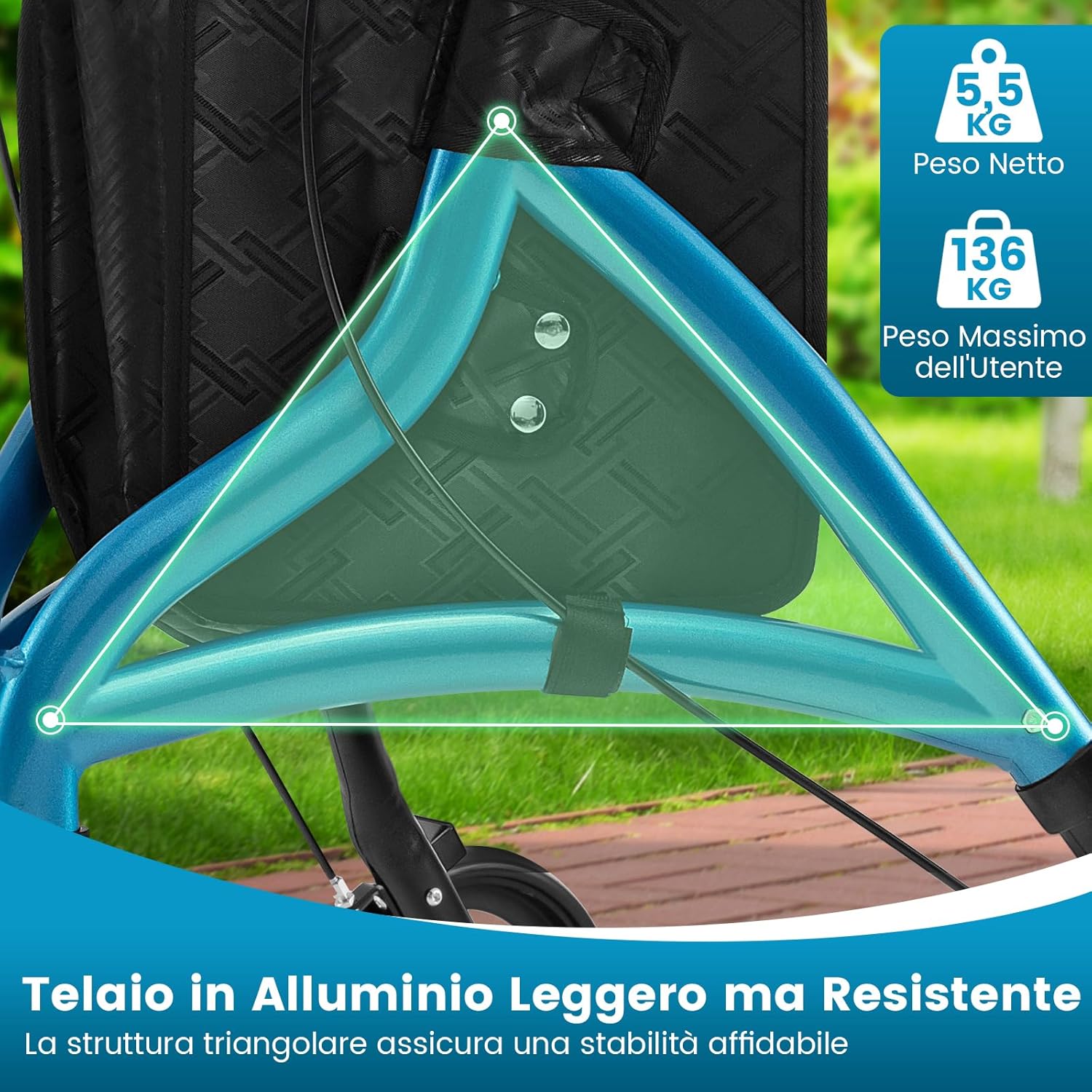
Figure 8: The lightweight yet robust aluminum frame with a triangular structure ensures reliable stability. Net weight: 5.5 kg, Max user weight: 136 kg.
Warranty and Support
For warranty information, product support, or to order replacement parts, please contact COSTWAY customer service. Refer to your purchase documentation for specific warranty terms and contact details.
Website: www.costway.com
Email: [Insert Customer Service Email Here]
Phone: [Insert Customer Service Phone Number Here]


