
1. Introduction
This manual provides comprehensive instructions for the safe and effective operation of your NICE-POWER SPS305 Adjustable DC Power Supply. This device is designed for applications requiring a stable and precise DC voltage and current, such as laboratory work, electronic repair, DIY projects, and battery charging. Please read this manual thoroughly before use and retain it for future reference.
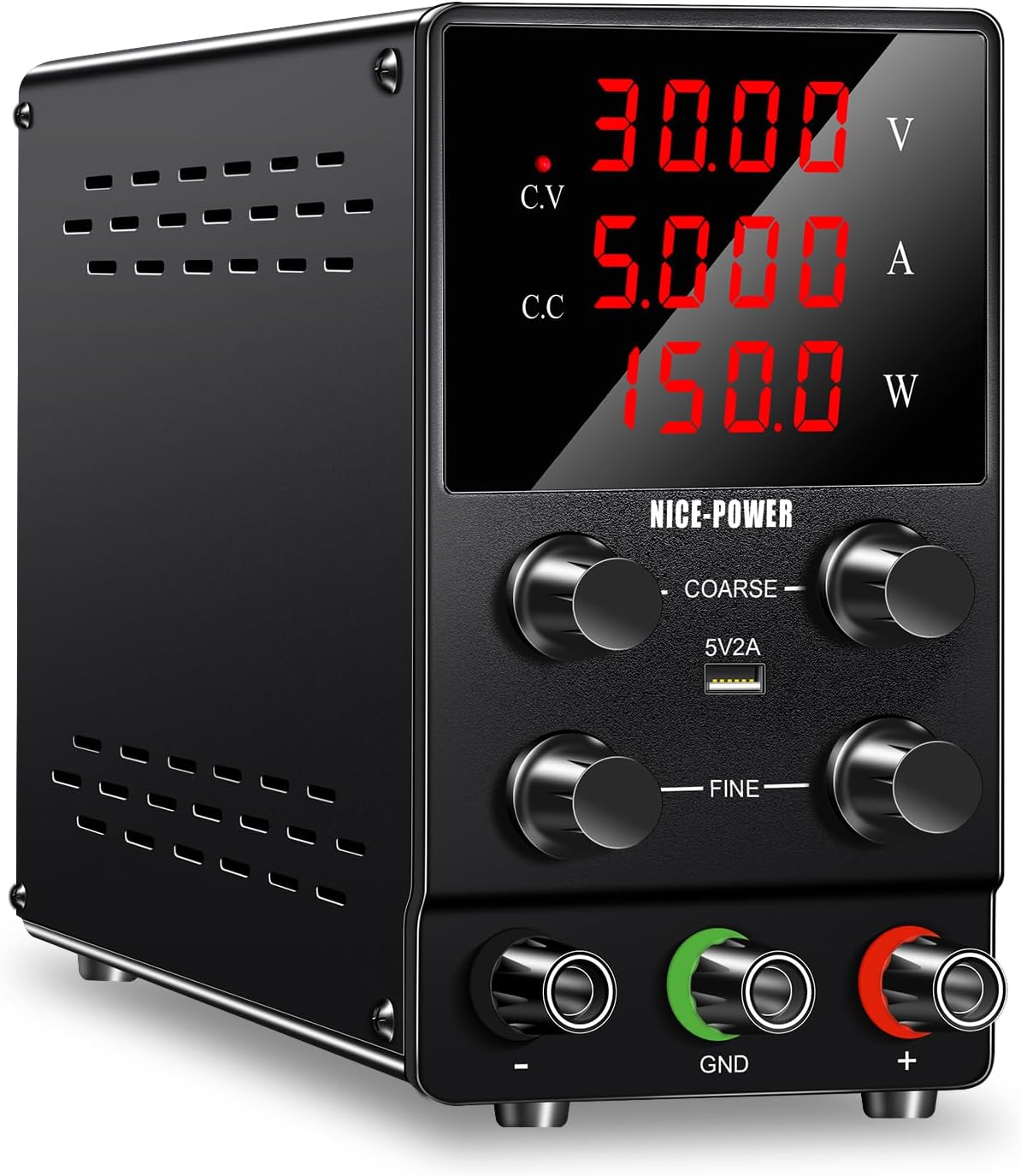
Figure 1: NICE-POWER SPS305 Adjustable DC Power Supply
2. Safety Information
Warning: Failure to follow these safety instructions may result in electric shock, fire, or damage to the device or connected equipment.
- Always ensure the DC power supply is turned on and the desired voltage/current is set before connecting the load. This prevents sudden voltage/current surges to your equipment.
- When setting the current limit, first adjust the voltage below 3V to avoid sparks. Then, short the output leads to set the current limit, and finally, unshort the leads and adjust the voltage to the desired level.
- Turn off the DC power supply and disconnect the power cord when not in use.
- Before cleaning the DC power supply, ensure the power cord is removed from the outlet.
- Do not use solvents containing hydrocarbons, chlorides, or similar chemicals for cleaning. Avoid detergents with abrasive ingredients.
- Be aware that the output voltage will gradually decrease after turning off the power, as capacitors discharge.
- This device is for indoor use only. Do not expose to rain or moisture.
- Do not operate the device if it has been dropped or damaged.
- Ensure proper ventilation around the unit to prevent overheating.

Figure 2: Multiple Security Protections
3. Product Features
- High Precision Output: Provides stable DC output with 0.01V and 0.001A accuracy and low ripple.
- 4-Digit LED Display: Clear, backlit display for precise readings of voltage, current, and power, even in low-light conditions.
- Automatic C.V/C.C Mode Switching: Automatically transitions between Constant Voltage (C.V) and Constant Current (C.C) modes based on load conditions.
- Comprehensive Protection: Includes Overvoltage Protection (OVP), Overcurrent Protection (OCP), Overheating Protection (OTP), Over Power Protection (OPP), Short Circuit Protection (SCP), and Leakage Protection.
- Integrated 5V/2A USB Port: Conveniently charge mobile phones, tablets, or other USB-powered devices.
- Intelligent Cooling Fan: Activates automatically when the internal temperature exceeds 50°C (122°F) to dissipate heat, reduce noise, and extend product lifespan.
- Durable Construction: All-metal body with a stable vertical design and shock absorber rubber feet for enhanced safety and stability.
- Compact and Portable: Lightweight design (2.6 lbs) with dimensions of 3.3 x 9.4 x 6.1 inches for easy transport.
- Certified Safety: CE & FCC certified for reliable and safe operation.
4. Package Contents
Upon opening the package, please verify that all items listed below are present and undamaged:
- NICE-POWER SPS305 DC Power Supply x 1
- Output Power Cord (Test Leads) x 1 set
- Input Power Cord (AC Power Cable) x 1
- User Manual x 1
5. Product Layout

Figure 3: Front Panel Overview
- Voltage Display (V): Shows the current output voltage.
- Current Display (A): Shows the current output amperage.
- Power Display (W): Shows the calculated output power.
- C.V Indicator: Illuminates when the unit is operating in Constant Voltage mode.
- C.C Indicator: Illuminates when the unit is operating in Constant Current mode.
- Coarse Voltage Knob: For large adjustments of the output voltage.
- Fine Voltage Knob: For precise, small adjustments of the output voltage.
- Coarse Current Knob: For large adjustments of the output current limit.
- Fine Current Knob: For precise, small adjustments of the output current limit.
- 5V/2A USB Port: For charging external USB devices.
- Output Negative (-) Terminal: Connects to the negative lead of the load.
- GND Terminal: Ground connection.
- Output Positive (+) Terminal: Connects to the positive lead of the load.

Figure 4: Rear Panel Overview
- Intelligent Cooling Fan: Automatically activates to cool the unit.
- Power Switch: Main ON/OFF switch for the unit.
- AC Power Input: Connects the supplied AC power cord.
- Spare Fuse Holder: Contains a replaceable fuse for protection.
6. Setup Instructions
- Placement: Place the power supply on a stable, level surface with adequate ventilation. Ensure no objects obstruct the cooling fan on the rear panel.
- Power Connection: Connect the supplied AC input power cord to the AC power input socket on the rear of the unit. Plug the other end into a standard wall outlet (110V AC).
- Initial Power On: Ensure the power switch on the rear panel is in the OFF position. Turn on the power switch. The LED display should illuminate.
- Output Lead Connection: Connect the red output power cord (test lead) to the red (+) terminal and the black output power cord to the black (-) terminal on the front panel. If grounding is required, connect the green lead to the GND terminal.
7. Operating Instructions
7.1 Setting Voltage and Current
It is crucial to set the desired voltage and current limit before connecting your load to prevent damage.
- Power On: Turn on the power supply using the switch on the rear panel.
- Set Voltage: Adjust the Coarse Voltage knob and Fine Voltage knob to achieve the desired output voltage. Observe the Voltage Display (V).
- Set Current Limit:
- First, reduce the output voltage to below 3V using the voltage knobs.
- Carefully short the red (+) and black (-) output terminals using the test leads. The C.C indicator should illuminate.
- Adjust the Coarse Current knob and Fine Current knob to set the desired maximum current limit. Observe the Current Display (A).
- Remove the short circuit from the output terminals. The C.C indicator should turn off, and the C.V indicator should illuminate.
- Now, adjust the voltage back to your desired operating voltage.

Figure 5: Coarse and Fine Adjustment Knobs
- Connect Load: With the voltage and current limit set, connect your load to the output terminals. The power supply will now deliver the set voltage, and the current will be limited to the preset maximum if the load draws more.
- Monitoring: Continuously monitor the Voltage, Current, and Power displays during operation.
7.2 Using the 5V/2A USB Port
The front panel features a dedicated 5V/2A USB port for charging compatible devices.
- Ensure the power supply is turned on.
- Connect your USB device (e.g., smartphone, tablet) to the 5V/2A USB port using a compatible USB cable.
- The device will begin charging. This port operates independently of the main adjustable DC output.

Figure 6: USB Charging Functionality
8. Maintenance
- Cleaning: Disconnect the power supply from the AC outlet before cleaning. Use a soft, dry cloth to wipe the exterior. Do not use liquid cleaners or sprays directly on the unit.
- Ventilation: Regularly check that the cooling fan and ventilation openings are free from dust and debris. A clogged fan can lead to overheating and reduced performance.
- Fuse Replacement: If the unit fails to power on, check the fuse located in the fuse holder on the rear panel. Replace it with a fuse of the same type and rating if necessary.
- Storage: Store the power supply in a cool, dry place away from direct sunlight and extreme temperatures when not in use for extended periods.
9. Troubleshooting
| Problem | Possible Cause | Solution |
|---|---|---|
| No power/Display off | Power cord disconnected, power switch off, blown fuse. | Check power cord connection, ensure power switch is ON, replace fuse if blown. |
| No output voltage/current | Output terminals not connected, voltage/current set to zero, protection activated. | Ensure leads are connected, adjust voltage/current knobs, check for short circuits in the load. |
| C.C indicator always on | Load resistance too low, output current limit set too low. | Increase current limit, check load for short circuit or very low resistance. |
| Unit overheats, fan runs constantly | Poor ventilation, prolonged high load operation. | Ensure adequate space around the unit, clean fan vents, reduce load if possible. |
10. Specifications
| Parameter | Value |
|---|---|
| Model | SPS305 |
| Output Voltage | 0-30V DC (Adjustable) |
| Output Current | 0-5A DC (Adjustable) |
| Output Power | 150W |
| Input Voltage | 110V AC (Minimum) |
| Voltage Display Accuracy | 0.01V |
| Current Display Accuracy | 0.001A |
| USB Output | 5V/2A |
| Cooling Method | Intelligent Air Cooling |
| Product Dimensions (L x W x H) | 9.4 x 3.3 x 5.9 inches |
| Item Weight | 3.74 pounds |
| Certifications | CE, FCC |
11. Warranty and Support
NICE-POWER is committed to providing quality products and customer satisfaction. This product undergoes thorough inspection before shipment to ensure its quality.
If you encounter any issues or have questions regarding your NICE-POWER SPS305 Adjustable DC Power Supply, please contact our customer support team. We aim to respond to all inquiries within 24 hours.
Please retain your purchase receipt for any warranty claims.


