
1. Introduction
Welcome to the user manual for your JBL Vibe Beam 2 True Wireless Noise Cancelling Earbuds. These earbuds are designed to provide a superior audio experience with JBL Pure Bass Sound, Active Noise Cancelling, and Smart Ambient technology. With up to 40 hours of playback and IP54 dust and water resistance, they are perfect for daily use, whether for entertainment, fitness, or calls.
2. What's in the Box
Carefully unpack your JBL Vibe Beam 2 earbuds. The package should contain the following items:
- 1 x JBL Vibe Beam 2 headphones
- 1 x Charging case
- 1 x Type-C USB charging cable
- 3 sizes of ear tips (S, M, L)
- 1 x Warranty / Warning (W / !) document
- 1 x Product Quick Start Guide / Safety Sheet (S / i)

Image: JBL Vibe Beam 2 earbuds (blue) with their charging case, showcasing the product's design and compact form factor.

Image: The USB-C charging cable and the three different sizes of ear tips included with the earbuds, allowing for a customized fit.
3. Setup
3.1 Initial Charging
Before first use, fully charge the earbuds and the charging case. Connect the Type-C USB charging cable to the charging case and a power source. The charging indicators on the case will show the charging status. A full charge takes approximately 2 hours.
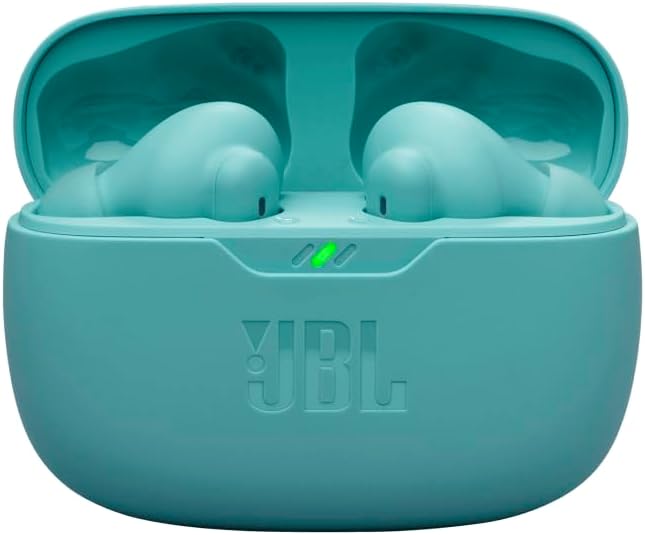
Image: A close-up view of the JBL Vibe Beam 2 earbuds nestled in their blue charging case, indicating the charging process.
3.2 Fitting the Earbuds
For optimal sound quality and noise cancellation, it is crucial to select the correct ear tip size and ensure a secure fit. Try all three sizes (S, M, L) to find the one that provides the best seal and comfort for your ears.
- Insert the earbud into your ear canal.
- Gently twist and adjust until it feels snug and comfortable.
- Test the fit by playing some audio; the bass should be clear and pronounced.

Image: A person demonstrating the proper way to wear the JBL Vibe Beam 2 earbuds, highlighting their ergonomic design.
3.3 Bluetooth Pairing
To connect your earbuds to a device:
- Open the charging case. The earbuds will automatically enter pairing mode.
- On your device (smartphone, tablet, etc.), go to Bluetooth settings.
- Select "JBL Vibe Beam 2" from the list of available devices.
- Once connected, you will hear an audible confirmation.
4. Operating Instructions
4.1 Power On/Off
The earbuds automatically power on when removed from the charging case and power off when placed back into the case and the lid is closed.
4.2 Music Playback
Control your music using the touch controls on the earbuds:
- Play/Pause: Tap once on either earbud.
- Next Track: Double-tap the right earbud.
- Previous Track: Triple-tap the left earbud.
4.3 Call Management
The JBL Vibe Beam 2 features 4 microphones for crisp, clear calls, even in noisy environments.
- Answer/End Call: Tap once on either earbud.
- Reject Call: Press and hold on either earbud for 2 seconds.
4.4 Active Noise Cancelling (ANC) & Smart Ambient
These features allow you to control how much of your surroundings you hear:
- Active Noise Cancelling (ANC): Reduces external noise for an immersive listening experience.
- Smart Ambient: Allows you to hear your surroundings and engage in conversations without removing your earbuds.
Switch between ANC, Smart Ambient, and Off modes by tapping and holding the left earbud (default setting, customizable via app).

Image: An infographic summarizing key features such as JBL Pure Bass Sound, Active Noise Cancelling with Smart Ambient, 4 mics for calls, and IP54 water and dust resistance.

Image: A close-up of a person wearing a JBL Vibe Beam 2 earbud, illustrating its discreet and comfortable fit.
5. JBL Headphones App
Enhance your experience by downloading the free JBL Headphones App. The app allows you to:
- Customize your sound with personalized EQ settings.
- Receive useful voice prompts (e.g., low battery).
- Access Relax Mode with five peaceful sounds for unwinding.
- Customize touch controls.
6. Maintenance
6.1 Cleaning
Regular cleaning helps maintain the performance and longevity of your earbuds:
- Gently wipe the earbuds and charging case with a soft, dry, lint-free cloth.
- Remove ear tips and clean them with mild soap and water, then dry thoroughly before reattaching.
- Do not use harsh chemicals or abrasive materials.
6.2 Water and Dust Resistance (IP54)
The JBL Vibe Beam 2 earbuds are IP54 rated, meaning they are protected against dust ingress and splashing water from any direction. This makes them suitable for workouts and outdoor activities. However, they are not designed for submersion in water. Ensure earbuds are dry before placing them back in the charging case.
6.3 Storage
When not in use, store the earbuds in their charging case to protect them and keep them charged.
7. Troubleshooting
If you encounter issues with your JBL Vibe Beam 2 earbuds, try the following solutions:
7.1 No Sound or Low Volume
- Ensure the earbuds are properly charged.
- Check the volume level on both your device and the earbuds.
- Make sure the earbuds are securely connected to your device via Bluetooth.
- Clean any debris from the earbud nozzles and ear tips.
7.2 Pairing Issues
- Ensure Bluetooth is enabled on your device.
- Place the earbuds back in the case, close the lid, wait a few seconds, then open it again to re-enter pairing mode.
- Forget/remove "JBL Vibe Beam 2" from your device's Bluetooth list and try pairing again.
- Ensure the earbuds are not connected to another device.
7.3 Charging Issues
- Verify the charging cable is securely connected to both the case and the power source.
- Ensure the charging contacts on the earbuds and inside the case are clean and free of debris.
- Try a different charging cable or power adapter.
7.4 One Earbud Not Working
- Place both earbuds back in the charging case, close the lid, and then open it again.
- Ensure both earbuds are charged.
- Perform a factory reset (refer to the JBL Headphones App or JBL support for specific instructions if needed).
8. Specifications
| Feature | Detail |
|---|---|
| Model Name | JBL Vibe Beam 2 |
| Connectivity Technology | Wireless (Bluetooth) |
| Battery Life | Up to 40 Hours (with charging case, ANC off) |
| Charging Time | 2 Hours (from empty) |
| Water & Dust Resistance | IP54 |
| Microphones | 4 (for clear calls) |
| Earbud Weight | Approx. 4.96 grams per earbud |
| Product Dimensions | 2.53 x 1.02 x 1.89 inches (charging case) |
| UPC | 724129380453 |
9. Warranty and Support
Your JBL Vibe Beam 2 earbuds come with a standard manufacturer's warranty. Please refer to the Warranty / Warning (W / !) document included in your package for detailed terms and conditions, including warranty period and coverage.
For further assistance, technical support, or warranty claims, please visit the official JBL support website or contact their customer service. Keep your proof of purchase for warranty validation.


