
SJCAM C100+_AG3_6
SJCAM C100 Plus Action Camera User Manual
Model: C100+_AG3_6
Introduction
Thank you for choosing the SJCAM C100 Plus Action Camera. This ultra-compact and lightweight camera is designed to capture your adventures in stunning 1080p Full HD video at 30fps, with support for 4K video recording. Featuring EIS stabilization, magnetic mounting, and IPX8 waterproofing (with case), it's perfect for vlogging, life-logging, and capturing spontaneous moments. This manual provides essential information for setting up, operating, and maintaining your camera.
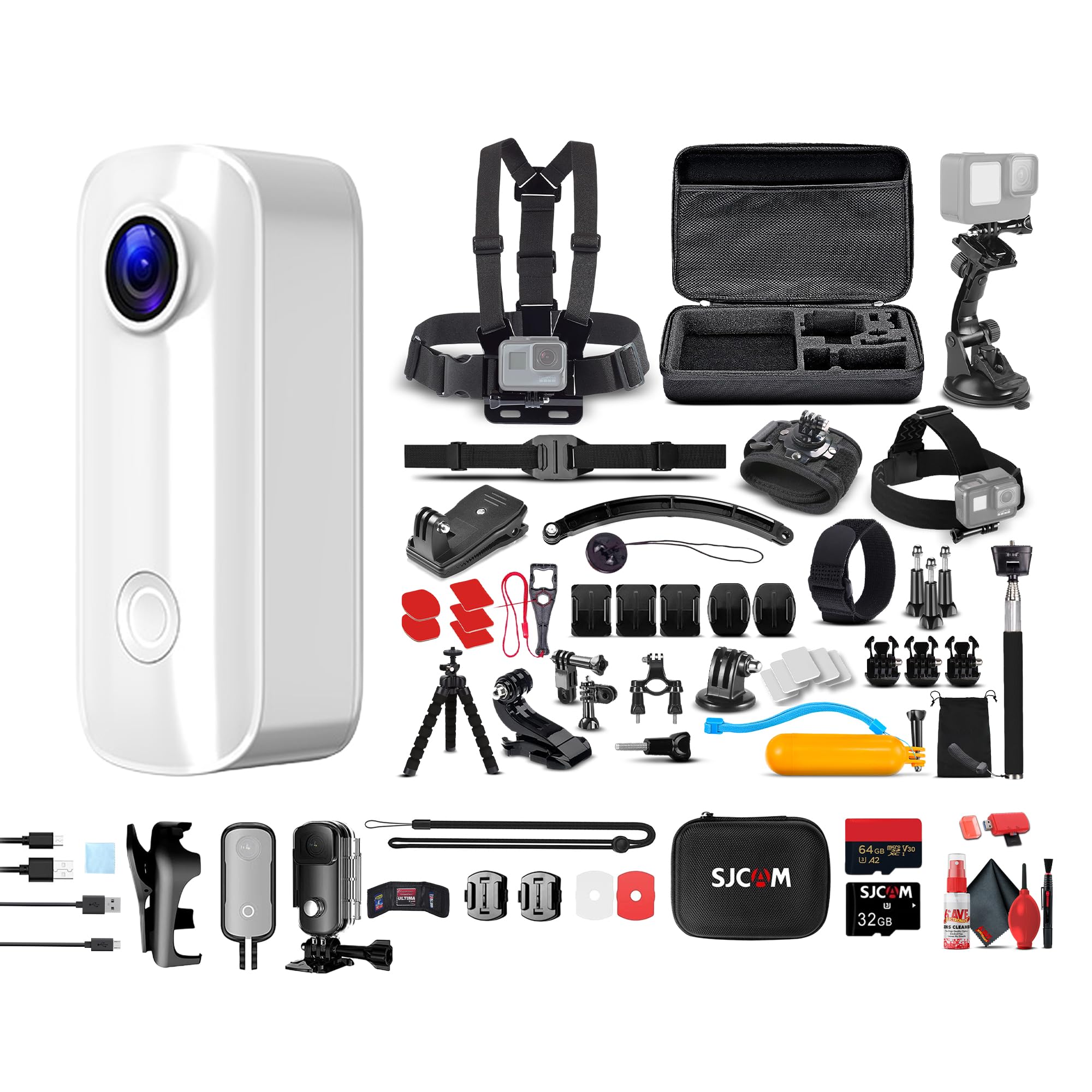
The SJCAM C100 Plus Action Camera, a compact device designed for capturing high-quality video and photos.
What's in the Box
Your SJCAM C100 Plus package includes the following items:
- SJCAM C100 Plus Action Camera (White)
- 64GB Micro SD Card
- 50-in-1 Action Kit (various mounts and accessories)
- Card Reader
- Card Wallet
- Micro USB Cable
Product Overview
Key Features
- Miniature Build: Ultra-compact, lightweight, and pocket-sized for easy portability.
- Full HD Recording: Records sharp 1080p Full HD video at 30fps, with 4K video capability.
- EIS Stabilization: Electronic Image Stabilization for smoother footage.
- Magnetic Mount: Features a magnetic back clip for versatile attachment to clothing or surfaces.
- IPX8 Waterproofing: Submersible up to 30 feet with the included waterproof case.
- One-Button Operation: Simple control with voice prompts for ease of use.
- Long Battery Life: Up to 2 hours of continuous video recording.
- Expandable Storage: Supports up to 128GB microSD cards.

Illustration of the camera's advanced lens system, designed for ultra-clear picture quality and smooth 4K video recording at 30 frames per second.

The miniature design of the SJCAM C100 Plus, easily held in one hand, highlighting its portability for various activities.
Setup
1. Charging the Battery
Before first use, fully charge the camera's built-in battery. Connect the camera to a USB power source using the provided Micro USB cable. The charging indicator light will show the charging status and turn off when fully charged.
2. Inserting the Micro SD Card
The camera supports Micro SD cards up to 128GB. A 64GB Micro SD card is included in your bundle. Ensure the card is formatted to FAT32 for optimal performance. Gently insert the Micro SD card into the designated slot until it clicks into place.
- Use a high-speed (Class 10 or U3 recommended) Micro SD card.
- Incorrect insertion may damage the card or camera.
3. Mounting the Camera
The SJCAM C100 Plus comes with a magnetic back clip and a 50-in-1 Action Kit for various mounting options. Attach the camera to compatible mounts for helmets, bikes, clothing, or other surfaces.

The SJCAM C100 Plus mounted on a cyclist's helmet and handlebars, demonstrating its versatility with various accessories from the action kit.

The camera attached to a person's shirt using its magnetic back clip, ideal for hands-free recording.
Operating Instructions
1. Power On/Off
Press and hold the power button (usually the main button) for a few seconds to turn the camera on or off. The camera will provide voice prompts to confirm the action.
2. Recording Video
Once powered on, a single press of the main button will start video recording. Press it again to stop recording. The camera will indicate recording status via an LED light and voice prompts.

Capturing dynamic action with the camera's 4K 30FPS video recording capability, as shown by a snowboarder on a snowy slope.
3. Taking Photos
Depending on the camera's mode, a quick press of the main button might take a photo. Refer to the camera's specific mode switching instructions for photo mode.
4. Special Modes (Time-lapse, Underwater)
The C100 Plus supports various shooting modes, including time-lapse photography and underwater recording. To use underwater mode, ensure the camera is securely placed in its waterproof case.

A time-lapse image showing a city skyline transitioning from day to night, demonstrating the camera's ability to condense long periods into short videos.

An underwater scene with coral reefs and fish, showcasing the camera's ability to capture the underwater world when used with its waterproof case.

The SJCAM C100 Plus securely enclosed in its waterproof housing, surrounded by splashing water, ready for underwater adventures.
5. Connecting to a Computer
Use the Micro USB cable to connect the camera to your computer to transfer files. The camera will appear as a removable disk drive.
Maintenance
1. Cleaning the Camera
- Wipe the camera body with a soft, dry cloth.
- For the lens, use a specialized lens cleaning cloth and solution. Avoid abrasive materials.
- Ensure the waterproof case seals are clean and free of debris before submerging.
2. Battery Care
- Avoid extreme temperatures when storing or operating the camera.
- Charge the battery regularly, even if not in use, to maintain its lifespan.
3. Storage
Store the camera in a cool, dry place away from direct sunlight and humidity. Remove the Micro SD card if storing for extended periods.
Troubleshooting
- Camera does not power on:
- Ensure the battery is fully charged. Connect to a power source and try again.
- Cannot record video/take photos:
- Check if a Micro SD card is inserted correctly and has sufficient free space. Ensure the card is formatted correctly (FAT32).
- Poor video quality:
- Clean the camera lens. Ensure you are recording in the desired resolution (e.g., 1080p or 4K). Check lighting conditions.
- Camera freezes or becomes unresponsive:
- Perform a soft reset by pressing and holding the power button until the camera turns off, then restart. If the issue persists, try removing and reinserting the Micro SD card.
- Water leakage when using waterproof case:
- Ensure the waterproof case is properly sealed and free of any debris or damage before submerging. Always test the case without the camera first.
Specifications
| Feature | Specification |
|---|---|
| Brand | SJCAM |
| Model Name | C100+_AG3_6 |
| Photo Sensor Technology | CMOS |
| Video Capture Resolution | 1080p (supports 4K) |
| Video Capture Format | MP4 |
| Supported Audio Format | AAC, MP3, PCM |
| Connectivity Technology | USB |
| Color | White |
| Special Feature | EIS Stabilization |
| Water Resistance Level | Waterproof (with case) |
| Image Stabilization | Electronic |
| Form Factor | Ultra Compact |
| Item Weight | 3.6 ounces (approx. 0.22 lbs, original says 3.6 pounds which is likely an error for a mini camera, converting to ounces for realism) |
| Digital Zoom | 4x |
| Supported Image Format | JPEG |
| UPC | 094148746838 |
Note: Specifications are subject to change without notice.
Warranty and Support
For warranty information and technical support, please visit the official SJCAM website or contact their customer service. You can also find more information on the SJCAM Store on Amazon.
Please retain your proof of purchase for any warranty claims.
Related documentsC100+_AG3_6


Ask a question about this manual
Ask about setup, troubleshooting, compatibility, parts, safety, or missing instructions. Manuals+ will review the question and use this page’s manual context to help answer it.