Download PDFFree PDF. The Save button below keeps a bookmark and private notes in your account.
Fujifilm Instax Mini SE Instant Film Camera User Manual
Model: Mini SE
1. Introduction
The Fujifilm Instax Mini SE is a compact instant film camera designed for ease of use and immediate photo development. It features exposure control adjustment and simple point-and-shoot functionality, producing credit-card-sized prints. This manual provides essential information for setting up, operating, and maintaining your camera.
2. Important Safety Instructions
Do not disassemble, modify, or attempt to repair the camera yourself.
Keep the camera and film away from water and moisture.
Avoid exposing the camera to extreme temperatures or direct sunlight for extended periods.
Use only specified batteries and Instax Mini film.
Keep film and batteries out of reach of small children.
Dispose of batteries and film cartridges according to local regulations.
3. What's in the Box
Fujifilm Instax Mini SE Camera
Camera Strap
User Manual (this document)
(Batteries and film are typically sold separately)
4. Camera Components
Familiarize yourself with the key parts of your Instax Mini SE camera:
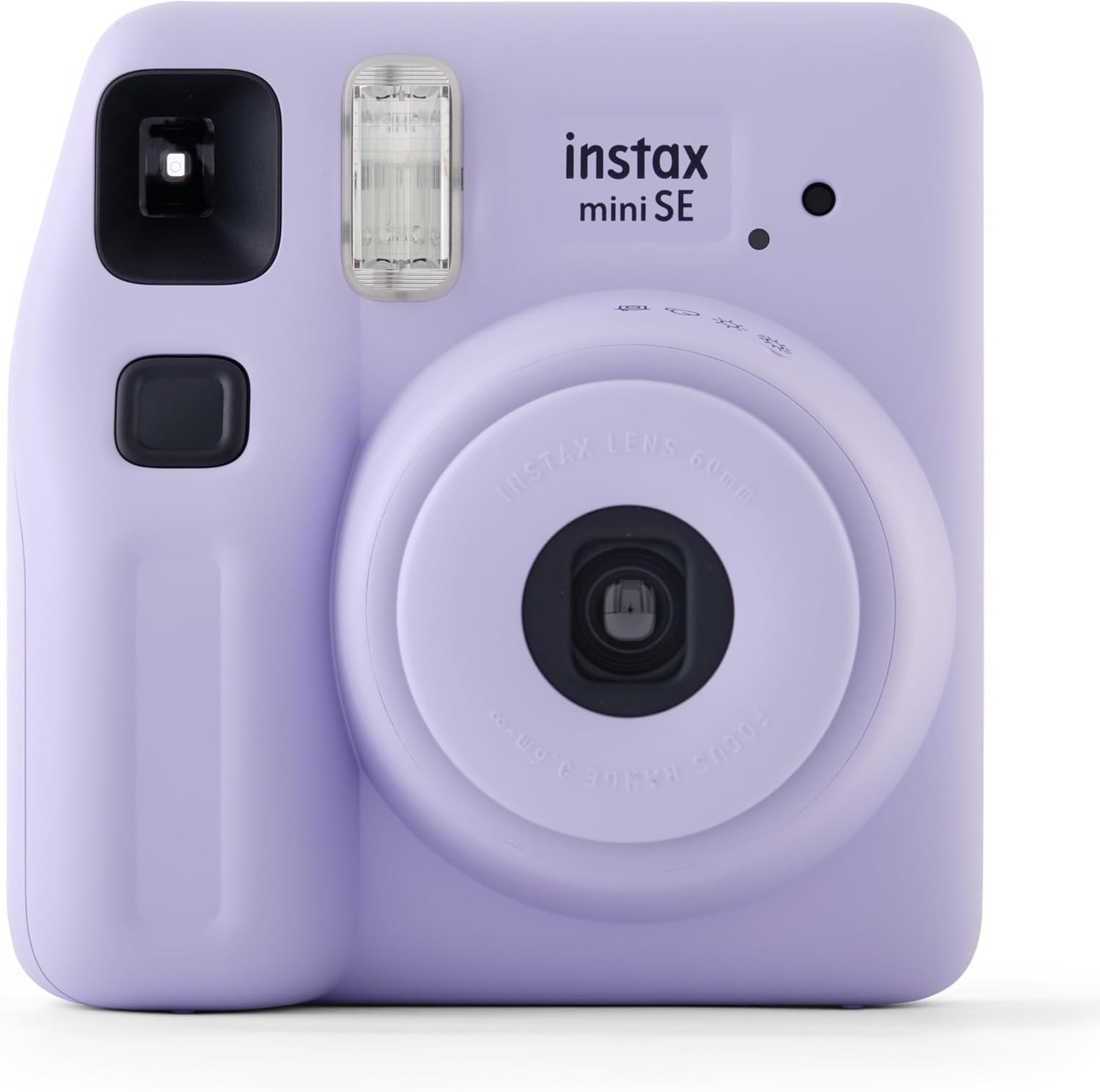
Front view of the Fujifilm Instax Mini SE camera in purple. Visible components include the lens, flash, viewfinder, shutter button, and the 'instax mini SE' branding.
Shutter Button: Press to take a photo.
Flash: Provides illumination in low-light conditions.
Viewfinder: Used for framing your shots.
Lens: The primary optical component for capturing images.
Lens Ring/Power Switch: Rotate to turn the camera on/off and adjust exposure settings.
Film Ejection Slot: Where developed photos emerge.
Film Door Latch: Opens the compartment for film loading.
Battery Compartment: Holds the batteries.
5. Setup
5.1. Inserting Batteries
The Instax Mini SE typically uses two AA-size alkaline batteries. Ensure correct polarity when inserting them into the battery compartment, usually located on the side or back of the camera. Close the battery compartment securely.
5.2. Loading Instax Mini Film
To load film:
Open the film compartment door on the back of the camera.
Align the yellow mark on the film pack with the yellow mark inside the camera's film compartment.
Gently push the film pack in until it clicks into place. Do not press on the black surface of the film pack.
Close the film compartment door.
Turn on the camera and press the shutter button once. The dark protective sheet will eject automatically. This indicates the film is loaded correctly and the camera is ready to shoot.
6. Operating the Camera
6.1. Turning On/Off
To turn on the camera, rotate the lens ring from "OFF" to "ON". The lens will extend. To turn off, rotate the lens ring back to "OFF". The lens will retract.
6.2. Taking a Photo
Turn on the camera.
Look through the viewfinder to frame your subject.
Press the shutter button firmly. The flash will fire automatically if needed, and the photo will eject from the top slot.
Allow the photo to develop naturally for a few minutes. Do not shake or bend the print.
6.3. Exposure Adjustment
The Instax Mini SE features automatic exposure control. The camera will automatically detect the brightness of the environment and adjust the flash and shutter speed accordingly. For specific lighting conditions, you can manually adjust the exposure by rotating the lens ring to select one of the following modes:
Indoor/Night: For darker environments.
Cloudy/Shade: For overcast days or shaded outdoor areas.
Sunny/Bright: For bright outdoor conditions.
Hi-Key: For softer, brighter images.
7. Maintenance
Cleaning the Lens: Use a soft, dry, lint-free cloth to gently wipe the lens. Avoid using chemical cleaners.
Cleaning the Camera Body: Wipe the camera body with a soft, slightly damp cloth. Do not use abrasive materials.
Storage: Store the camera in a cool, dry place away from direct sunlight and extreme temperatures. Remove batteries if the camera will not be used for an extended period.
Film Care: Store film packs in a cool, dry place. Once a photo is taken, allow it to develop in a normal room temperature environment.
8. Troubleshooting Guide
Problem
Possible Cause
Solution
Camera does not turn on.
Dead or incorrectly inserted batteries.
Replace batteries with new ones, ensuring correct polarity.
Film does not eject.
Film pack empty or incorrectly loaded.
Check film counter. If 0, replace film pack. Re-insert film pack correctly.
Photos are too dark/light.
Incorrect exposure setting or challenging lighting.
Adjust the exposure mode on the lens ring to match ambient light conditions.
Flash does not fire.
Batteries low or flash disabled (if applicable).
Replace batteries. Ensure camera is not in a mode that disables flash.
9. Technical Specifications
Feature
Specification
Film
Fujifilm Instax Mini Instant Film
Lens
2 components, 2 elements, f=60mm, 1:12.7
Viewfinder
Real image finder, 0.37x, with target spot
Shooting Range
0.3m and beyond (use selfie mode for 0.3m to 0.5m)
Shutter
Programmed electronic shutter 1/2 to 1/250 sec. Slow synchro for low light.
For warranty information and customer support, please refer to the documentation provided with your purchase or visit the official Fujifilm website. Keep your proof of purchase for any warranty claims.
Ask about setup, troubleshooting, compatibility, parts, safety, or missing instructions. Manuals+ will review the question and use this page’s manual context to help answer it.