
BAOFENG BD-V12B
Contents
BAOFENG BD-V12B FRS Two-Way Radio User Manual
Model: BD-V12B
1. Introduction
This manual provides detailed instructions for the safe and efficient operation of your BAOFENG BD-V12B FRS Two-Way Radios. The BD-V12B is a portable FRS two-way radio designed for reliable communication, complying with FCC Part 95 standards. It features 16 preset channels, VOX functionality, 32 encrypted channels, wireless cloning, batch copying, and channel scanning. Please read this manual thoroughly before using the product.
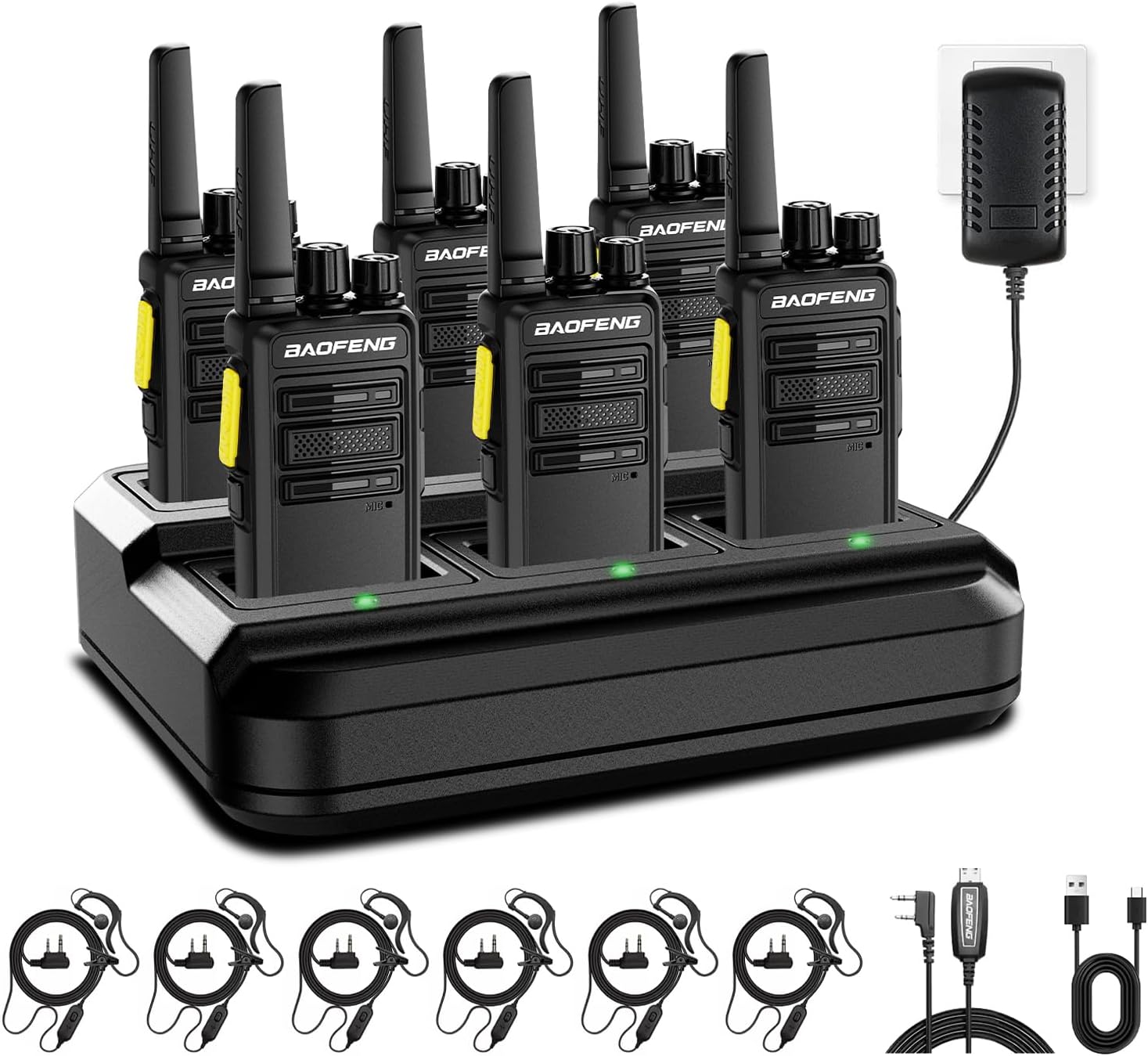
Figure 1.1: The BAOFENG BD-V12B FRS Two-Way Radio package, including six radios and the multi-unit charger.
2. Package Contents
Upon unpacking, please verify that all items listed below are present and in good condition.
- 6 x BAOFENG BD-V12B Radios
- 6 x Li-ion Batteries (1000mAh each)
- 1 x 6-Way Multi-Unit Charging Base
- 6 x Earpieces
- 6 x Belt Clips
- 1 x Power Adapter for Charging Base
- 3 x USB Charging Cables (Type-C compatible)
- 6 x Lanyards
- 1 x User Manual
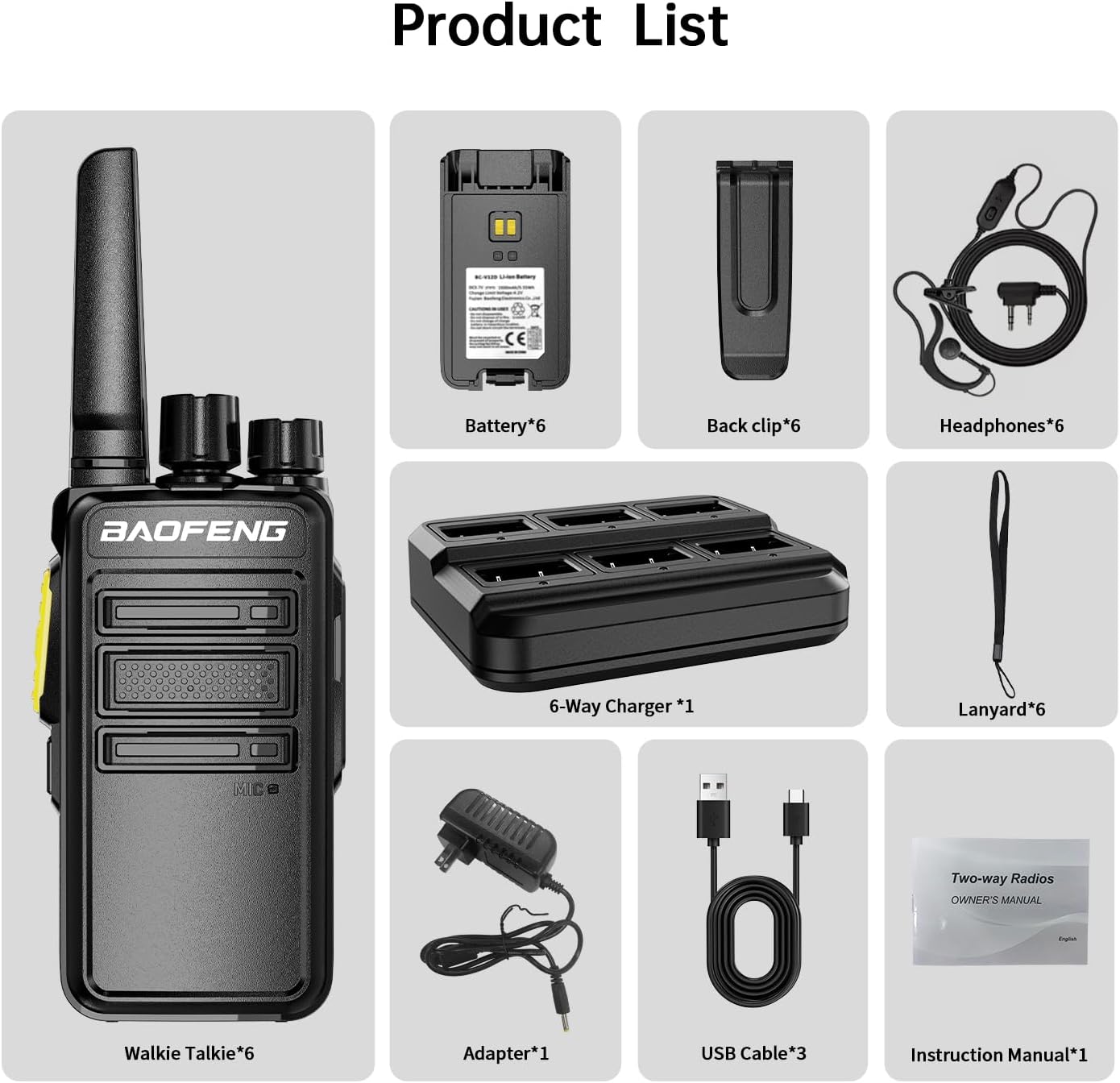
Figure 2.1: All components included in the BAOFENG BD-V12B FRS Two-Way Radio package. This includes six radios, six batteries, a 6-way multi-unit charger, six earpieces, six belt clips, a power adapter, three USB cables, six lanyards, and the instruction manual.
3. Product Overview
Familiarize yourself with the various parts of your BAOFENG BD-V12B radio.
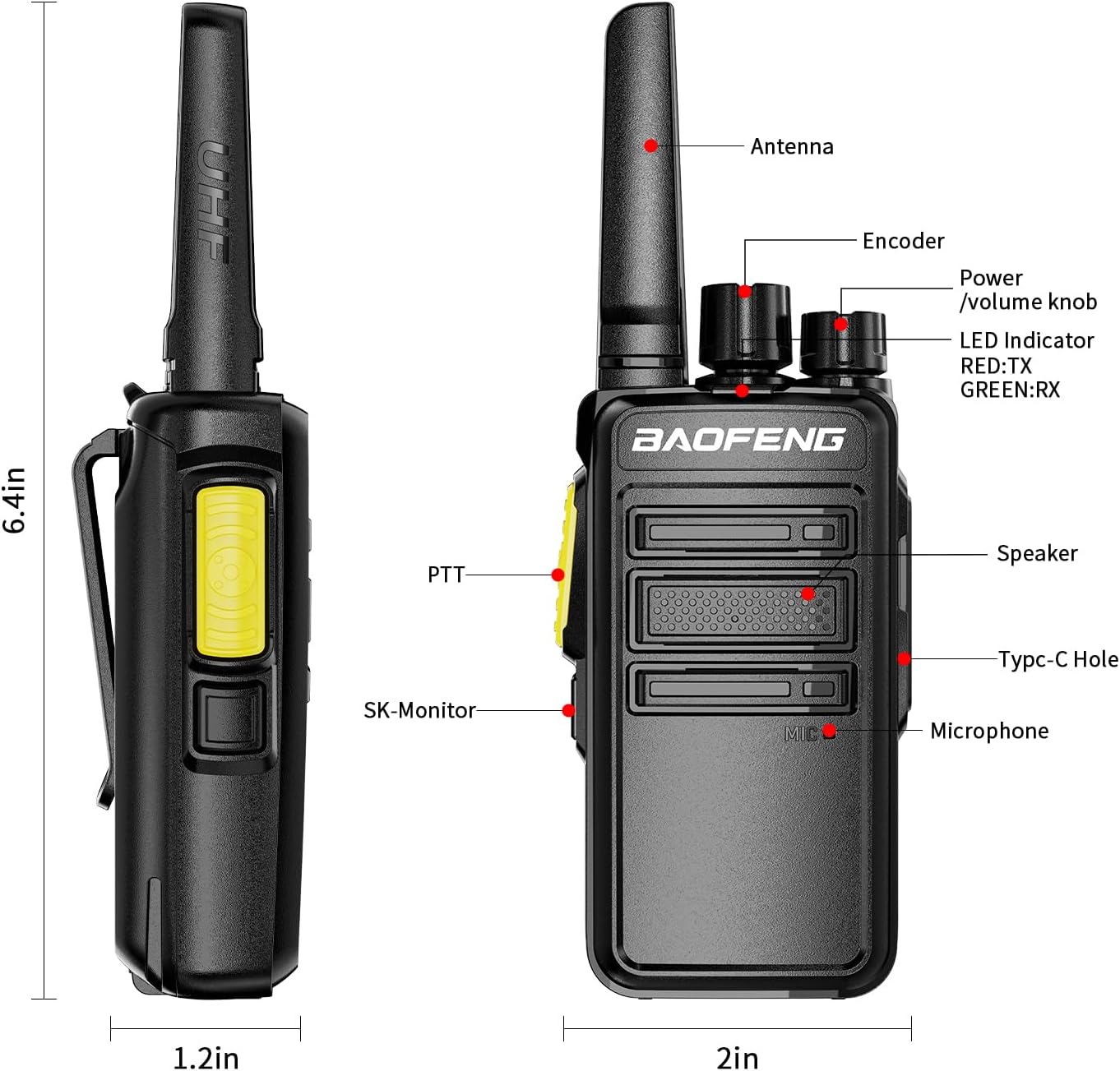
Figure 3.1: Labeled diagram of the BAOFENG BD-V12B radio. Key components include the Antenna, Encoder (channel selector), Power/Volume knob, LED Indicator (Red for TX, Green for RX), PTT (Push-to-Talk) button, SK-Monitor button, Speaker, Type-C Charging Port, and Microphone.
- Antenna: For transmitting and receiving radio signals.
- Encoder (Channel Selector): Used to select one of the 16 preset channels.
- Power/Volume Knob: Rotates to turn the radio on/off and adjust the volume.
- LED Indicator: Illuminates red during transmission (TX) and green during reception (RX).
- PTT (Push-to-Talk) Button: Press and hold to transmit your voice; release to listen.
- SK-Monitor Button: Activates the monitor function to listen to weak signals.
- Speaker: Outputs received audio.
- Type-C Charging Port: Allows direct charging of the radio using a USB Type-C cable.
- Microphone: Captures your voice for transmission.
4. Setup
4.1 Battery Installation
- Ensure the radio is powered off.
- Align the battery pack with the battery compartment on the back of the radio.
- Slide the battery pack into place until it clicks securely.
- To remove, press the release latch (if present) and slide the battery out.
4.2 Charging the Radios
The BAOFENG BD-V12B radios come with a 6-way multi-unit charger for efficient charging of multiple units or individual batteries. Each radio also features a Type-C port for direct charging.

Figure 4.1: BAOFENG BD-V12B radios being charged in the 6-way multi-unit charging base. The image highlights the 1000mAh battery, 12-hour work time, and 72-hour standby time.

Figure 4.2: Dimensions of the 6-way multi-unit charger. The charger measures approximately 9.1 inches by 6.9 inches by 2.4 inches. The power adapter cable is approximately 41.8 inches long. The charger includes protections against overcharge, overheating, and high voltage.

Figure 4.3: Various charging methods for the BAOFENG BD-V12B radio. In addition to the multi-unit charger, radios can be charged via the Type-C port using a vehicle charger, power bank, USB wall adapter, or PC charging.
Using the 6-Way Multi-Unit Charger:
- Connect the power adapter to the 6-way multi-unit charger and plug it into a standard AC outlet.
- Place the radios (with batteries installed) or individual batteries into the charging slots.
- The LED indicator on the charger will show the charging status (typically red for charging, green for fully charged).
- Charging typically takes 3-4 hours for a full charge.
Using the Type-C Charging Port:
- Connect one end of the USB Type-C cable to the radio's Type-C port.
- Connect the other end to a compatible USB power source (e.g., computer, power bank, USB wall adapter, vehicle charger).
- The radio's LED indicator may show charging status.
5. Operating Instructions
5.1 Power On/Off and Volume Adjustment
- To power on the radio, rotate the Power/Volume knob clockwise until you hear a click.
- To power off, rotate the knob counter-clockwise until you hear a click.
- Adjust the volume by rotating the Power/Volume knob clockwise to increase and counter-clockwise to decrease.
5.2 Channel Selection
- The BD-V12B has 16 preset FRS channels.
- Rotate the Encoder (Channel Selector) knob to choose the desired channel.
- Ensure all radios intended for communication are set to the same channel.
5.3 Transmitting and Receiving
- To transmit, press and hold the PTT (Push-to-Talk) button. Speak clearly into the microphone, holding the radio approximately 2-3 inches from your mouth. The LED indicator will glow red.
- Release the PTT button to stop transmitting and listen for a response. The LED indicator will glow green when receiving a signal.
5.4 VOX Function (Voice Operated Exchange)
The VOX function allows hands-free operation. When activated, the radio will automatically transmit when it detects your voice, without needing to press the PTT button.
- Refer to the full instruction manual for specific steps to activate and adjust VOX sensitivity, as this may require programming software or a specific button sequence not detailed here.
5.5 Monitor Function
- Press and hold the SK-Monitor button to temporarily disable the squelch and listen to weak signals or background noise on the current channel. This can be useful for checking if a channel is clear before transmitting.
5.6 Channel Scanning
The radio supports channel scanning to detect active transmissions across its preset channels.
- Specific activation methods for scanning may vary. Consult the full manual for detailed instructions on initiating and stopping channel scans.

Figure 5.1: Illustration of typical communication ranges for the BAOFENG BD-V12B radio. In city environments, the range is approximately 0.6 miles. In suburban areas, it extends to about 1.2 miles. In open areas, the range can reach up to 4 miles. Actual range depends on environmental factors and obstacles.
6. Maintenance
6.1 General Care
- Keep the radio dry. If it gets wet, wipe it immediately.
- Avoid exposing the radio to extreme temperatures.
- Do not use harsh chemicals or strong detergents to clean the radio. Use a soft, damp cloth.
- Do not disassemble the radio. Repairs should only be performed by authorized service personnel.
6.2 Battery Care
- Charge batteries fully before first use.
- Do not overcharge or deep discharge batteries.
- Store batteries in a cool, dry place when not in use for extended periods.
- Dispose of old batteries according to local regulations.
7. Troubleshooting
If you encounter issues with your radio, refer to the following common problems and solutions.
| Problem | Possible Cause | Solution |
|---|---|---|
| No power | Battery not installed correctly or discharged. | Ensure battery is securely installed. Charge the battery. |
| Cannot transmit or receive | Incorrect channel selected; out of range; low battery. | Verify both radios are on the same channel. Move closer to the other radio. Charge the battery. |
| Poor audio quality / Static | Weak signal; interference; volume too low. | Move to an area with fewer obstructions. Adjust volume. Check antenna connection. |
| Radio not charging | Charger or cable faulty; radio not seated correctly. | Check charger and cable connections. Ensure radio/battery is properly seated in the charging slot. |

Figure 7.1: The BAOFENG BD-V12B features upgraded noise reduction speakers, designed to provide clear and loud sound by intelligently reducing ambient noise and filtering call noise for improved communication quality.
8. Specifications
| Feature | Detail |
|---|---|
| Model Number | BD-V12B |
| Frequency Range | 410 - 469 MHz (FRS Compliant) |
| Number of Channels | 16 Preset Channels |
| Battery Type | 1000mAh Li-ion Rechargeable Battery |
| Charging Time | 3-4 hours (approx.) |
| Work Time | 8-12 hours (transmission) |
| Standby Time | Up to 72 hours |
| Talking Range (Open Areas) | Up to 4 kilometers (approx. 2.5 miles) |
| Talking Range (City/Suburbs) | 0.5 - 1.5 miles (approx.) |
| Dimensions (Radio) | 1.38"D x 2.95"W x 6.89"H (approx.) |
| Weight (Item) | 3.9 pounds (for the package, individual radio weight not specified) |
| Water Resistance Level | Not Water Resistant |
| Special Features | VOX, 32 Encrypted Channels, Wireless Cloning, Batch Copying, Channel Scanning, Multi-Unit Charging, Type-C Charging |
9. Warranty and Support
9.1 Warranty Information
The BAOFENG BD-V12B FRS Two-Way Radio comes with a 1-Year Manufacturer Warranty. This warranty covers defects in materials and workmanship under normal use. Please retain your proof of purchase for warranty claims.
9.2 Customer Support
For any questions, technical assistance, or warranty inquiries, please contact BAOFENG customer service. Our professional team is available to help you resolve any issues.
Contact information can typically be found on the BAOFENG official website or through the retailer where the product was purchased.
Documents and downloads
Ask a question about this manual
Ask about setup, troubleshooting, compatibility, parts, safety, or missing instructions. Manuals+ will review the question and use this page’s manual context to help answer it.