
Pamray S20
Pamray 64.5 Inch Reversible L-Shaped Desk (Model S20) Instruction Manual
Brand: Pamray | Model: S20
Product Overview
This manual provides detailed instructions for the assembly, use, and maintenance of your Pamray 64.5 Inch Reversible L-Shaped Desk. This versatile desk is designed to adapt to various room layouts and functional needs, serving as an office table, computer desk, gaming desk, or study table.

The Pamray 64.5 Inch Reversible L-Shaped Desk offers flexible configurations to suit your space. It can be assembled as an L-shaped desk for corner placement or as a long straight desk.
Safety Information
- Ensure all components are present before beginning assembly.
- Follow assembly instructions carefully to prevent injury or damage.
- Do not exceed the maximum weight capacity of 150 lbs (68 kg).
- Keep small parts away from children during assembly.
Package Contents
Verify that all parts listed in the instruction manual are included in your package.

The package includes all necessary hardware and tools for assembly, along with clear instructions.
Assembly Instructions
The assembly process is designed to be straightforward. Refer to the included instruction manual for detailed step-by-step guidance. All necessary tools are provided.
Step 1: Frame Assembly
Begin by assembling the heavy-duty steel frame. Connect the frame components using the provided screws and Allen wrenches. The reinforced X-shaped back braces contribute to the desk's stability.

The sturdy steel frame provides a stable foundation for the desk, featuring X-shaped back braces for enhanced durability.
Step 2: Desktop Panel Installation
Once the frame is secure, carefully place the desktop panels onto the frame and secure them using the designated fasteners. Ensure all connections are tight.

The desk surface is made from FSC-Certified Wood, providing a durable and spacious work area.
Step 3: Reversible Configuration
This desk features a reversible design, allowing you to configure it as an L-shaped desk for left or right corners, or as a long straight desk. Choose the configuration that best suits your space and needs during assembly.

The desk can be configured in multiple ways: as a left L-shape, right L-shape, or a long straight desk, offering adaptability to various room layouts.
Step 4: Attaching Accessories
Attach the side storage bag and headphone hook as desired. These accessories provide convenient storage for documents, headphones, or other small items.

The detachable side storage bag offers additional space for books, documents, or other office supplies, helping to keep your workspace organized.

A convenient headphone hook is included for easy access and storage of your headphones, keeping them off the desktop.
Operating Instructions
Desktop Space Utilization
The desk provides 11.37 square feet of functional workspace, capable of accommodating up to three monitors, printers, laptops, and other essential equipment. Arrange your items to optimize your workflow and maintain a tidy environment.
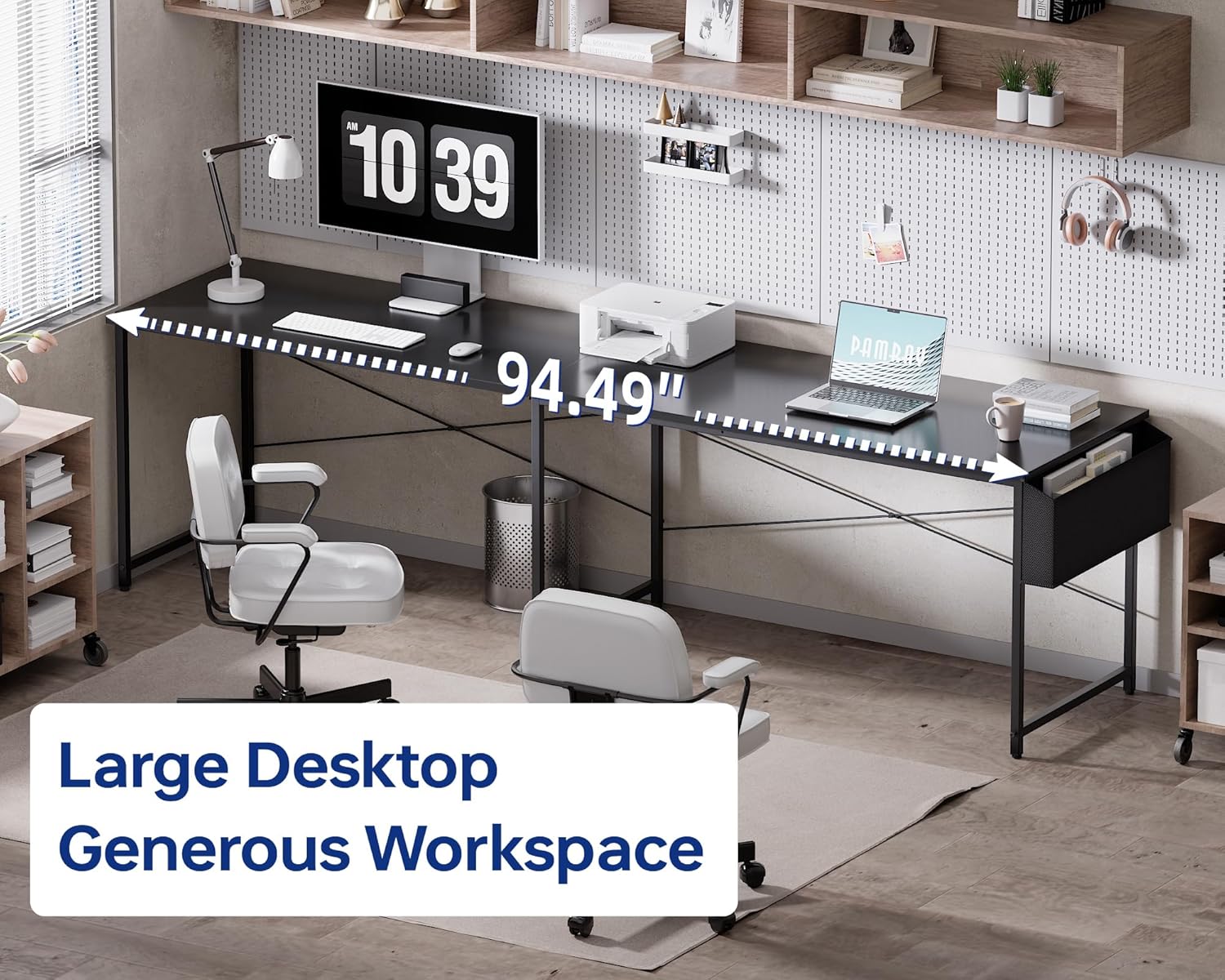
The spacious desktop can comfortably hold multiple monitors and various office or gaming equipment, enhancing productivity.
Adjusting for Uneven Floors
The desk is equipped with adjustable leg pads. If your floor is uneven, rotate the leg pads at the bottom of each leg to stabilize the desk and prevent wobbling.

Adjustable leg pads allow for leveling the desk on uneven surfaces, ensuring stability.
Maintenance
Cleaning the Surface
The tabletop is made of FSC-Certified Wood. For general cleaning, wipe the surface with a soft, damp cloth. Avoid abrasive cleaners or harsh chemicals that could damage the finish.

The desk surface is designed to be water-resistant, making it easy to clean spills with a damp cloth.
Frame Care
Periodically check all screws and connections to ensure they remain tight. Tighten any loose fasteners as needed to maintain the desk's structural integrity.
Troubleshooting
Desk Wobbles
If the desk wobbles, ensure all assembly screws are securely tightened. Adjust the leg pads at the bottom of each leg to compensate for any unevenness in the floor.
Missing Parts
If any parts are missing upon arrival, please contact Pamray customer support with your purchase details for assistance.
Specifications
| Feature | Detail |
|---|---|
| Brand | Pamray |
| Model | S20 |
| Configuration | Reversible L-shaped or Straight |
| Dimensions (L-shape) | 17.3"D x 64.6"W x 29.2"H |
| Dimensions (Straight) | 94.5"W (approx.) |
| Material | FSC-Certified Wood (Tabletop), Metal (Frame) |
| Weight Capacity | 150 lbs (68 kg) |
| Assembly Required | Yes |
| Special Features | Reversible design, Side storage bag, Headphone hook, Adjustable leg pads |
Warranty and Support
For warranty information or customer support, please refer to the contact details provided with your purchase or visit the official Pamray website.
Ask a question about this manual
Ask about setup, troubleshooting, compatibility, parts, safety, or missing instructions. Manuals+ will review the question and use this page’s manual context to help answer it.