
1. Product Overview
The XTRONS 10.25 Inch Android Car Stereo is an advanced infotainment system designed to upgrade your BMW 3 Series E90/E91/E92/E93 (2008-2012) left-hand driving vehicle. This unit features a high-resolution IPS touch screen, integrated GPS navigation, wireless CarPlay and Android Auto support, and Bluetooth 5.0 connectivity. It seamlessly integrates with your vehicle's existing systems, retaining original car functions and controls.
2. Applicable Models and Important Notes
This unit is specifically designed for BMW 3 Series E90/E91/E92/E93 models manufactured between 2008 and 2012, for left-hand driving vehicles. It is compatible with vehicles that do NOT have an original display.
Important Installation Note: Installing this monitor may require cutting a permanent hole in your dashboard. If your vehicle has a storage box on the top of the dashboard, uninstalling it may provide sufficient space without cutting. A template sticker is provided to assist with accurate hole placement if cutting is necessary.

Figure 2.1: Applicable BMW 3 Series E90/E91/E92/E93 models and installation template sticker.
3. Key Features
- 10.25-inch IPS Touch Screen: Enjoy a clear and vibrant display with a 1920x720 resolution and 178° viewing angle. Supports 1080p video playback.
- Wireless CarPlay & Android Auto: Seamlessly integrate your smartphone for navigation, calls, music, and voice assistants (Google Assistant, Siri).
- Bluetooth 5.0: Provides stable hands-free calling, number dialing, contact searching, and audio streaming.
- Dual-Band Wi-Fi: Connects to both 2.4GHz and 5GHz Wi-Fi networks for faster data transfer and a stable internet connection.
- Integrated GPS Navigation: Supports popular Android navigation software such as Google Maps, Sygic, and Waze.
- Intelligent UI with Day & Night Modes: User interface adapts automatically or can be adjusted manually for optimal visibility and reduced eye strain.
- Retains Original Car Functions: Maintains iDrive system control, steering wheel controls, original Bluetooth, and other factory features.
- Split-Screen Mode: Allows simultaneous use of two applications, such as navigation and music playback.

Figure 3.1: Ultra-HD Visuals with IPS Touch Screen.

Figure 3.2: Seamless Connection with CarPlay & Android Auto.

Figure 3.3: Perfect Integration of Android OS and Original System.

Figure 3.4: Intelligent UI with Day & Night Modes.

Figure 3.5: Stay Connected with Dual-Band Wi-Fi and Accurate Navigation.
4. Setup and Installation
Installation of the XTRONS Android Car Stereo involves replacing the existing dashboard trim and integrating the new display. It is recommended that installation be performed by a trained car mechanic or professional to ensure proper functionality and to prevent damage.
4.1. Pre-Installation Steps
- Ensure the vehicle's ignition is off and the battery is disconnected.
- Carefully remove the existing dashboard trim and any components as instructed in the detailed installation guide.
- Use the provided template sticker to mark the cutting area on the dashboard if necessary.
4.2. Wiring Harness Connection
Connect the ISO wiring harness to the vehicle's existing wiring. Ensure all connections are secure. The unit is designed to integrate with the original car's systems, including the iDrive controller, factory amplifier, and steering wheel controls.
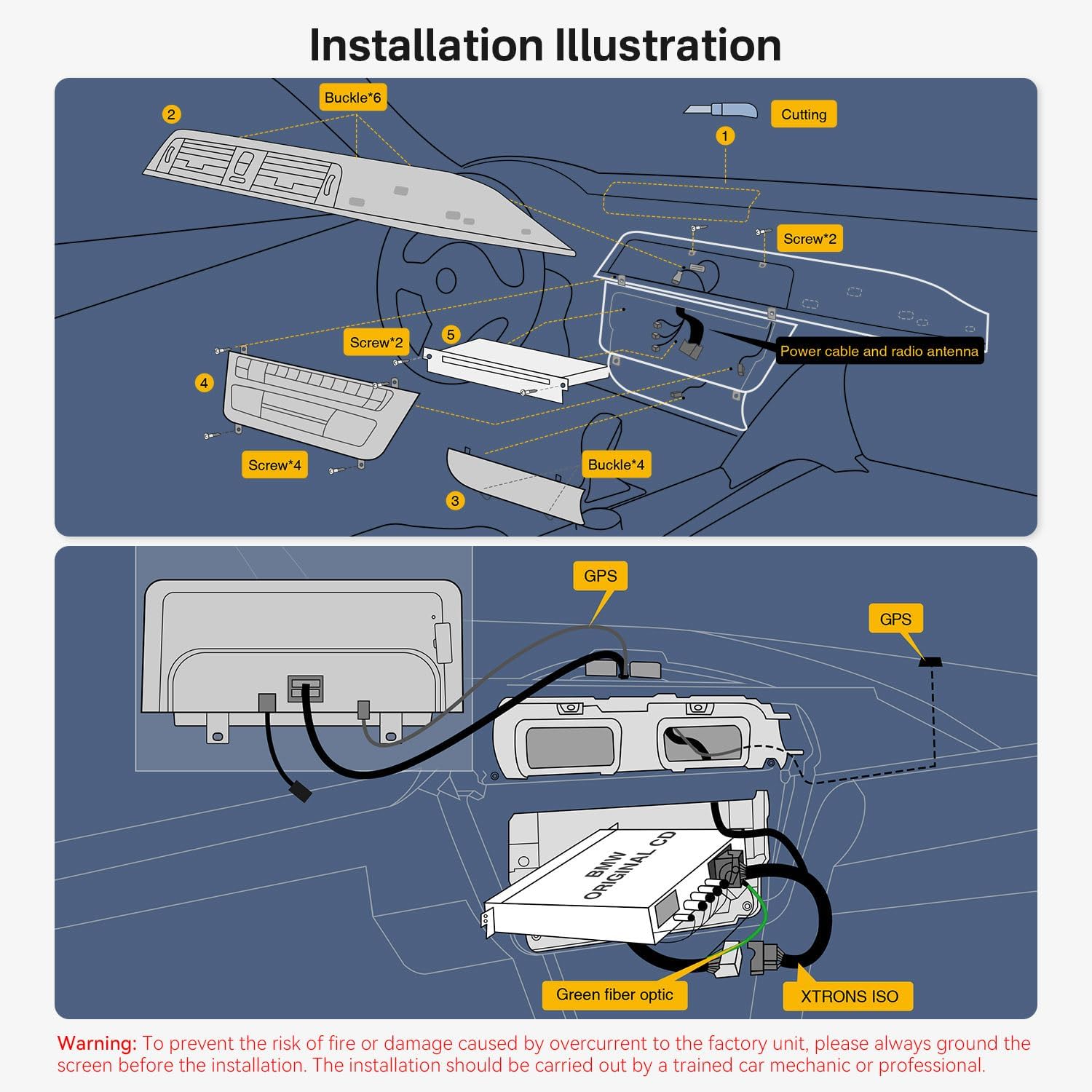
Figure 4.1: Installation Illustration.

Figure 4.2: Wiring Harness Diagram.
Warning: To prevent the risk of fire or damage caused by overcurrent to the factory unit, always ground the screen before installation. The installation should be carried out by a trained car mechanic or professional.
5. Operating Instructions
5.1. Initial Power-On
After successful installation, reconnect the battery and turn on the vehicle's ignition. The XTRONS logo will appear, indicating the system is booting up.
5.2. Navigating the User Interface
The system features an intuitive touch-screen interface. Swipe left or right to access different application pages. Tap on icons to launch applications such as Navigation, Music, Bluetooth, and Car Auto Play.
5.3. Wireless CarPlay and Android Auto
To use Wireless CarPlay or Android Auto, ensure your smartphone's Bluetooth and Wi-Fi are enabled. Pair your phone with the car stereo via Bluetooth. Once paired, the system will prompt you to activate CarPlay or Android Auto. Follow the on-screen instructions to complete the setup. This allows access to phone functions, messages, maps, and music directly from the car stereo display.
5.4. GPS Navigation
The unit comes with pre-installed navigation capabilities. You can also download and use other compatible Android navigation apps from the Google Play Store. Ensure the GPS antenna is properly installed for optimal signal reception.
5.5. Bluetooth Connectivity
Access the Bluetooth menu to pair your smartphone for hands-free calls and audio streaming. You can dial numbers, search contacts, and manage call history directly from the stereo.
5.6. Split-Screen Functionality
To activate split-screen mode, open an application and then drag another compatible application to the side of the screen. This allows you to view and interact with two applications simultaneously.
5.7. Video Playback
The system supports up to 1080p video playback. You can play videos from USB devices or streaming apps. The Picture-in-Picture (PiP) mode allows you to watch videos while using other applications.
Video 5.1: Overview of XTRONS Qualcomm 685 Car Stereo features, including CarPlay, Android Auto, Split-Screen, and retained original car functions.
6. Maintenance
To ensure the longevity and optimal performance of your XTRONS car stereo, follow these maintenance guidelines:
- Screen Cleaning: Use a soft, lint-free cloth to gently wipe the screen. For stubborn smudges, slightly dampen the cloth with water or a screen-safe cleaner. Avoid harsh chemicals or abrasive materials.
- Software Updates: Periodically check for software updates to ensure you have the latest features and bug fixes. Updates can typically be found on the XTRONS official website or through the device's settings menu.
- Environmental Conditions: Avoid exposing the unit to extreme temperatures, direct sunlight for prolonged periods, or excessive moisture.
- Cable Connections: Ensure all cables remain securely connected. Loose connections can lead to intermittent functionality.
7. Troubleshooting
If you encounter issues with your XTRONS car stereo, refer to the following common troubleshooting steps:
- No Power: Check all power connections and the vehicle's fuse box. Ensure the unit is properly grounded.
- No Sound: Verify that the volume is not muted or set too low. Check audio cable connections. If using original car amplifier, ensure it is functioning correctly. For BMW E92 without fiber optic, ensure AUX is connected and check for any necessary AUX coding or settings.
- Touch Screen Unresponsive: Try restarting the unit. If the issue persists, ensure the screen is clean and free from obstructions.
- CarPlay/Android Auto Not Connecting: Ensure Bluetooth and Wi-Fi are active on your phone and the stereo. Try forgetting the device on both ends and re-pairing. Check for any software updates for both your phone and the stereo.
- GPS Signal Issues: Ensure the GPS antenna is installed in a location with a clear view of the sky and is securely connected.
- System Lag/Freezing: Close unnecessary background applications. Perform a system restart. If the issue continues, consider a factory reset (note: this will erase all user data).
For persistent issues, contact XTRONS customer support or consult a professional installer.
8. Specifications
| Item Weight | 5.95 pounds |
| Package Dimensions | 17.13 x 8.86 x 8.27 inches |
| Display Size | 10.25 Inches |
| Screen Resolution | 1920x720 |
| Operating System | Android |
| Memory Storage Capacity | 64 GB |
| Connectivity Technology | Bluetooth, USB, Wi-Fi |
| Special Feature | Bluetooth, Touchscreen |
| Mounting Type | Dashboard Mount |
| Vehicle Service Type | Car |
9. What's in the Box
The following components are included with your XTRONS 10.25 Inch Android Car Stereo:
- 1 × ISO Wiring Harness
- 1 × USB Cable
- 1 × GPS Antenna
- 1 × Mini Speaker
- 1 × Audio Cable
- 1 × Controller
- 1 × Installation Instructions
- 1 × User Manual
- 1 × Cutter Knife
- 1 × Installation Screw Template Sticker
10. Optional Accessories
Enhance your driving experience with these optional accessories (sold separately):
- TPMS Function: Tire Pressure Monitoring System for enhanced safety.
- Front / Reversing Camera: For improved visibility and parking assistance.
- External DVR: Digital Video Recorder for capturing driving footage.
11. Warranty Information
This XTRONS product comes with a 1 Year Manufacturer Warranty. Please retain your proof of purchase for warranty claims. For detailed warranty terms and conditions, refer to the official XTRONS website or contact customer support.
12. Support
For technical assistance, product inquiries, or warranty support, please visit the official XTRONS website or contact their customer service department. You can often find FAQs, troubleshooting guides, and contact information on their support pages.
Online Resources: XTRONS Store on Amazon


