
1. Introduction
Thank you for choosing the OBEST Mini Coffee Scale with Timer. This digital scale is designed for precise measurements in coffee preparation and general kitchen use, featuring high accuracy, a built-in timer, and a rechargeable battery. Please read this manual thoroughly before use to ensure proper operation and maintenance.
2. Safety Information
- Do not immerse the scale in water. While the surface is waterproof, the charging port and internal components are not.
- Avoid placing the scale on uneven surfaces, or in areas with strong wind or vibration, as this may affect accuracy.
- Do not overload the scale beyond its maximum capacity of 3kg.
- Keep the scale away from extreme temperatures and direct sunlight.
- Use only the provided Type-C charging cable or a compatible charger.
- This device is not a toy. Keep out of reach of children.
3. Package Contents
- OBEST Mini Coffee Scale with Timer
- Type-C USB Charging Cable
- User Manual

Image 3.1: OBEST Mini Coffee Scale with included Type-C charging cable.
4. Product Overview
Familiarize yourself with the main components and controls of your OBEST Mini Coffee Scale.
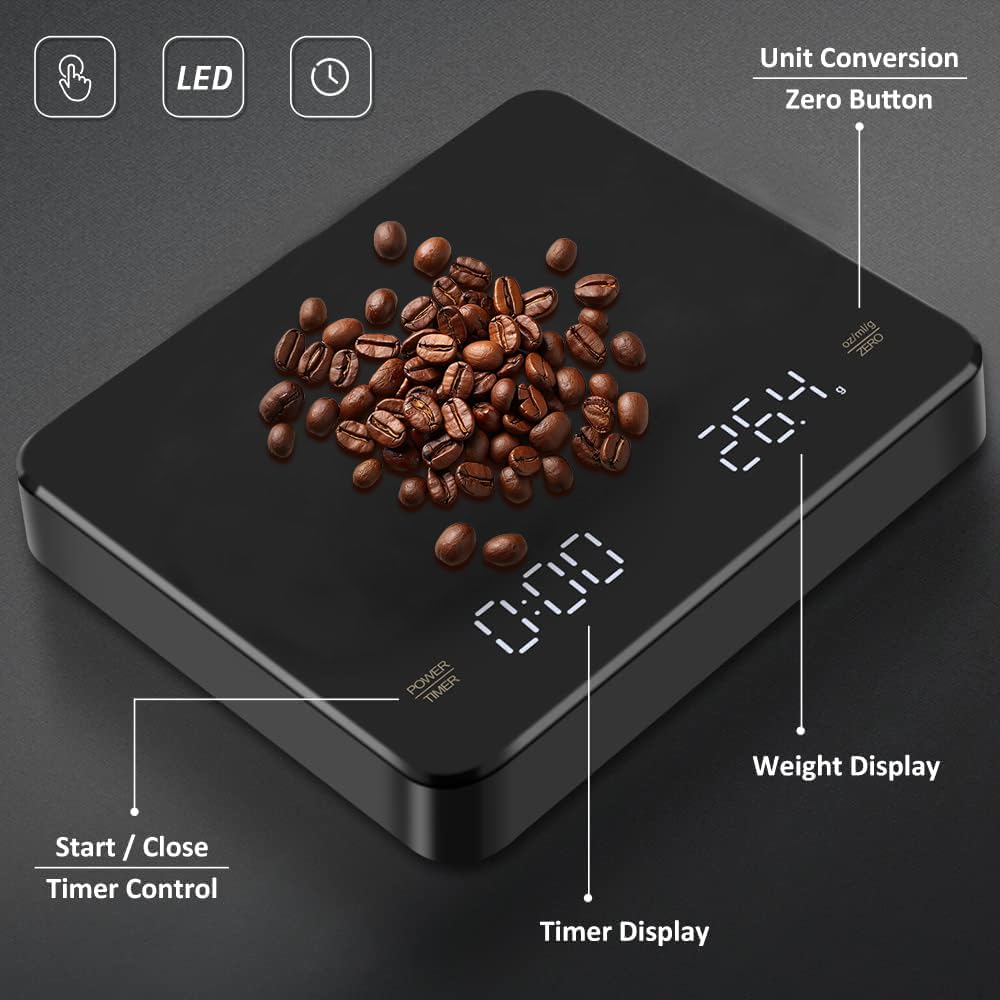
Image 4.1: Key features and controls of the OBEST Mini Coffee Scale.
- Power/Timer Button: Press to power on/off, or to start/stop the timer.
- Unit Conversion/Zero Button: Press to change weighing units (g, ml, oz) or to tare (zero out) the current weight.
- Weight Display: Shows the measured weight.
- Timer Display: Shows the elapsed time.
- Invisible LED Screen: The display lights up only when in use.
5. Setup
5.1 Initial Charging
Before first use, fully charge the scale. Connect the provided Type-C USB cable to the charging port on the side of the scale and to a USB power source (e.g., computer, wall adapter). The battery indicator will show charging status. A full charge typically lasts for approximately two weeks of regular use.

Image 5.1: Connecting the Type-C charging cable to the scale.
5.2 Placement
Place the scale on a flat, stable, and level surface to ensure accurate readings. Avoid placing it near sources of vibration or drafts.
6. Operating Instructions
6.1 Power On/Off
- To power on, press the Power/Timer button. The display will illuminate.
- To power off, press and hold the Power/Timer button for 3 seconds.
- The scale will automatically shut down after 180 seconds of inactivity to conserve battery.
6.2 Unit Conversion
After powering on, press the Unit Conversion/Zero button to cycle through the available units: grams (g), milliliters (ml), and ounces (oz). The scale will remember the last used unit.
6.3 Tare Function
The tare function allows you to zero out the weight of a container, so you only measure the contents. Place an empty container on the scale, then press the Unit Conversion/Zero button. The display will reset to zero. You can then add your ingredients to the container, and the scale will show only the weight of the ingredients.
6.4 Timer Function
The scale offers two timing modes: Manual and Automatic.
6.4.1 Manual Timing Mode
- With the scale powered on, press the Power/Timer button once to start the timer.
- Press the Power/Timer button again to pause/stop the timer.
- To reset the timer, press and hold the Power/Timer button for 3 seconds while the timer is stopped.
6.4.2 Automatic Timing Mode
This mode is particularly useful for pour-over coffee, as it starts the timer automatically when liquid is detected.
- Place your coffee brewing setup (e.g., dripper, server) on the scale.
- Press the Unit Conversion/Zero button to tare the weight.
- Begin pouring water. The timer will automatically start when the scale detects a change in weight.
- The timer will continue until manually stopped or reset.

Image 6.1: Auto timing for pour-over coffee and manual timing for espresso.
7. Maintenance
7.1 Cleaning
Wipe the scale surface with a soft, damp cloth. Do not use abrasive cleaners or immerse the scale in water. Ensure no liquid enters the charging port or other openings.
7.2 Storage
Store the scale in a cool, dry place. Avoid placing heavy objects on the scale when not in use to prevent damage to the sensors.
8. Troubleshooting
- Inaccurate Readings: Ensure the scale is on a flat, stable surface. Avoid drafts or vibrations. Recalibrate if necessary (refer to specific calibration instructions if provided separately, or contact support).
- Scale Not Turning On: Check if the battery is charged. Connect the Type-C charging cable and allow it to charge for at least 30 minutes before attempting to power on again.
- Display Errors: If the display shows an error code, try turning the scale off and then on again. If the issue persists, contact customer support.
9. Specifications
| Feature | Specification |
|---|---|
| Model Number | LAOUS73055 |
| Weight Capacity | 0.1g to 3kg |
| Accuracy | 0.1g |
| Units of Measurement | g, ml, oz |
| Battery | 250mAh Rechargeable Lithium Battery |
| Charging Port | Type-C USB |
| Auto-Off | 180 seconds of inactivity |
| Material | PC+ABS Plastic |
| Dimensions | Approximately 13 cm (5.1 in) x 11 cm (4.3 in) x 1.8 cm (0.7 in) |
| Weight | Approximately 255g (8.82 oz) |

Image 9.1: Compact dimensions of the OBEST Mini Coffee Scale.
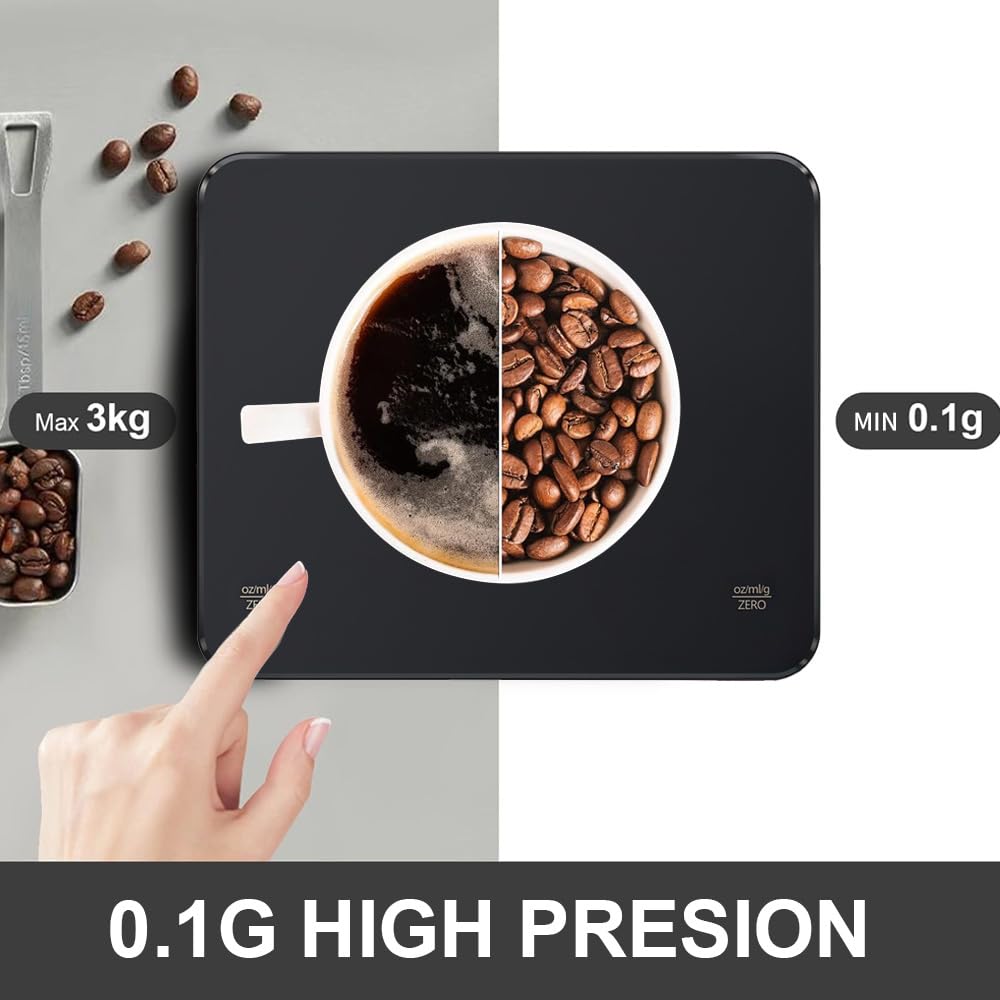
Image 9.2: High precision and capacity of the scale.
10. Warranty and Support
OBEST products are manufactured to high-quality standards. For warranty information, technical support, or assistance with your product, please refer to the contact information provided on the product packaging or the official OBEST website. Please retain your proof of purchase for warranty claims.