
1. Introduction
This manual provides comprehensive instructions for the safe and effective use of your Cangaroo Babypone Callisto Baby Monitor. This modern baby monitor offers clear image and sound transmission, convenient two-way communication, soothing lullabies, night vision capabilities, and a room temperature sensor. The camera can be remotely controlled from the parent unit, allowing for upward, downward, left, and right adjustments. The system provides reliable monitoring, flexible camera control, and clear picture and sound quality, day and night.
2. Package Contents
Please check the package contents carefully. If any items are missing or damaged, contact your retailer.
- Parent Unit with 2.8-inch LCD display
- Baby Unit (Camera)
- Power Adapter for Parent Unit
- Power Adapter for Baby Unit
- USB Power Cables (2x)
- Wall Mounting Kit (screws and anchors)
- User Manual (this document)

Image 2.1: Included accessories: two USB power cables, two power adapters, and a wall mounting kit.
3. Product Overview
Familiarize yourself with the components and controls of your Cangaroo Babypone Callisto Baby Monitor.
3.1 Parent Unit

Image 3.1: Close-up view of the Parent Unit's 2.8-inch LCD screen and control buttons.
- 2.8-inch LCD Display: Shows live video feed from the baby unit.
- Power Button: Turns the parent unit on/off.
- OK Button: Confirms selections.
- Navigation Buttons (Up, Down, Left, Right): Navigate menus, control camera pan/tilt.
- Menu Button: Accesses settings and features.
- Lullaby Button: Activates/deactivates lullabies.
- Microphone: For two-way audio communication.
- Speaker: For audio output from the baby unit and lullabies.
- Charging Port: For connecting the power adapter.
3.2 Baby Unit (Camera)

Image 3.2: Front view of the Baby Unit (camera) with its lens and sensors.
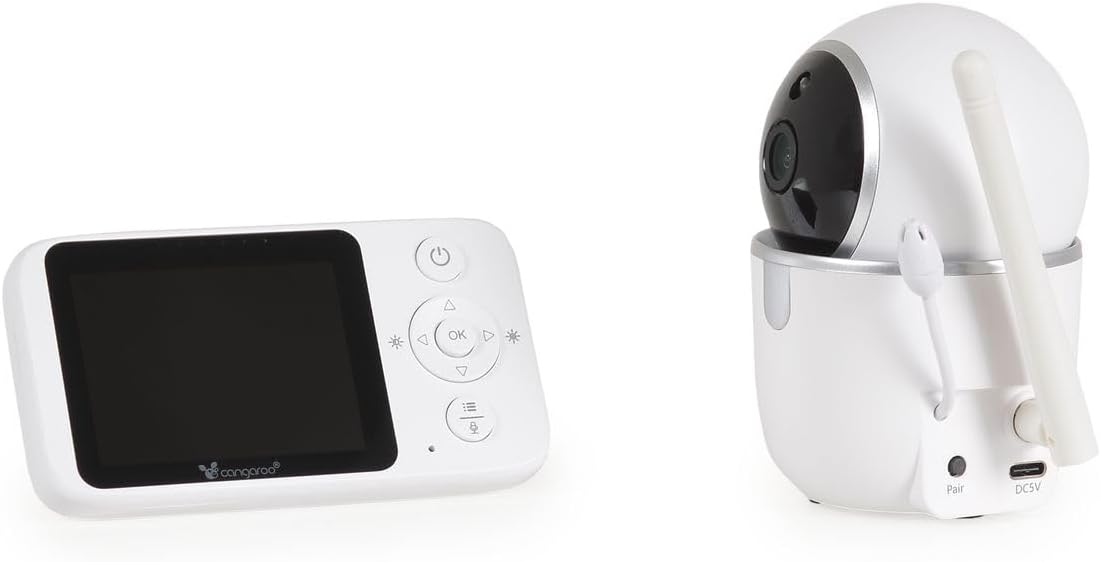
Image 3.3: Rear view of the Baby Unit, showing the 'Pair' button and DC5V power input.
- Camera Lens: Captures video feed.
- Infrared LEDs: For night vision functionality.
- Microphone: Picks up sounds from the baby's room.
- Speaker: For two-way audio and lullaby playback.
- Temperature Sensor: Monitors room temperature.
- Pair Button: Used to pair the baby unit with the parent unit.
- DC5V Power Input: For connecting the power adapter.
- Antenna: For wireless signal transmission.
4. Setup
4.1 Powering On the Units
- Connect the power adapter to the Baby Unit's DC5V input and plug it into a power outlet. The baby unit will power on automatically.
- Connect the power adapter to the Parent Unit's charging port and plug it into a power outlet. Press and hold the Power Button on the Parent Unit to turn it on.
- Allow both units a few moments to establish a connection. The parent unit display will show the live video feed once connected.
4.2 Positioning the Baby Unit (Camera)
Place the baby unit in a location that provides a clear view of your baby's crib or sleeping area. Ensure it is at least 1 meter (3 feet) away from the baby to prevent any potential cord hazards. The camera can be placed on a flat surface or mounted to a wall using the included wall mounting kit.
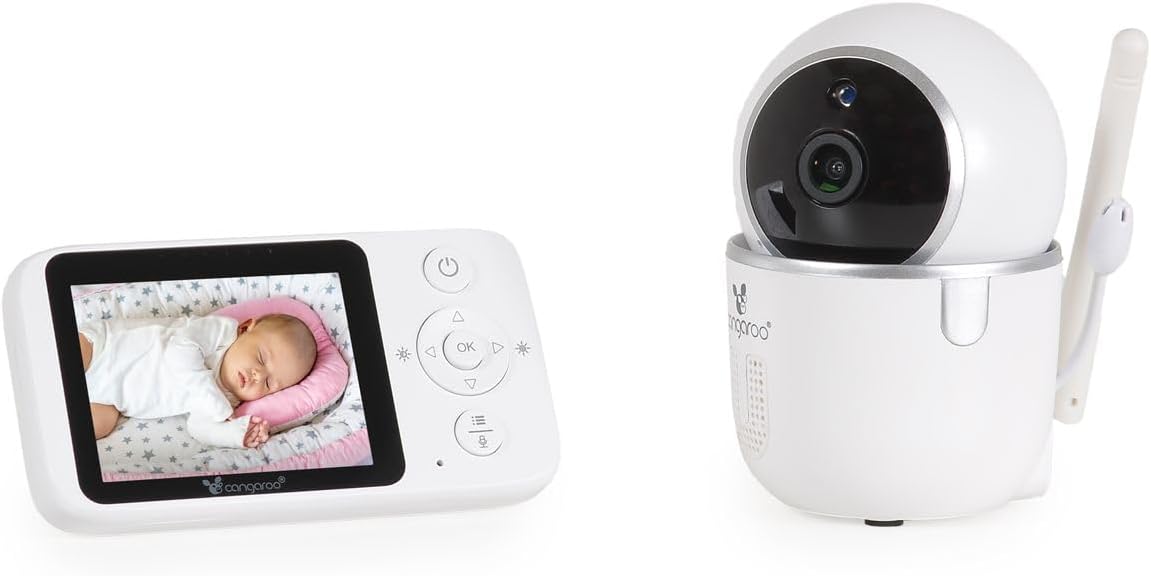
Image 4.1: The Parent Unit displaying a baby, alongside the Baby Unit (camera).
- Optimal Placement: Position the camera to capture the entire crib area.
- Cord Safety: Keep all cords out of reach of children.
- Signal Range: The monitor has a radio range of up to 250m outdoors and up to 50m indoors. Obstacles like walls and furniture can reduce this range.
4.3 Pairing (If Necessary)
The units are typically pre-paired. If they do not connect automatically, follow these steps:
- Ensure both the Parent Unit and Baby Unit are powered on.
- On the Parent Unit, press the Menu button to access the menu.
- Navigate to the "Pairing" option using the navigation buttons and press OK.
- Within 10 seconds, press the "Pair" button located on the back of the Baby Unit.
- The Parent Unit will display a confirmation message once pairing is successful.
5. Operating Instructions
5.1 Basic Monitoring
- Once powered on and paired, the Parent Unit will automatically display the live video feed and audio from the Baby Unit.
- The screen will show the current room temperature detected by the Baby Unit's sensor.
- Night Vision: The Baby Unit automatically activates infrared night vision in low-light conditions, providing clear images up to 5 meters.
5.2 Two-Way Audio Communication
To speak to your baby through the Baby Unit's speaker:
- Press and hold the Talk button (often represented by a microphone icon) on the Parent Unit.
- Speak clearly into the microphone on the Parent Unit.
- Release the Talk button to hear your baby again.
5.3 Remote Camera Control (Pan/Tilt)
You can remotely adjust the camera's viewing angle from the Parent Unit:
- Use the Up/Down/Left/Right navigation buttons on the Parent Unit to pan (left/right) and tilt (up/down) the Baby Unit's camera. The camera supports 360° rotation.
5.4 Lullabies
To play lullabies to your baby:
- Press the Lullaby button on the Parent Unit.
- Use the navigation buttons to select one of the 5 built-in lullabies.
- Press OK to start playback. Press the Lullaby button again to stop.
5.5 Alarm Function and Settings
The monitor includes an alarm function and adjustable settings:
- Volume Adjustment: Use the Parent Unit's menu to adjust the alarm volume.
- Brightness Adjustment: Adjust the display brightness via the Parent Unit's menu.
- Energy Saving Mode: Activate this mode in the menu to conserve battery life. The screen may turn off after a period of inactivity, but audio monitoring continues. The screen will reactivate upon detecting sound or pressing a button.
6. Maintenance
- Cleaning: Wipe the units with a dry, soft cloth. Do not use abrasive cleaners or solvents.
- Battery Care (Parent Unit): The Parent Unit has a built-in rechargeable ion battery. For optimal battery life, avoid fully discharging the battery frequently. Recharge when the low battery indicator appears.
- Storage: If storing the unit for an extended period, ensure the battery is partially charged and store in a cool, dry place.
- Environmental Conditions: Avoid exposing the units to extreme temperatures, direct sunlight, dust, or moisture.
7. Troubleshooting
| Problem | Possible Cause | Solution |
|---|---|---|
| No picture/sound on Parent Unit. | Units are not powered on or not paired. Out of range. | Ensure both units are plugged in and powered on. Re-pair the units if necessary (see Section 4.3). Move Parent Unit closer to Baby Unit. |
| Poor picture/sound quality. | Interference from other devices. Units are too far apart or obstacles are blocking the signal. | Move the units away from other electronic devices (e.g., Wi-Fi routers, microwaves). Reduce the distance between units. |
| Parent Unit battery drains quickly. | Energy Saving Mode is off. Frequent use of features. | Activate Energy Saving Mode in the menu. Reduce screen brightness. Ensure the battery is fully charged before use. |
| Camera not responding to remote control. | Units are out of range or connection issue. | Move Parent Unit closer to Baby Unit. Check connection status. |
| Temperature reading seems inaccurate. | Baby Unit placed near a heat source or draft. | Relocate the Baby Unit to a more central location in the room, away from windows, vents, or direct sunlight. |
8. Specifications
- Model: Cangaroo Babypone Callisto (Model Number: 112301)
- Parent Unit Display: 2.8-inch LCD
- Wireless Technology: Digital 2.4 GHz FHSS
- Indoor Range: Up to 50 meters (approx. 164 feet)
- Outdoor Range: Up to 250 meters (approx. 820 feet)
- Night Vision: Infrared, up to 5 meters
- Camera Features: Pan/Tilt (360° rotation), Two-Way Audio, Temperature Sensor, Lullabies (5 built-in)
- Power Supply: DC 5V (via included adapters)
- Parent Unit Battery: Built-in rechargeable Li-ion battery
- Material: Plastic
- Parent Unit Dimensions: L 11 x W 3 x H 6 cm
- Baby Unit Dimensions: L 6 x W 8 x H 10.5 cm
- Item Weight: 400 g (total product)
9. Warranty and Support
For warranty information and customer support, please refer to the documentation provided with your purchase or contact your retailer. Keep your proof of purchase for any warranty claims.


