
1. Important Safety Instructions
Please read all instructions carefully before using this electric space heater. Failure to follow these instructions may result in fire, electric shock, injury, or property damage. Keep this manual for future reference.
- Electrical Safety: Ensure the power cord is not damaged. Do not use the heater if the cord or plug is damaged. Plug the heater directly into a wall socket; do not use extension cords or portable power strips, as this can lead to overheating or deformation. Avoid overloading circuits by not connecting other high-voltage devices to the same socket.
- Placement: Place the heater on a firm, level surface. Keep the heater away from walls, furniture, curtains, and other combustible materials to prevent blocked air inlets/outlets and overheating. Maintain at least 3 feet (0.9 meters) clearance from all sides.
- Operation: Never cover the heater or run the power cord under carpets, furniture, or appliances. Do not use the heater in wet or damp locations, such as bathrooms or laundry areas, or near water sources.
- Supervision: This appliance is not intended for use by persons (including children) with reduced physical, sensory, or mental capabilities, or lack of experience and knowledge, unless they have been given supervision or instruction concerning use of the appliance by a person responsible for their safety. Children should be supervised to ensure that they do not play with the appliance.
- Overheat & Tip-Over Protection: The heater is equipped with automatic shut-off features for overheating and tip-over events. If the heater tips over by more than 45 degrees, it will automatically power off. Ensure the heater is placed upright on a stable surface for continuous operation.
- Material Safety: The heater is constructed with V-0 flame-retardant materials for enhanced safety.

Figure 1: How to Use More Safely
2. Product Overview
2.1 Components
The Lerat Electric Space Heater features a compact design with essential components for efficient and safe heating.
- Control Knob: Located on the top, used to select operating modes.
- Air Inlet/Outlet Grille: Front grille for heat emission, rear grille for air intake.
- Power Cord: For connecting to an electrical outlet.
- Anti-Tilt Switch: Located at the bottom, activates tip-over protection.
- Non-Slip Rubber Base: Provides stability.

Figure 2: Lerat Electric Space Heater (Front View)

Figure 3: Automatic Anti-Tilt Switch and Non-Slip Rubber Base
2.2 Key Features
- Rapid PTC Ceramic Heating: Equipped with 1200W PTC ceramic heating elements for quick warmth in approximately 2 seconds.
- Compact and Portable: Measuring 6.02"L x 4.72"W x 8.66"H and weighing 2.4 pounds, designed for easy portability.
- Multiple Modes: Offers Fan Only, Low Heat (600W), and High Heat (1200W) settings for year-round use.
- Quiet Operation: Operates at a low noise level of approximately 35dB, suitable for sleeping, reading, or working environments.
- Comprehensive Safety: Includes Overheat Protection, 45° Tip-Over Protection, and V-0 Flame Retardant Material construction.
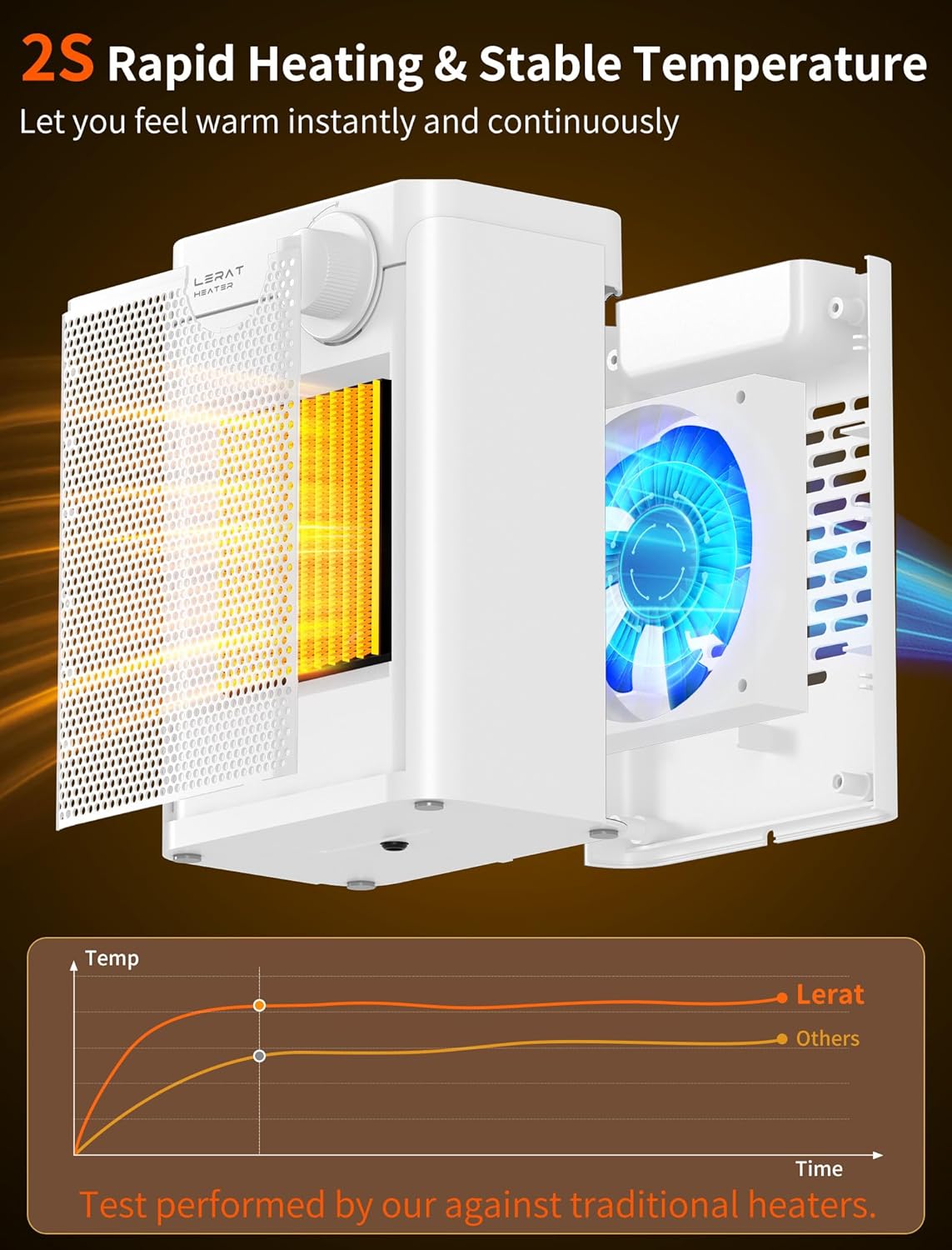
Figure 4: Rapid Heating Mechanism

Figure 5: Temperature Settings and Control
3. Setup
- Unpack: Carefully remove the heater from its packaging. Retain packaging for storage if needed.
- Placement: Place the heater on a stable, flat, and heat-resistant surface. Ensure there is at least 3 feet (0.9 meters) of clear space around the heater from any walls, furniture, or flammable materials. Do not place it directly under a power outlet.
- Power Connection: Ensure the heater's control knob is in the 'OFF' position. Plug the power cord directly into a standard 120V AC electrical wall outlet. Do not use extension cords or adapters.
4. Operating Instructions
The Lerat Electric Space Heater is designed for simple, one-button control.
- Power On: Ensure the heater is placed upright on a stable surface. Rotate the control knob clockwise from the 'OFF' position to select your desired mode.
- Select Mode:
- Fan Only: Rotate the knob to the fan icon for cool air circulation without heat.
- Low Heat (600W): Rotate the knob to the single flame icon for moderate heating.
- High Heat (1200W): Rotate the knob to the double flame icon for maximum heating.
- Tip-Over Protection: If the heater is tilted or knocked over by more than 45 degrees during operation, the automatic tip-over protection will activate, and the unit will shut off. To resume operation, place the heater back on a stable, upright surface and select your desired mode again.
- Power Off: To turn off the heater, rotate the control knob counter-clockwise to the 'OFF' position. Unplug the heater from the wall outlet when not in use.

Figure 6: Tip-Over Protection in Action
5. Maintenance and Cleaning
Regular cleaning helps maintain the heater's performance and extends its lifespan.
- Before Cleaning: Always turn off the heater and unplug it from the power outlet. Allow the heater to cool down completely before cleaning.
- Exterior Cleaning: Use a soft, damp cloth to wipe the exterior surfaces of the heater. Do not use abrasive cleaners, waxes, or polishes, as these may damage the finish.
- Air Inlet/Outlet: Use a vacuum cleaner with a brush attachment to gently remove dust and debris from the air inlet and outlet grilles. Do not insert any objects into the grilles.
- Storage: When not in use, store the heater in a cool, dry place, preferably in its original packaging, away from direct sunlight and moisture.
- Do Not Disassemble: Do not attempt to disassemble or repair the heater yourself. Refer all servicing to qualified service personnel.
6. Troubleshooting
If your heater is not operating correctly, please refer to the following common issues and solutions:
| Problem | Possible Cause | Solution |
|---|---|---|
| Heater does not turn on. | No power supply. Tip-over switch activated. Overheat protection activated. | Ensure the power cord is securely plugged into a working outlet. Ensure the heater is on a flat, stable surface and upright. Unplug the heater, let it cool for 30 minutes, then plug it back in. |
| Heater turns off unexpectedly. | Heater was tipped over. Overheating due to blocked air vents. | Place the heater back on a stable, upright surface. Check for obstructions around the air inlet/outlet. Ensure proper clearance. Unplug and allow to cool before restarting. |
| Weak airflow or reduced heat. | Dust accumulation on grilles. | Clean the air inlet and outlet grilles as described in the Maintenance section. |
7. Specifications
| Feature | Specification |
|---|---|
| Brand | Lerat |
| Model Number | JC-XILR-JRV4 |
| Power Output | 1200W (High Heat), 600W (Low Heat), 5W (Fan Only) |
| Heating Element | PTC Ceramic |
| Dimensions (L x W x H) | 6.02" x 4.72" x 8.66" (15.3 cm x 12 cm x 22 cm) |
| Weight | 2.4 pounds (1.09 kg) |
| Safety Features | Overheat Protection, 45° Tip-Over Protection, V-0 Flame Retardant Material |
| Noise Level | Approximately 35dB |
| Input Voltage | 120V AC |
8. Warranty and Support
For warranty information or technical support, please refer to the documentation included with your purchase or contact Lerat customer service. Keep your purchase receipt as proof of purchase.
For further assistance, you may visit the official Lerat store online: Lerat Store on Amazon
