
Carpuride 904 Dual Cam, 904S Three Cam
Carpuride 10.26 Inch Wireless Carplay & Android Auto with Dash Camera User Manual
Models: 904 Dual Cam, 904S Three Cam
Introduction
This manual provides comprehensive instructions for the installation, operation, and maintenance of your Carpuride 10.26 Inch Wireless Carplay & Android Auto Dash Camera system. This system is available in two models: the 904 Dual Cam, featuring a 4K front camera and 1080P rear camera, and the 904S Three Cam, which includes a 4K front camera, 1080P infrared in-car camera, and 1080P rear camera. Both models offer seamless smartphone integration for Carplay and Android Auto, enhancing your driving experience with navigation, communication, and entertainment features, alongside robust dash camera capabilities for recording and safety.

Image: Overview of Carpuride 904 (top) and 904S (bottom) dash camera systems, showing the main unit with display and integrated cameras.
Product Features
High-Definition Multi-Camera Systems
The Carpuride dash cams are designed to capture clear footage in various lighting conditions. The W904 Dual Dash Cam features a 4K front camera and 1080P rear camera. The W904S Three Cam Car Navigation Screen expands on this with a 4K front camera, a 1080P infrared in-car camera, and a 1080P rear camera. Both models feature wide-angle lenses and offer 350° rotation for the front camera, allowing flexible adjustment to suit your vehicle and installation needs. The front camera can also be rotated to record inside the car, which is particularly useful for monitoring children in the back seat.
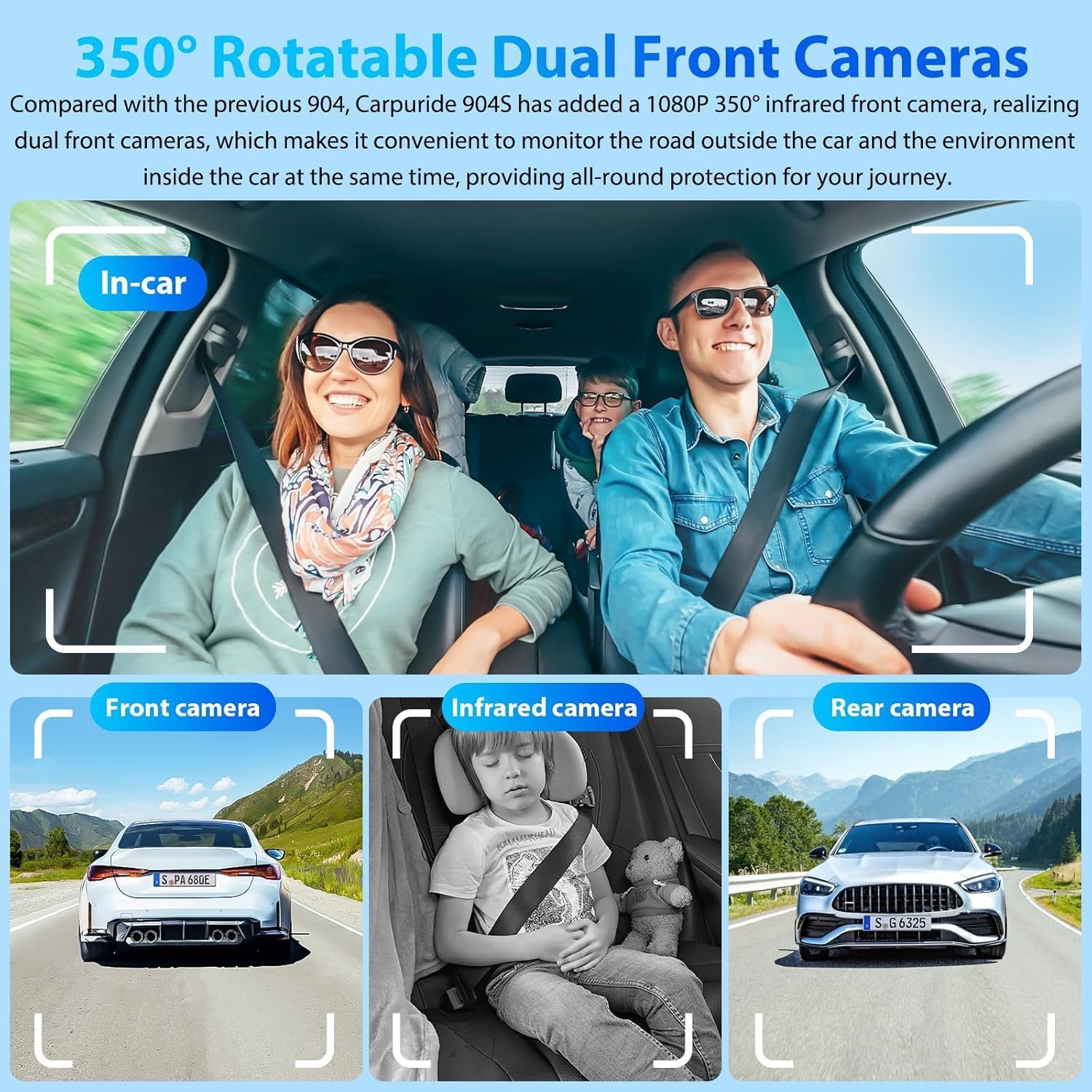
Image: Illustration of the Carpuride 904S system highlighting the 350° rotatable dual front cameras, showing views from the front camera, infrared in-car camera, and rear camera.

Image: Demonstrates the 350° rotation capability of the front camera, illustrating its use for both external road recording and internal cabin monitoring, along with views from the front and rear cameras.
Loop Recording & Gravity Sensor
The Carpuride system comes equipped with a 64GB TF card for driving records, video playback, and settings. It supports simultaneous display of front and rear views when reversing, enhancing safety. The loop recording function automatically overwrites older files to conserve storage space. A built-in gravity sensor (G-sensor) automatically locks critical video segments in the event of a collision, preventing them from being overwritten and preserving accident evidence.

Image: The Carpuride display demonstrating split-screen functionality, showing navigation, music playback, Apple Carplay, Android Auto, and simultaneous front and rear camera views with auto loop recording.

Image: Illustrates the high-definition dual front and rear cameras, highlighting the 170° viewing angle and features like reverse reference lines and waterproof design for accurate parking.
Seamless Smartphone Integration (IOS/Android)
The 10.26-inch portable car stereo is compatible with Wireless Carplay and Android Auto. After a wireless connection, all your phone's essential features are accessible on a clean, safe, and easy-to-use HD touchscreen. This includes GPS navigation, messaging, phone calls, Bluetooth music, and voice assistants like Siri. It is compatible with iOS 6 and above, and Android 11 and above.

Image: The Carpuride display showcasing the Wireless Carplay and Android Auto interface, with various app icons for calls, music, navigation, and messages.

Image: Demonstrates the GPS navigation and voice control capabilities of the Carpuride system, showing interaction with Siri/Google Assistant for calls, music, and navigation commands.
Enhanced Audio and Display
The car audio touchscreen supports car Bluetooth sound via Carplay or Android Auto. It does not support TF card sound transmission to car speakers. The unique light sensor automatically adjusts light sensitivity or allows manual setting to prevent screen flickering caused by continuous flashing points of multiple car lights at night. The HD IPS + 2.5D Curved Touchscreen is designed to reduce glare, ensuring clear visibility even when wearing polarized glasses.

Image: Shows the Carpuride system's Bluetooth audio capabilities, including AUX to car's audio, FM transmit, and built-in speaker options.

Image: Highlights the HD IPS + 2.5D Curved Touchscreen, emphasizing its anti-glare, anti-scratch, and light-sensitive features for optimal viewing.
Setup Guide
- Power Connection: Connect the device using the provided Type-C 5V 2A car charger. Important: Always use the original Carpuride car charger to ensure optimal performance, especially for FM transmission.
- TF Card Insertion: Insert the 64GB TF card (included) into the designated slot. This card is specifically for storing camera data and driving records. It cannot be used to play music, videos, or other files directly on the device.
- Mounting: Securely mount the Carpuride unit on your dashboard or windshield using the provided mounting accessories. Ensure it does not obstruct your view or interfere with vehicle controls.
- Camera Placement (for 904S Three Cam):
- Front Camera: Adjust the 350° rotatable front camera to capture the road ahead. It can also be rotated inwards to monitor the car's interior.
- Rear Camera: Install the 1080P rear camera at the back of your vehicle, ensuring a clear view for reversing and rear recording.
- Infrared In-Car Camera (904S only): This camera is integrated into the main unit and provides a 170° wide-angle view of the cabin, switching to infrared black-and-white in low light.
- Initial Power On: Once connected, the device should power on automatically with your vehicle's ignition. Follow any on-screen prompts for initial setup.
Operating Instructions
Connecting to Smartphone (Wireless Carplay & Android Auto)
- Ensure Bluetooth and Wi-Fi are enabled on your smartphone.
- On the Carpuride device, navigate to the Carplay or Android Auto icon.
- Follow the on-screen instructions to pair your phone via Bluetooth. Once paired, the system will automatically establish a Wi-Fi connection for Carplay/Android Auto functionality.
- You can now access navigation, make calls, send messages, play music, and use voice commands (Siri/Google Assistant) directly from the Carpuride screen.
Dash Camera Operation
- Automatic Recording: The dash camera automatically begins recording when the device powers on.
- Loop Recording: Videos are recorded in segments (e.g., 1, 3, or 5 minutes) and stored on the TF card. When the card is full, the oldest unlocked files are automatically overwritten.
- G-Sensor (Gravity Sensor): In the event of a sudden impact or collision, the G-sensor will automatically detect it and lock the current video file, preventing it from being overwritten by loop recording.
- Viewing Recordings: Access recorded videos through the playback menu on the device.
- Reversing Display: When the vehicle is in reverse, the screen can simultaneously display both front and rear camera views to assist with safe maneuvering.
- Camera Adjustment: The front camera can be manually rotated 350° to capture either the road ahead or the vehicle's interior. Caution: Avoid making large, forceful adjustments to prevent potential disconnection or loosening of the camera cable.
Display and Audio Settings
- Light Sensor: The device features a unique light sensor that can automatically adjust screen brightness. You can also manually set the light sensitivity to prevent flickering, especially at night.
- Audio Output: The system supports Bluetooth audio transmission to your car's speakers via Carplay or Android Auto. It also has a built-in speaker and FM transmit function.
- Split Screen: Utilize the split-screen feature to view multiple applications or camera feeds simultaneously, such as navigation alongside front/rear camera views.
Maintenance
- TF Card Management: Regularly review and back up important video files from your TF card. While loop recording manages space, occasional manual formatting of the TF card (after backing up desired files) can help maintain optimal performance and prevent data corruption.
- Cleaning: Use a soft, lint-free cloth to clean the screen and camera lenses. Do not use abrasive cleaners or solvents, as they may damage the surfaces.
- Cable Inspection: Periodically check all connected cables for any signs of wear, damage, or loose connections.
- Software Updates: Check the Carpuride official website or contact support for any available firmware updates to ensure your device has the latest features and bug fixes.
Troubleshooting
| Problem | Possible Cause | Solution |
|---|---|---|
| Poor FM transmission performance. | Using a non-original car charger. | Ensure you are using the original Carpuride car charger (Type-C 5V 2A). |
| Camera cable disconnects or becomes loose. | Excessive or forceful adjustment of the 350° rotatable camera. | Make adjustments to the camera gently and avoid large, sudden movements. Reconnect the cable if it has come loose. |
| Cannot play music/videos from TF card. | TF card is intended for camera data only. | The TF card is designed for storing driving records. Music and videos should be played via Carplay/Android Auto or Bluetooth from your smartphone. |
| Screen flickering at night. | Light sensor sensitivity setting. | Adjust the light sensor sensitivity setting in the device menu to prevent flickering caused by external lights. |
| Device not powering on. | Power connection issue. | Check if the car charger is properly plugged into both the device and the car's power outlet. Ensure the car's ignition is on. |
Specifications
| Feature | Detail |
|---|---|
| Display Size | 10.26 Inches |
| Display Type | HD IPS + 2.5D Curved Touchscreen |
| Front Camera (904 & 904S) | 4K Resolution, 350° Rotatable |
| Rear Camera (904 & 904S) | 1080P Resolution |
| In-Car Camera (904S only) | 1080P Infrared, 170° Wide-Angle |
| Smartphone Integration | Wireless Carplay, Wireless Android Auto |
| Compatible OS | IOS 6 and above, Android 11 and above |
| Storage | 64GB TF Card (included), supports loop recording |
| Sensors | Built-in Gravity Sensor (G-sensor), Light Sensor |
| Power Supply | Type-C 5V 2A (use original Carpuride car charger) |
| Other Display Features | Wireless |
| ASIN | B0FLXZ3GMZ |
| First Available | July 14, 2025 |
Important Notes and Warnings
- TF Card Usage: TF cards are specifically intended for storing camera data. You will not be able to play music, videos, or any other files directly from a TF card on your device.
- Power Supply: Power is supplied via Type-C 5V 2A. Please make sure to use the original Carpuride car charger. Otherwise, it may affect the FM transmission performance.
- 350-Degree Adjustment: Please be cautious not to make large, forceful adjustments to the camera to avoid causing the camera cable to disconnect or become loose.
Warranty and Support
For warranty information, technical support, or service inquiries, please refer to the contact information provided with your product packaging or visit the official Carpuride website. Keep your purchase receipt as proof of purchase for warranty claims.
Online Support: Visit the Carpuride Store on Amazon
Ask a question about this manual
Ask about setup, troubleshooting, compatibility, parts, safety, or missing instructions. Manuals+ will review the question and use this page’s manual context to help answer it.