
Introduction
Thank you for choosing the EvoFox One X Wireless Gaming Controller. This manual provides detailed instructions for setting up, operating, and maintaining your controller. The EvoFox One X offers versatile connectivity, precise controls, and broad compatibility across multiple platforms, including PC, Nintendo Switch, Android, iOS, and macOS.
Key Features
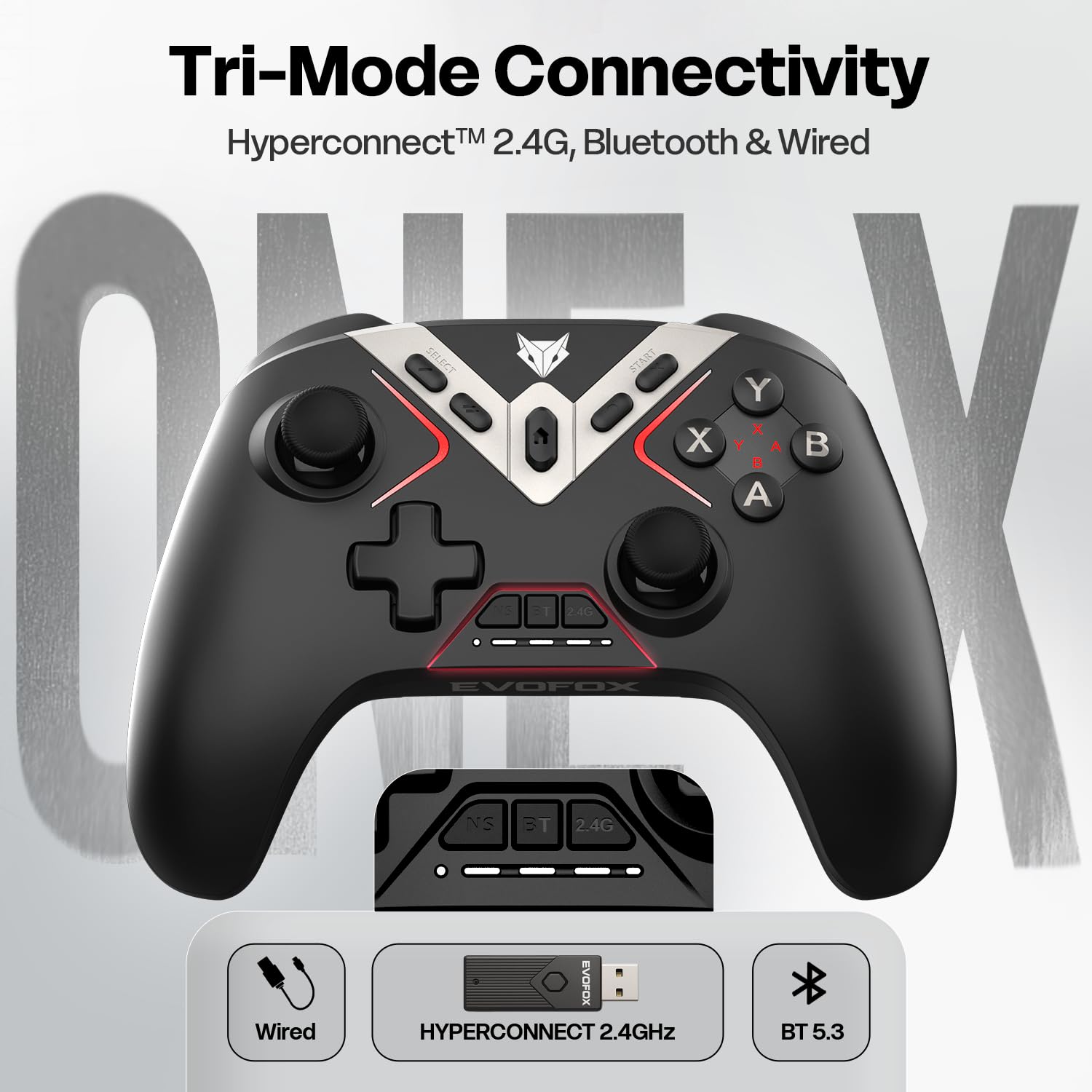
- Tri-Mode Connectivity: Supports 2.4GHz wireless, Bluetooth 5.3, and wired USB-C connections.
- Universal Compatibility: Works with PC, Nintendo Switch, Android, iOS, and macOS.
- Hall Effect Joysticks & Triggers: Ensures precision and eliminates stick drift and dead zones.
- 6-Axis Gyroscope: Provides smooth motion sensing for precise aiming and natural movement.
- On-the-fly Precision Mode: Instantly reduces right-stick sensitivity for enhanced aiming.
- 1000Hz Polling Rate: Delivers ultra-fast 1ms input delay for responsive gameplay.
- Programmable Macro Buttons: Four customizable buttons for personalized commands.
- Turbo Mode: Enables rapid-fire actions for specific buttons.
- Keylinker App Support: Allows for button remapping, sensitivity adjustments, and firmware updates.
- 800mAh Battery: Provides long-lasting power with USB Type-C charging and smart auto-sleep.
- Dual Vibration Motors: Enhances immersion with tactile feedback.
- Ergonomic Design: Textured grip for comfortable extended gaming sessions.
Controller Layout
Familiarize yourself with the buttons and components of your EvoFox One X controller.
- Left Analog Stick: For movement and navigation.
- D-Pad: Directional input.
- SELECT/BACK Button: Function varies by platform.
- HOME Button: Returns to system home screen.
- START Button: Function varies by platform.
- Right Analog Stick: For camera control and aiming.
- Action Buttons (A, B, X, Y): Primary action inputs.
- Shoulder Buttons (LB, RB): Top-mounted buttons.
- Triggers (LT, RT): Analog input for precise control.
- Programmable Back Buttons (M1, M2, M3, M4): Customizable buttons on the rear.
- USB-C Port: For wired connection and charging.
- Mode Indicator Lights: Show current connection mode and battery status.
Setup and Connectivity
1. 2.4GHz Wireless Connection (PC, Android TV Box)
- Insert the 2.4GHz USB dongle into an available USB port on your device.
- Turn on the controller. The controller will automatically connect to the dongle.
- The indicator light will show a steady connection.
2. Bluetooth 5.3 Connection (PC, Android, iOS, macOS, Switch)
- Ensure Bluetooth is enabled on your device.
- Press and hold the Bluetooth pairing button on the controller until the indicator light flashes rapidly.
- On your device, search for new Bluetooth devices and select "EvoFox One X".
- Once paired, the indicator light will become steady.
3. Wired USB-C Connection (PC, Switch)
- Connect one end of the provided USB-C cable to the controller and the other end to your device.
- The controller will automatically be recognized and function in wired mode.
Operating the Controller
6-Axis Gyroscope
The built-in 6-Axis Gyroscope provides motion sensing capabilities, allowing for intuitive control in supported games.

Precision Mode
Activate Precision Mode to temporarily reduce the sensitivity of the right analog stick, enabling more precise aiming.

Programmable Macro Buttons
The four back buttons (M1, M2, M3, M4) can be programmed to perform single actions or complex macros.

Turbo Function
The Turbo function allows a button to register multiple presses rapidly while held down. Refer to the Keylinker App section for customization.
Hall Effect Joysticks and Triggers
The Hall Effect technology provides magnetic sensing for the joysticks and triggers, ensuring long-term accuracy and preventing wear-related issues.

1000Hz Polling Rate
The controller communicates with your device at a 1000Hz polling rate, resulting in a mere 1ms input delay for highly responsive gameplay.

Keylinker App Customization
The Keylinker App provides advanced customization options for your EvoFox One X controller. Download the app from the official EvoFox website or your device's app store.

App Functions:
- Button Remapping: Assign any button to a different function.
- Sensitivity Adjustment: Fine-tune joystick and trigger sensitivity.
- Macro Programming: Create and manage complex button sequences for the programmable back buttons.
- Vibration Intensity: Adjust the strength of the dual vibration motors.
- Firmware Updates: Keep your controller up-to-date with the latest enhancements.
Charging and Battery
The EvoFox One X controller is equipped with an 800mAh rechargeable battery.
- Charging: Connect the controller to a USB power source using the provided USB-C cable. The indicator lights will show charging status.
- Battery Life: A full charge provides extended gameplay hours. Actual battery life may vary based on usage and vibration intensity.
- Auto-Sleep: The controller features an intelligent auto-sleep function to conserve power when idle for a period. Press any button to wake it up.
Maintenance
To ensure the longevity and optimal performance of your controller, follow these maintenance guidelines:
- Keep the controller clean by wiping it with a soft, dry cloth.
- Avoid exposing the controller to extreme temperatures, humidity, or direct sunlight.
- Do not disassemble the controller, as this will void the warranty.
- Store the controller in a safe place when not in use to prevent damage.
Troubleshooting
| Problem | Solution |
|---|---|
| Controller does not turn on. | Ensure the battery is charged. Connect the controller via USB-C cable to charge. |
| Cannot connect wirelessly. | For 2.4GHz, ensure the dongle is properly inserted. For Bluetooth, ensure Bluetooth is enabled on your device and the controller is in pairing mode. Try re-pairing. |
| Input lag or unresponsiveness. | Ensure the controller is fully charged. Reduce distance between controller and device. Avoid interference from other wireless devices. Try a wired connection. |
| Joysticks or triggers are not accurate. | Use the Keylinker App to calibrate joysticks and triggers. Ensure no physical obstructions. |
| Vibration not working. | Check game settings for vibration support. Adjust vibration intensity via the Keylinker App. |
Specifications
| Feature | Detail |
|---|---|
| Model Number | 495 |
| Connectivity | 2.4GHz Wireless, Bluetooth 5.3, USB-C Wired |
| Compatibility | PC, Nintendo Switch, Android, iOS, macOS, Steam OS |
| Battery | 800mAh (Rechargeable Li-ion) |
| Polling Rate | 1000Hz |
| Joysticks & Triggers | Hall Effect |
| Motion Sensor | 6-Axis Gyroscope |
| Product Dimensions | 15.8 x 10.6 x 5.8 cm |
| Item Weight | 225 g |
| Country of Origin | China |
Warranty Information
The EvoFox One X Wireless Gaming Controller comes with a standard manufacturer's warranty. Please refer to the warranty card included in your product packaging for specific terms and conditions, including warranty period and coverage details. Keep your purchase receipt as proof of purchase for any warranty claims.
Support
For further assistance, technical support, or to access additional resources, please visit the official EvoFox support page:
You may also find helpful information and FAQs on the EvoFox website.
