
Introduction
The Rohent N20 Dual Baby Car Camera system provides a clear and reliable way to monitor up to two children in your vehicle. Designed for enhanced safety and convenience, this system features a 6.9-inch HD split screen monitor, 1080P cameras with infrared night vision, and automatic brightness adjustment. The 360° adjustable cameras ensure optimal viewing angles for various car models, including SUVs and minivans.

The Rohent N20 system allows simultaneous monitoring of two children with its split-screen display.
What's Included
The Rohent N20 Dual Baby Car Camera package includes the following components:
- 1x 6.9 Inch Monitor
- 2x Baby Car Camera
- 1x Bracket for Monitor
- 1x USB A Power Cord
- 1x Lighter Adapter
- 4x Straps
- 1x User Manual
- Cable Management Clips & Sticker

All components included in the Rohent N20 Dual Baby Car Camera package.
Setup
Follow these steps for quick and easy installation of your Rohent N20 Dual Baby Car Camera system:
- Mount the Cameras: Securely attach each baby car camera to the headrests of the rear seats using the provided elastic hook-and-loop straps. Ensure the camera lens is facing the child's car seat for optimal viewing. The cameras are 360° adjustable for precise positioning.
- Mount the Monitor: Install the 6.9-inch monitor on your vehicle's windshield or dashboard using the suction cup bracket. Press the air buckle on the suction cup firmly to ensure a secure installation.
- Connect Power: Connect the monitor to a power source. You can use either the provided USB A power cord or the cigarette lighter adapter. Route the cables discreetly using the included cable management clips and stickers to prevent clutter and ensure safety.
- Power On: Once all connections are secure, power on the system. The monitor should automatically display the camera feeds.

Visual guide for installing the cameras and connecting the monitor.

Simplified installation process with no tools required.
Video demonstrating the setup and functionality of the N20 Baby Car Camera System.
Operating Instructions
- Power On/Off: Long press the power button on the monitor to turn the system on or off.
- Switch Channels/View Modes: Press the power button once to cycle through different view modes: Camera 1, Camera 2, and Split Screen mode (both cameras simultaneously).
- Adjust Brightness: The monitor features an advanced light sensor that automatically adjusts screen brightness for optimal clarity in varying light conditions. The screen brightens in bright sunlight and dims in low light to prevent glare.
- Night Vision: The cameras are equipped with infrared night vision technology, providing clear visibility in low-light conditions without emitting harsh light that could disturb your child.
- Camera Adjustment: The cameras can be rotated 360° to achieve the best viewing angle for your child.
- Mirrored/Normal View: The product image is mirrored by default. If the camera is fixed on the front seats and the child is facing the front, the image will be normal. If the camera is fixed on the backseats and the child is facing the back, you may need to cut the thin white wire on the camera's extension cord to switch to a mirrored image.

The monitor automatically adjusts brightness for optimal viewing day and night.

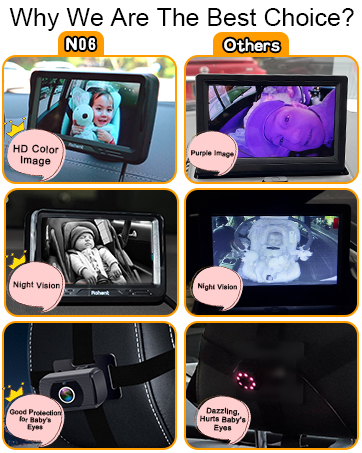
Infrared night vision provides a clear view without harsh glare.

Easily switch between single and dual camera views with a single button.
Features
- Dual Cameras: Monitor two children simultaneously with dedicated cameras for each.
- 6.9-inch HD Split Screen: Provides crystal-clear images on a large display, allowing parents to see both children at once.
- Smart Light Sensor: Automatically adjusts screen brightness for optimal clarity in various lighting conditions, from bright sunlight to dark tunnels.
- 1080P HD Resolution & Infrared Night Vision: Ensures vibrant, high-definition images during the day and reliable, eye-safe visibility in low-light conditions.
- Easy Plug-and-Play Installation: Tool-free setup with headrest straps for cameras and a suction cup mount for the monitor.
- 360° Adjustable Cameras: Offers flexible positioning to capture the best viewing angle for each child, eliminating blind spots.
- Vehicle Compatibility: Ideal for SUVs, minivans, EVs, and other family cars, designed to fit various vehicle interiors.
- Durable Construction: Built to withstand the rigors of family travel, ensuring long-lasting performance and secure placement.

The 6.9-inch HD monitor offers clear and safe viewing with multiple features.
The 360° rotating camera allows for precise angle adjustment.

Switch between normal and mirrored views depending on car seat orientation.
Maintenance
- Cleaning: Use a soft, dry cloth to clean the monitor screen and camera lenses. Avoid abrasive cleaners or solvents.
- Cable Management: Regularly check cable routing to ensure they are not pinched, tangled, or interfering with vehicle operation. Use the provided clips to keep wires tidy.
- Secure Mounting: Periodically verify that the cameras and monitor are securely mounted to prevent dislodgement during travel.
Troubleshooting
- No Image on Monitor:
- Ensure the monitor is powered on (long press the power button).
- Check all power connections to the monitor and cameras.
- Verify that the power source (USB or cigarette lighter) is functioning correctly.
- Poor Image Quality:
- Clean camera lenses and monitor screen.
- Ensure cameras are properly aimed and not obstructed.
- Check for any kinks or damage in the camera cables.
- Monitor Not Adjusting Brightness:
- Ensure the light sensor on the monitor is not obstructed.
Specifications
| Feature | Specification |
|---|---|
| Model Number | N20 |
| Screen Size | 6.9 Inches |
| Video Capture Resolution | 1080p |
| Special Features | Brightness Control, HD Resolution, Night Vision |
| Installation Type | Surface Mount |
| Voltage | 12 Volts |
| Item Dimensions (L x W x H) | 6.42 x 3.82 x 7.76 inches |
| Item Weight | 1.78 pounds |
| Material | Plastic |
Warranty
For information regarding the product warranty, please refer to the documentation included in your package or contact Rohent customer support directly. Standard warranty terms typically cover manufacturing defects for a specified period from the date of purchase.
Support
Should you encounter any issues or require further assistance with your Rohent Dual Baby Car Camera N20, please contact our dedicated customer support team. You can find contact details in the user manual or by visiting the official Rohent website.