
1. Product Overview
The Jocoevol Farmhouse Executive Desk is designed to provide a functional and aesthetically pleasing workspace for home offices or study areas. It features a classic farmhouse style with beadboard detailing and vintage-style pulls. Constructed with a thickened solid wood base and a beveled-edge desktop, this desk offers stability and durability. It includes extensive storage options and a convenient built-in charging station.

Image 1.1: Front view of the Jocoevol Farmhouse Executive Desk in Antique White, showcasing its design and storage.
Key Features:
- Farmhouse Design: Classic beadboard detailing and distressed vintage-style pulls.
- Heavy-Duty Construction: Thickened solid wood base and a robust, beveled-edge desktop for stability.
- Ample Storage: Includes 5 small drawers, 1 large center drawer, a dedicated bottom file cabinet, and a file storage drawer for letter/legal documents.
- Built-in Charging Station: Equipped with 2 AC outlets, USB ports, and a Type-C port.
- Spacious Work Surface: Desktop dimensions of 57"L x 21"W.
- Headphone Hook: Integrated hook for convenient headphone storage.
2. Setup and Assembly
This desk requires assembly. Please follow the instructions carefully and use all provided hardware. It is recommended to have assistance during assembly due to the size and weight of the components.
2.1 Unpacking and Inspection
- Carefully unpack all components from the packaging.
- Verify that all parts and hardware listed in the assembly guide are present and undamaged. Refer to the included parts list.
- Place components on a soft, clean surface to prevent scratches during assembly.
2.2 Assembly Tips
- Do not overtighten screws during assembly to prevent stripping. Hand-tighten where possible, and use tools gently.
- Ensure all connections are secure before moving or using the desk.
- For optimal stability, assemble the desk on a flat, level surface.
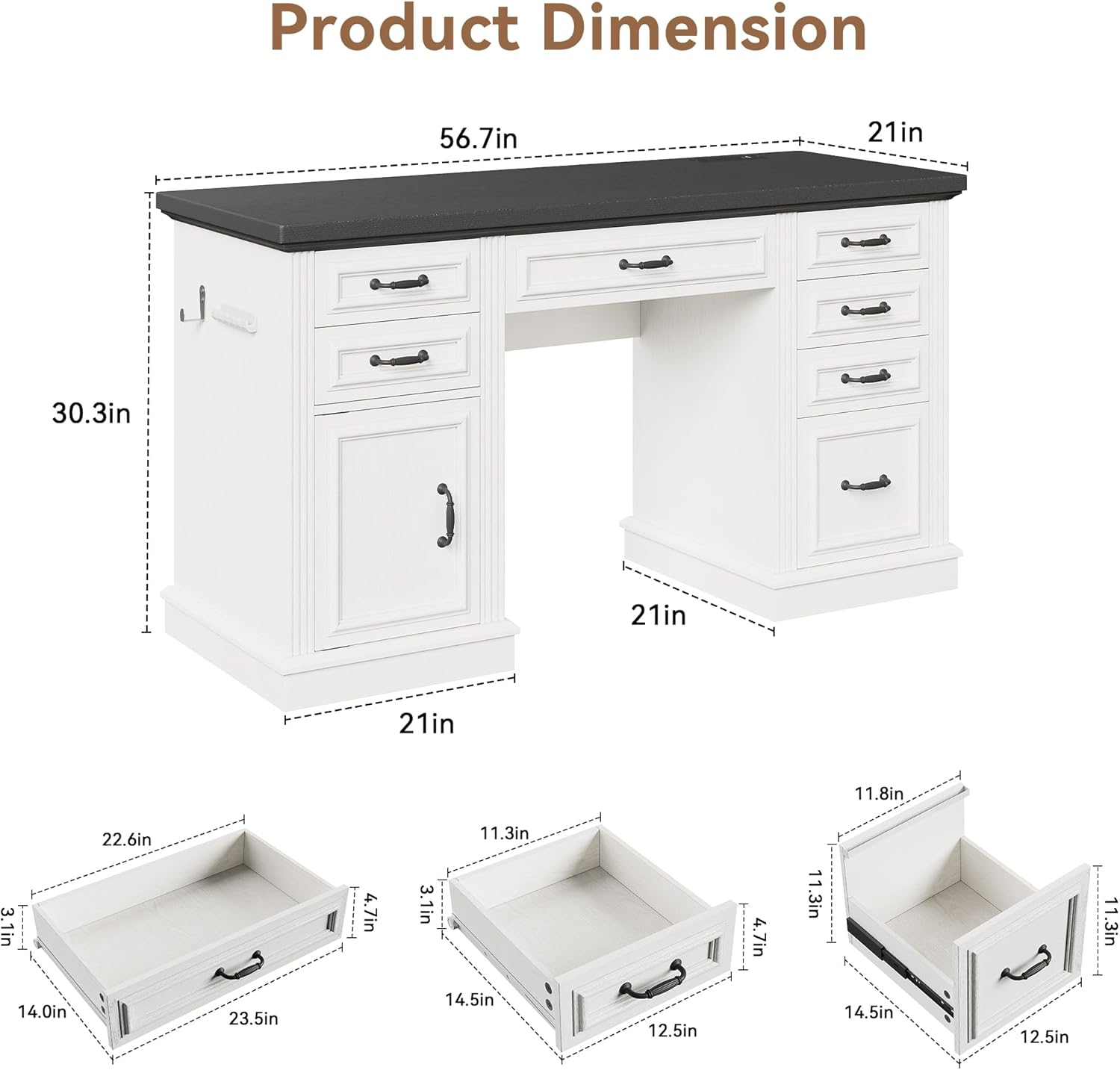
Image 2.1: Diagram showing the overall product dimensions (56.7"W x 30.3"H x 21"D) and individual drawer dimensions.

Image 2.2: Example of desk components and hardware, illustrating parts typically included for assembly.
3. Operating Instructions
3.1 Using the Built-in Charging Station
The desk features an integrated charging station for convenient power access. It includes two standard AC outlets, USB ports, and a Type-C port.
- Locate the charging station on the desktop.
- Plug the desk's power cord into a wall outlet.
- Connect your devices (laptops, phones, tablets, desk lamps, etc.) to the available AC outlets, USB ports, or Type-C port.
- Utilize the integrated cable organizer to manage cords and reduce clutter.

Image 3.1: The convenient charging station with 2 AC outlets, USB ports, and a Type-C port, shown in use with various devices.
3.2 Utilizing Storage Features
The desk offers multiple storage options to keep your workspace organized.
- Small Drawers (5): Ideal for storing calculators, notebooks, pens, and other small office supplies.
- Large Center Drawer (1): Suitable for bulkier items or a keyboard and mouse when not in use.
- File Cabinet: A dedicated cabinet for larger storage needs, such as document boxes or personal items.
- File Storage Drawer: Designed to hold letter and legal-sized hanging file folders, keeping important documents accessible.

Image 3.2: An exploded view illustrating the various storage compartments, including drawers, the file cabinet, and the headphone hook.

Image 3.3: A drawer containing various office supplies such as a calculator, notebooks, and pens.

Image 3.4: The large capacity storage cabinet with its door open, showing space for document boxes.

Image 3.5: A spacious file drawer designed for letter and legal-sized hanging folders.
3.3 Headphone Hook
A convenient hook is located on the side of the desk, providing a dedicated spot to hang headphones or other small accessories, keeping them within reach and off the desktop.
4. Maintenance
Proper care will help maintain the appearance and longevity of your Jocoevol Executive Desk.
- Cleaning: Wipe the desk surfaces with a damp cloth. Avoid using harsh chemicals or abrasive cleaners, which can damage the finish.
- Spills: Immediately wipe up any spills to prevent moisture damage, especially to the engineered wood components.
- Heat Protection: Use coasters or protective pads under hot items to prevent heat marks on the desktop.
- Sunlight Exposure: Avoid prolonged exposure to direct sunlight, which can cause fading or discoloration over time.
- Hardware Check: Periodically check and tighten any loose screws or hardware to ensure the desk remains stable.
5. Troubleshooting
If you encounter any issues with your desk, please refer to the following common solutions:
- Loose or Wobbly Desk: Ensure all assembly screws are securely tightened. Check that the desk is placed on a level surface.
- Drawers Not Sliding Smoothly: Verify that the drawer slides are correctly installed and free from obstructions. Ensure the drawers are not overloaded.
- Charging Station Not Working: Confirm that the desk's main power cord is securely plugged into a functional wall outlet. Check device cables for damage.
- Stripped Screws During Assembly: Exercise caution and avoid overtightening screws. If a screw strips, contact customer support for replacement hardware or guidance.
- Water Damage: Engineered wood can be susceptible to water damage. Avoid prolonged exposure to liquids. Wipe spills immediately with a dry cloth.
If problems persist, please contact Jocoevol customer support for further assistance.
6. Specifications
| Brand | Jocoevol |
| Model Number | B11859 |
| Product Dimensions (D x W x H) | 21"D x 57"W x 30.5"H |
| Color | Antique White |
| Style | Farmhouse |
| Base Material | Engineered Wood |
| Top Material Type | Engineered Wood |
| Finish Type | Unfinished |
| Item Weight | 55.4 Pounds |
| Special Features | 6 drawers, Built-In USB Outlet, File Storage Drawer, Large Capacity Storage Cabinet, Large Desktop, Headphone Hook |
| Required Assembly | Yes |
| Product Care Instructions | Wipe with Damp Cloth |
7. Warranty and Support
Jocoevol is committed to customer satisfaction. If you have any questions, concerns, or require assistance with your product, please do not hesitate to contact us. We aim to respond as soon as possible.
- Returns: This product is eligible for 30-day easy returns. Please refer to your purchase platform's return policy for detailed instructions.
- Customer Support: For product-related inquiries, assembly assistance, or to report missing/damaged parts, please contact Jocoevol customer service.
- Warranty Information: For specific warranty terms and conditions, please contact Jocoevol directly or refer to the documentation provided with your purchase.