
1. Safety Information
Please read all safety instructions carefully before operating the appliance. Failure to follow these instructions may result in electric shock, fire, and/or serious injury.
- Ensure the power supply voltage matches the appliance's requirements (12/24V DC, 100-240V AC).
- Do not operate the appliance with a damaged cord or plug.
- Keep the appliance away from heat sources and direct sunlight.
- Do not immerse the appliance in water or expose it to rain.
- Ensure adequate ventilation around the appliance to prevent overheating.
- Unplug the appliance before cleaning or performing any maintenance.
- This appliance is not intended for use by persons (including children) with reduced physical, sensory or mental capabilities, or lack of experience and knowledge, unless they have been given supervision or instruction concerning use of the appliance by a person responsible for their safety.
- Children should be supervised to ensure that they do not play with the appliance.
2. Product Overview
The Feelfunn 40QT Dual Zone Electric Cooler is a versatile portable refrigerator/freezer designed for various applications including travel, camping, RV use, and home. It features independent temperature control for two zones, fast cooling capabilities, and energy-efficient operation.
Key Features:
- Dual-Zone Independent Control: Two separate compartments with individual temperature settings ranging from -4°F to 68°F (-20°C to 20°C). This prevents odor mixing and allows for flexible storage of different items.
- Fast Cooling & Low Power Consumption: Utilizes premium compressor technology to cool from 77°F (ambient) to 32°F in 15 minutes, and down to -4°F in 45 minutes (under empty conditions). Features ECO mode for energy saving (under 30W) and Max mode (50W) for rapid cooling.
- Low Noise & Anti-Shaking Design: Operates at less than 45dB, ensuring quiet performance. Equipped with 4 fixing holes for secure placement in vehicles, maintaining stability even on bumpy roads (up to 40° incline).
- User-Friendly Design: Includes a removable basket for organization, a bottom drain for easy cleaning, built-in LED lights for visibility in dark conditions, ergonomic handles for portability, and reversible doors.
- Battery Protection: Features 3-level battery protection to prevent vehicle battery drain. UL certified for performance and safety.
Components:
- 1x Feelfunn 40QT Portable Refrigerator
- 1x DC Power Cord (12V/24V)
- 1x AC Adapter (100-240V)
- 1x User Manual
- 1x Removable Large Storage Basket

Image: The 40QT (38L) capacity of the cooler, showing storage for cans, water bottles, and wine bottles.

Image: Illustration of the cooler's fast cooling capability, reaching 32°F in 15 minutes and -4°F in 45 minutes.

Image: Graphic illustrating the cooler's low noise operation, rated at less than 45dB.
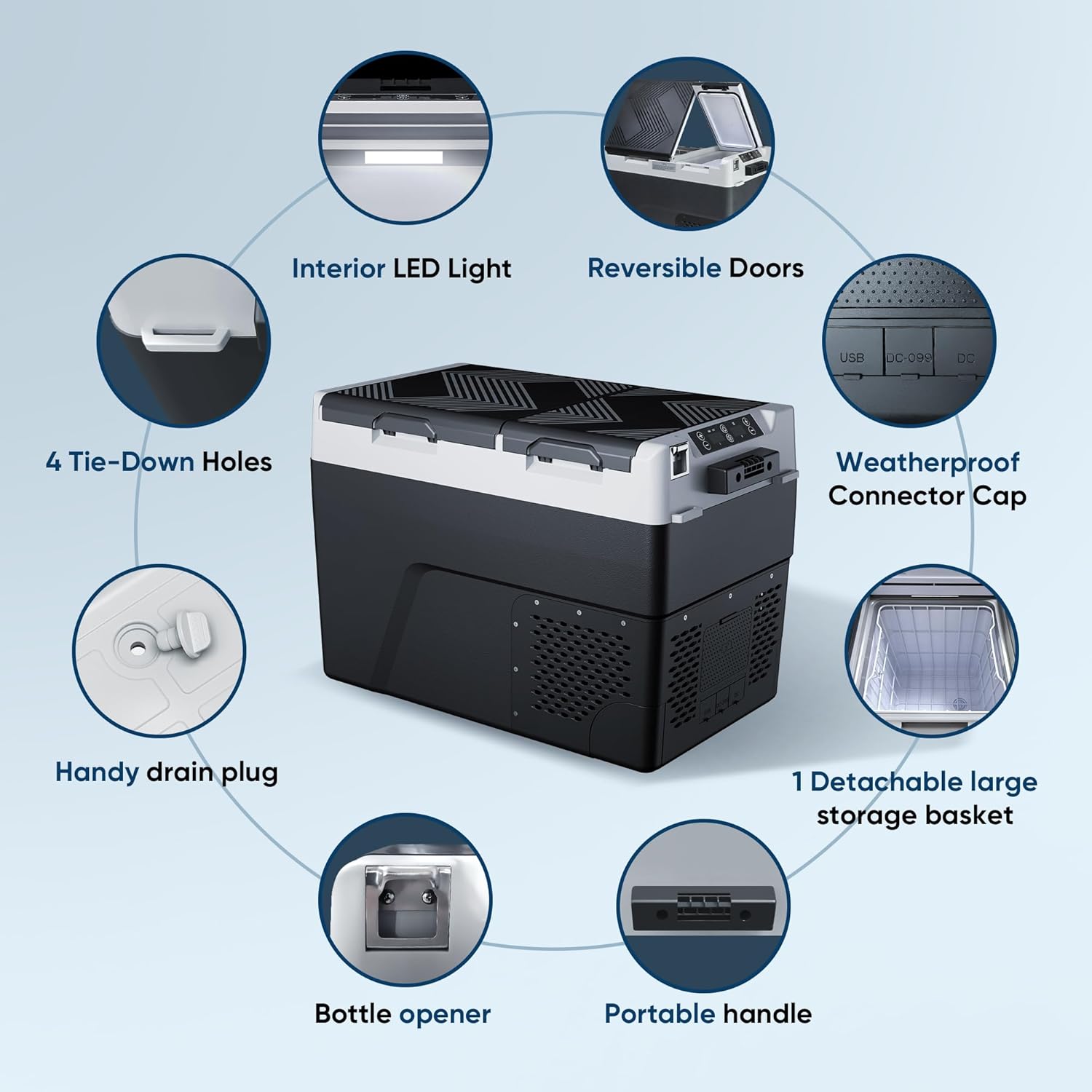
Image: Diagram highlighting user-friendly features such as interior LED light, portable handle, drain plug, and reversible doors.

Image: Shows multiple power options for the cooler, including car use (12V/24V DC), solar power system, and indoor use (100-240V AC).
3. Setup
- Unpacking: Carefully remove the cooler from its packaging. Inspect for any damage.
- Initial Placement: Before first use, allow the cooler to stand upright for at least 6 hours. This allows the compressor lubricants to settle.
- Power Connection:
- DC Power (12V/24V): Connect the DC power cord to the cooler's DC input port and then to your vehicle's cigarette lighter socket or a compatible 12V/24V power source.
- AC Power (100-240V): Connect the AC adapter to the cooler's AC input port, then plug the adapter into a standard wall outlet.
The cooler is designed to operate with both DC and AC power sources. Ensure the correct cable is used for the respective power input.
- Initial Cleaning: Wipe the interior and exterior of the cooler with a damp cloth before placing any items inside.
4. Operating Instructions
Control Panel:
The control panel is located on the top of the cooler and features touch-sensitive buttons and digital displays for each zone.
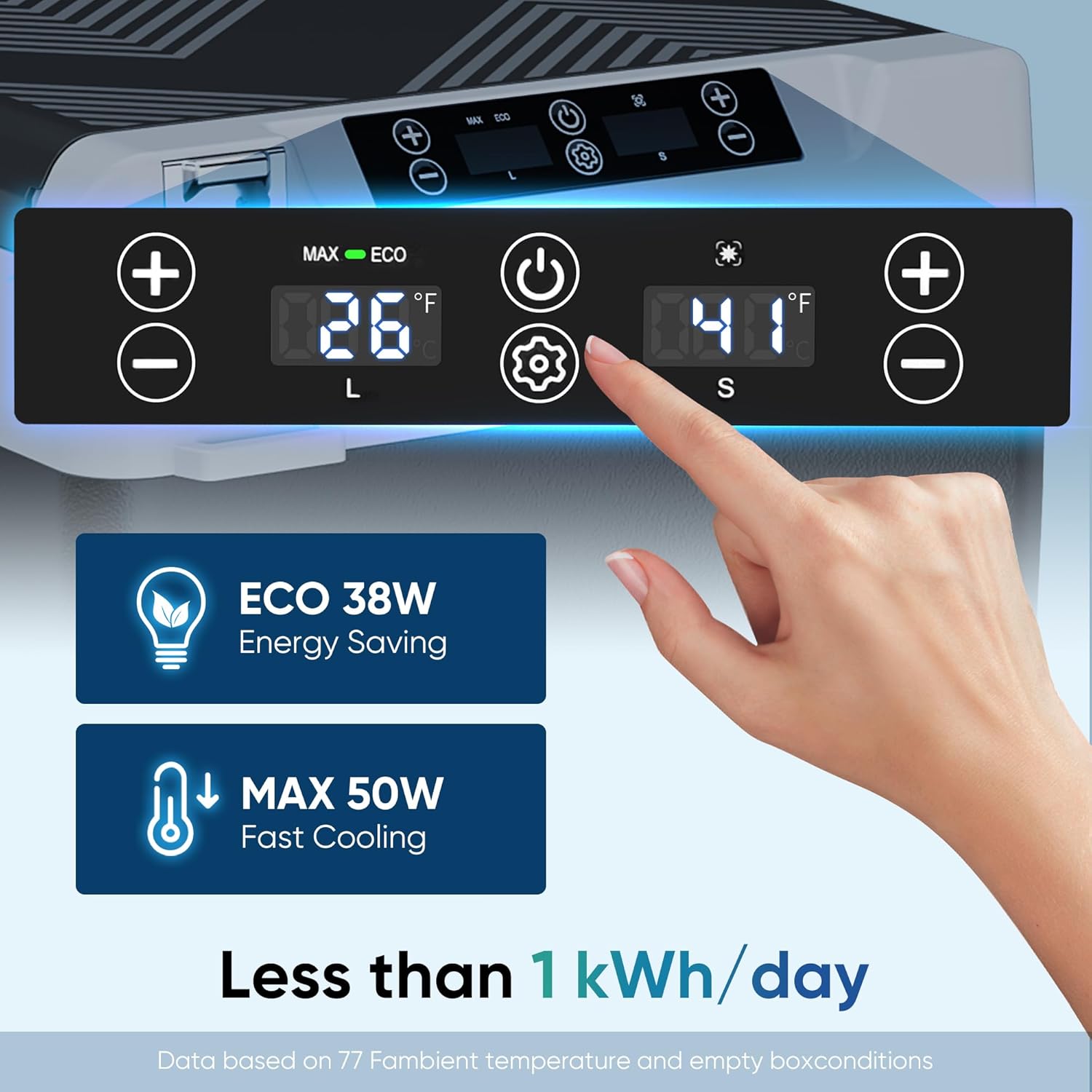
Image: Control panel with digital temperature displays and control buttons for each zone.
- Power Button (⏻): Press to turn the cooler ON or OFF.
- Settings Button (⚙): Press to cycle through operating modes (ECO, MAX) or to enter temperature unit selection (°C/°F).
- Temperature Adjustment Buttons (+/-): Use these buttons to increase or decrease the target temperature for the selected zone. There are separate sets of buttons for the large (L) and small (S) zones.
- Digital Display: Shows the current temperature of each zone.
Temperature Settings:
- Turn on the cooler using the Power button.
- Select the zone you wish to adjust (L for large, S for small). The active zone's display may flash or have an indicator light.
- Use the corresponding '+' or '-' buttons to set your desired temperature. The temperature range is -4°F to 68°F (-20°C to 20°C).
- The cooler will automatically adjust to reach and maintain the set temperature.
Operating Modes:
- ECO Mode: Energy-saving mode, suitable for maintaining temperature over longer periods with lower power consumption (under 30W).
- MAX Mode: Fast cooling mode, ideal for quickly reaching desired temperatures (up to 50W).
- To switch modes, press the Settings button (⚙) until "ECO" or "MAX" appears on the display, then release.
Battery Protection Settings:
The cooler features a 3-level battery protection system to prevent excessive discharge of your vehicle's battery. To adjust this setting:
- With the cooler ON, press and hold the Settings button (⚙) for 3 seconds. The current battery protection level (H1, N2, or L3) will flash on the display.
- Press the Settings button (⚙) repeatedly to cycle through the levels: H1 (High), N2 (Medium), L3 (Low).
- Release the button when your desired level is displayed. The setting will be saved automatically.
| Voltage | High (H1) | Medium (N2) | Low (L3) |
|---|---|---|---|
| 12V DC Cut Out | 11.3V | 10.1V | 8.5V |
| 12V DC Cut In | 12.5V | 11.4V | 9.6V |
| 24V DC Cut Out | 24.6V | 22.3V | 21.3V |
| 24V DC Cut In | 26.0V | 23.7V | 22.7V |
Note: The 'High' setting is recommended for vehicle battery protection, while 'Low' is suitable when using a dedicated power station.
Usage Scenarios and Dual-Zone Functionality:
Video: Demonstrates usage scenarios, operational methods, and dual-zone temperature control of the Feelfunn electric cooler.
The dual-zone feature allows you to set different temperatures for each compartment, effectively functioning as a refrigerator and a freezer simultaneously. This is ideal for separating items that require different cooling levels, such as fresh produce in one zone and frozen meats or ice cream in the other.

Image: Top-down view of the cooler showing two independent compartments with different temperature settings for various food types.
5. Maintenance
- Cleaning:
- Always unplug the cooler before cleaning.
- Use a soft cloth dampened with mild detergent and water to clean the interior and exterior surfaces.
- Do not use abrasive cleaners or harsh chemicals.
- For thorough cleaning, utilize the bottom drain plug to remove any liquids.
- Defrosting: If frost builds up inside, turn off the cooler and allow the frost to melt naturally. Use the drain plug to remove water. Do not use sharp objects to remove frost.
- Storage: When not in use for extended periods, ensure the cooler is clean and dry. Store it in a cool, dry place with the lids slightly ajar to prevent odors and mold growth.
- Ventilation: Regularly check that the ventilation grilles are clear of dust and debris to ensure efficient operation.

Image: Close-up of the handy drain plug for easy cleaning and water removal.
6. Troubleshooting
| Problem | Possible Cause | Solution |
|---|---|---|
| Cooler not turning on | No power, faulty cable, low battery voltage | Check power connection. Ensure vehicle battery is charged or power station has sufficient charge. Replace cable if damaged. Adjust battery protection level if too high. |
| Insufficient cooling | Poor ventilation, door not sealed, ambient temperature too high, ECO mode active | Ensure proper ventilation. Check door seals. Move to a cooler environment if possible. Switch to MAX mode for faster cooling. |
| Unusual noise | Appliance not level, fan obstruction | Place the cooler on a flat, stable surface. Check for any obstructions around the fan. |
| Error code on display | Internal fault | Refer to the specific error code in the full user manual or contact customer support. |
7. Specifications
| Specification | Detail |
|---|---|
| Brand | Feelfunn |
| Model Info | CF026-38BL |
| Item Weight | 35.7 pounds |
| Product Dimensions | 15.6 x 28.6 x 17.1 inches (39.6 x 72.6 x 43.4 cm) |
| Capacity | 38 Liters (40 Quart) |
| Temperature Range | -4°F to 68°F (-20°C to 20°C) |
| Annual Energy Consumption | 143 Kilowatt Hours Per Year |
| Installation Type | Freestanding for Truck Van RV Camper SUV |
| Form Factor | Portable |
| Special Features | Dual-Zone Independent Control, Anti-Shake, Energy Efficient, Low Noise, Portable, Touch Control |
| Color | Black |
| Voltage | 12 Volts (DC), 100-240 Volts (AC) |
| Defrost System | Frost Free |
| Door Material Type | Plastic |
| Number Of Doors | 2 |
| Certification | ETL |
8. Warranty and Support
The Feelfunn 40QT Dual Zone Electric Cooler comes with a 1-year warranty from the date of purchase.
For any questions, technical assistance, or warranty claims, please contact Feelfunn customer support. Refer to the contact information provided in your purchase documentation or on the official Feelfunn website.