
1. Introduction
This manual provides essential instructions for the safe and efficient use of your LIVALL PikaBoost 2 E-Bike Conversion Kit. Please read this manual thoroughly before installation and operation to ensure proper function and longevity of your device. The PikaBoost 2 is designed to transform a standard bicycle into an electric bike, offering assistance and extended range for various cycling needs.
2. Important Safety Information
- Always use a 65W USB-C charger for the battery. Using an incompatible charger may damage the battery or pose a safety risk.
- The PikaBoost 2 is compatible only with bicycles featuring round seatposts with a diameter between 25-35mm (0.98-1.38 inches). Ensure your bike meets these specifications before installation.
- This product is not suitable for children's bicycles, tricycles, wheelchairs, D-shaped seat tubes, carbon fiber seat posts, or bikes with rear suspension.
- The motor is equipped with a gyroscope that automatically shuts off power if the unit tilts over 30°. An SOS alert will be triggered if the tilt exceeds 60°, enhancing safety on challenging terrains.
- Regularly inspect the V-shape tire for wear. The tire is designed for durability, lasting 3,000 to 5,000 km, but replacement may be necessary based on usage conditions.
- Ensure all components are securely fastened before each ride.
- Adhere to local traffic laws and regulations when operating an e-bike.
3. Package Contents
Verify that all items are present and in good condition upon unpacking.
- LIVALL PikaBoost 2 Main Unit
- Rechargeable Battery (158Wh or 220Wh, depending on model)
- Wireless Remote Control
- USB-C Charging Cable
- Mounting Bracket and Hardware
- Tool Kit
- Quick Guide

Image: Contents of the LIVALL PikaBoost 2 E-Bike Conversion Kit package.
4. Product Overview
The LIVALL PikaBoost 2 is a compact and versatile e-bike conversion kit designed for easy attachment to the rear wheel of compatible bicycles. It features a powerful motor, a long-lasting battery, and smart connectivity for an enhanced riding experience.
Key Components:
- Main Unit: Houses the motor, battery, and control electronics. Attaches to the seatpost.
- Drive Wheel: The small wheel that makes contact with the bicycle's rear tire, providing propulsion.
- Rear Light: Integrated LED light for visibility and safety.
- Wireless Remote Control: Allows for mode switching and speed adjustments during rides.
- Battery: Available in 158Wh or 220Wh capacities, providing power for the motor. Features a multi-layered Battery Management System (BMS) for safety.

Image: The LIVALL PikaBoost 2 E-Bike Conversion Kit main unit and remote control.
5. Setup and Installation
5.1 Compatibility Check
Before installation, ensure your bicycle meets the following criteria:
- Bike Models: Most common hardtail bikes (mountain bikes, road bikes, hybrid bikes, folding bikes).
- Wheel Size: 35.6–73.7 cm (14–29 inches).
- Seat Tube Type: Round tube.
- Seat Tube Length: Over 50 mm (1.97 inches).
- Seat Tube Diameter: 25–35 mm (0.98–1.38 inches).
- Tire Width:
- V-shaped Tire: 25–65 mm (1.0–2.6 inches)
- Road Tire: 23–32 mm (0.9–1.3 inches)
- Mountain Tire: 45–65 mm (1.8–2.6 inches)
Note: Not suitable for tricycles, wheelchairs, D-shaped seat tubes, carbon fiber seat posts, or rear-suspension bikes.
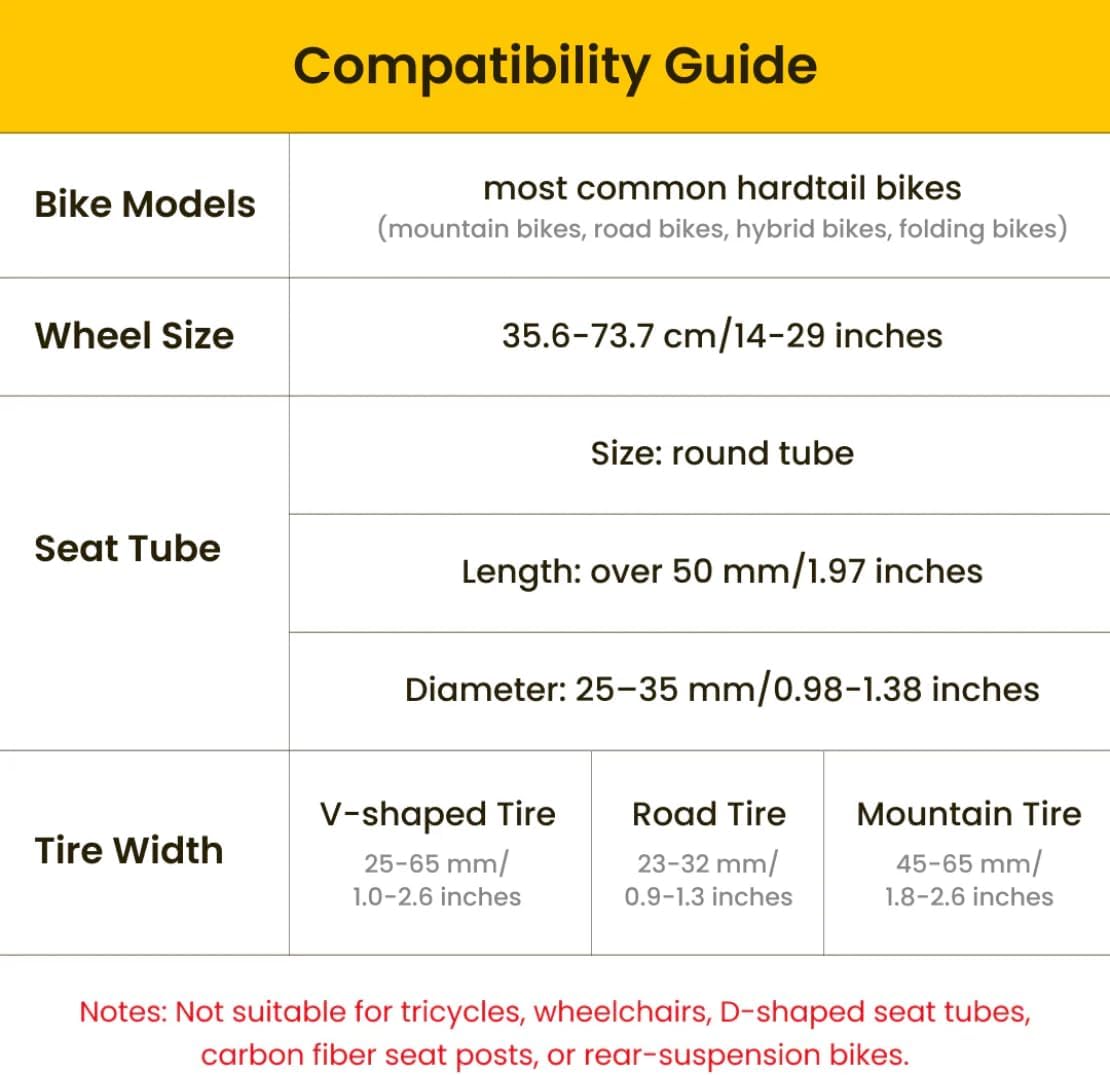
Image: Detailed compatibility guide for the PikaBoost 2.
5.2 Mounting the PikaBoost 2 Unit
- Attach the mounting bracket to your bicycle's seatpost. Ensure it is securely tightened according to the quick guide instructions.
- Slide the PikaBoost 2 main unit onto the mounting bracket until it clicks into place. Verify that the drive wheel makes proper contact with the rear bicycle tire.
- Adjust the unit's position to ensure optimal contact and alignment with the tire.

Image: PikaBoost 2 unit installed on a bicycle.
Video: Demonstration of installing the PikaBoost 2 unit onto a bicycle seatpost.
5.3 Initial Battery Charge
Before first use, fully charge the PikaBoost 2 battery.
- Connect the USB-C charging cable to the charging port on the PikaBoost 2 unit.
- Connect the other end of the cable to a 65W USB-C power adapter (not included).
- The charging indicator lights will illuminate. Charge until all lights are solid, indicating a full charge.
Video: Illustrates the process of charging the PikaBoost 2 battery.
5.4 App Connection and Calibration
Download the official LIVALL app from your smartphone's app store. The app allows for automatic installation, calibration, and advanced control features.
- Ensure Bluetooth is enabled on your smartphone.
- Open the LIVALL app and follow the on-screen instructions to pair with your PikaBoost 2 unit.
- The app will guide you through initial calibration for optimal performance.
Video: Demonstrates connecting the PikaBoost 2 to the LIVALL app and initial setup.
6. Operating Instructions
6.1 Power On/Off
Press and hold the power button on the PikaBoost 2 unit to turn it on or off. The indicator lights will confirm the status.
6.2 Riding Modes
The PikaBoost 2 offers four distinct riding modes, selectable via the remote control or the LIVALL app:
- Standby Status: Motor is inactive.
- Assist Mode: Provides motor assistance based on your pedaling effort.
- Cruise Mode: Maintains a set speed without continuous pedaling.
- Workout Mode: Offers resistance for a more intense cycling workout.

Image: PikaBoost 2 modes for diverse riding styles.
6.3 Remote Control Functions
The wireless remote control provides convenient access to key functions:
- Center Button: Pause assistance or switch between modes.
- Up/Down Buttons: Adjust speed in Cruise Mode.
- Left/Right Buttons: Sync with turn signals (if available and paired).
- Brake Lever Sensors: Intelligent E-Brake automatically cuts motor power when braking.
Video: Overview of the remote control functions for the PikaBoost 2.
6.4 App Control
The LIVALL app offers advanced control and monitoring features:
- Switch between the 4 riding modes.
- Monitor battery level and ride statistics.
- Create groups with friends for shared rides.
- Access remote troubleshooting functions.
7. Maintenance
- Cleaning: Wipe the PikaBoost 2 unit with a damp cloth. Avoid using harsh chemicals or abrasive cleaners. Do not submerge the unit in water.
- Battery Care: For optimal battery life, avoid fully discharging the battery frequently. Store the unit in a cool, dry place when not in use, and charge it periodically if stored for extended periods. The battery is designed to retain 80% capacity after 1,000 cycles.
- Tire Inspection: Regularly check the PikaBoost 2's V-shape drive tire for wear and tear. Replace if significant wear is observed to maintain optimal traction and performance.
- Firmware Updates: Check the LIVALL app periodically for firmware updates to ensure your PikaBoost 2 has the latest features and performance enhancements.
8. Troubleshooting
| Problem | Possible Cause | Solution |
|---|---|---|
| Unit does not power on. | Battery is depleted or not properly inserted. | Charge the battery fully. Ensure the battery is correctly seated in the unit. |
| Motor not providing assistance. | Incorrect riding mode selected, unit not properly calibrated, or poor contact with bike tire. | Switch to Assist or Cruise Mode. Re-calibrate via the app. Adjust unit position to ensure firm contact with the tire. |
| Remote control unresponsive. | Remote battery low or not paired. | Replace remote battery. Re-pair the remote with the PikaBoost 2 unit according to the quick guide. |
| App connection issues. | Bluetooth off, app outdated, or unit not discoverable. | Ensure Bluetooth is on. Update the LIVALL app. Restart the PikaBoost 2 unit and try connecting again. |
9. Specifications
| Feature | Detail |
|---|---|
| Brand | LIVALL |
| Model Name | PikaBoost 2 (Essential Edition) |
| Battery Capacity | 158Wh or 220Wh |
| Estimated Range (158Wh) | Up to 50 km (31 miles) under ideal conditions |
| Estimated Range (220Wh) | Up to 70 km (43 miles) under ideal conditions |
| Motor Power | 500W Peak Power, 250W Rated Power |
| Max Speed (Assisted) | Up to 25 km/h (15 mph) |
| Compatibility (Seatpost Diameter) | Round seatposts, 25-35mm (0.98-1.38 inches) |
| Compatibility (Wheel Size) | 14-29 inches (35.6-73.7 cm) |
| Material | Aluminum (Frame) |
| Special Feature | Portable, Fall Detection (Gyroscope), Regenerative Power System |
| Battery Compliance Standards | UL227, UL2580 (US) |
| Item Package Dimensions | 17.24 x 7.6 x 5.2 inches |
| Package Weight | 8.8 Pounds |
| UPC | 199284744318 |

Image: Internal view of the PikaBoost 2 motor and regenerative power system.
10. Warranty and Support
10.1 Warranty Information
The LIVALL PikaBoost 2 E-Bike Conversion Kit comes with a 1-Year Warranty Protection from the date of purchase. This warranty covers manufacturing defects under normal use. Please retain your proof of purchase for warranty claims.
For detailed warranty terms and conditions, please refer to the official LIVALL website or contact customer support.
10.2 Customer Support
If you encounter any issues or have questions regarding your PikaBoost 2, please contact LIVALL customer support through the following channels:
- Official User Manual (PDF): Download PDF Manual
- LIVALL Official Website: Visit the LIVALL Store on Amazon for product information and support resources.
- In-App Support: Utilize the remote troubleshooting functions available within the LIVALL app.


