
1. Introduction
This manual provides essential instructions for the proper installation, operation, and maintenance of the NHJLFKSA KFR-35GW/BPZA SX-SAKAVBBP-M37546 Air Conditioning Computer Board. This component serves as a replacement motherboard or controller for compatible air conditioning units, ensuring their correct functionality. Please read this manual thoroughly before attempting any installation or service.
2. Safety Information
WARNING: Electrical shock hazard. Improper installation or service can result in serious injury or death. Always follow these safety guidelines:
- Always disconnect power to the air conditioning unit at the main circuit breaker before beginning any installation, maintenance, or troubleshooting.
- Installation should only be performed by qualified and experienced technicians.
- Wear appropriate personal protective equipment, including insulated gloves and safety glasses.
- Handle the circuit board with care to prevent damage from electrostatic discharge (ESD). Use an anti-static wrist strap and work on an anti-static mat.
- Ensure all connections are secure and correctly polarized before restoring power.
- Do not operate the air conditioning unit with damaged or improperly installed components.
3. Package Contents
Verify that all items are present and undamaged upon opening the package:
- 1 x NHJLFKSA KFR-35GW/BPZA SX-SAKAVBBP-M37546 Air Conditioning Computer Board
4. Setup and Installation
This section outlines the general procedure for replacing an existing air conditioning computer board. Specific steps may vary depending on your air conditioning unit model.
4.1. Preparation
- Disconnect Power: Locate the main circuit breaker for your air conditioning unit and switch it to the OFF position. Verify that power is completely disconnected using a voltage tester.
- Access the Unit: Open the service panel of your air conditioning unit to access the existing computer board.
- Document Connections: Before disconnecting any wires, take clear photographs or draw a detailed diagram of all wire connections to the old board. Note the color, position, and function of each wire. This is crucial for correct re-installation.
- Gather Tools: Ensure you have the necessary tools, such as screwdrivers, wire cutters/strippers, and an anti-static wrist strap.
4.2. Removal of Old Board
- Carefully disconnect all wires and connectors from the old computer board, referring to your documentation.
- Unscrew or unclip the old board from its mounting points within the unit.
- Remove the old board and set it aside.
4.3. Installation of New Board
- Wearing an anti-static wrist strap, carefully position the new NHJLFKSA KFR-35GW/BPZA SX-SAKAVBBP-M37546 computer board in the mounting location.
- Secure the new board using the appropriate screws or clips. Do not overtighten.
- Reconnect all wires and connectors to the new board, precisely matching them to the positions documented in step 4.1.3. Ensure all connections are firm and secure.
- Double-check all connections against your documentation to prevent miswiring.
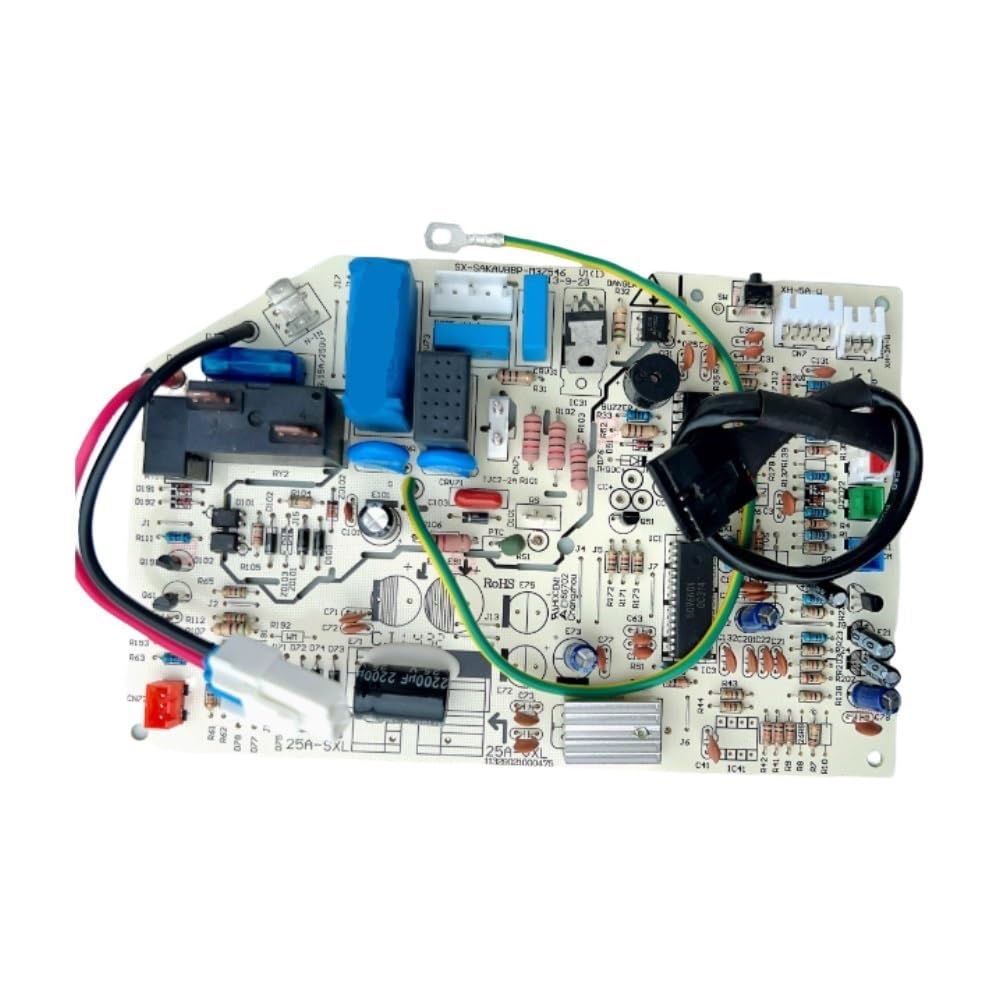
Image: The NHJLFKSA KFR-35GW/BPZA SX-SAKAVBBP-M37546 Air Conditioning Computer Board, showing various connectors and components. This image illustrates the general appearance of the circuit board for identification and installation reference.
4.4. Post-Installation Check
- Close the service panel of the air conditioning unit.
- Restore power to the air conditioning unit at the main circuit breaker.
- Test the air conditioning unit's functionality, including all modes (cooling, heating, fan), temperature settings, and other features, to ensure proper operation.
5. Operating Instructions
As a replacement computer board, the NHJLFKSA KFR-35GW/BPZA SX-SAKAVBBP-M37546 does not have direct user-operable controls. Its function is to enable the air conditioning unit to operate as designed. Once correctly installed, the air conditioning unit should respond to its standard controls (e.g., thermostat, remote control) as it did prior to the board replacement. Refer to your air conditioning unit's specific user manual for operating instructions.
6. Maintenance
The computer board itself requires minimal maintenance. However, to ensure its longevity and the reliable operation of your air conditioning unit, consider the following:
- Regular Inspection: During routine air conditioning unit maintenance, visually inspect the board for any signs of damage, corrosion, or loose connections.
- Keep Clean: Ensure the area around the board is free from dust, debris, and moisture. Use a soft, dry brush or compressed air to gently clean the board if necessary, always with power disconnected.
- Environmental Control: Ensure the air conditioning unit's environment is within its specified operating conditions (temperature, humidity) to prevent stress on electronic components.
7. Troubleshooting
If your air conditioning unit experiences issues after the board replacement, consider these troubleshooting steps:
- No Power: Verify that the main circuit breaker is ON and that all power connections to the board are secure. Check for any blown fuses within the unit.
- Incorrect Operation/Error Codes: Double-check all wire connections against your documentation. A single miswired connection can cause various malfunctions. Consult your air conditioning unit's service manual for specific error code interpretations.
- Intermittent Issues: Inspect for loose connections or signs of overheating on the board. Ensure proper ventilation within the unit.
- Unit Not Responding: Confirm that the thermostat or remote control is functioning correctly and sending signals to the unit.
If issues persist after performing these checks, it is recommended to contact a qualified HVAC technician for further diagnosis and repair.
8. Specifications
| Specification | Value |
|---|---|
| Brand | NHJLFKSA |
| Model Numbers | KFR-35GW/BPZA, SX-SAKAVBBP-M37546 |
| Part Number | NHJLFKSA |
| Item Weight | 1.76 ounces |
| Product Dimensions | 0.39 x 0.39 x 0.39 inches |
| Manufacturer | NHJLFKSA |
| Application | Home Air Conditioner Parts |
9. Warranty Information
There is no explicit warranty description provided for this product. Please refer to the retailer's return policy or contact the manufacturer directly for any warranty-related inquiries.
10. Support
For technical assistance, installation guidance, or troubleshooting beyond the scope of this manual, please contact the manufacturer, NHJLFKSA, or a certified HVAC professional.