
1. Introduction
This manual provides essential information for the setup, operation, and maintenance of your FANATEC CSL Steering Wheel P1 V2 (QR2 LITE). Please read these instructions carefully to ensure proper use and to maximize your sim racing experience. This steering wheel is designed for use with compatible Fanatec Wheel Bases on PC, PlayStation 5, and PlayStation 4 platforms.

Image 1.1: General view of the FANATEC CSL Steering Wheel P1 V2 (QR2 LITE).
2. Setup
2.1 Attaching the Steering Wheel
The CSL Steering Wheel P1 V2 comes with a QR2 LITE Wheel-Side preinstalled, designed for quick and secure attachment to a compatible Fanatec Wheel Base. Ensure the wheel base is powered off before attachment.
- Align the QR2 LITE mechanism on the steering wheel with the shaft of your Fanatec Wheel Base.
- Push the steering wheel firmly onto the wheel base shaft until it clicks into place.
- Verify that the quick release mechanism is fully engaged and the wheel is securely fastened.
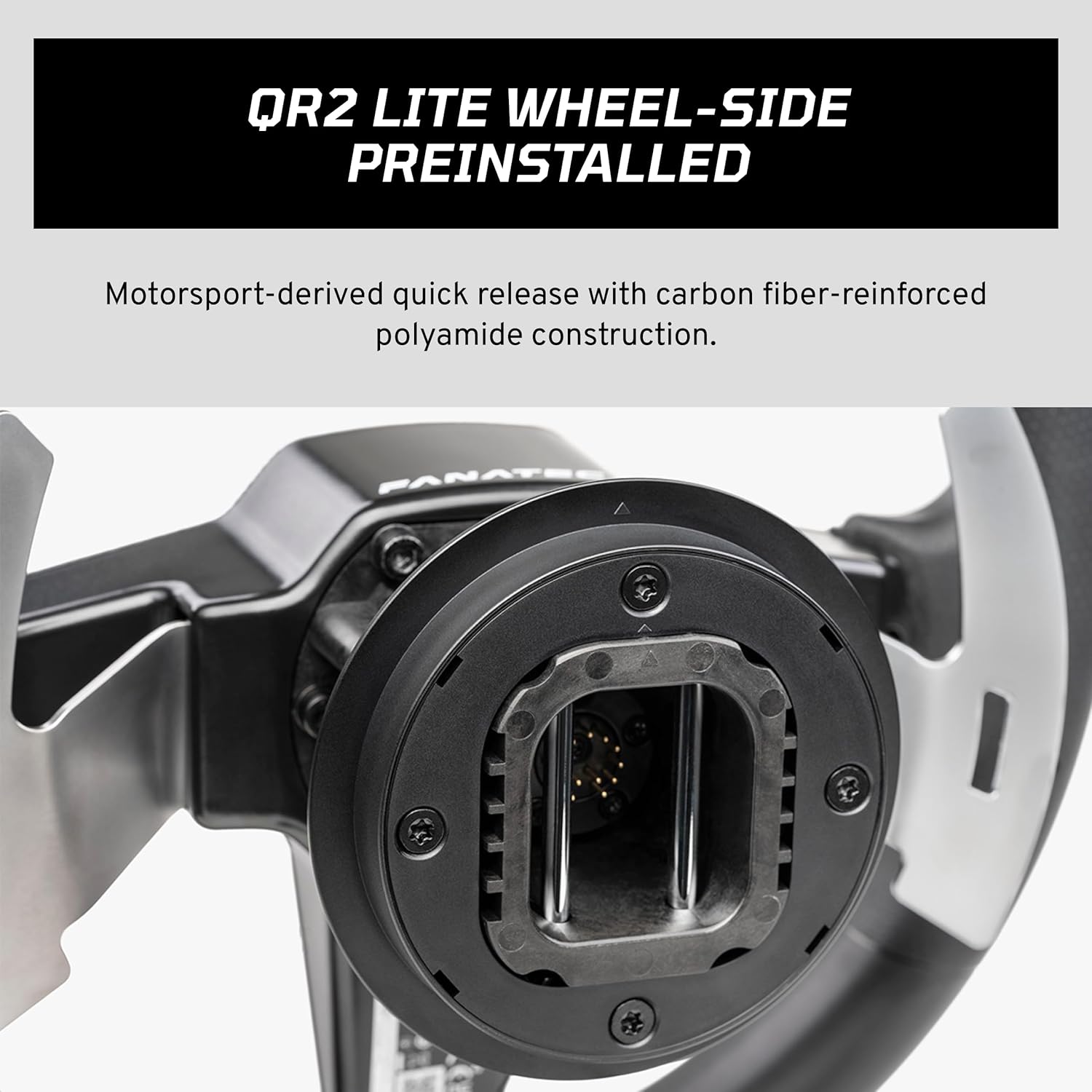
Image 2.1: Close-up of the QR2 LITE Wheel-Side preinstalled on the steering wheel.
2.2 Connecting to PC/Console
Once attached to the wheel base, the steering wheel communicates directly through the wheel base. No separate connection is required for the wheel itself.
- PC: Connect your Fanatec Wheel Base to your PC via USB. Install the latest Fanatec drivers and firmware from the official Fanatec website.
- PlayStation (PS5/PS4): Ensure your Fanatec Wheel Base is PlayStation-licensed and connected to your console. The steering wheel will be recognized automatically.
3. Operating Instructions
3.1 Basic Controls
The CSL Steering Wheel P1 V2 features a comprehensive set of controls for an immersive racing experience.
- 12 Buttons: Located on the face of the wheel, these buttons are fully assignable in compatible games for various functions.
- 4-way Direction Pad with Push Button: Provides directional input and an additional button press, ideal for menu navigation or specific in-game controls.

Image 3.1: Detail of the 12 face buttons and 4-way D-pad.
3.2 Metal Shifter Paddles
The steering wheel is equipped with durable metal shifter paddles, providing tactile feedback for precise gear changes.
- Snap-dome Activation: Each paddle features a snap-dome mechanism for a distinct "click" feeling, ensuring reliable and satisfying shifts.
- Function: Typically used for upshifting and downshifting in racing simulations.

Image 3.2: Metal shifter paddles for gear changes.
3.3 Integrated RevStripe and LED Display
The steering wheel integrates a RevStripe and a three-digit LED display to provide crucial information during gameplay.
- RevStripe: A multi-color LED strip that functions as an engine RPM indicator, helping you time your shifts perfectly.
- Three-digit LED Display: This display can show various telemetry data such as speed, current gear, or other in-game information, depending on game compatibility. It also allows access to the Tuning Menu settings of your Fanatec Wheel Base.

Image 3.3: The RevStripe and LED display showing a numerical value.
3.4 Ergonomic Design
The steering wheel is designed for comfort and performance during extended racing sessions.
- 300 mm Diameter: An ergonomic size suitable for various driving styles and vehicle types.
- Rubberized Grip: Provides a secure and comfortable hold, reducing fatigue and improving control.
4. Maintenance
4.1 Cleaning
To maintain the appearance and functionality of your steering wheel:
- Use a soft, dry cloth to wipe down the wheel rim and button areas.
- For stubborn dirt, slightly dampen the cloth with water. Avoid harsh chemicals or abrasive cleaners.
- Do not spray cleaning liquids directly onto the wheel, especially near electronic components or the LED display.
4.2 Storage
When not in use, store the steering wheel in a clean, dry environment away from direct sunlight and extreme temperatures. If detached from the wheel base, place it in a protective cover or box to prevent dust accumulation and physical damage.
5. Troubleshooting
If you encounter issues with your CSL Steering Wheel P1 V2, consider the following steps:
- Wheel Not Recognized: Ensure the wheel is securely attached to the wheel base. Check that the wheel base is powered on and properly connected to your PC or console. For PC, verify that the latest Fanatec drivers and firmware are installed.
- Buttons/Paddles Not Responding: Test button functionality within the Fanatec control panel (PC) or a compatible game. Ensure no software conflicts are present.
- LED Display/RevStripe Issues: Check the wheel base's Tuning Menu settings to ensure the display is enabled and configured correctly. Verify game compatibility for telemetry data.
- Firmware Update: Regularly check the Fanatec website for firmware updates for both your wheel base and steering wheel, as these often resolve known issues and improve compatibility.
For persistent issues, please refer to the official Fanatec support resources.
6. Specifications
| Model Number | CSL_SW_P1_V2R_QR2L |
| Brand | Fanatec |
| Diameter | 300 mm |
| Grip Material | Rubber |
| Shifter Paddles | Metal, Snap-dome activated |
| Quick Release | QR2 LITE Wheel-Side (Preinstalled) |
| Buttons | 12 face buttons, 4-way D-pad with push button |
| Display | Three-digit LED, Integrated RevStripe |
| Compatibility | PC (with any Fanatec Base), PS5/PS4 (with PlayStation-licensed Fanatec Base) |
| Item Weight | 2.86 pounds (approx.) |
| Package Dimensions | 15.25 x 14.25 x 7.5 inches (approx.) |
7. Warranty Information
Fanatec products are covered by a manufacturer's warranty. The specific terms and duration of the warranty may vary by region and product. For detailed warranty information, including coverage, terms, and how to make a claim, please visit the official Fanatec website and refer to their warranty policy section. Keep your proof of purchase for warranty purposes.
8. Support
For technical assistance, product inquiries, or further support, please contact Fanatec customer service through their official channels:
- Official Website: fanatec.com
- Support Portal: Visit the support section on the Fanatec website for FAQs, drivers, firmware, and contact options.
Always ensure you have your product model number and serial number ready when contacting support.


