
1. Product Overview
The YESHOMY Vanity Desk YH-0841 is designed to provide a functional and organized space for personal grooming. It features a large mirror with adjustable lighting, integrated power outlets, and multiple storage compartments.

Figure 1: Overview of the YESHOMY Vanity Desk YH-0841.
Key Features:
- Large lighted mirror with 11 bulbs and 3 color modes.
- Integrated power outlet with two AC sockets, one USB port, and one Type-C port.
- Ample storage including 4 open shelves, 1 wide drawer, 6 deep drawers, and 3 desktop storage compartments.
- Durable wood construction.
2. Package Contents
Before beginning assembly, please verify that all components listed below are present and undamaged. If any parts are missing or damaged, please contact customer support.
- Vanity Desk Components (various panels, hardware)
- Lighted Mirror Unit
- Power Outlet Unit
- 11 LED Bulbs (plus spare bulbs if included)
- Remote Control for Lights
- Assembly Tool Kit
- Installation and Usage Manual (this document)
3. Setup and Assembly
Assembly of the YESHOMY Vanity Desk requires careful attention to detail. It is recommended that two people perform the assembly. All components and accessories are labeled for easier identification.
3.1 Preparation
- Clear a spacious area for assembly.
- Lay out all parts on a soft, clean surface to prevent scratches.
- Identify all hardware using the provided parts list.
3.2 Assembly Steps (General Guide)
- Assemble the Base Frame: Connect the main side panels and back panels using the provided screws and connectors. Ensure all connections are secure.
- Install Drawers: Assemble each drawer according to the instructions. Install the drawer slides onto the main frame and then insert the assembled drawers.
- Attach Desktop: Secure the desktop panel to the assembled base frame.
- Mount Mirror Unit: Carefully attach the lighted mirror unit to the back of the desktop. Ensure it is stable and properly aligned.
- Install Light Bulbs: Screw the 11 LED bulbs into the sockets around the mirror.
- Connect Power Outlet: Integrate the power outlet unit into its designated slot on the desktop and connect its power cord.
- Final Checks: Verify all screws are tightened and the vanity is stable.

Figure 2: Illustration of the vanity desk's multiple storage compartments, including open shelves, wide drawers, and deep drawers.

Figure 3: Detail of the integrated power outlet and hair dryer rack.
4. Operating Instructions
4.1 Lighted Mirror Operation
The vanity mirror features 11 LED bulbs with adjustable lighting modes.
- Power On/Off: Use the remote control or the touch sensor on the mirror to turn the lights on or off.
- Adjust Color Modes: The lights offer three color modes: Warm Yellow, Natural White, and Cold White. Cycle through these modes using the remote control or the touch sensor.
- Adjust Brightness: Use the remote control to increase or decrease the brightness of the lights.
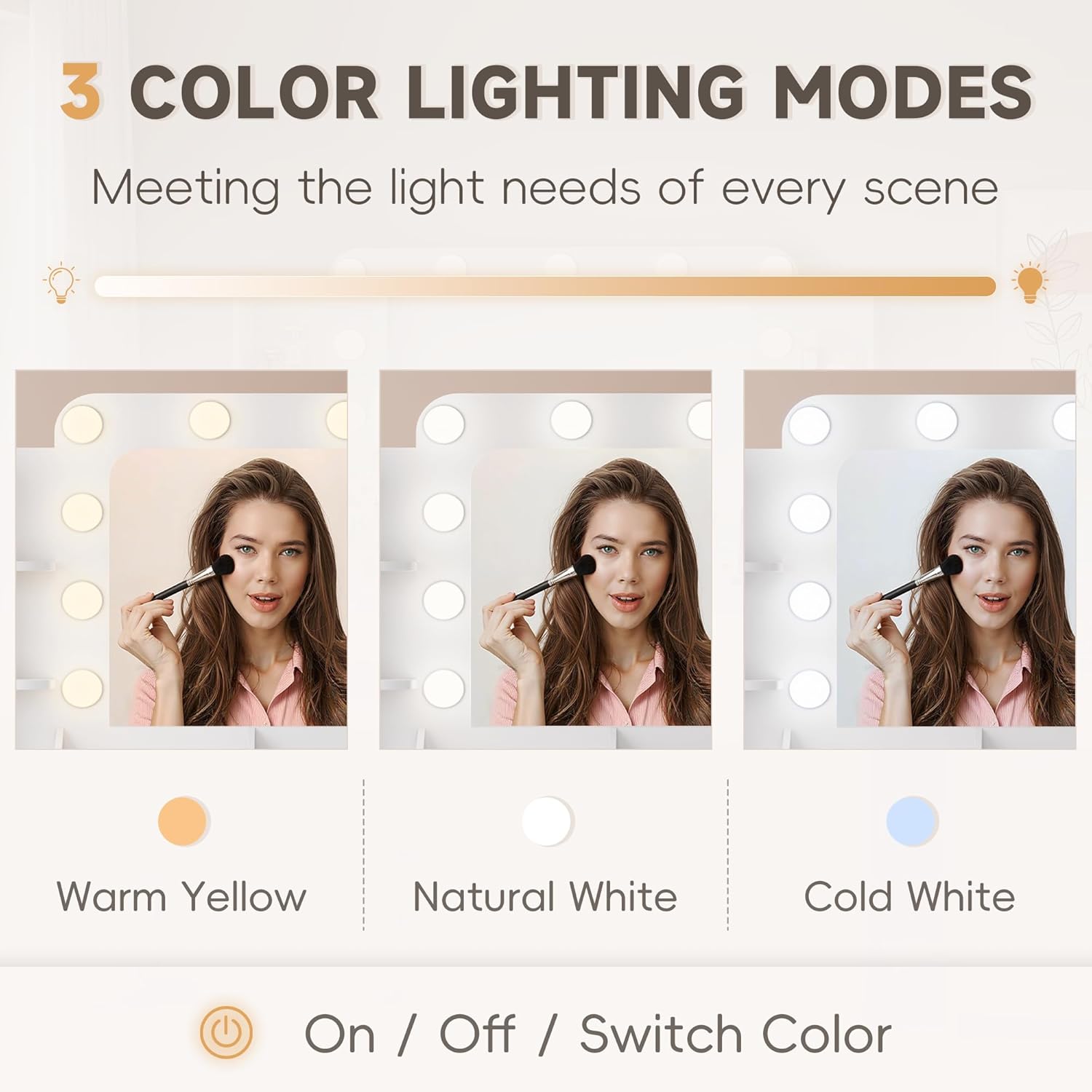
Figure 4: The three available color lighting modes for the mirror.
4.2 Power Outlet Usage
The integrated power outlet provides convenient access to power for your electronic devices.
- AC Outlets: Two 125V/12A AC outlets are available for standard electrical appliances.
- USB Port: One 5V/3A USB port is available for charging mobile phones and other USB-powered devices.
- Type-C Port: One Type-C port is available for compatible devices.
- Ensure devices are compatible with the provided voltage and current ratings.
4.3 Storage Compartments
Utilize the various storage options to keep your items organized.
- Open Shelves: Ideal for frequently used items or decorative pieces.
- Desktop Storage: Compartments on the desktop for smaller items like brushes or perfumes.
- Drawers: Use the wide and deep drawers for cosmetics, jewelry, and other personal belongings.
5. Maintenance and Care
Proper maintenance will ensure the longevity and appearance of your vanity desk.
- Cleaning: Wipe surfaces with a soft, damp cloth. Avoid abrasive cleaners or harsh chemicals that may damage the finish.
- Mirror Care: Clean the mirror with a glass cleaner and a lint-free cloth.
- Bulb Replacement: If an LED bulb needs replacement, ensure the power is off before unscrewing the old bulb and installing a new one. Use bulbs of the same type and wattage.
- Avoid Overloading: Do not place excessively heavy items on the desktop or in the drawers.
- Environmental Conditions: Keep the vanity desk away from direct sunlight and excessive moisture to prevent warping or discoloration.
6. Troubleshooting
If you encounter any issues with your vanity desk, refer to the following common troubleshooting steps:
- Lights Not Working:
- Check if the vanity is properly plugged into a working power outlet.
- Ensure the power switch for the lights is on.
- Verify that all bulbs are securely screwed in. Replace any faulty bulbs.
- Check the remote control battery if using it.
- Power Outlets Not Functioning:
- Confirm the main power cord of the vanity is plugged in.
- Test the wall outlet with another device to ensure it is working.
- Ensure the device you are trying to charge or power is functioning correctly.
- Drawers Sticking or Not Closing:
- Check for any obstructions in the drawer slides.
- Ensure the drawer slides are properly aligned and secured.
- Verify that the drawer contents are not preventing it from closing.
- Vanity Wobbles:
- Ensure all assembly screws are tightened.
- Place the vanity on a flat, level surface.
7. Specifications
| Brand | YESHOMY |
| Model Number | YH-0841 |
| Color | White |
| Material | Wood (Synthetic wood board) |
| Product Dimensions (L x W x H) | 43.3" x 15.74" x 53.9" (15.74"D x 43.3"W x 53.9"H) |
| Item Weight | 96.8 pounds |
| Assembly Required | Yes |
| Lighting | 11 LED bulbs, 3 color modes (Warm Yellow, Natural White, Cold White) |
| Power Outlet | 2 AC outlets (125V/12A), 1 USB port (5V/3A), 1 Type-C port |

Figure 5: Detailed product dimensions.
8. Warranty Information
Specific warranty details for the YESHOMY Vanity Desk YH-0841 are not provided in this manual. Please refer to the product packaging, any included warranty cards, or the official YESHOMY website for comprehensive warranty information.
9. Customer Support
For further assistance, missing parts, or technical support, please contact YESHOMY customer service. Contact information is typically available on the product packaging, the brand's official website, or through your purchase platform.
When contacting support, please have your model number (YH-0841) and purchase details readily available.