
1. Introduction
Thank you for choosing the SUPNIU M6 Portable Karaoke Machine and PA System. This device is designed to provide a versatile audio solution for various applications, including karaoke, public address, and instrument amplification. It features a 5-channel mixer, 200W RMS power output, Bluetooth connectivity, and two wireless microphones. Please read this manual thoroughly to understand the product's functions and ensure safe and optimal operation.
2. Package Contents
Verify that all items listed below are included in your package:
- 1 x SUPNIU M6 Portable Speaker
- 2 x Wireless Microphones
- 1 x Power Cable
- 1 x Quick Start Guide
3. Safety Information
To prevent damage to the product or injury to yourself or others, please observe the following safety precautions:
- Do not expose the unit to rain or moisture.
- Do not open the casing; refer all servicing to qualified personnel.
- Ensure proper ventilation to prevent overheating.
- Use only the provided power cable and accessories.
- Keep the unit away from heat sources and direct sunlight.
- Avoid placing heavy objects on the unit.
4. Product Overview: Controls and Connections
The SUPNIU M6 features a comprehensive control panel for managing audio inputs and outputs. Familiarize yourself with the layout below:

Image: Top view of the SUPNIU M6 mixer panel, showing various knobs and input jacks.
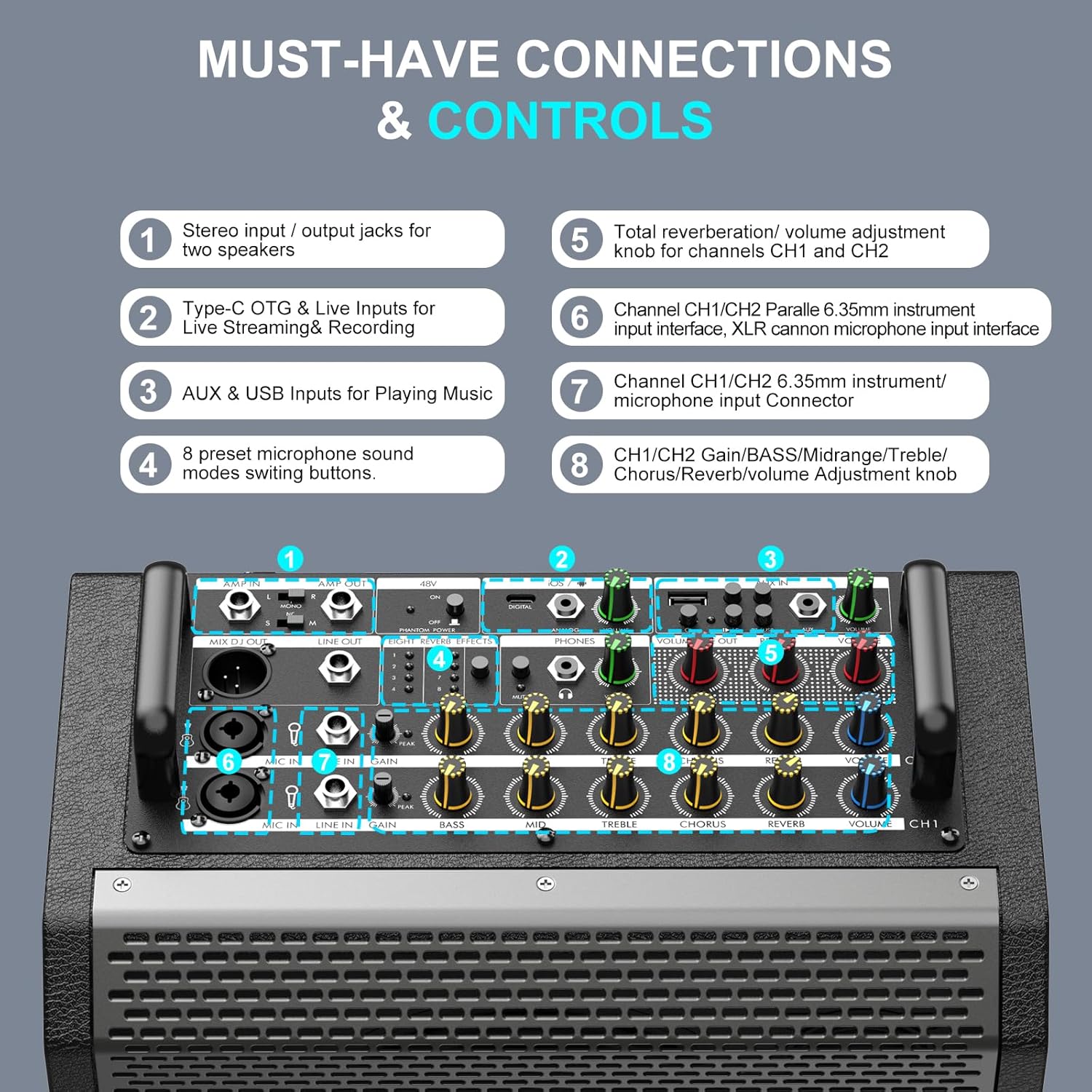
Image: Detailed view of the SUPNIU M6 mixer panel with numbered labels indicating specific controls and connections.
4.1 Mixer Panel Components
- Stereo Input / Output Jacks: For connecting to other speakers or audio devices.
- Type-C OTG & Live Inputs: For live streaming and recording.
- AUX & USB Inputs: For playing music from external devices.
- Preset Microphone Sound Modes: Buttons to switch between different microphone sound effects.
- Total Reverb/Volume Adjustment: Controls for overall reverberation and volume for channels 1 and 2.
- Channel CH1/CH2 Parallel 6.35mm Instrument Input Interface: For connecting instruments like guitars. XLR cannon microphone input interface is also available.
- Channel CH1/CH2 6.35mm Instrument/Microphone Input Connector: Additional input for instruments or wired microphones.
- CH1/CH2 Gain/Bass/Midrange/Treble/Chorus/Reverb/Volume Adjustment Knobs: Individual controls for each channel to fine-tune audio.
5. Setup
5.1 Charging the Unit
Before first use, fully charge the SUPNIU M6 speaker. Connect the provided power cable to the unit's power input and a suitable power outlet. The unit can also operate while charging.
5.2 Wireless Microphone Setup
The SUPNIU M6 comes with two wireless UHF microphones. They are designed for automatic pairing with the speaker.

Image: Two wireless UHF microphones, showing their digital displays and USB-C charging ports.
- Ensure the microphones are charged using their USB-C ports.
- Turn on the SUPNIU M6 speaker.
- Power on the wireless microphones. They should automatically connect to the speaker. The OLED display on the microphones will indicate connection status and battery level.
5.3 Positioning Options
The SUPNIU M6 offers flexible positioning to suit various environments:

Image: Demonstrates the three available positioning options for the SUPNIU M6: vertical on a table, tilted back as a monitor, and mounted on a speaker stand.
- Vertical: Place upright on a flat surface for general sound projection.
- Tilt-back: Position on its side with the front angled upwards, ideal for use as a stage monitor.
- Pole-mounted: Utilize the integrated pole mount on the bottom to elevate the speaker for wider sound dispersion.
6. Operating Instructions
6.1 Power On/Off
Press and hold the power button on the unit to turn it on or off.
6.2 Connecting Audio Sources
6.2.1 Bluetooth Connection
- Ensure the SUPNIU M6 is powered on and in Bluetooth mode (indicated by a blue LED).
- On your device (smartphone, tablet, etc.), enable Bluetooth and search for available devices.
- Select "SUPNIU M6" from the list to pair. A confirmation sound will indicate a successful connection.
6.2.2 AUX/USB Connection
- AUX Input: Connect an audio device using a 3.5mm AUX cable to the AUX input jack.
- USB Input: Insert a USB flash drive containing audio files into the USB port. The unit will automatically detect and play compatible files.
6.3 Using Microphones and Instruments
Connect wired microphones or instruments (e.g., guitar, keyboard) to the XLR/1/4" combo jacks or 6.35mm instrument input connectors. Adjust the individual GAIN, BASS, MIDRANGE, TREBLE, CHORUS, REVERB, and VOLUME knobs for each channel to achieve the desired sound.

Image: Two musicians, one playing guitar and the other saxophone, utilizing the SUPNIU M6 for instrument amplification.
6.4 Adjusting Sound Effects
Use the dedicated knobs on the mixer panel to adjust various sound parameters:
- EQ (Bass, Midrange, Treble): Fine-tune the tonal balance of each channel.
- Chorus/Reverb: Add spatial effects to vocals and instruments.
- Preset Microphone Sound Modes: Experiment with different vocal effects using the dedicated buttons.
6.5 Live Streaming and Recording
The Type-C OTG & Live Inputs allow for direct connection to compatible devices for live streaming or recording performances. Refer to your streaming/recording software for specific setup instructions.
Video: An overview of the SUPNIU M6 PA Speaker, demonstrating its features and portability. This video provides a general introduction to the product's capabilities.
Video: A detailed demonstration of the M6 PA Speaker, focusing on its mixer controls and various input options. This video is useful for understanding the operational aspects of the device.
7. Maintenance
7.1 Cleaning
Wipe the unit with a soft, dry cloth. Do not use abrasive cleaners or solvents. Ensure no liquids enter the openings.
7.2 Storage
When not in use for extended periods, store the unit in a cool, dry place, away from direct sunlight and extreme temperatures. Ensure the battery is partially charged before storage.
8. Troubleshooting
| Problem | Possible Cause | Solution |
|---|---|---|
| No sound output. | Volume too low; incorrect input selected; cables not connected properly. | Increase master volume and individual channel volumes. Verify input source selection. Check all cable connections. |
| Microphone not working. | Microphone off; low battery; not paired; volume too low. | Ensure microphone is powered on and charged. Re-pair if necessary. Increase microphone volume on the mixer. |
| Bluetooth connection issues. | Device too far; interference; not in pairing mode. | Ensure device is within 33 ft (10m) range. Avoid obstacles. Restart Bluetooth on both devices and try pairing again. |
| Unit not charging. | Power cable not connected; faulty outlet. | Check power cable connection to unit and outlet. Try a different outlet. |
9. Specifications
| Feature | Detail |
|---|---|
| Brand | SUPNIU |
| Model Number | M6 |
| Speaker Maximum Output Power | 600 watts (Peak) / 200 watts (RMS) |
| Connectivity Technology | Auxiliary, Bluetooth, USB |
| Audio Output Mode | Stereo |
| Input Voltage | 28 volts DC |
| Enclosure Material | Acrylonitrile Butadiene Styrene (ABS), Metal, Wood |
| Speaker Type | Portable Speaker / Karaoke Machine / PA system |
| Subwoofer Diameter | 6.5 inches |
| Tweeter Diameter | 2.25 inches |
| Color | Black |
| Control Method | Push Button |
| Number of Audio Channels | 1.1 |
| Item Dimensions (D x W x H) | 10.5"D x 10.6"W x 12.6"H |
| Power Source | Battery Powered / DC |
| Number of Batteries | 6 C batteries required (included) |
| Wireless Technology | Bluetooth |
| Subwoofer Connectivity | Wired |
10. Warranty and Customer Support
The SUPNIU M6 comes with a 1-year warranty. For added peace of mind, SUPNIU offers lifetime technical support and fast-response assistance from our customer service team. If you have any product questions or require assistance during use, please do not hesitate to contact our support team. Refer to the contact information provided in your Quick Start Guide or on the official SUPNIU website.