
1. Introduction
This manual provides detailed instructions for the installation, operation, and maintenance of your UNITOPSCI Android 15 Car Stereo. Please read this manual thoroughly before using the product to ensure proper functionality and safety. This unit is specifically designed for Honda Odyssey models from 2005 to 2010 (left-hand drive).
2. Product Overview
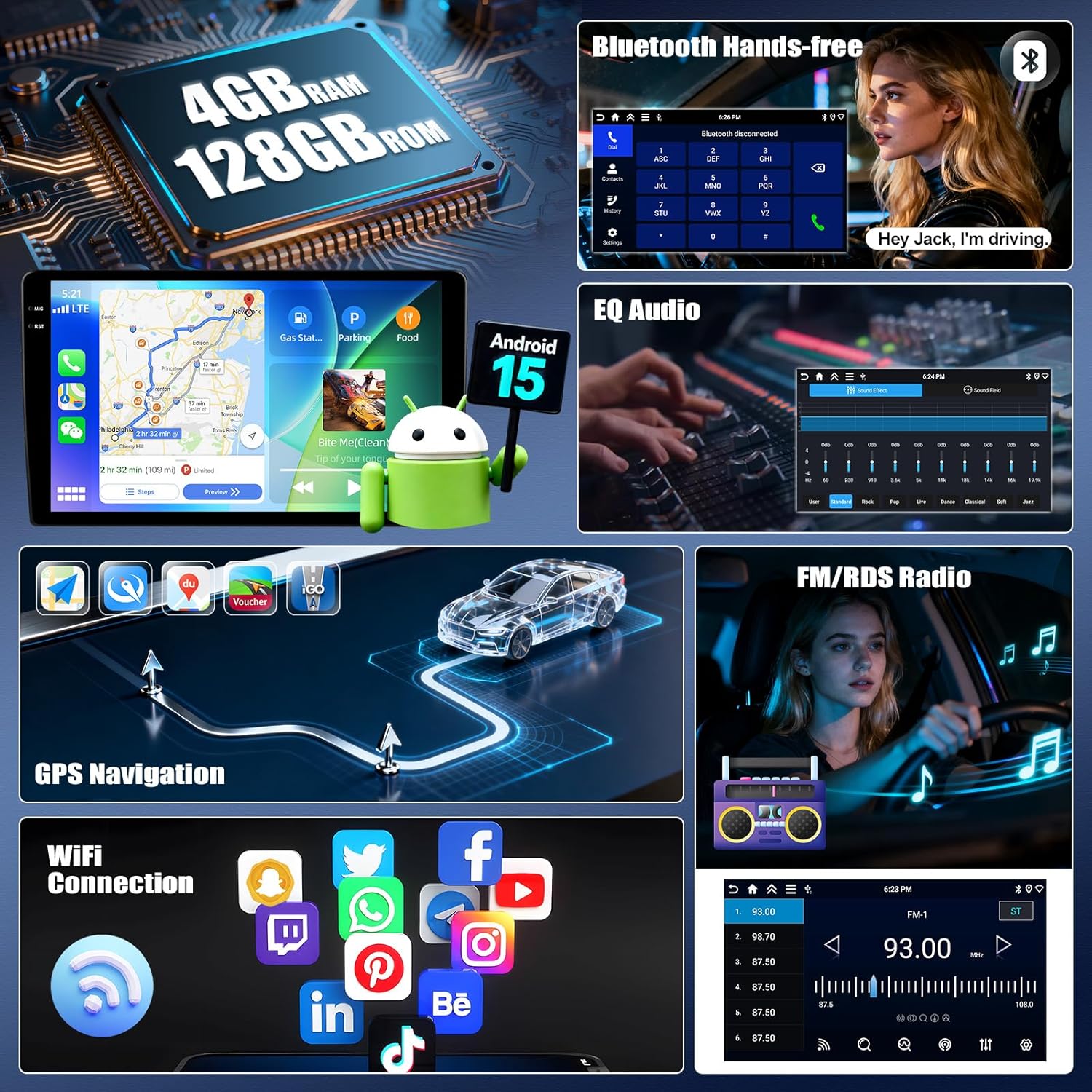
The UNITOPSCI Android 15 Car Stereo features a 10-inch IPS touchscreen with 1280x720P resolution, offering a clear and responsive interface. It is equipped with 4GB RAM and 128GB ROM, providing ample space for applications and smooth performance. Key features include:
- Wireless Carplay and Android Auto for seamless smartphone integration.
- Mirror Link functionality for both iOS and Android devices.
- Built-in GPS navigation with support for offline and online maps.
- Bluetooth 5.0 for hands-free calling and audio streaming.
- FM/RDS radio with enhanced signal reception.
- EQ Audio settings for a customizable sound experience.
- Steering Wheel Control (SWC) compatibility.
- AHD Rear Camera input with parking assist lines.
- Multiple UI themes and Split Screen multitasking.
- Integrated WiFi for internet access and app downloads.
3. Package Contents
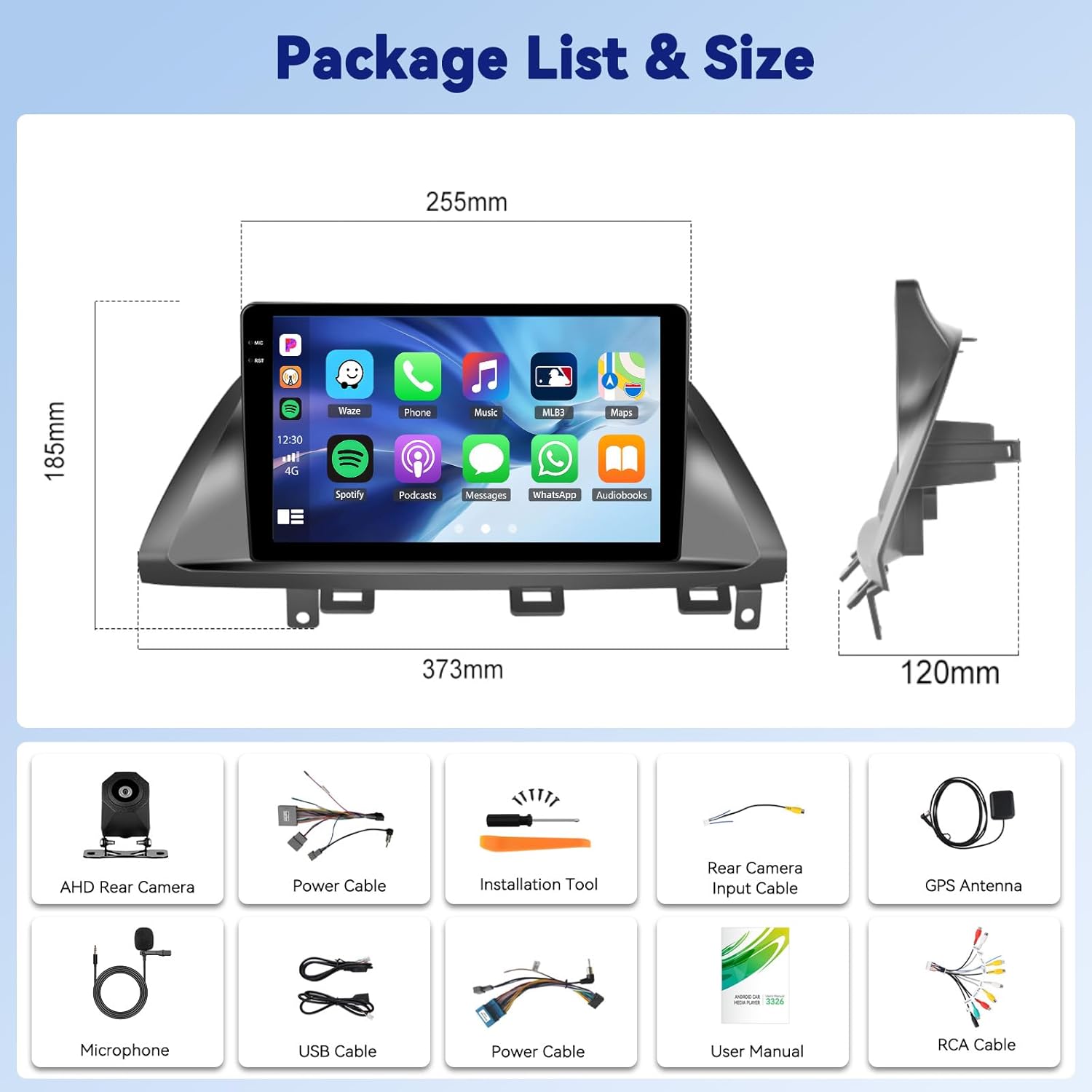
Please verify that all items are present in the package:
- 1 x Car Radio
- 1 x Power Cable
- 1 x Car Rear View Camera
- 1 x Installation Tool
- 1 x GPS Antenna
- 1 x Rear Camera Input Cable
- 1 x RCA Cable
- 2 x USB Cable
- 1 x User Manual
- 1 x Microphone (MIC)

4. Installation
Professional installation is recommended. Ensure the vehicle's power is disconnected before beginning installation. Refer to your vehicle's specific wiring diagram for accurate connections. The car stereo is designed to fit Honda Odyssey 2005-2010 models.

5. Basic Operation
The 10-inch IPS touchscreen provides intuitive control over all functions. Navigate through menus by swiping and tapping. The main interface displays essential information and quick access to frequently used applications.
6. Wireless Carplay & Android Auto Connection
Connect your smartphone wirelessly to access navigation, music, calls, and messages directly from the car stereo display.
- Open the 'S-Play' application on the car stereo.
- Ensure Bluetooth is enabled on your smartphone and the car stereo.
- Pair your phone's Bluetooth with the car stereo (e.g., 'BLINK_UNW2652').
- Follow the on-screen prompts to establish the Carplay or Android Auto connection.

7. Mirror Link (Jlink)
Mirror Link allows you to display your smartphone's screen directly onto the car stereo. Android users can also control their phone from the stereo's touchscreen.
- Open the 'Jlink' application on the car stereo.
- For initial setup, connect the car stereo to your mobile phone's hotspot via WiFi. If prompted, download the Jlink client to your phone by scanning the QR code.
- On your mobile phone, open the Jlink app and initiate screen casting.
8. GPS Navigation
The car stereo features a built-in GPS module supporting both online and offline navigation. You can download maps for offline use or utilize online mapping services via WiFi.

9. Bluetooth 5.0
The integrated Bluetooth 5.0 module enables hands-free calling and wireless audio streaming from your paired smartphone. Access your phonebook, call history, and dial numbers directly from the stereo.
10. FM/RDS Radio
Enjoy your favorite radio stations with improved signal reception thanks to the built-in FM/RDS tuner. The system allows you to store preset stations for quick access.
11. EQ Audio Settings
Customize your audio experience with the Equalizer (EQ) settings. Adjust various frequency bands to match your preferences and vehicle acoustics. Multiple preset sound effects are available.

12. Steering Wheel Control (SWC)
The car stereo supports your vehicle's existing steering wheel controls, allowing you to safely manage audio functions like volume, track changes, and call answering without taking your hands off the wheel. The system includes a learning function to map your steering wheel buttons.
13. Rear View Camera
An AHD backup camera is included. When shifting into reverse gear, the display automatically switches to show a real-time view from the rear camera, complete with parking assist lines to aid in safe maneuvering.

14. Multiple UI Themes & Split Screen
Personalize your car stereo's appearance by choosing from various user interface themes. The split-screen function allows you to run two applications simultaneously, such as navigation and music playback, with adjustable sizing and positioning.
15. Specifications
| Item Weight | 4.29 pounds |
| Product Dimensions | 14.69 x 4.72 x 7.28 inches |
| Display Size | 10 Inches |
| Operating System | Android 15 |
| RAM | 4GB |
| ROM | 128GB |
| Screen Resolution | 1280*720P IPS |
| Connectivity Technology | Bluetooth 5.0, Wi-Fi |
| Vehicle Service Type | Car (Honda Odyssey 2005-2010) |
16. Troubleshooting
If you encounter any issues, please refer to the following common solutions:
- No Power: Check all power connections and fuses. Ensure the ignition is on.
- No Sound: Verify speaker connections, volume levels, and EQ settings. Check if the mute function is active.
- Bluetooth Connection Issues: Ensure Bluetooth is enabled on both devices. Delete previous pairings and try reconnecting. Check for interference.
- GPS Signal Loss: Ensure the GPS antenna is properly installed and has a clear view of the sky.
- Touchscreen Unresponsive: Try restarting the unit. If the issue persists, a factory reset may be necessary (note: this will erase all user data).
For more complex issues, please contact customer support.
17. Warranty and Support
UNITOPSCI offers a 1-year warranty for this product. We also provide a 30-day money-back guarantee and a 12-month replacement service. Our dedicated 24/7 professional after-sales team is available to assist you with any inquiries or concerns regarding installation or usage.
For online support, please contact us at UNITOPSCI@126.com.


