
1. Product Overview
The Hemudu Mobile TV Stand with Shelf (Model HW01B-001) is designed to provide a versatile and portable solution for displaying televisions ranging from 23 to 60 inches. It supports LCD, LED, and OLED flat or curved screens with VESA mounting patterns from 100x100mm to 400x400mm. This stand features a sturdy alloy steel construction, a height-adjustable pole, and a tilt function for optimal viewing angles. Integrated lockable casters allow for easy movement and secure positioning. A convenient shelf is included for media devices or accessories.
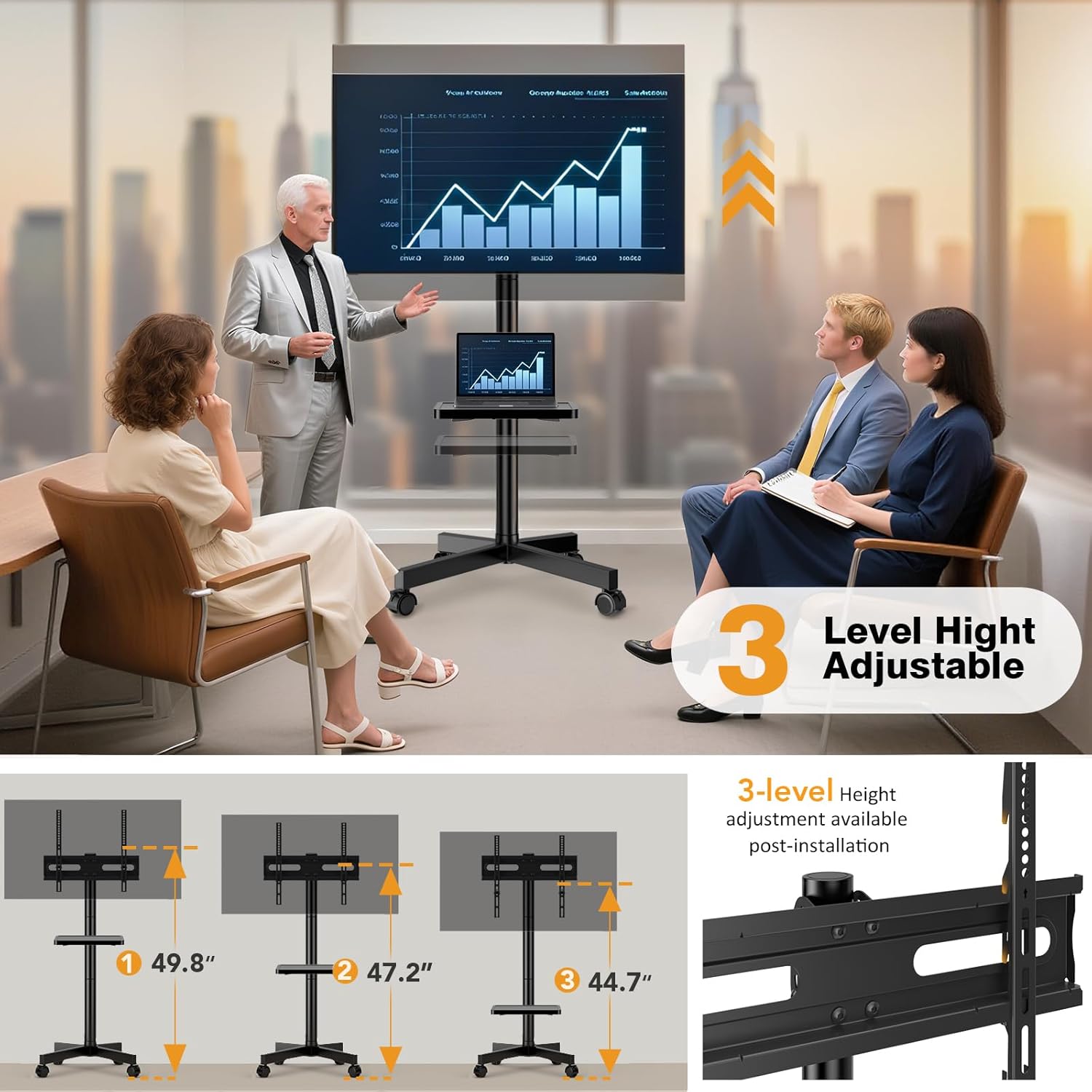
Figure 1.1: Hemudu Mobile TV Stand with Shelf, illustrating its design and integrated shelf.
2. Safety Information
- Read all instructions carefully before assembly and use.
- Do not exceed the maximum weight capacity of 77 lbs (35 kg).
- Ensure the TV's VESA pattern is compatible (100x100mm to 400x400mm).
- Always lock the casters when the stand is in a stationary position to prevent accidental movement.
- Distribute weight evenly on the shelf and avoid placing heavy objects that could cause tipping.
- Keep children and pets away from the stand during assembly and when moving it.
- Periodically check all screws and connections to ensure they are secure.
- Do not attempt to modify the stand in any way.
3. Package Contents
Verify that all components are present before beginning assembly. If any parts are missing or damaged, contact customer support.
- Base with Lockable Casters
- Vertical Support Poles (Multiple sections for height adjustment)
- TV Mounting Bracket
- Media Shelf
- Hardware Kit (Screws, washers, spacers for TV mounting and stand assembly)
- Cable Ties (3 pieces)
- Assembly Tools (e.g., Allen wrench, spanner)

Figure 3.1: Illustration of stand components and key dimensions, including VESA compatibility and weight capacity.
4. Setup Instructions
Follow these steps to assemble your Hemudu Mobile TV Stand. No drilling is required for installation.
4.1 Assemble the Base
- Attach the vertical support pole(s) to the base. Ensure all screws are tightened securely.
- Verify that the lockable casters are properly installed and can be engaged/disengaged.

Figure 4.1: Detail of the stable base design with internal reinforcement and lockable casters.
4.2 Install Vertical Poles and Adjust Height
The stand's height can be adjusted by using one, two, or three pole sections. Select the desired height during assembly.
- Connect the desired number of vertical pole sections.
- Secure the connections with the provided hardware.

Figure 4.2: Visual representation of the three available height levels for the TV stand.
Figure 4.3: Diagram showing how to connect pole sections to achieve different heights (18", 32.7", 47.2").
4.3 Attach the TV Mounting Bracket
- Secure the TV mounting bracket to the top of the vertical pole assembly.
- Ensure the bracket is level and all fasteners are tight.
4.4 Mount the TV
- Identify the VESA mounting holes on the back of your TV.
- Select the appropriate screws, washers, and spacers from the hardware kit that fit your TV.
- Attach the TV mounting arms to the back of your TV.
- Carefully lift the TV and hook the mounting arms onto the TV mounting bracket on the stand.
- Secure the TV to the bracket using the safety screws provided to prevent accidental dislodgement.

Figure 4.4: Example of VESA mounting holes on the back of a TV (W)100-400mm x (H)100-400mm.

Figure 4.5: Detail of the safety screw mechanism to secure the TV to the bracket.
4.5 Install the Media Shelf
The media shelf can be installed at your desired height on the vertical pole.
- Slide the shelf onto the vertical pole at the preferred height.
- Secure the shelf in place using the provided fasteners.

Figure 4.6: The media shelf can be freely adjusted up and down, and rotated. Also shows cable management with ties.
5. Operating Instructions
5.1 Moving the TV Stand
- To move the stand, ensure the casters are unlocked.
- Gently push the stand to its desired location.
- Once in position, engage the locks on all casters to secure the stand and prevent accidental movement.

Figure 5.1: Illustration of how to lock and unlock the casters for mobility and stability.

Figure 5.2: The TV stand being smoothly rolled from one room to another.
5.2 Adjusting TV Tilt
The TV mounting bracket allows for a tilt adjustment of +10° upward and -8° downward to optimize viewing angles and reduce glare.
- Loosen the tilt adjustment knobs or bolts on the TV mounting bracket.
- Carefully tilt the TV to the desired angle.
- Tighten the knobs or bolts to secure the TV in the new position.

Figure 5.3: Visual demonstration of the TV's tilt capability, showing +10° up and -8° down.
5.3 Adjusting Media Shelf Height
The media shelf can be repositioned along the vertical pole to suit your needs.
- Loosen the fasteners securing the media shelf to the pole.
- Slide the shelf to the desired height.
- Tighten the fasteners to secure the shelf.
5.4 Cable Management
Use the included cable ties to organize and secure cables along the vertical pole, maintaining a tidy appearance and preventing tripping hazards.

Figure 5.4: Close-up of a cable tie securing cables to the stand's pole.
6. Maintenance
- Cleaning: Wipe the stand with a soft, damp cloth. Avoid abrasive cleaners or solvents that could damage the finish.
- Inspection: Periodically check all bolts, screws, and connections to ensure they remain tight and secure. Retighten if necessary.
- Casters: Keep the casters free of debris to ensure smooth rolling.
7. Troubleshooting
- Problem: Stand is unstable or wobbles.
- Solution: Ensure all assembly screws are fully tightened. Verify that the TV weight does not exceed the maximum capacity and is centered. Check if the floor surface is even.
- Problem: Casters do not roll smoothly or lock properly.
- Solution: Check for debris (hair, lint) caught in the caster wheels and remove it. Ensure the locking mechanism is fully engaged or disengaged as intended.
- Problem: TV cannot be tilted.
- Solution: Loosen the tilt adjustment knobs/bolts sufficiently before attempting to tilt. Ensure no cables are obstructing the movement.
- Problem: Missing parts during assembly.
- Solution: Review the "Package Contents" section. If parts are genuinely missing, contact Hemudu customer support for assistance.
8. Specifications
| Brand | Hemudu |
| Model Number | HW01B-001 |
| Compatible TV Sizes | 23 - 60 inches |
| VESA Compatibility | 100x100mm to 400x400mm |
| Maximum Weight Capacity | 77 lbs (35 kg) |
| Material | Alloy Steel |
| Mounting Type | Floor Mount |
| Movement Type | Swivel, Tilt, Mobile |
| Tilt Angle | +10° / -8° |
| Product Dimensions (Max Height) | 40 x 20 x 120 cm (approx. 15.7 x 7.9 x 47.2 inches) |
| Product Weight | 5.02 kg (approx. 11.07 lbs) |
9. Warranty and Support
For warranty information or technical support, please refer to the product packaging or contact Hemudu customer service directly. Keep your purchase receipt for warranty claims.
Contact Information: Please visit the official Hemudu website or refer to the contact details provided with your product for support.